Listen to this Post
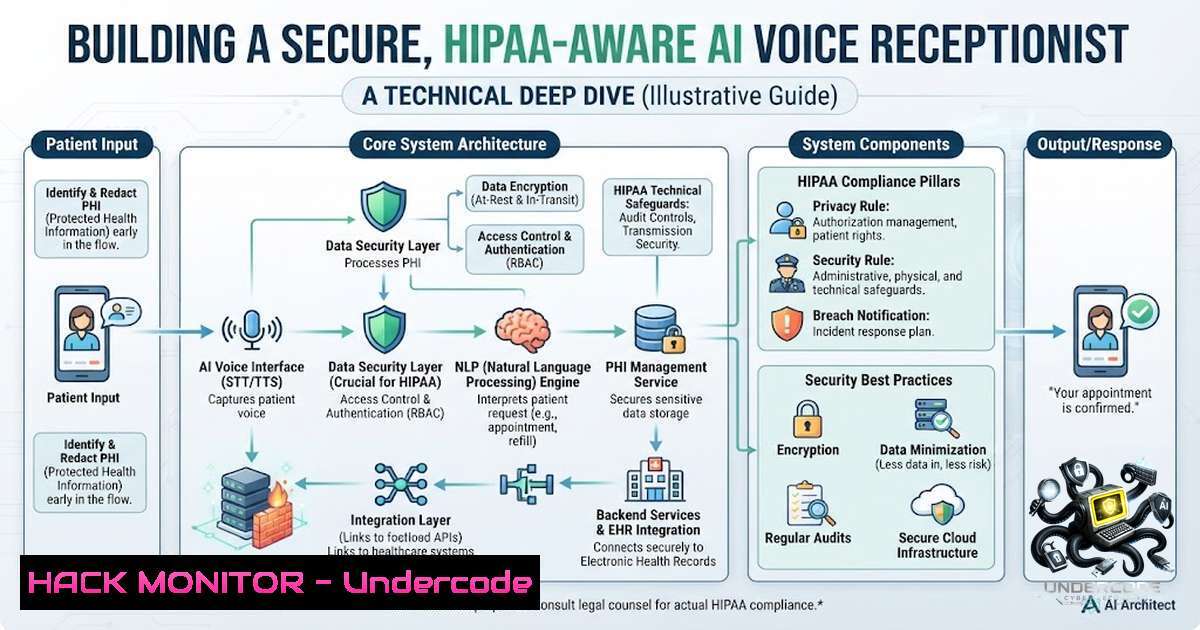
Introduction:
The integration of Large Language Models (LLMs) with workflow automation platforms is revolutionizing business operations, as demonstrated by the development of an AI voice receptionist capable of handling appointment scheduling, patient registration, and sentiment analysis. This article provides a comprehensive technical analysis of building such a system using Retell AI, n8n, and Google Workspace APIs, focusing on the critical security, compliance, and reliability considerations that separate a proof-of-concept from a production-ready deployment.
Learning Objectives:
- Understand the architecture and component interactions of an AI-powered voice agent system.
- Implement robust security controls for API keys, webhooks, and OAuth 2.0 flows.
- Apply HIPAA compliance and data protection strategies for healthcare AI applications.
- Build and secure automated workflows using n8n with Google Calendar, Gmail, and Google Sheets integrations.
You Should Know:
1. System Architecture: Orchestrating Voice AI with Automation
The core architecture comprises four layers: the voice interface (Retell AI), the automation orchestrator (n8n), the data layer (Google Workspace), and the communication layer (webhooks and email). Retell AI handles real-time voice interactions, including speech recognition, natural language understanding, and text-to-speech synthesis. It exposes a REST API for building, testing, and deploying AI voice agents that can make and receive phone and web calls.
n8n serves as the workflow automation backbone, connecting Retell AI’s webhooks to Google Calendar for appointment management, Google Sheets for call logging, and Gmail for email notifications. Webhooks act as the real-time event triggers, with Retell AI sending HTTP POST requests to n8n endpoints whenever a call event occurs (e.g., appointment booked, cancellation requested).
The system processes calls through the following flow:
1. Incoming call triggers Retell AI agent.
- Agent transcribes speech and processes intent using its configured LLM.
- Agent invokes n8n webhook with structured data (e.g.,
{"action": "book_appointment", "patient": "John Doe", "time": "2026-07-22T10:00:00"}). - n8n workflow validates the request, checks Google Calendar availability, creates the event, logs to Google Sheets, and sends confirmation email via Gmail.
- Retell AI receives the webhook response and speaks the confirmation to the caller.
This decoupled architecture allows each component to scale independently while maintaining clear separation of concerns.
- Securing Retell AI Voice Agents: API Keys, Guardrails, and Fraud Protection
API key security is paramount when deploying voice agents to production. Retell AI authenticates API requests using Bearer tokens: Authorization: Bearer YOUR_API_KEY. Never embed API keys in client-side code or public repositories. If a key is exposed, immediately rotate and revoke it. Restrict API key permissions by scoping them to specific endpoints rather than granting full access.
For public-facing interfaces like chat widgets or call widgets, Retell AI recommends implementing Google reCAPTCHA to protect against toll fraud and spam. Additionally, enable fraud protection features in the Retell dashboard to gain fine-grained control over agent access.
Implement guardrails to enforce safety and accuracy. Retell AI provides configurable guardrails that can be set via dashboard or API, adding approximately 50ms of latency but significantly improving reliability. The Agent Handbook presets offer best-practice prompts for personality, accuracy, and safety with a single toggle.
Step-by-step: Securing Your Retell AI Agent
- Generate and store API keys securely: In your Retell dashboard, navigate to API Keys and generate a new key. Store it as an environment variable (e.g.,
RETELL_API_KEY) on your server, never in code. - Restrict key permissions: When creating the key, select only the specific endpoints your application needs (e.g., “Create Chat Completion,” “List Agents”) rather than “Full Access”.
- Enable guardrails: In the agent configuration, navigate to Security & Fallback Settings and enable guardrails for transcription accuracy and trust & safety.
- Implement fraud protection: In your Retell dashboard, navigate to Fraud Protection and configure rate limiting and abuse prevention rules.
- Add reCAPTCHA: For public-facing widgets, enable Google reCAPTCHA integration to prevent automated abuse.
- Monitor and rotate keys: Regularly audit API key usage and rotate keys quarterly or immediately after any suspected compromise.
-
Hardening n8n Workflows: Encryption, Access Control, and Data Redaction
n8n workflows handle sensitive data including patient names, appointment details, and email addresses. Production deployments require a persistent encryption key so credentials remain secure across restarts. By default, n8n generates a new key automatically, which is unsuitable for production.
Restrict public access to the n8n UI and API by placing it behind a VPN or IP allow-lists. Enforce SSO/MFA and limit roles that can create or edit workflows to reduce expression injection risk. A recent cybersecurity advisory highlighted that unauthenticated parties could trigger workflows by sending forged webhook events if proper authentication is not enforced.
Redact execution data to hide sensitive input and output data from workflow executions. Navigate to Settings > Security and configure the Data redaction section. Enable enforcement for all workflows to protect live data while keeping manual test runs visible for debugging.
Step-by-step: Securing n8n Workflows
- Set a persistent encryption key: Set the `N8N_ENCRYPTION_KEY` environment variable to a strong, static value before starting n8n.
- Deploy behind a reverse proxy: Configure nginx or Apache with TLS to encrypt data in transit.
- Restrict network access: Use firewall rules or a VPN to limit access to the n8n UI and API to trusted IP ranges only.
- Enable data redaction: In n8n Settings > Security, configure Data Redaction to hide sensitive fields from execution logs.
- Block unnecessary nodes: In Settings > Security, disable nodes that are not required for your workflows to reduce the attack surface.
- Audit workflows regularly: Review workflow definitions for unusual expressions or newly created/modified workflows that could indicate compromise.
-
Google Workspace API Security: OAuth 2.0 Scopes and Least Privilege
Integrating with Google Calendar, Gmail, and Google Sheets requires OAuth 2.0 authorization. The principle of least privilege is critical: choose the most narrowly focused scope possible and avoid requesting scopes that your application doesn’t require.
For Google Calendar, if your application only needs to read and create events, request `https://www.googleapis.com/auth/calendar.events` rather than the broader `https://www.googleapis.com/auth/calendar` scope. Writing to Google Calendar requires the restricted `calendar.events` scope, which triggers a full security assessment before production.
For Gmail, use the Authorization Code flow with PKCE (Proof Key for Code Exchange), not the deprecated implicit flow. Implement server-side authorization when your application needs to access Google APIs on behalf of the user, for example when the user is offline. Use API Controls to allowlist trusted OAuth apps and block unreviewed ones.
For Google Sheets, note that Sheets API scopes apply to entire spreadsheet files and cannot be limited to specific sheets. To prevent modification of specific sheets, use `ProtectedRange` to define cells or ranges that cannot be edited.
Step-by-step: Configuring Google Workspace OAuth 2.0
- Create OAuth 2.0 credentials: In Google Cloud Console, navigate to APIs & Services > Credentials and create OAuth 2.0 Client IDs for each application (web, desktop, or service account).
- Configure OAuth consent screen: Define the application name, support email, and authorized domains.
- Select minimal scopes: When configuring the consent screen, select only the scopes your application actually needs (e.g., `calendar.events` for Calendar, `gmail.send` for Gmail, `spreadsheets` for Sheets).
- Implement Authorization Code flow: Use the server-side flow with PKCE to obtain refresh tokens for offline access.
- Store tokens securely: Encrypt refresh tokens and access tokens at rest, and never log them.
- Verify bearer tokens: If using bearer tokens, verify that the request is coming from Google and is intended for your domain.
5. Webhook Security: Authentication, Signatures, and Replay Protection
Webhooks are the event-driven backbone connecting Retell AI to n8n. However, they are also a common attack vector. The core principle: never trust incoming webhooks without verification.
Implement HMAC-SHA256 signatures to validate webhook payloads. The webhook provider (Retell AI) signs each payload using a shared secret. Your n8n workflow calculates its own signature using the same secret and request body; if the signatures match, the payload is authentic and unaltered. This prevents both spoofing and man-in-the-middle attacks.
Additionally, implement replay attack protection by including a timestamp in the webhook payload and rejecting requests older than a configurable window (e.g., 5 minutes). Verify source IP addresses and DNS resolution as an additional layer of defense. For high-security environments, consider mutual TLS (mTLS) authentication.
Step-by-step: Securing Webhooks in n8n
- Generate a webhook signing key: In Retell AI, configure a webhook signing key and store it securely in n8n as a credential.
- Configure the Webhook node: In n8n, add a Webhook node and set the authentication method to “HMAC Signature.”
- Implement signature verification: In the Webhook node settings, specify the signing key and the signature header name (e.g.,
X-Retell-Signature). - Validate timestamps: Add a Function node after the Webhook node to check the timestamp in the payload and reject requests older than 5 minutes.
- Verify source IP: Use n8n’s HTTP Request node or a Function node to check the incoming request’s source IP against an allow-list.
- Log all webhook events: Enable detailed logging for all webhook requests to facilitate security audits and incident investigations.
-
HIPAA Compliance and PHI Protection for Healthcare Voice Agents
Deploying voice agents in healthcare environments requires a security and compliance foundation that is both technically robust and administratively sound. Protected Health Information (PHI) can be present in every call, requiring encryption, access controls, and audit logging.
Key HIPAA controls for voice AI systems include:
- Encryption at rest and in transit: All PHI must be encrypted using AES-256 or equivalent. TLS 1.2+ is required for all network communications.
- Business Associate Agreements (BAAs): Sign BAAs with all vendors that process PHI, including Retell AI, n8n, and Google Workspace.
- PHI redaction: Implement automated redaction of PHI from transcripts, logs, and analytics data before storage.
- Audit logging: Maintain detailed logs of all access to PHI, including who accessed what, when, and why.
- Zero Retention Mode: Configure voice providers to not retain audio or transcript data after the call ends.
Step-by-step: Implementing HIPAA Controls
- Execute BAAs: Sign Business Associate Agreements with Retell AI, n8n (or your hosting provider), and Google Workspace.
- Enable encryption: Configure TLS for all endpoints and encrypt all databases and storage volumes.
- Implement PHI redaction: Use a middleware layer or an n8n Function node to scan and redact PHI (names, phone numbers, dates of birth) from transcripts and logs before storage.
- Enable audit logging: In n8n, enable execution data logging and retain logs for at least six years as required by HIPAA.
- Configure zero retention: In Retell AI and any voice provider, enable Zero Retention Mode to prevent storage of audio and transcript data.
- Conduct regular compliance audits: Use a HIPAA compliance checklist to validate your deployment before launch and after any significant changes.
-
Reliability Engineering: Handling Accents, Noise, and Edge Cases
Real-world voice agents must handle diverse accents, background noise, and ambiguous requests. A combination of noise suppression, voice activity detection (VAD), and prompt engineering addresses these challenges. For low-confidence transcriptions caused by heavy accents or background noise, the AI should ask for clarification or seamlessly transfer the call to a human.
Testing edge cases before deployment is critical. Issues like background noise, interrupted calls, ambiguous booking requests, and calendar conflicts can break automation. Use stress-testing tools to uncover issues that only show up in real-world conversations—interruptions, noisy audio, ambiguous requests, and multi-turn failures.
Step-by-step: Building Reliable Voice Agents
- Configure noise suppression: In Retell AI, enable noise suppression and VAD to filter out background noise and detect speech activity accurately.
- Implement clarification prompts: In your agent’s prompt, include instructions to ask for clarification when transcriptions have low confidence (e.g., “I didn’t quite catch that, could you please repeat your name?”).
- Set confidence thresholds: Configure the agent to transfer to a human when transcription confidence falls below a certain threshold (e.g., 70%).
- Test edge cases: Use a testing framework to simulate background noise, interruptions, and ambiguous requests before deployment.
- Monitor in production: Log all calls where the agent transferred to a human and analyze these logs to improve the agent’s prompts and confidence thresholds.
What Undercode Say:
- Key Takeaway 1: Building an AI voice receptionist is technically feasible using off-the-shelf components (Retell AI, n8n, Google Workspace), but production deployment demands rigorous security, compliance, and reliability engineering.
- Key Takeaway 2: Security is not an afterthought—it must be designed into the architecture from day one. API key management, webhook authentication, OAuth 2.0 scoping, and data redaction are non-1egotiable for any system handling sensitive customer data.
Analysis: The demonstration of an AI voice receptionist for dental clinics highlights the immense potential of AI automation in healthcare. However, the comments from industry professionals reveal the gap between a functional demo and a deployable solution. Questions about handling accents, background noise, and edge cases underscore the importance of reliability engineering. The mention of HIPAA compliance by other commenters points to the regulatory hurdles that must be cleared. The system’s architecture—using Retell AI for voice, n8n for orchestration, and Google Workspace for data—is sound, but each component introduces its own security considerations. The future of healthcare AI lies not just in building functional agents, but in building agents that are secure, compliant, and resilient enough to earn patient trust.
Prediction:
- +1 The demand for AI-powered healthcare automation will accelerate, with voice agents becoming standard in dental, primary care, and specialty practices within 24-36 months.
- +1 Open-source and no-code platforms like n8n will lower the barrier to entry, enabling small practices to deploy sophisticated AI agents without dedicated engineering teams.
- -1 Regulatory scrutiny will intensify, with HIPAA and GDPR enforcement actions targeting non-compliant AI deployments, potentially leading to significant fines and reputational damage.
- -1 The attack surface of AI voice agents will attract malicious actors, leading to a rise in voice-based social engineering attacks, API key theft, and data exfiltration attempts.
- +1 Specialized compliance-as-a-service providers will emerge to help healthcare organizations deploy AI agents safely, creating a new ecosystem of security and compliance tools.
- -1 Without standardization, the interoperability of voice agents across different EHR systems and practice management software will remain a challenge, limiting widespread adoption.
- +1 Advances in noise suppression, accent adaptation, and multi-turn conversation handling will dramatically improve the user experience, making AI agents nearly indistinguishable from human receptionists.
- +1 The integration of sentiment analysis and escalation workflows will improve patient satisfaction by ensuring that urgent cases receive immediate human attention.
- -1 The reliance on third-party APIs (Retell AI, Google Workspace) introduces vendor lock-in and dependency risks, as changes to API pricing, availability, or features could disrupt operations.
- +1 The combination of voice AI with other modalities (chat, SMS, email) will create omnichannel patient engagement platforms that streamline the entire patient journey from first contact to post-visit follow-up.
▶️ Related Video (82% Match):
🎯Let’s Practice For Free:
🎓 Live Courses & Certifications:
Join Undercode Academy for Verified Certifications
🚀 Request a Custom Project:
Secure, high-velocity infrastructure and disruptive technological engineering. Contact our engineering team for high-tier development and proprietary systems:
[email protected]
💎 Smart Architecture | 🛡️ Secure by Design | ⭐ Trusted by Thousands
IT/Security Reporter URL:
Reported By: Mohd Hamid – Hackers Feeds
Extra Hub: Undercode MoN
Basic Verification: Pass ✅


