
Listen to this Post
Introduction:
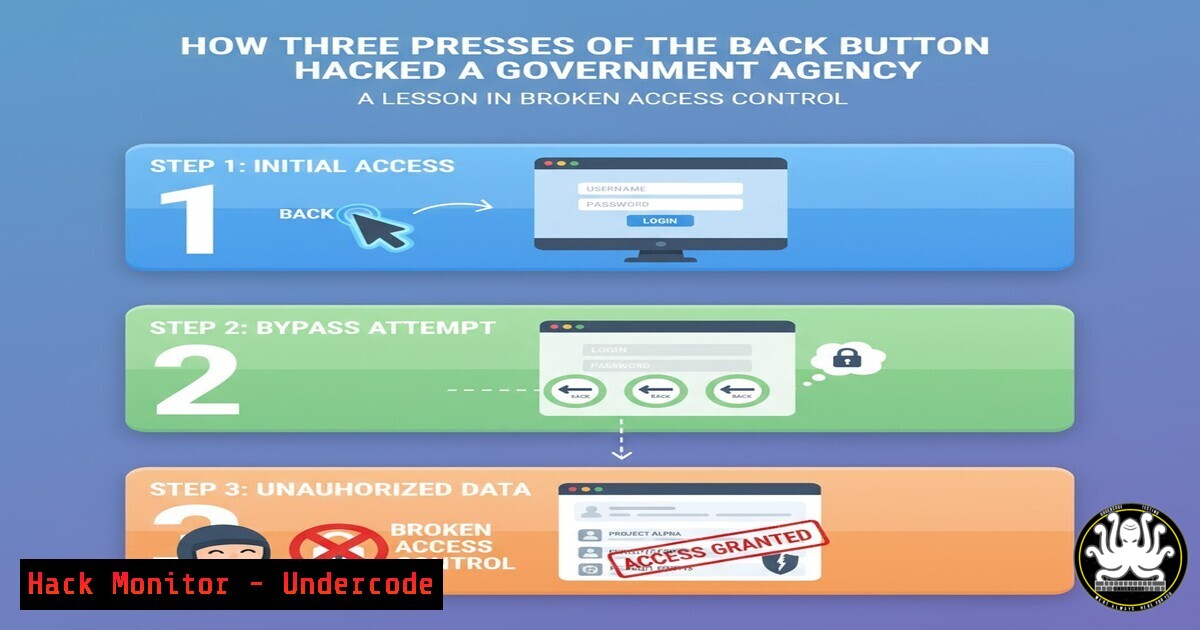
In an era where sophisticated zero‑day exploits dominate headlines, a simple browser button has exposed a catastrophic flaw in a government system managing millions of companies. A bug bounty hunter discovered that by logging in, navigating to a company filing feature, and pressing the back button three times, they could access and edit sensitive personal data—home addresses, emails, and dates of birth—of any entity. This incident underscores a harsh reality: broken access control and business logic flaws remain the most dangerous and overlooked vulnerabilities, often bypassing even the most advanced security stacks.
Learning Objectives:
- Understand the mechanics of broken access control and how they manifest in web applications.
- Learn to identify and test for business logic flaws using manual techniques and common tools.
- Explore step‑by‑step methods to discover and exploit improper state management.
- Grasp effective mitigation strategies to prevent such vulnerabilities in production environments.
You Should Know:
1. The Anatomy of the “Back Button” Vulnerability
The vulnerability described is a classic case of improper access control combined with insecure direct object references (IDOR). Here’s what likely happened:
- The application allows authenticated users to “file for another company” – a legitimate business feature.
- When a user enters a company number, the server presumably sends a one‑time authentication code (e.g., via email or SMS) to verify ownership.
- However, the application fails to maintain the verification state on the server side. Instead, it relies on client‑side navigation history.
- By pressing the back button three times, the user forces the browser to reload a previous page (the “file for another company” form) without re‑validating the authorization token. The server, lacking a robust session check, grants access to the target company’s data.
This is not a technical vulnerability like SQL injection; it’s a logic flaw where the sequence of steps expected by the developer does not match the sequence enforced by the browser. The root cause is that authorization decisions are made based on client‑side state rather than re‑verified at every critical action.
- How to Replicate and Test for Similar Flaws (Ethically)
To test for such issues in a controlled environment (e.g., a bug bounty program or your own application), follow these steps:
Step 1: Map the Workflow
- Use a proxy like Burp Suite or OWASP ZAP to record the entire flow: login → navigate to “file for another company” → enter a company number → receive auth code → submit code → access data.
- Identify all requests that handle sensitive operations (e.g., viewing or editing data).
Step 2: Manipulate Browser Navigation
- After completing the flow and gaining access to one company, use the browser’s back button repeatedly to see if you can land on a previous step (e.g., the page that displays the data) without re‑entering the auth code.
- Alternatively, open a new tab and manually re‑enter the URL of the data‑view page (e.g., `https://target.gov/company/12345/edit`) to see if the server re‑checks permissions.
Step 3: Replay Requests
– With Burp Suite, capture the request that loads the company data after successful auth.
– Log out and log in with a different account. Replay that captured request (using Repeater) with the new session cookies. If you still receive the data, it indicates that the server is not verifying that the current user is authorized for that specific company.Step 4: Use cURL for Command‑Line Testing
 Log in and save cookies
curl -X POST -d "username=attacker&password=test" https://target.gov/login -c cookies.txt

 Attempt to access a company without authorization
curl -b cookies.txt https://target.gov/company/67890/edit
If the server returns the data, the access control is broken.
3. Why the Back Button Works: Understanding Browser History and Server State
Modern web applications often use single‑page application (SPA) frameworks or maintain state through session variables. In this case, the flaw likely stems from the server not invalidating a session’s “authorized for company X” flag after the user moves away from that page. When the back button is pressed, the browser re‑requests the page from its cache (or from the server) with the same session cookies. Because the session still contains the previously granted privilege, the server erroneously serves the data.
Key technical point: The server must treat every request as independent and re‑authorize based on the current user’s relationship to the requested resource. Using random anti‑CSRF tokens or per‑request nonces can help, but the real fix is to never trust that a previous step in the workflow guarantees the current step’s authorization.
4. Mitigation Strategies for Developers and Architects
To prevent this class of vulnerabilities, implement the following measures:
– Server‑Side State Validation: After each sensitive action, re‑verify that the user is still entitled to perform that action on that specific resource. Do not rely on the order of pages visited.
– Use of UUIDs or Unpredictable Identifiers: Instead of sequential company numbers (e.g., 12345), use GUIDs. Even if access control fails, an attacker cannot guess other identifiers.
– Strict Referer or Origin Checks: While not foolproof, checking that the request originated from the expected previous page can add a layer of defense against direct navigation.
– Short‑Lived Authorizations: If a user passes a verification step (like an auth code), store that authorization only for the intended transaction and expire it immediately after use.
– Session Invalidation on Logout: Ensure that logging out clears all privileges and that the back button cannot restore a logged‑in state.5. Tools and Commands for Detecting Logic Flaws
| Tool / Command | Purpose | Example Usage |
|-|||
| Burp Suite (Repeater & Intruder) | Replay requests with modified parameters to test authorization | Capture a request for one company, change the ID, and send. |
| OWASP ZAP | Similar to Burp, with built‑in access control testing | Use the “Access Control Testing” add‑on. |
| Browser Developer Tools (Network tab) | Inspect requests and responses during the workflow | Right‑click → “Copy as cURL” to replay in terminal. |
| cURL | Command‑line replay with cookie jars | `curl -b cookies.txt https://target.gov/company/999` |
| Python Requests | Automate testing of multiple IDs | Write a script to loop through company numbers and check responses. |
6. Real‑World Impact and Similar Incidents
This vulnerability is far from unique. In 2021, a major financial service allowed users to view any account by simply changing the account number in the URL after logging in. Another incident involved a government tax portal where pressing the back button after filing a return exposed another citizen’s data. These are not just theoretical—they lead to massive data breaches, regulatory fines, and loss of public trust.
The attack described requires no technical skill—just a browser and knowledge of the workflow. This makes it especially dangerous because it can be exploited by any malicious user, not just sophisticated hackers.
7. Secure Coding Practices to Eliminate Logic Flaws
- Adopt the “Deny by Default” Principle: Every access to a resource must be explicitly granted. Start with no access and require a positive check.
- Implement Centralized Authorization: Use a single module or middleware that checks permissions before any sensitive operation. Avoid scattering authorization logic across controllers.
- Conduct Threat Modeling Early: Map out all user roles and workflows to identify places where the expected sequence can be subverted.
- Automated Testing for Business Logic: Write integration tests that simulate users skipping steps, pressing the back button, or directly accessing URLs out of order.
- Code Review Focus: During peer reviews, specifically look for functions that rely on a previous page’s state without re‑validation.
What Undercode Say:
- Key Takeaway 1: Broken access control remains the most prevalent and dangerous web vulnerability, as evidenced by this simple “back button” exploit. Security teams must prioritise logic‑based testing alongside traditional vulnerability scanning.
- Key Takeaway 2: Never trust the client to enforce workflow order. Every sensitive request must be independently authorised on the server side, regardless of how the user arrived there.
This incident is a wake‑up call for developers and security professionals alike. While we chase the latest zero‑days, the back button quietly wreaks havoc. Organisations must embed security into the design phase, simulate real‑user behaviours, and rigorously test for logic flaws. Only then can we move beyond patching symptoms and start fixing the underlying disease—insecure application logic.
Prediction:
As more government and enterprise systems adopt complex user journeys with multiple verification steps, we will see a surge in similar “workflow bypass” attacks. Automated scanners cannot easily detect these flaws, so manual testing and business logic reviews will become mandatory compliance requirements. In the next two years, regulators are likely to issue specific guidance on testing for logical vulnerabilities, and bug bounty programs will increasingly reward reports that chain simple navigation tricks into full account takeovers.
▶️ Related Video (74% Match):
🎯Let’s Practice For Free:
IT/Security Reporter URL:
Reported By: Martinmarting Bug – Hackers Feeds
Extra Hub: Undercode MoN
Basic Verification: Pass ✅


