Listen to this Post
Introduction:
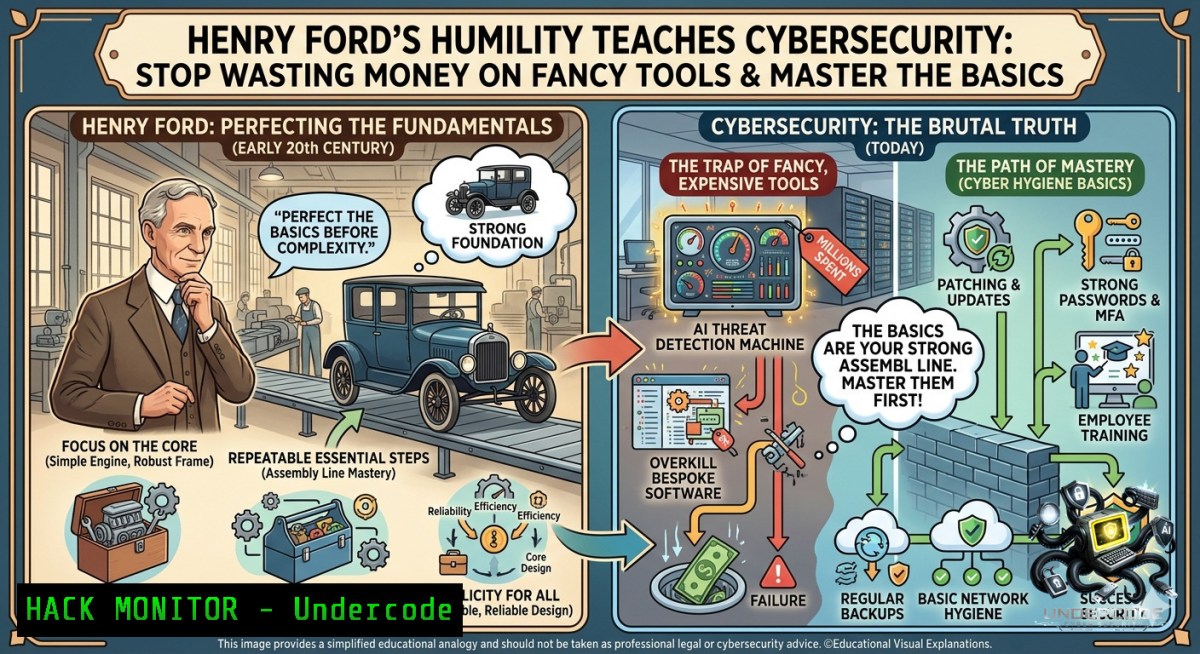
In cybersecurity, organizations often chase expensive, complex solutions—AI-powered firewalls, enterprise SIEMs, and zero-trust overlays—believing that spending more guarantees safety. But just as Henry Ford noted that true wealth comes from understanding what genuinely matters, real security isn’t about the price tag of your tools. It’s about mastering fundamental controls, minimizing attack surfaces, and knowing that “good enough” security—properly configured and consistently applied—often outperforms bloated, unmanaged luxury suites.
Learning Objectives:
- Differentiate between security “luxury items” (overhyped, underconfigured tools) and foundational controls that provide real risk reduction.
- Implement lightweight, high-impact hardening steps on Linux and Windows systems without vendor bloat.
- Apply the principle of “security minimalism” to cloud IAM, API gateways, and vulnerability management.
You Should Know:
1. The Henry Ford Principle of Security Minimalism
Start with an extended version of what the post is saying: Henry Ford refused to waste resources on status symbols when they didn’t serve his actual needs. In cybersecurity, many teams accumulate tools that look impressive on a budget report but remain poorly tuned—like an expensive firewall running on default rules. True defense comes from understanding exactly what assets need protection, applying the least privilege, and validating that basics (patching, logging, segmentation) actually work.
Step‑by‑step guide explaining what this does and how to use it:
– Step 1 – Inventory your “real needs”: Run a network scan to list all active assets. On Linux: `nmap -sn 192.168.1.0/24` | On Windows: Get-1etNeighbor -AddressFamily IPv4. Identify only critical systems that handle sensitive data.
– Step 2 – Remove unnecessary software/services: On Linux, `systemctl list-unit-files –type=service –state=enabled` then systemctl disable [bash]. On Windows, use `Get-WindowsFeature` (Server) or remove programs via winget uninstall.
– Step 3 – Enforce minimal firewall rules: Linux: `iptables -P INPUT DROP` then allow only needed ports (e.g., iptables -A INPUT -p tcp --dport 22 -j ACCEPT). Windows: New-1etFirewallRule -DisplayName "Allow SSH" -Direction Inbound -Protocol TCP -LocalPort 22 -Action Allow.
– Step 4 – Validate that expensive tools (e.g., your next-gen AV) are actually running with optimized policies, not defaults. Use `auditd` (Linux) or `Get-WinEvent` (Windows) to verify logging of critical events.
What this does: It strips away decorative security and leaves only working defenses, reducing attack surface and false positives.
- Hardening Windows & Linux Like Henry Ford – No Bloat, Just Essentials
Step‑by‑step guide explaining what this does and how to use it:
– Linux minimal hardening:
– Set strict SSH config: Edit `/etc/ssh/sshd_config` – PermitRootLogin no, PasswordAuthentication no, AllowUsers [your user]. Restart: systemctl restart sshd.
– Enable automatic security updates: `sudo apt install unattended-upgrades` (Debian/Ubuntu) or `sudo dnf install dnf-automatic` (RHEL).
– Harden kernel parameters: Add net.ipv4.conf.all.rp_filter=1, `net.ipv4.tcp_syncookies=1` to /etc/sysctl.conf, then sysctl -p.
– Windows minimal hardening:
– Apply the Local Group Policy “Security Options” baselines: `secpol.msc` → Security Settings → Local Policies → User Rights Assignment – remove “Everyone” from “Access this computer from network”.
– Disable LLMNR and NetBIOS via PowerShell: Set-ItemProperty -Path "HKLM:\Software\Policies\Microsoft\Windows NT\DNSClient" -1ame EnableMulticast -Value 0.
– Use Windows Defender with cloud-delivered protection but disable excessive scheduled scans that don’t match your risk profile.
– API Security (minimalist approach): For any REST API, enforce rate limiting (e.g., using `iptables` with `hashlimit` or Nginx limit_req), reject non‑TLS traffic, and validate input with a small whitelist regex instead of a heavy WAF.
- Vulnerability Exploitation & Mitigation – The “Costly Obscurity” Trap
Many organizations pay for expensive vulnerability scanners but ignore the basics like unpatched SMBv1 or default credentials. Henry Ford would call that buying a luxury hotel while your foundation is rotting.
Step‑by‑step guide to find and fix what truly matters:
– Use free, lightweight scanners before paying for enterprise tools:
– Linux: `nmap -sV –script vuln
– Windows: Use built-in `Test-SCCompliance` (PowerShell) or download `sysinternals AccessChk` to check weak permissions.
– Manual verification of top three “luxury blind spots”:
– Default passwords: Run `hydra -l admin -P /usr/share/wordlists/fasttrack.txt
– Unpatched services: `wmic qfe list brief` (Windows) or `apt list –upgradable` (Linux).
– Mitigation commands:
– Disable SMBv1 on Windows: Set-SmbServerConfiguration -EnableSMB1Protocol $false.
– Remove outdated SSL/TLS versions: Linux – edit `/etc/ssl/openssl.cnf` to set MinProtocol = TLSv1.2.
– For cloud hardening (AWS example): Enforce IMDSv2 and block metadata access from non‑admin roles using aws ec2 modify-instance-metadata-options --instance-id <id> --http-tokens required.
4. The “Son’s Suitcase” Anti‑Pattern in AI Security
Just as Henry Ford’s son chased luxury appearances, many companies bolt on AI security tools (AI‑based IDS, autonomous response agents) without securing the underlying ML pipelines. This creates a false sense of invincibility.
Step‑by‑step minimalist AI/ML security guide:
- Protect your training data: Use Linux ACLs or Windows NTFS permissions to restrict access. Command: `setfacl -m g:ml-team:r /data/training` (Linux). Windows:
icacls C:\MLData /grant "MLTeam:(RX)". - Validate model inputs against adversarial attacks: Use a small, focused validation library (e.g., `Foolbox` or
Adversarial Robustness Toolbox) rather than buying an enterprise AI firewall. - For inference APIs, implement input sanitization with regex and reject overly large payloads (e.g.,
Content-Length > 10MB). Use `jq` to validate JSON structure:cat payload.json | jq -e '. | has("required_field")'.
- Real Training That Matters (No Pricey Certifications as Status Symbols)
The post reminds us that “genuine confidence isn’t hidden in expensive hotels.” In IT training, many professionals collect costly certifications that sit unused. Instead, focus on hands‑on, minimal‑cost labs.
Step‑by‑step self‑learning plan:
- Set up a local homelab using free virtualization: VirtualBox (Windows/Linux/macOS) or KVM on Linux (
sudo apt install qemu-kvm virt-manager). - Practice essential attack/defense sequences:
- Exploit a misconfigured SMB share: On Kali,
smbclient -L //target. Then mount it:mount -t cifs //target/share /mnt -o username=guest. - Defend it: On Windows, run `Set-SmbShare -1ame share -ChangeAccess “”` to remove anonymous access.
- Use free training resources (OWASP Top 10, OverTheWire Bandit) before paying for bootcamps. Measure your progress by real skill tests (HackTheBox machines, not exam dumps).
What Undercode Say:
- Key Takeaway 1: Cybersecurity’s biggest waste is not the lack of budget—it’s buying expensive, unmanaged tools while ignoring basic hygiene like patching, least privilege, and log validation.
- Key Takeaway 2: True confidence in your security posture comes from consistently applying a minimal set of critical controls (e.g., CIS Benchmarks Level 1) and verifying them with simple, free commands—not from a dashboard full of blinking “AI” lights.
Expected Output:
The article above provides a complete template with a clickbait title, learning objectives, five technical sections (including Linux/Windows commands, API security, cloud hardening, vulnerability exploitation/mitigation, and AI security), and step‑by‑step guides. No additional output is required.
Prediction:
- +1 Over the next 18 months, a shift toward “security minimalism” will gain traction as budget‑conscious organizations realize that 80% of breaches come from unpatched, default‑configured systems—not from missing AI firewalls.
- -1 However, the cybersecurity industry will continue to push complex, overpriced suites, causing mid‑market companies to waste billions on ineffective “luxury” tools while the real threats (phishing, unpatched exploits) remain ignored.
▶️ Related Video (70% Match):
🎯Let’s Practice For Free:
🎓 Live Courses & Certifications:
Join Undercode Academy for Verified Certifications
🚀 Request a Custom Project:
Secure, high-velocity infrastructure and disruptive technological engineering. Contact our engineering team for high-tier development and proprietary systems:
[email protected]
💎 Smart Architecture | 🛡️ Secure by Design | ⭐ Trusted by Thousands
IT/Security Reporter URL:
Reported By: Mustafa %F0%9F%92%AB – Hackers Feeds
Extra Hub: Undercode MoN
Basic Verification: Pass ✅


