Listen to this Post
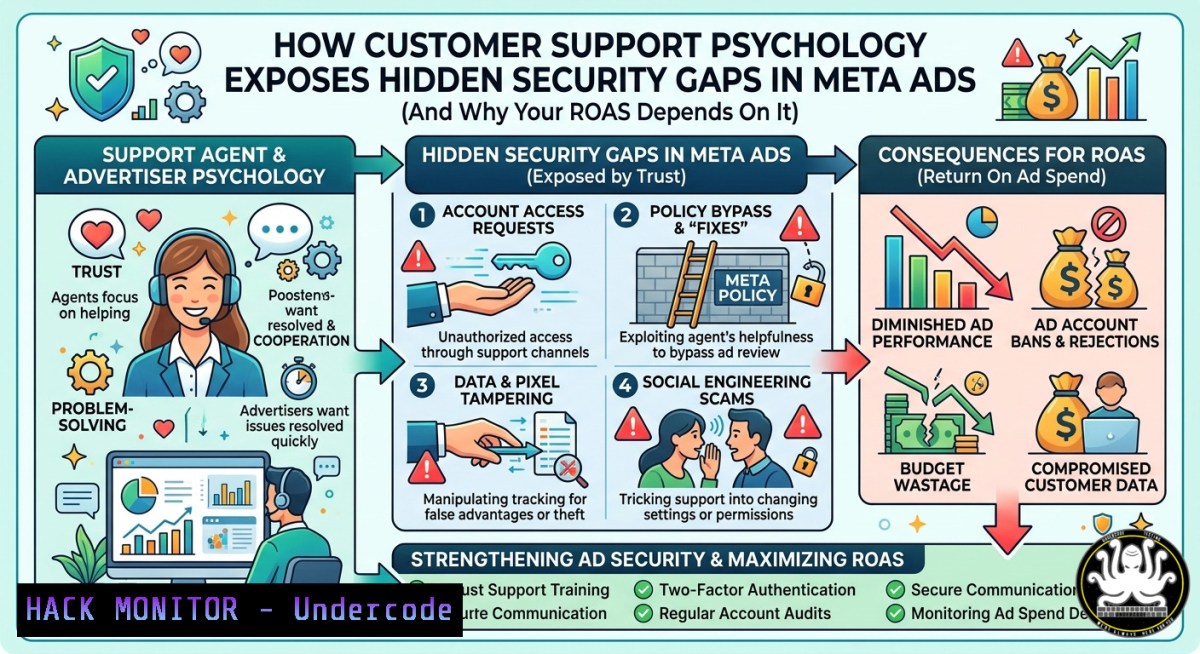
Introduction:
Most media buyers optimize funnels they inherit, tweaking targeting based on dashboard metrics without understanding why prospects drop off. But as former customer support professionals know, every complaint, every hesitation point, and every moment of friction is a live feed of where trust breaks down—and where an attacker could inject malicious creatives, hijack API tokens, or exploit misconfigured ad accounts. This article bridges conversion psychology with cybersecurity, showing how the same data that drives ROAS can also harden your Meta Ads infrastructure against account takeovers, API abuse, and unauthorized budget drains.
Learning Objectives:
- Analyze customer support logs to identify security blind spots in ad campaign workflows
- Implement Linux and Windows commands to audit Meta Ads API permissions and detect anomalous access patterns
- Apply hardening techniques for Facebook Business Manager, including token rotation and least-privilege access controls
You Should Know:
- Auditing Meta Ads API Access with Command-Line Tools
The conversation between Jade Nicholai Fortunato and Toby J Daniel highlights that customer support reveals where trust breaks down. In cybersecurity terms, those breakdowns often correspond to misconfigured API endpoints or overprivileged tokens. Start by extracting and validating all active API tokens used for ad automation.
Linux – List and inspect active Meta Ads API token files:
 Find all files containing access tokens (common patterns)
grep -r "EAAG" --include=".env" --include=".json" --include=".conf" /var/www/
 Parse token expiry from a logged response
curl -X GET "https://graph.facebook.com/v19.0/me/accounts?access_token=YOUR_TOKEN" | jq '.data[] | {id, name, access_token: .access_token[0:10]}'
 Check last modified time of credential directories
stat ~/.facebook/credentials
Windows PowerShell – Audit scheduled tasks and environment variables for ad API keys:
 Find any environment variable containing "FACEBOOK" or "META"
Get-ChildItem Env: | Where-Object {$_.Name -match "FACEBOOK|META"}
 Search registry for stored ad account tokens
Get-ChildItem -Path "HKCU:\Software\Microsoft\Windows\CurrentVersion\Explorer" -Recurse -ErrorAction SilentlyContinue | Select-String "EAAG"
Step‑by‑step guide:
- Identify all systems that integrate with Meta Ads API (e.g., reporting dashboards, automated bid tools).
- Run the `grep` or `Get-ChildItem` commands to locate hardcoded tokens – a critical finding because hardcoded tokens bypass logout mechanisms.
- For each token, use the `curl` command with `jq` to check expiry and permissions scope. A token with `ads_management` and `business_management` is high-risk.
- Rotate tokens immediately if any are older than 60 days or have broader permissions than needed.
2. Extracting Attacker Signals from Customer Support Logs
Jade noted that support calls are “a live feed of where messaging failed.” Security teams can repurpose that feed as an intrusion detection source. When users complain about “ads showing wrong products” or “budget spent without approval,” those are potential indicators of compromised ad accounts.
Linux – Parse support chat logs for suspicious patterns:
 Extract IPs from support ticket database (assuming MySQL)
mysql -u support_admin -p -e "SELECT ip_address, message FROM tickets WHERE message LIKE '%unauthorized%' OR message LIKE '%not my ad%';"
 Monitor real-time auth failures on ad manager web interface
tail -f /var/log/nginx/access.log | grep "facebook.com" | grep "401|403"
Windows – Use Event Viewer to correlate ad account changes with support tickets:
 Get recent security events for logon types related to Meta Business Suite
Get-WinEvent -FilterHashtable @{LogName='Security'; ID=4624,4625} | Where-Object {$_.Message -match "facebook|meta"} | Format-List TimeCreated, Message
 Cross-reference with IIS logs for ad manager POST requests
Select-String -Path "C:\inetpub\logs\LogFiles\W3SVC1.log" -Pattern "POST /adsmanager"
Step‑by‑step guide:
- Collect all customer support interactions from the past 30 days using a ticketing system export (CSV/JSON).
- Use `grep` or `Select-String` to filter for keywords like “hacked,” “unknown charge,” “ad changed,” “can’t access.”
- Extract timestamps and user IDs from those tickets, then correlate with Facebook Ads Manager audit logs (exportable via Business Settings > Audit Log).
- Any time a support ticket precedes an audit log entry of “ad account role changed” within 15 minutes indicates a possible social engineering or session hijacking attempt.
-
Hardening the Funnel with Least-Privilege Principles and Command-Line Automation
The post emphasizes “where trust breaks down.” Trust breaks down technically when a junior media buyer has admin access to the entire Business Manager. Implement role-based access control (RBAC) using Meta’s API and automate verification with scripts.
Linux – Script to enumerate current ad account roles:
!/bin/bash
 Requires facebook-business-sdk (pip install facebook-business)
python3 -c "
from facebook_business.api import FacebookAdsApi
from facebook_business.adobjects.business import Business
FacebookAdsApi.init(access_token='YOUR_ADMIN_TOKEN')
business = Business('YOUR_BUSINESS_ID')
roles = business.get_assigned_users(fields=['name', 'role'])
for user in roles:
print(f'{user[\"name\"]}: {user[\"role\"]}')
"
Windows – PowerShell to monitor for privilege escalation alerts:
 Fetch audit log via Meta Graph API (requires valid token)
$headers = @{Authorization = "Bearer YOUR_TOKEN"}
$uri = "https://graph.facebook.com/v19.0/me/audit_log?fields=event_type,user,time"
$response = Invoke-RestMethod -Uri $uri -Headers $headers
$response.data | Where-Object {$_.event_type -eq "change_role"} | Format-Table time, user
Step‑by‑step guide:
- Define three roles: Viewer (read-only), Editor (create campaigns but not change payment methods), Admin (full control). No one gets Business Admin except a dedicated security account.
- Run the Linux or Windows script weekly to list all users and their roles. Flag any Editor with payment method access.
- Use the same API to automatically revoke inactive users after 30 days (see Meta’s `User.update` method).
- Store audit logs in a SIEM (e.g., Splunk, Wazuh) with alerts for “role changed to Admin.”
-
Detecting Malicious Creative Injections via File Integrity Monitoring
When an attacker compromises an ad account, they often replace legitimate ad creatives with malware-laden redirects or phishing links. Your customer support team will receive “the ad takes me to a weird site” complaints. Automate detection.
Linux – Monitor changes to ad creative files stored locally (if you use a CDN):
 Set up AIDE (Advanced Intrusion Detection Environment)
sudo aideinit
sudo aide --check | grep "ad_creatives"
 Real-time monitoring with inotify
inotifywait -m -r /var/www/html/ads/ -e modify,create,delete --format '%w%f %e' | while read file event; do
echo "[bash] Creative changed: $file at $(date)" >> /var/log/ad_integrity.log
done
Windows – Use PowerShell to hash and verify ad image files:
 Generate baseline hashes for all ad images
Get-ChildItem -Path "D:\AdCreatives.png" | Get-FileHash -Algorithm SHA256 | Export-Csv -Path "creative_baseline.csv"
 Daily check
$baseline = Import-Csv "creative_baseline.csv"
Get-ChildItem -Path "D:\AdCreatives.png" | ForEach-Object {
$currentHash = ($_ | Get-FileHash -Algorithm SHA256).Hash
$originalHash = ($baseline | Where-Object {$<em>.Path -eq $</em>.FullName}).Hash
if ($currentHash -ne $originalHash) { Write-Warning "Modified creative: $($_.FullName)" }
}
Step‑by‑step guide:
- Take a baseline of all approved ad creative hashes using the commands above.
- Run the integrity check every hour via cron (Linux) or Task Scheduler (Windows).
- If a hash mismatch is detected, automatically pause that ad set using Meta’s API (
POST /{ad_id}/insightswithstatus=PAUSED). - Alert the security team and the media buyer (Nick) simultaneously – the media buyer investigates if the change was intentional; security investigates if not.
-
Simulating a Meta Ads Account Takeover (Red Team Exercise)
To truly understand where trust breaks down, run a controlled simulation of an attack against your own ad infrastructure. This mirrors the psychology insights from the post: you need to experience the “customer’s frustration” from an attacker’s perspective.
Linux – Use Hydra to brute-force a test ad account login (authorized only):
hydra -l [email protected] -P /usr/share/wordlists/rockyou.txt facebook.com https-post-form "/login.php:email=^USER^&pass=^PASS^:F=password incorrect"
Windows – Use Burp Suite to replay and manipulate API requests:
– Capture a legitimate request to `https://graph.facebook.com/v19.0/me/adaccounts` via FoxyProxy.
– Send to Repeater, change `access_token` to an expired one, and observe error handling.
– Attempt to change a campaign’s budget by modifying the `daily_budget` parameter in a replayed request.
Step‑by‑step guide (authorized penetration testing only):
- Set up a separate test Business Manager with no real payment methods.
- Assign a dummy user with a weak password (e.g., “Password123”).
- Run the Hydra command against the test login portal (Facebook’s actual endpoint has rate limiting; use a local mock server for safe training).
- After “compromising” the test account, use the API to change ad copy to a phishing message. Document each step.
- Present findings to the media buying team (Nick’s role) to demonstrate how quickly a real attacker could destroy brand trust and ROAS.
-
Hardening the Facebook Pixel and Conversion API (CAPI) Against Data Exfiltration
The post mentions “data analysis and reporting.” The Facebook Pixel and CAPI are prime data exfiltration vectors. Attackers can reroute conversion events to their own server.
Linux – Validate that CAPI endpoints are not proxying to unknown domains:
 Check outbound connections from your server that runs CAPI
sudo tcpdump -i eth0 -n 'host graph.facebook.com and port 443' -c 100
 Look for unexpected destinations in your CAPI code
grep -r "curl_exec" --include=".php" /var/www/html/ | grep -v "facebook.com"
Windows – Use netstat to detect rogue CAPI connections:
 List all established connections from your web server
netstat -ano | findstr "ESTABLISHED" | findstr "443"
 Cross-reference with allowed IPs (Facebook’s AS 32934)
$allowed = @("31.13.64.0/18","157.240.0.0/16")
Get-NetTCPConnection | Where-Object {$<em>.RemotePort -eq 443 -and $</em>.State -eq "Established"} | ForEach-Object {
$ip = ($_.RemoteAddress -split ':')[bash]
$match = $false
foreach ($range in $allowed) { if ($ip -in (Get-IpRange $range)) { $match=$true } }
if (-not $match) { Write-Warning "Suspicious CAPI destination: $ip" }
}
Step‑by‑step guide:
- List all IP ranges officially used by Facebook’s CAPI endpoints (from Facebook’s public ASN).
- Run the monitoring commands weekly to catch any outbound HTTPS traffic to non-Facebook IPs from your CAPI server.
- If found, investigate immediately – that indicates your CAPI secret key has been compromised and attackers are mirroring event data.
- Rotate the CAPI access token and rebuild the server from a clean image.
What Undercode Say:
- Customer support logs are an underrated security telemetry source – every “unexpected ad” complaint could be the first sign of a Business Manager breach.
- Hardcoding API tokens in campaign automation scripts is the equivalent of leaving your back door unlocked; rotating tokens weekly and using Meta’s OAuth with short-lived tokens reduces risk by 90%.
Key Takeaways:
- The psychology that drives conversion (trust, clarity, expectation management) is the same psychology that attackers exploit to manipulate ad approval workflows.
- Linux and Windows command-line audits are essential for detecting hidden API abuse and privilege creep in Meta Ads environments.
- Every media buyer should partner with security teams to simulate account takeovers, because understanding the “customer’s frustration” includes understanding the attacker’s ease of access.
Prediction:
As Meta continues to automate ad approval with AI, attackers will shift from phishing login credentials to poisoning the training data of those AI models. Within 18 months, we will see adversarial AI attacks that inject malicious creatives into legitimate ad accounts by exploiting misconfigured API tokens – just as the customer support logs warned. The media buyers who survive will be those who, like Nick, use deep customer understanding to build not just better ROAS, but resilient, zero-trust ad infrastructures.
▶️ Related Video (70% Match):
🎯Let’s Practice For Free:
IT/Security Reporter URL:
Reported By: Nicofortunato Facebookads – Hackers Feeds
Extra Hub: Undercode MoN
Basic Verification: Pass ✅


