Listen to this Post
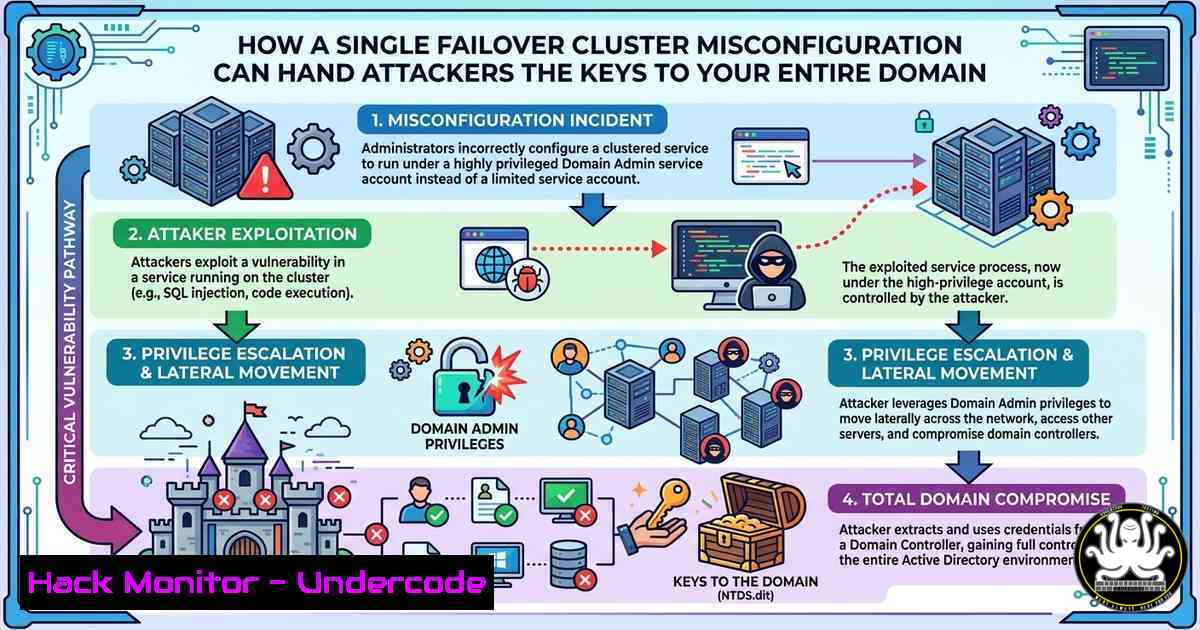
Introduction:
Failover Clusters are critical components in enterprise environments, designed to ensure high availability for applications and services. However, when misconfigured with overly permissive rights, improper organizational unit (OU) structures, or weak ownership models, they can become a silent attack vector. Recent research highlights how attackers can exploit these complex setups to move laterally and escalate privileges, turning a cluster designed for resilience into a gateway for domain-wide compromise.
Learning Objectives:
- Understand the inherent security risks associated with Active Directory-integrated Failover Clusters.
- Identify common misconfigurations, such as permissive security descriptors and improper cluster name object (CNO) permissions.
- Learn how to audit, exploit, and harden Failover Cluster environments using PowerShell and Windows security tools.
You Should Know:
1. The Anatomy of a Failover Cluster Attack
Failover Clusters rely heavily on Active Directory for identity management. The Cluster Name Object (CNO) and Virtual Computer Objects (VCOs) are computer accounts within AD that manage cluster resources. The core security issue arises when the CNO or VCOs are given excessive privileges, such as membership in privileged domain groups (e.g., Domain Admins, Administrators) or the ability to modify other AD objects. An attacker who compromises a node or service account with write privileges to these objects can effectively control the cluster, leading to resource hijacking, credential dumping, and domain escalation.
Step‑by‑step guide explaining what this does and how to use it:
An attacker typically begins by enumerating cluster configurations. Using tools like Active Directory PowerShell or BloodHound, they look for clusters with over-permissive ACLs.
Reconnaissance Phase (Windows PowerShell):
 Discover Failover Clusters in the domain
Get-Cluster -Domain <DomainName>

Check cluster permissions (requires RSAT)
Get-Cluster | Get-ClusterAccess -User Everyone
Get-ClusterResource | Get-ClusterParameter

Using Active Directory module to find CNO
Get-ADComputer -Filter "Name -like 'CLUSTER'" -Properties memberOf, ntSecurityDescriptor
Exploitation (If Permissions are Overly Permissive):
If the attacker has `GenericAll` or `WriteDacl` on the CNO, they can abuse the resource-based constrained delegation (RBCD) or simply add the cluster account to a privileged group.
 Add CNO to Domain Admins (if permissions allow)
Add-ADGroupMember -Identity "Domain Admins" -Members "CLUSTER_NAME$"

Or, use PowerView to modify ACLs
Add-DomainObjectAcl -TargetIdentity "CLUSTER_NAME$" -PrincipalIdentity "attacker_account" -Rights All
Note: This demonstrates the risk; actual exploitation requires valid credentials on the cluster node.
2. Exploiting Over-Permissive Security Descriptors
One of the most dangerous misconfigurations is setting permissive security descriptors on the cluster itself. Administrators often grant “Full Control” to service accounts or domain users for troubleshooting, forgetting to revert the changes. This allows any user with that access to start/stop cluster roles, modify configurations, or even move resources between nodes, potentially bypassing network segmentation.
Step‑by‑step guide explaining what this does and how to use it:
Identifying Weak ACLs:
Using a tool like `AccessChk` from Sysinternals, an attacker can quickly check who has access to cluster resources.
 Check who can access cluster services
accesschk.exe -accepteula -w "cluster"

Find who can modify cluster security
accesschk.exe -accepteula -a "cluster"
Abuse Scenario:
An attacker with write access can use PowerShell to reconfigure the cluster to run malicious code.
 Change the cluster to run a malicious script on failover
Set-ClusterParameter -Name "StartProgram" -Value "cmd.exe /c powershell -enc <payload>"
Mitigation: Regularly audit cluster permissions using `Get-ClusterAccess` and ensure only authorized service accounts have administrative privileges.
- CNO and VCO Ownership: A Critical Hardening Step
By default, the first administrator who creates the cluster becomes the owner. In many environments, cluster objects are created by domain admins, leaving high-privilege accounts as owners. If an attacker compromises a service account or node, they can leverage this ownership to reset the CNO password, leading to Kerberoasting or Silver Ticket attacks against the cluster.
Step‑by‑step guide explaining what this does and how to use it:
Audit CNO Ownership:
 Check the owner of the CNO
Get-ADComputer "CLUSTER_NAME" -Properties nTSecurityDescriptor | Select-Object -ExpandProperty nTSecurityDescriptor
Hardening with Delegated Permissions:
Instead of using high-privilege accounts, delegate control to a dedicated service account with limited rights.
1. Create a service account for cluster management.
- Delegate “Reset Password” and “Write Account Restrictions” permissions to this account on the CNO OU.
- Remove default Domain Admins from having explicit modify rights on the cluster OU.
Verification Commands:
 Verify effective permissions for the service account
Set-ADFineGrainedPasswordPolicy -Identity "ClusterMgmtPolicy" -AllowedToResetPassword "ClusterMgmtAcct"
Get-ADOrganizationalUnit -Identity "OU=Clusters,DC=domain,DC=com" | Get-ACL | Select -ExpandProperty Access
4. Lateral Movement via Cluster Networks
Failover Clusters often span multiple subnets and VLANs, creating a “trust bridge” between isolated environments. An attacker who compromises a single cluster node can use the cluster’s network infrastructure to pivot to other segments. Tools like `Invoke-Command` or `Enter-PSSession` can be used to hop between nodes without re-authenticating if CredSSP or Kerberos delegation is misconfigured.
Step‑by‑step guide explaining what this does and how to use it:
Pivoting Using PowerShell Remoting (If enabled):
 From a compromised node, enumerate cluster nodes
Get-ClusterNode

Use implicit remoting to access another node
Invoke-Command -ComputerName Node2 -ScriptBlock { whoami ; ipconfig }
Defensive Countermeasure (Linux/Windows):
- Windows: Disable unconstrained delegation for all cluster nodes. Configure “Resource-based constrained delegation” (RBCD) specifically for required services.
- Linux (if managing via Samba or similar): Ensure Samba clusters are not configured with insecure domain joins. Use `samba-tool domain join` with `–machine-pass` and strict firewall rules.
5. Post-Exploitation: Extracting Credentials from Cluster Logs
Failover clusters generate verbose logs that can inadvertently store sensitive information, such as service account passwords in plain text or connection strings. Attackers with access to the cluster node can retrieve these logs for credential harvesting.
Step‑by‑step guide explaining what this does and how to use it:
Harvesting Logs (Windows):
 Access cluster diagnostic logs
Get-WinEvent -LogName "Microsoft-Windows-FailoverClustering/Operational" | Where-Object { $_.Message -match "password" }

Check the cluster log file
Get-Content C:\Windows\Cluster\cluster.log | Select-String "password"
Mitigation:
- Implement centralized logging with SIEM (e.g., Splunk, ELK) to monitor access to cluster logs.
- Disable verbose logging in production unless required for debugging.
- Use Group Policy to restrict access to the `C:\Windows\Cluster` directory to only cluster administrators.
What Undercode Say:
- Key Takeaway 1: Failover Clusters are a high-value target because they host critical services and often hold privileged AD accounts. Their complex nature leads to misconfigurations that are frequently overlooked during security assessments.
- Key Takeaway 2: Hardening cluster security requires a shift from default high-privilege ownership to a delegated, least-privilege model. Regular auditing of permissions on CNOs and cluster resources is non-negotiable.
Analysis: The intersection of high availability infrastructure and Active Directory creates a unique attack surface. While many organizations focus on securing endpoints and servers, the underlying cluster infrastructure—often managed by infrastructure teams separate from security—remains a blind spot. The use of unconstrained delegation or overly permissive ACLs on cluster objects can effectively nullify other security investments. As demonstrated, a single misconfigured permission on a cluster can allow a low-privilege user to escalate to domain admin within hours. Security teams must integrate cluster-specific checks into their regular vulnerability management and Active Directory hygiene routines, employing tools like BloodHound to visualize these complex relationships.
Prediction:
As organizations continue to adopt hybrid and multi-cloud architectures, the complexity of failover clusters will increase, introducing new misconfiguration vectors. We will likely see a rise in “cluster-aware” malware that specifically targets CNOs and VCOs for persistence and lateral movement. Additionally, with the push for DevSecOps, there will be a growing need for automated compliance scanners that can validate cluster security postures against frameworks like CIS Benchmarks and the Microsoft Security Best Practices. The future of cluster security will depend less on manual audits and more on real-time monitoring of AD permissions and cluster resource integrity.
▶️ Related Video (78% Match):
🎯Let’s Practice For Free:
IT/Security Reporter URL:
Reported By: Daniel Scheidt – Hackers Feeds
Extra Hub: Undercode MoN
Basic Verification: Pass ✅


