
Listen to this Post
Introduction:
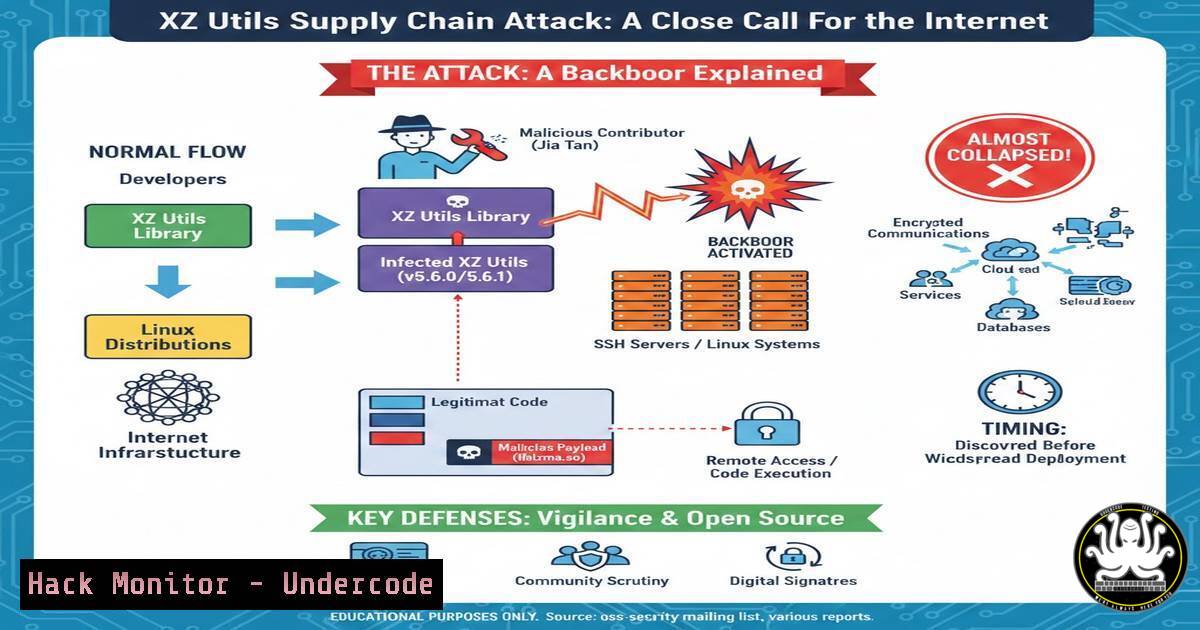
In late March 2024, the cybersecurity world held its breath as a sophisticated backdoor was discovered in XZ Utils, a widely used data compression library present in virtually every Linux distribution. Discovered by a vigilant Microsoft engineer, this supply chain attack targeted SSH servers, threatening to grant unauthorized remote access to millions of systems. This article breaks down the technical anatomy of the attack, the analysis process, and the critical security measures required to detect and prevent such sophisticated threats.
Learning Objectives:
- Understand the technical mechanics of the XZ backdoor and its impact on SSH authentication.
- Learn how to analyze suspicious binaries and libraries using static and dynamic analysis tools.
- Identify indicators of compromise (IoCs) and implement mitigation strategies against supply chain attacks.
You Should Know:
1. The Anatomy of the XZ Backdoor Attack
The XZ backdoor was not a random exploit; it was a meticulously planned social engineering and supply chain compromise. The attacker, over several years, gained maintainer trust and introduced malicious code into the liblzma library. This library is a dependency of libsystemd, which in turn is linked by the OpenSSH server (sshd) on many Systemd-based distributions. The backdoor was designed to intercept and modify SSH authentication functions, allowing the attacker to bypass standard authentication and execute arbitrary commands remotely using a specific cryptographic key.
Step‑by‑step guide: Understanding the Infection Chain
To grasp how the backdoor operated, security analysts dissected the build process. The malicious code was hidden in the test files of the source tarball and executed during the compilation phase.
1. Extraction: The attacker planted obfuscated scripts in the `m4/build-to-host.m4` file and test binary files.
2. Obfuscation: During the `./configure` stage, the script extracted a malicious binary object from a test file.
3. Injection: This object was then injected into the `liblzma` build process, specifically targeting the `_audit_plugin` symbol used by the dynamic linker (ld.so).
4. Interception: Once loaded by `sshd` (via libsystemd), the backdoor hijacked the `RSA_public_decrypt` and `RSA_public_encrypt` functions, allowing it to validate a specific, hidden master key.
To check if a system might be vulnerable, analysts ran the following Linux command to inspect the linker for the malicious audit hook:
 Check if liblzma is linked to sshd and if the audit hook exists
ldd $(which sshd) | grep lzma
 Look for a dependency on liblzma. If found, it's potentially in the target scope.

Check the sshd binary for the specific backdoor string pattern
strings $(which sshd) | grep "bad protocol"
 A vulnerable version might show specific error strings injected by the backdoor.
2. Static Analysis of the Malicious Library
When Thomas Roccia and other researchers analyzed the case, static analysis was the first line of defense. They had to examine the compromised `liblzma.so.5` library without executing it.
Step‑by‑step guide: Extracting Indicators with Command-Line Tools
- Identify the library version: Locate the library on a potentially affected system.
find /usr -name "liblzma.so"
e.g., /usr/lib/x86_64-linux-gnu/liblzma.so.5.4.1
- Extract strings: Look for unusual strings that don’t belong in a compression library.
strings -n 8 /path/to/liblzma.so.5 | grep -E "RSA|SSH|audit|systemd"
Look for references to OpenSSL functions or audit hooks.
3. Analyze symbols: Check for symbol table anomalies.
nm -D /path/to/liblzma.so.5 | grep -E "RSA|<em>audit</em>"
 A clean library should not export RSA-related symbols or audit hooks.
4. Use `objdump` to disassemble: Examine the control flow of suspicious functions.
objdump -d /path/to/liblzma.so.5 | less
 Search for the function that replaces the RSA_public_decrypt. Look for conditional jumps based on specific keys.
3. Dynamic Analysis and Sandboxing
To understand the backdoor’s runtime behavior without infecting a production server, researchers utilized sandboxed environments. This allowed them to monitor system calls and network activity.
Step‑by‑step guide: Using `strace` and `ltrace` on a Test System
Note: Only perform this in an isolated lab environment.
1. Monitor SSH daemon: Run `strace` on a patched or test instance of `sshd` to see what libraries it accesses.
sudo strace -e trace=openat,read,write -p $(pgrep -o sshd) 2>&1 | grep liblzma
 This reveals if the process attempts to open the library in a suspicious manner.
2. Trace library calls: Use `ltrace` to intercept library calls made by sshd.
sudo ltrace -e "RSA_public_decrypt" -p $(pgrep -o sshd)
 In a clean system, this function is rarely called by sshd during connection setup. Frequent or modified calls indicate tampering.
3. Network simulation: Use `netstat` or `tcpdump` to observe if the backdoor initiates outbound connections when a specific SSH key is sent.
sudo tcpdump -i any port 22 -A
 Capture the authentication handshake to see if a specific "magic" packet triggers abnormal behavior.
4. Auditing System Logs for Backdoor Activity
Post-compromise, the backdoor attempted to blend in. However, specific log entries could indicate an attacker exploiting it.
Step‑by‑step guide: Forensic Log Analysis on Linux
- Check SSH authentication logs: Look for successful logins that bypass normal methods.
sudo grep "Accepted password for" /var/log/auth.log | tail -20
sudo grep "Accepted publickey for" /var/log/auth.log | tail -20
A successful backdoor exploit might not leave any "Accepted" line, but can cause specific error messages.
- Search for error anomalies: The backdoor sometimes introduced specific failure messages.
sudo zgrep -i "bad packet" /var/log/auth.log | grep -v "normal"
sudo journalctl -u ssh --no-pager | grep -i "disconnect"
Look for disconnections immediately after a failed login attempt, which could be the backdoor rejecting a non-master key.
- Correlate with process accounting: If `psacct` or `acct` is enabled, review command history.
sudo lastcomm | head -20
Look for unusual commands run by the SSH user immediately after a connection time.
5. Securing CI/CD Pipelines Against Build-Time Attacks
The XZ attack exploited the build process. Modern DevSecOps must implement “trust but verify” mechanisms in their software supply chains.
Step‑by‑step guide: Implementing Build Verification
- Reproducible Builds: Ensure that builds are reproducible. If the same source code always produces the same binary, deviations are easily spotted.
diffoscope my-build-xyz.deb official-build-xyz.deb
This tool compares two binaries and reports the differences.
- Software Bill of Materials (SBOM): Generate and verify SBOMs.
Using a tool like syft or trivy
syft packages /usr/bin/sshd -o spdx-json > sshd_sbom.json
Compare the SBOM against known good values. The malicious version would show liblzma with a different hash.
- Static Analysis of Build Scripts: Scan build configuration files (like `.m4` or
CMakeLists.txt) for obfuscated code.Simple grep for suspicious patterns in build files find . -name ".m4" -o -name "configure" | xargs grep -E "eval|exec|base64|curl|wget" The XZ backdoor used complex sed and eval commands in the .m4 file to extract the payload.
6. Hardening SSH Against Future Backdoors
Since the XZ backdoor targeted SSH, system administrators must layer their defenses to mitigate the impact of any future library compromise.
Step‑by‑step guide: SSH Configuration Hardening
- Disable unused authentication methods: If the backdoor targets
RSA_public_decrypt, limiting key types can help.sudo nano /etc/ssh/sshd_config Add or modify the following lines: PubkeyAcceptedAlgorithms ssh-ed25519,[email protected] HostKeyAlgorithms ssh-ed25519,[email protected] This restricts the server to using Ed25519 keys, potentially bypassing the RSA-focused backdoor.
- Use `sshd` from a non-standard path: Compile OpenSSH statically or with a specific, audited libc to avoid system libraries.
This is complex but effective for high-security environments.
Example: Compile SSH with musl libc to avoid glibc and its linker tricks.
- Implement Two-Factor Authentication (2FA): Even if the SSH key is compromised or bypassed, 2FA provides a second layer.
sudo apt install libpam-google-authenticator
Configure PAM to require TOTP.
What Undercode Say:
- Trust, but verify, is dead: The XZ incident proves that implicit trust in upstream maintainers is a critical vulnerability. Every binary must be verified against a reproducible build standard, and every line of code, especially in build scripts, must be audited.
- Complexity is the enemy of security: The backdoor succeeded because the codebase was complex enough to hide malicious test files. Security strategies must prioritize simplicity and modularity to reduce the attack surface for social engineering and code obfuscation.
- Defense in depth for the supply chain: Relying solely on code reviews is insufficient. Organizations must implement runtime detection (eBPF, auditd), software composition analysis (SCA), and strict access controls to detect anomalies post-deployment, as the initial compromise might slip through.
Prediction:
This incident will accelerate the adoption of “memory-safe” languages in critical infrastructure and force a fundamental shift in how open-source maintainers are onboarded. We will likely see a rise in AI-driven code analysis tools specifically designed to detect social engineering patterns and subtle logic bombs hidden in build scripts. Furthermore, governments will push for mandatory SBOMs and stricter liability laws for critical open-source components, potentially leading to a “two-tier” internet where commercial entities pay for audited, secure versions of previously free software.
▶️ Related Video (76% Match):
🎯Let’s Practice For Free:
IT/Security Reporter URL:
Reported By: Thomas Roccia – Hackers Feeds
Extra Hub: Undercode MoN
Basic Verification: Pass ✅


