
Listen to this Post
Introduction:
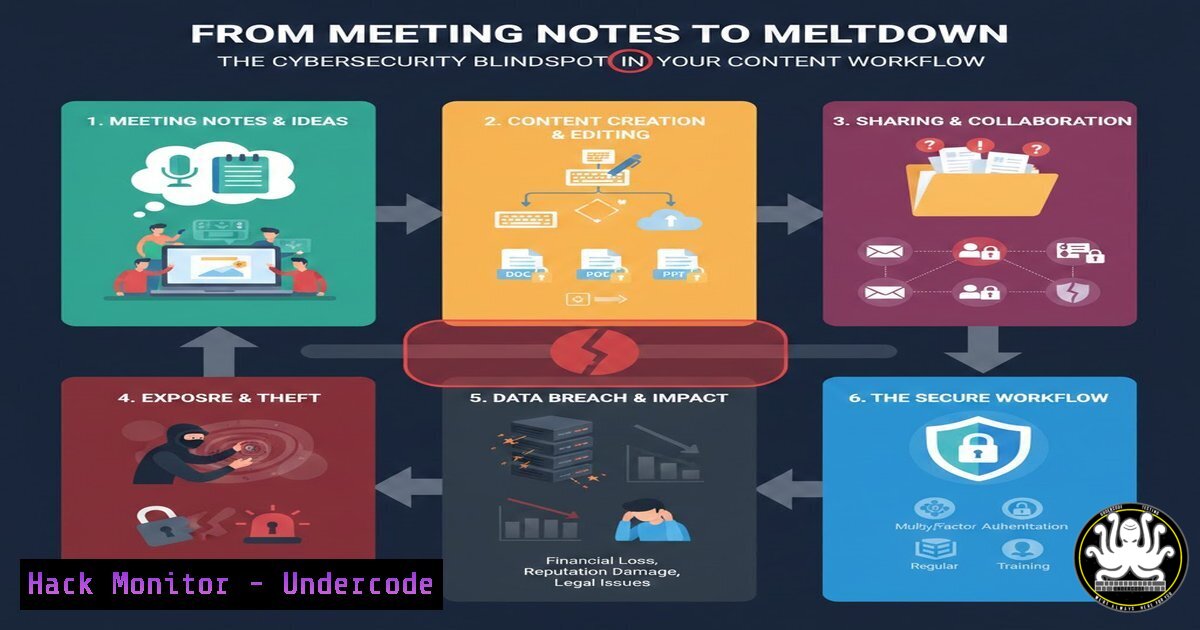
In an era where “being the content” is a mantra for business growth, the lines between daily operations and public exposure are blurring. The common practice of recording sensitive client calls and internal meetings for marketing purposes introduces a complex web of cybersecurity risks, from data leakage to non-compliance with global privacy regulations. This article dissects the hidden technical vulnerabilities in modern content creation workflows, providing a roadmap for security professionals and IT teams to harden these processes against exploitation.
Learning Objectives:
- Identify the specific data leakage points in audio/video recording workflows.
- Implement secure configurations for network segmentation of media devices.
- Master the use of encryption and secure transfer protocols for raw media assets.
- Apply data sanitization and redaction techniques to recorded content.
- Develop a compliance checklist for recording client communications.
You Should Know:
- The Air Gap Fallacy: Segmenting Your Recording Infrastructure
The original post suggests using “two groups of audio/video” – one for the meeting and one for recording content. While this is excellent for quality, from a security perspective, it is a critical control point if implemented incorrectly. If both devices (the work laptop and the recording camera) are on the same Wi-Fi network, they are part of the same attack surface.
Step‑by‑step guide: Network Segmentation for Media Devices
This guide ensures your “Group 2” recording device cannot be a pivot point into your corporate network.
- Create a VLAN: On your managed switch or firewall (e.g., pfSense, Cisco, Ubiquiti), create a dedicated VLAN (e.g., VLAN 20 – “MediaSegment”).
- Isolate the Traffic: Configure the VLAN with rules that block all traffic to the corporate LAN (VLAN 1) but allow outbound internet access for cloud uploads, if necessary.
pfSense Rule Example: `Action: Block | Protocol: Any | Source: VLAN 20 Net | Destination: LAN Net`
3. Dedicated SSID: Broadcast a separate Wi-Fi SSID specifically for this VLAN. Connect your Sony camera or smartphone to this network, not the corporate one. - Verify with Command Line: From the recording device, attempt to ping a critical internal resource.
Linux/macOS (on the recording device, if jailbroken/terminal accessible):ping -c 4 [bash] Expected Result: "Request timeout for icmp_seq" indicating isolation.
Windows (PowerShell on a laptop used as a recorder):
Test-NetConnection [bash] -Port 445
Expected Result: "TcpTestSucceeded : False"
2. Securing the “Raw Assets” in Transit
Uploading raw, unredacted meeting footage to an “offshore editor” is a high-risk data transfer. These assets often contain Personally Identifiable Information (PII), financial details, or internal strategies. The transfer method must be secure, and the data must be encrypted at rest during the workflow.
Step‑by‑step guide: Encrypted Asset Handover
Instead of relying on consumer-grade cloud links, establish a secure tunnel and container.
- Generate an Encrypted Container: Before upload, place the raw video files into a VeraCrypt container.
Linux Command:
 Create a 10GB encrypted volume
dd if=/dev/zero of=secure_assets.hc bs=1M count=10240
veracrypt -t -c secure_assets.hc --filesystem=ext4 --password=[bash] --keyfiles="" --pim=0 --volume-type=normal --encryption=aes --hash=sha-512
 Mount and copy files
veracrypt secure_assets.hc /mnt/veracrypt1
cp raw_meeting.mov /mnt/veracrypt1/
veracrypt -d
2. Use SFTP/SCP for Transfer: Do not use HTTP or unencrypted FTP. Use SSH File Transfer Protocol.
Windows (PowerShell with OpenSSH):
 Copy the encrypted container to the editor's server
scp -i C:\Keys\editors_key.ppk C:\Assets\secure_assets.hc [email protected]:/incoming/
3. Share Password Out-of-Band: Never send the container password via the same channel (e.g., email). Use a separate communication tool like Signal or a secure password manager.
3. Redacting Sensitive Data from Video Transcripts
Using “AI + video transcript” to generate copy is powerful, but AI tools can inadvertently memorize and expose sensitive information. If you feed a raw transcript containing a client’s API key or password into a public AI model, you have just suffered a data breach.
Step‑by‑step guide: Transcript Sanitization
Before sending transcripts to any LLM, scrub them for secrets.
- Generate the Transcript: Use a local, open-source transcription tool like `whisper.cpp` to avoid cloud uploads initially.
Clone and build whisper.cpp
git clone https://github.com/ggerganov/whisper.cpp
cd whisper.cpp
make
Transcribe a meeting recording
./main -f meeting_audio.wav -otxt -of meeting_transcript
- Sanitize with Regex: Use `grep` and `sed` to identify and redact patterns.
Linux Command to find and mask IP addresses and API keys:Redact IPv4 addresses sed -E 's/([0-9]{1,3}.){3}[0-9]{1,4}/[bash]/g' meeting_transcript.txt > sanitized_transcript.txt Redact potential API keys (example pattern for hex keys) sed -E 's/[[:xdigit:]]{32,40}/[bash]/g' sanitized_transcript.txt > final_transcript.txt - Verify: Manually scan the `final_transcript.txt` for any missed PII before feeding it to the AI tool for copywriting.
4. Mitigating the “Laser Microphone” Threat
The article mentions using a stationary mic for the meeting and a shotgun mic for content. In high-security environments (e.g., discussing M&A, patent details), physical security of audio is paramount. Audio leaks can occur via laser microphones aimed at window panes, picking up vibrations from the conversation.
Step‑by‑step guide: Hardening the Physical Audio Layer
- Acoustic White Noise Generation: Deploy hardware white noise generators near windows. Alternatively, use software-defined solutions on a Raspberry Pi.
Conceptual Python Script for a Raspberry Pi with a speaker:import pyaudio import numpy as np Generate white noise (frequency masking) p = pyaudio.PyAudio() stream = p.open(format=pyaudio.paFloat32, channels=1, rate=44100, output=True) while True: Generate white noise samples samples = np.random.uniform(-1, 1, 44100).astype(np.float32) stream.write(samples.tobytes()) Run this script during sensitive meetings
- Vibration Dampening: Physically decouple the room. Ensure meeting room windows have double glazing and blinds. The vibrations from the sound waves in the room are what a laser reads; disrupting them with noise or barriers mitigates the risk.
5. Compliance and Consent Logging (Audit Trail)
Recording client calls for content requires strict consent under regulations like GDPR, CCPA, or HIPAA. You must prove consent was obtained.
Step‑by‑step guide: Creating a Tamper-Proof Consent Log
- Pre-Meeting Banner: Implement a system that displays a consent agreement before the call can start (e.g., a custom Zoom/Teams integration or a pre-call form).
2. Capture Network Evidence: Log the consent event.
Linux Server Logging (simulated):
echo "$(date) - Client: [bash] - IP: [bash] - Consent: Granted for recording" >> /var/log/meeting_consent.audit
 Hash the log entry for integrity
echo "$(tail -1 /var/log/meeting_consent.audit)" | sha256sum >> /var/log/consent_hashes.log
3. Include Verbal Confirmation: At the start of every recording (Group 2), verbally confirm consent. “Just to confirm on the recording, we have your permission to use this for internal training and marketing, correct?” This creates an audio trail embedded in the raw file.
What Undercode Say:
- Convergence of OPSEC and Marketing: The drive for authentic content has forced operational security (OPSEC) into the marketing department. IT teams must now treat marketing workflows with the same rigor as financial data flows.
- The Insider Threat Amplifier: Offshoring raw, unredacted content creates a massive insider risk. The editor in a low-security jurisdiction becomes a high-value target for adversaries seeking intelligence on your company’s operations and clientele.
The core of the advice—recording real work—is sound, but the execution is a potential catastrophe waiting to happen. Most professionals are focusing on the lighting and audio quality, completely ignoring the data leakage. By treating every recording session as a potential breach event and applying network segmentation, encryption, and sanitization before the editor ever sees the file, you can harness the power of authentic content without exposing the crown jewels. In 2026, a leaked video clip of a sensitive negotiation will do far more damage than a poorly edited marketing post ever could.
Prediction:
We will see the rise of “Secure Content Gateways” within the next 18 months. These will be specialized software or hardware appliances that sit between the recording device and the editor. They will automatically run redaction algorithms, enforce encryption, and strip metadata from video files before they leave the corporate perimeter, effectively creating a DMZ (Demilitarized Zone) for media assets. The first major class-action lawsuit resulting from PII leaked via a “behind-the-scenes” marketing video will be the catalyst for this market.
▶️ Related Video (84% Match):
🎯Let’s Practice For Free:
IT/Security Reporter URL:
Reported By: Alexbsheridan How – Hackers Feeds
Extra Hub: Undercode MoN
Basic Verification: Pass ✅


