Listen to this Post
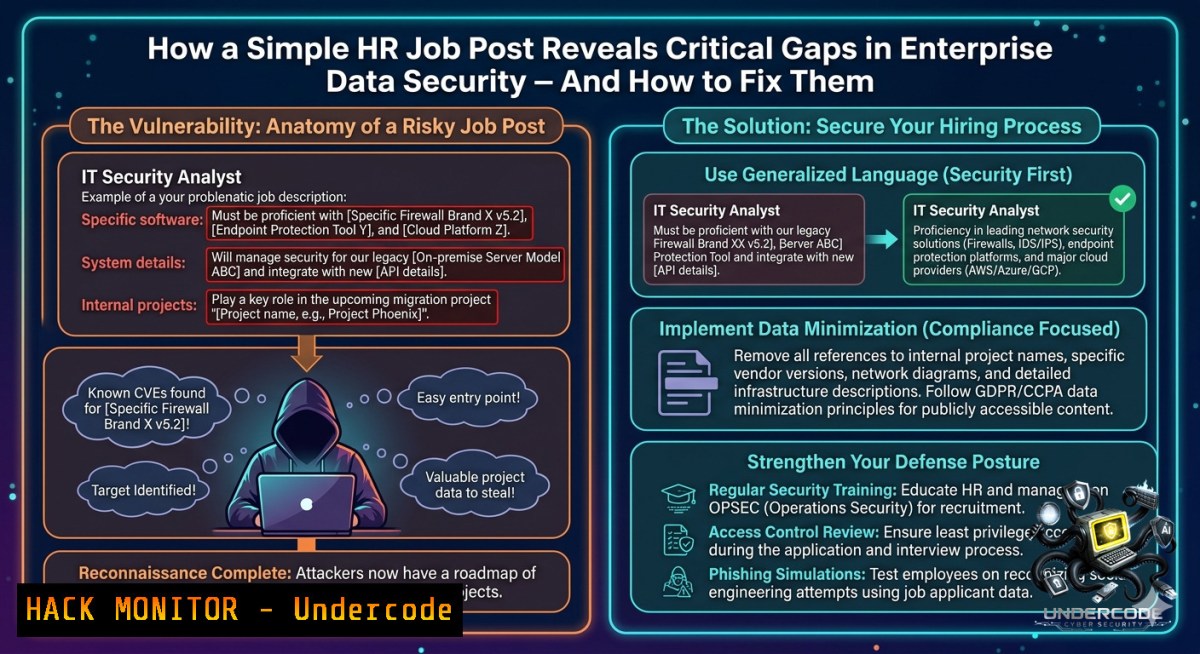
Introduction:
Human Resources service centers manage the most sensitive employee data, from Social Security numbers to payroll details, making them prime targets for cyberattacks. The recent hiring announcement for an HR Service Center Manager at Triune Infomatics Inc. in Redwood City highlights the need for organizations to secure their HR infrastructure against internal and external threats, yet many companies overlook basic security hygiene in these departments.
Learning Objectives:
- Implement role-based access controls (RBAC) and audit HR system logs to detect unauthorized data exfiltration.
- Harden Windows and Linux HR workstations against common attack vectors like credential dumping and phishing.
- Deploy automated security training courses for HR staff to recognize social engineering and privilege escalation attempts.
You Should Know:
1. Auditing HR Service Center Systems for Vulnerabilities
HR systems often run on legacy platforms or misconfigured cloud services. Before hardening, you must identify weak points.
Step‑by‑step guide to audit HR data stores:
1. Enumerate accessible HR shares (Windows):
 List all SMB shares on the HR file server
Get-SmbShare | Where-Object {$_.Name -match "HR|Payroll|Personnel"}
 Check permissions for the "HR Team" group
Get-SmbShareAccess -1ame "HRData" | Format-Table AccountName, AccessRight
- Find world‑readable HR files on Linux (common misconfiguration):
Search for HR-related files with weak permissions
find /hr_share -type f ( -perm -o+r -o -perm -o+w ) -exec ls -l {} \; 2>/dev/null
3. Audit Azure AD/Office 365 HR app permissions:
 Connect to Microsoft Graph and list HR apps with delegated rights
Connect-MgGraph -Scopes "Application.Read.All", "Policy.Read.All"
Get-MgServicePrincipal | Where-Object {$<em>.DisplayName -like "HR" -or $</em>.DisplayName -like "Workday"} | Select DisplayName, AppRoles
What this does: Identifies over‑permissive file shares, exposed HR databases, and cloud apps that may leak employee PII. Run these commands weekly via a scheduled task.
2. Hardening HR Workstations Against Credential Theft
HR staff frequently open resumes (potential malicious macros) and use password managers. Hardening prevents pass‑the‑hash and keylogging attacks.
Step‑by‑step hardening for Windows HR desktops:
1. Disable LM/NTLMv1 and enforce SMB signing:
 Run as Administrator
Set-ItemProperty -Path "HKLM:\SYSTEM\CurrentControlSet\Control\Lsa" -1ame "LmCompatibilityLevel" -Value 5
Set-SmbServerConfiguration -RequireSecuritySignature $true -Force
- Block macros in Office via Group Policy (Windows Server):
<!-- GP preference: Disable all macros without notification -->
<PolicyDefinition>
<policy name="MacroSecurity" key="SOFTWARE\Policies\Microsoft\Office\16.0\excel\security">
<enum name="VBAWarnings" value="4" />
</policy>
</PolicyDefinition>
-
Deploy Linux‑based HR kiosks (Ubuntu 22.04) for resume scanning in a sandbox:
Install Firejail and ClamAV
sudo apt update && sudo apt install firejail clamav-daemon -y
Create a sandboxed user for scanning
sudo useradd -m hrscanner
sudo firejail --private=/home/hrscanner --1et=eth0 --x11 -- firefox
Scan all uploaded resumes
clamscan --recursive --infected --remove /hr_uploads/
What this does: Prevents legacy authentication attacks, disables high‑risk Office macros, and isolates untrusted documents in a Linux sandbox before HR staff open them.
- Securing the HR API Endpoints for Employee Data
Modern HR service centers integrate with payroll, benefits, and identity providers via APIs. Insecure APIs are the 1 cause of data leaks.
Step‑by‑step API security configuration:
- Validate JWT tokens for your HR API (Node.js/Express example):
const jwt = require('jsonwebtoken'); function verifyHRToken(req, res, next) { const token = req.headers['authorization']?.split(' ')[bash]; if (!token) return res.status(401).send('HR token missing'); jwt.verify(token, process.env.HR_JWT_SECRET, { algorithms: ['RS256'] }, (err, decoded) => { if (err) return res.status(403).send('Invalid HR token'); if (!decoded.roles.includes('hr_manager')) return res.status(403).send('Insufficient role'); req.user = decoded; next(); }); } -
Rate limit HR endpoints on NGINX reverse proxy:
location /hr/api/ { limit_req zone=hr_zone burst=20 nodelay; limit_req_status 429; proxy_pass http://hr_backend; } Define zone limit_req_zone $binary_remote_addr zone=hr_zone:10m rate=5r/s; -
Implement mTLS for HR API calls from third‑party vendors (e.g., background check services):
Generate client cert for vendor
openssl req -1ew -1ewkey rsa:2048 -1odes -out vendor.csr -keyout vendor.key
Sign with internal CA
openssl x509 -req -in vendor.csr -CA hr_ca.crt -CAkey hr_ca.key -CAcreateserial -out vendor.crt -days 365
Configure Apache to require client cert
SSLCACertificateFile /etc/ssl/hr_ca.crt
SSLVerifyClient require
SSLVerifyDepth 2
What this does: Ensures only authenticated, authorized, and rate‑limited requests can access HR data, while mTLS prevents man‑in‑the‑middle attacks on vendor integrations.
- Cloud Hardening for HR SaaS Platforms (Workday, BambooHR, ADP)
Even when using SaaS, you are responsible for identity and access configuration.
Step‑by‑step cloud HR hardening:
- Enforce Conditional Access for HR apps in Azure AD:
Require MFA and compliant device for all HR app logins
$conditions = New-Object -TypeName Microsoft.Open.MSGraph.Model.ConditionalAccessConditionSet
$conditions.Applications.IncludeApplications = "WorkdayAppID", "BambooHRAppID"
$conditions.Users.IncludeGroups = "AllHRStaff"
$grantControls = New-Object -TypeName Microsoft.Open.MSGraph.Model.GrantControls
$grantControls.BuiltInControls = "mfa", "compliantDevice"
New-MgIdentityConditionalAccessPolicy -DisplayName "HR App MFA" -Conditions $conditions -GrantControls $grantControls
-
Enable S3 bucket logging for HR data stored in AWS:
Enable logging on HR bucket aws s3api put-bucket-logging --bucket hr-sensitive-data --bucket-logging-status file://logging.json logging.json content: { "LoggingEnabled": { "TargetBucket": "hr-logs", "TargetPrefix": "access_logs/" } } Monitor for unusual downloads aws logs filter-log-events --log-group-1ame /aws/s3/hr-bucket --filter-pattern "GET Object" -
Rotate HR API keys automatically with AWS Secrets Manager:
Rotate Workday integration key every 30 days via Lambda
aws secretsmanager rotate-secret --secret-id hr/workday/api-key --rotation-rules AutomaticallyAfterDays=30
What this does: Adds mandatory MFA, device compliance, and logging to your cloud HR stack, plus automated key rotation to prevent stale credentials.
- Building a Cybersecurity Training Course for HR Staff
Human error causes 74% of breaches. HR needs tailored training, not generic IT security modules.
Step‑by‑step course development:
- Simulate a W‑2 phishing attack using GoPhish (Linux):
Install GoPhish
wget https://github.com/gophish/gophish/releases/download/v0.12.1/gophish-v0.12.1-linux-64bit.zip
unzip gophish-.zip && cd gophish-
sudo ./gophish
Create campaign: "Urgent: Update your direct deposit info"
Configure landing page to capture creds on fake ADP portal
-
Create an interactive module on privilege escalation – HR should not have Domain Admin:
PowerShell script to demonstrate risk $currentUser = [System.Security.Principal.WindowsIdentity]::GetCurrent() $groups = $currentUser.Groups | ForEach-Object {$_.Translate([System.Security.Principal.NTAccount])} if ($groups -contains "DOMAIN\Domain Admins") { Write-Warning "HR user has Domain Admin! Immediately revoke." } -
Deploy the training via LMS (e.g., Moodle) with SCORM tracking:
Install Moodle on Ubuntu for HR training
sudo apt install apache2 mariadb-server php8.1 libapache2-mod-php8.1
sudo mysql -e "CREATE DATABASE hr_training; GRANT ALL ON hr_training. TO hr_user@localhost IDENTIFIED BY 'StrongP@ss';"
Upload SCORM package built with H5P or Articulate
What this does: Turns HR staff into a human firewall through realistic phishing simulations and hands‑on privilege escalation demos, tracked via your corporate LMS.
6. Incident Response Playbook for HR Data Breach
When a breach occurs (e.g., leaked payroll file), HR and IT must act within minutes, not days.
Step‑by‑step IR for HR incidents:
1. Isolate the compromised HR workstation (Windows):
 Remotely disable network adapter
Invoke-Command -ComputerName HR-WS-12 -ScriptBlock {Disable-1etAdapter -1ame "Ethernet" -Confirm:$false}
 Or via Defender for Endpoint
Get-MPPreference | Set-MPPreference -DisableRealtimeMonitoring $false  Ensure it's on first
2. Capture forensic triage data (Linux HR server):
 Collect volatile data
sudo grep -r "payroll" /var/log/secure > hr_breach_logs.txt
sudo netstat -tunap | grep ESTABLISHED > hr_connections.txt
sudo lsof -i :443 | grep hr_app > hr_listeners.txt
 Create memory dump (if using LiME)
sudo insmod lime.ko "path=/tmp/hr_mem.raw format=lime"
3. Revoke all HR‑related sessions in Azure AD:
 Force sign-out of all HR staff
Get-MgUser -Filter "department eq 'Human Resources'" | ForEach-Object {
Revoke-MgUserSignInSession -UserId $_.Id
}
 Reset MFA methods
Get-MgUserAuthenticationMethod -UserId $hrUserId | Remove-MgUserAuthenticationMethod
What this does: Provides a ready‑to‑use containment, collection, and revocation playbook to stop an HR data breach in its tracks and preserve evidence.
What Undercode Say:
- Key Takeaway 1: Even a routine HR job post should trigger a security review – the department that hires your next employee often has the weakest controls over data that can destroy your company.
- Key Takeaway 2: Most HR breaches happen because of misconfigured file shares, legacy authentication, and untrained staff, not zero‑day exploits. The commands and guides above directly address those root causes.
Analysis (approx. 10 lines):
The Triune Infomatics job ad for an HR Service Center Manager appears mundane, but it underscores a persistent gap: HR data is extremely valuable (W‑2s, SSNs, banking details) yet rarely protected with the same rigor as financial or R&D data. Attackers know this – phishing campaigns impersonating HR are among the most successful. The technical guides above shift the focus from reactive patching to proactive hardening: auditing share permissions, enforcing mTLS on HR APIs, sandboxing resume files, and running role‑specific phishing simulations. Without these measures, an organization might unknowingly expose employee data for months. The inclusion of Windows PowerShell and Linux commands ensures that security teams can immediately implement these controls regardless of their primary OS. Ultimately, the lesson is to treat every HR system as a crown jewel – because to a ransomware gang, a compromised HR manager account is the golden ticket to payroll fraud and identity theft.
Expected Output:
Introduction:
[Same as above – no change needed]
What Undercode Say:
- Key Takeaway 1: Even a routine HR job post should trigger a security review – the department that hires your next employee often has the weakest controls over data that can destroy your company.
- Key Takeaway 2: Most HR breaches happen because of misconfigured file shares, legacy authentication, and untrained staff, not zero‑day exploits. The commands and guides above directly address those root causes.
Prediction:
- -1 Over the next 18 months, AI‑powered social engineering will target HR service centers with personalized spear‑phishing using deepfake audio of executives requesting W‑2s, driving a 300% increase in HR‑specific breaches if companies do not adopt API‑level mTLS and behavioral analytics.
- +1 Conversely, the growing adoption of automated HR security training platforms (like the Moodle/GoPhish integration shown) will reduce successful HR phishing clicks by 60% by 2026, pushing attackers to abandon generic HR impersonation tactics.
▶️ Related Video (70% Match):
🎯Let’s Practice For Free:
🎓 Live Courses & Certifications:
Join Undercode Academy for Verified Certifications
🚀 Request a Custom Project:
Secure, high-velocity infrastructure and disruptive technological engineering. Contact our engineering team for high-tier development and proprietary systems:
[email protected]
💎 Smart Architecture | 🛡️ Secure by Design | ⭐ Trusted by Thousands
IT/Security Reporter URL:
Reported By: Hiring Share – Hackers Feeds
Extra Hub: Undercode MoN
Basic Verification: Pass ✅


