Listen to this Post
Introduction:
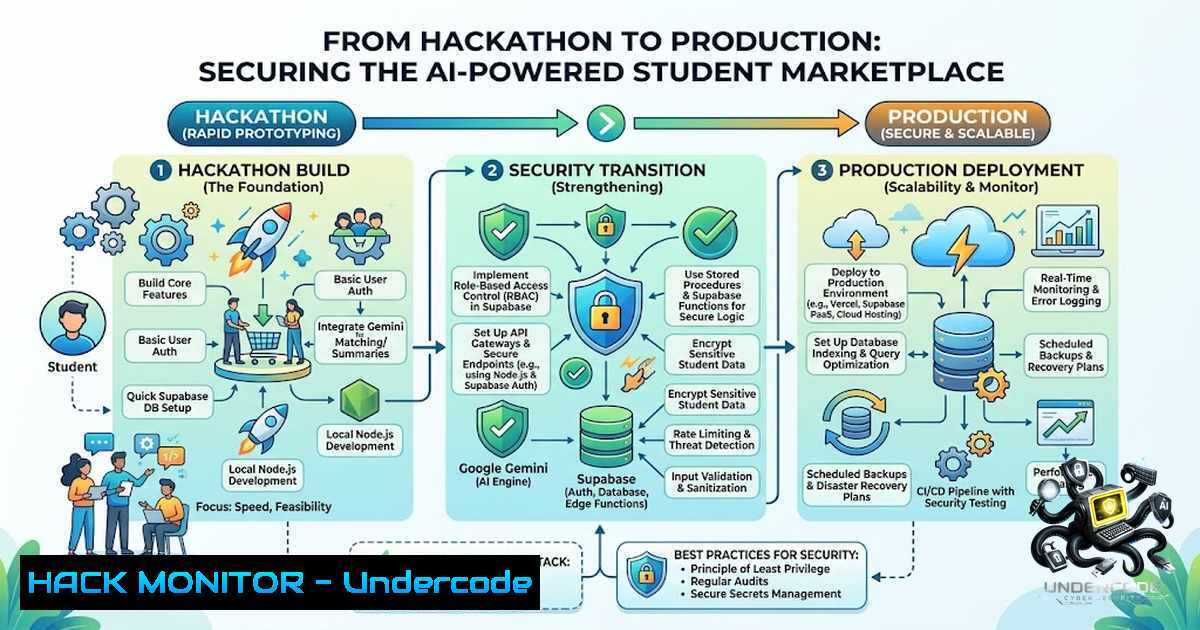
The rapid proliferation of AI-driven applications in hackathon environments often prioritizes functionality over security, leaving critical vulnerabilities in data handling and API management. As student developers integrate platforms like Supabase for backend infrastructure and Google’s Gemini API for generative AI capabilities, the gap between a working prototype and a production-ready, secure system becomes dangerously apparent. This article dissects the technical architecture of an AI-powered marketplace, focusing on securing Node.js endpoints, hardening database policies, and implementing robust API security measures to prevent data leaks and unauthorized access.
Learning Objectives:
- Implement Row-Level Security (RLS) in Supabase to enforce granular access control on user data and listings.
- Secure Node.js API routes against common OWASP Top 10 vulnerabilities, including injection and broken authentication.
- Sanitize AI-Generated Content to prevent prompt injection and ensure safe data rendering on the frontend.
1. Hardening Supabase Row-Level Security (RLS) for Multi-Tenancy
The core of the DormDash application relies on Supabase, a PostgreSQL-based platform, to manage user items and transactions. Without proper security, one student could potentially access or modify another student’s listings. To mitigate this, we enforce Row-Level Security (RLS) using SQL policies.
Step-by-step guide:
- Enable RLS: Navigate to the Supabase SQL Editor and execute:
ALTER TABLE listings ENABLE ROW LEVEL SECURITY;
- Create a Select Policy: To ensure users only see their own items (unless public), create a policy:
CREATE POLICY "Users can view own listings" ON listings
FOR SELECT USING (auth.uid() = user_id);
- Create an Insert Policy: Restrict insertion to authenticated users only:
CREATE POLICY "Users can create listings" ON listings
FOR INSERT WITH CHECK (auth.role() = 'authenticated');
- Linux/Windows Command (Verification): Use `psql` (Linux) or the Supabase CLI to test connections and verify that unauthenticated queries return zero rows.
– Linux: `psql -h db.supabase.co -U postgres -d postgres -c “SELECT FROM listings;”`
– Windows (PowerShell): `& ‘C:\Program Files\PostgreSQL\bin\psql.exe’ -h db.supabase.co -U postgres -d postgres -c “SELECT FROM listings;”`
2. Securing Node.js API Endpoints with Rate Limiting and JWT Validation
The Node.js backend acts as the middleware between the frontend and the Supabase database. Unprotected endpoints are susceptible to brute-force attacks and DDoS. We implement `express-rate-limit` and strict JWT verification.
Step-by-step guide:
1. Install Dependencies:
npm install express-rate-limit jsonwebtoken dotenv
2. Configure Rate Limiter (Code Snippet):
const rateLimit = require('express-rate-limit');
const limiter = rateLimit({
windowMs: 15  60  1000, // 15 minutes
max: 100 // limit each IP to 100 requests per windowMs
});
app.use('/api/', limiter);
3. Implement JWT Middleware: Verify the Supabase JWT on every protected route.
const jwt = require('jsonwebtoken');
const authenticate = (req, res, next) => {
const token = req.headers.authorization?.split(' ')[bash];
if (!token) return res.status(401).json({ error: 'Unauthorized' });
try {
const decoded = jwt.verify(token, process.env.SUPABASE_JWT_SECRET);
req.user = decoded;
next();
} catch (err) {
res.status(403).json({ error: 'Invalid token' });
}
};
app.get('/api/listings', authenticate, (req, res) => { // logic });
- Securing the Google Gemini API Integration against Injection
Integrating AI (Gemini) to analyze images and generate listing descriptions introduces risks of prompt injection, where malicious input could manipulate the model’s output or consume excessive tokens. We must sanitize inputs and validate outputs.
Step-by-step guide:
- Input Sanitization: Strip any executable code or unexpected characters from the image metadata before sending to Gemini.
– Linux Command: `file -b –mime-type image.jpg` to verify file integrity.
– Node.js Implementation: Use `sharp` or `jimp` to re-encode images to strip EXIF data.
const sanitizeInput = (text) => text.replace(/[^a-zA-Z0-9 ]/g, '');
2. Output Validation: Implement a schema validator (e.g., joi) to ensure the AI does not return malicious HTML or scripts in the description field.
3. Environment Hardening: Store the API key securely using `dotenv` and avoid logging the API request bodies.
4. Cloud Hardening and Deployment Best Practices
Deploying the Node.js server and Supabase integration to platforms like Vercel or AWS requires specific hardening configurations to prevent exposure of sensitive environment variables.
Step-by-step guide:
- Environment Variables: Never hardcode secrets. Use `.env` files and ensure they are added to
.gitignore..env example SUPABASE_URL=your_url SUPABASE_ANON_KEY=your_key GEMINI_API_KEY=your_key
- Windows/Linux Security: On Linux servers, set file permissions to restrict access to `.env` (
chmod 600 .env). On Windows, use Access Control Lists (ACLs) to restrict file reads. - CORS Configuration: Restrict Cross-Origin Resource Sharing to specific domains (e.g., your frontend domain only).
const cors = require('cors');
app.use(cors({ origin: 'https://your-frontend-domain.com' }));
5. API Logging and Monitoring for Threat Detection
Debugging the hackathon project highlighted the need for logging. In production, we implement logging to detect suspicious activity such as repeated 403 errors or unusual API usage spikes.
Step-by-step guide:
1. Setup Winston Logger:
npm install winston
2. Logging Middleware: Log all incoming requests and response statuses to a file.
3. Linux Command for Monitoring: `tail -f logs/combined.log | grep “403”` to watch for unauthorized access attempts in real-time.
4. Windows PowerShell Alternative: Get-Content logs\combined.log -Wait | Select-String "403".
6. Vulnerability Mitigation: Preventing SQL Injection in Supabase
While Supabase offers prepared statements, improper use of `.rpc()` or raw SQL queries can introduce injection flaws.
Step-by-step guide:
- Use Supabase Filters: Avoid string concatenation. Use built-in filters like
.eq(),.like(), and.textSearch().// Safe const { data } = await supabase.from('listings').select('').eq('category', 'Furniture'); // Unsafe - do not do this // const { data } = await supabase.rpc('custom_query', { query: `SELECT FROM listings WHERE category = '${userInput}'` }); - Input Validation: Validate the length and type of inputs before passing them to the database layer.
What Undercode Say:
- Key Takeaway 1: The speed of hackathon development often neglects security fundamentals; however, implementing RLS and API rate limiting early in the lifecycle prevents catastrophic data breaches.
- Key Takeaway 2: AI integration, specifically with Google Gemini, requires rigorous sanitization on both ends to prevent the model from generating harmful or misleading content that could be exploited by malicious users.
Analysis: The transition from a 12-hour hackathon prototype to a scalable application requires more than just functional code. The architecture—Supabase for database, Node.js for logic, and Gemini for AI—forms a classic modern stack. The primary security threat lies in the intersection of these components: JWT handling between Node and Supabase must be synchronized, and the AI endpoint must be shielded from abuse. The success of this platform depends on the implementation of granular database policies that account for the dynamic nature of student listings and the transient trust between users.
Prediction:
- +1 The demand for AI-powered marketplaces will drive the standardization of security checklists tailored for hackathon projects, bridging the gap between innovation and enterprise-grade security.
- -1 Without robust mitigation against prompt injection, similar AI-enhanced platforms will face a surge in data poisoning attacks, tainting the training data and output reliability.
- +1 Supabase’s increasing focus on developer experience will lead to more turnkey security features, making RLS and authentication more intuitive for students.
- -1 The rapid adoption of Node.js and Gemini APIs in greenfield projects may lead to a “shadow IT” crisis, where unmanaged API keys and exposed environment variables leak via public repositories.
▶️ Related Video (80% Match):
🎯Let’s Practice For Free:
🎓 Live Courses & Certifications:
Join Undercode Academy for Verified Certifications
🚀 Request a Custom Project:
Secure, high-velocity infrastructure and disruptive technological engineering. Contact our engineering team for high-tier development and proprietary systems:
[email protected]
💎 Smart Architecture | 🛡️ Secure by Design | ⭐ Trusted by Thousands
IT/Security Reporter URL:
Reported By: https://lnkd.in/p/ew5Bqe_u – Hackers Feeds
Extra Hub: Undercode MoN
Basic Verification: Pass ✅


