Listen to this Post
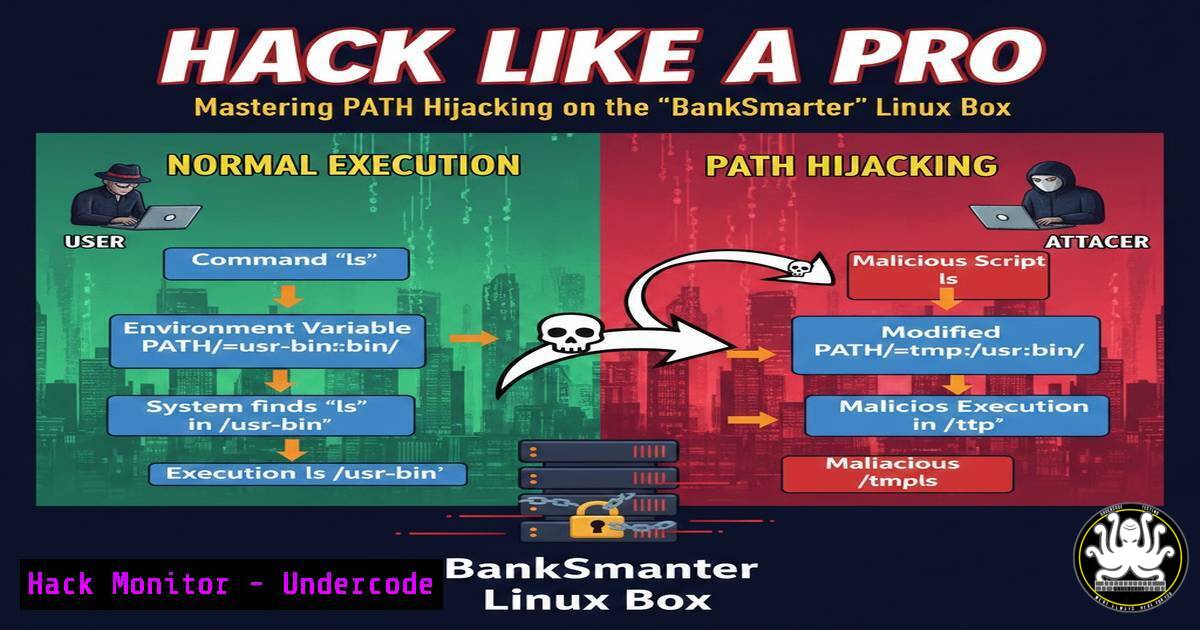
Introduction:
In the latest episode of offensive security practice, a medium-difficulty Linux machine named “BankSmarter” was conquered, revealing the critical and often overlooked privilege escalation vector known as PATH Hijacking. This technique exploits how the Linux operating system locates and executes commands, allowing a low-privilege user to trick the system into running a malicious script instead of a legitimate binary. By understanding this vulnerability, security professionals can better identify weaknesses in system configurations and harden their environments against such stealthy takeovers.
Learning Objectives:
- Understand the mechanics of the Linux $PATH variable and how command resolution works.
- Learn to identify and exploit insecure sudo permissions combined with PATH Hijacking.
- Master step-by-step techniques to escalate privileges from a standard user to root on a Linux target.
You Should Know:
1. Understanding PATH Hijacking and Initial Foothold
The core of this attack lies in the $PATH environment variable. When a user types a command like `ls` or cat, the shell searches through a list of directories defined in $PATH (e.g., /usr/bin, /bin) to find the executable. If the system or an administrator configures a script to run with elevated privileges (via sudo) but does not use absolute paths for the commands within that script, an attacker can manipulate the $PATH to point to a malicious binary they control first.
In the case of BankSmarter, initial access was gained by exploiting a vulnerable web application or service, granting a low-privilege shell on the machine. From this foothold, the enumeration phase began to uncover misconfigurations that would allow for privilege escalation.
2. Identifying the Vulnerability: The Sudo -l Check
The first step after gaining initial access is to check what commands the current user can run with superuser privileges without needing the root password. The command for this is:
sudo -l
On the BankSmarter box, this command revealed a specific entry. It showed that the user could run a particular script or binary (e.g., `/usr/local/bin/deploy` or a custom application) as root or another user, without a password. The output might look similar to:
User victim may run the following commands on BankSmarter:
(ALL : ALL) NOPASSWD: /usr/local/bin/backup-script
This is the golden ticket. It indicates that we can execute `/usr/local/bin/backup-script` with root privileges.
3. Analyzing the Target Script
Now, we must examine the content of that script to see if it’s exploitable. We can view it using `cat` or less.
cat /usr/local/bin/backup-script
The contents might reveal a poorly written script, for example:
!/bin/bash

echo "Starting backup process..."
tar -czf /backups/backup.tar.gz /home/user/data
echo "Backup complete."
Or a more subtle, vulnerable version:
!/bin/bash

cp -r /important/files /tmp/
chown -R root:root /tmp/files
The vulnerability here is that the commands tar, cp, and `chown` are called using their short names, not their absolute paths (e.g., `/bin/tar` or /usr/bin/cp). Because the script is run with sudo, it executes with root privileges. However, the shell spawned by `sudo` will still use the current user’s $PATH environment variable to resolve where `tar` or `cp` is located. This is the opening we need.
4. Crafting and Executing the PATH Hijack
We can exploit this by creating our own malicious “tar” or “cp” script, placing it in a directory we control, and then manipulating the $PATH so our fake script is found and executed by the privileged script instead of the real system binary.
First, create a malicious script in a writable directory, like /tmp. Let’s target the `tar` command from the backup script.
cd /tmp
echo '!/bin/bash' > tar
echo 'cp /bin/bash /tmp/rootbash && chmod +s /tmp/rootbash' >> tar
chmod +x tar
This malicious `tar` script, when executed, will copy the `/bin/bash` shell to `/tmp/rootbash` and set the SUID bit (chmod +s). An SUID binary runs with the permissions of its owner (in this case, root), giving us a root shell when executed.
Now, we need to make the system find our fake `tar` before the real one. We do this by prepending our directory (/tmp) to the beginning of the $PATH variable.
export PATH=/tmp:$PATH
echo $PATH
 Output should show /tmp at the very beginning, e.g., /tmp:/usr/local/bin:/usr/bin...
With the path hijacked, we simply run the vulnerable script with sudo.
sudo /usr/local/bin/backup-script
When the script calls tar, the shell will search $PATH, find our malicious `/tmp/tar` first, and execute it as root.
5. Reaping the Rewards: Getting the Root Shell
If the exploit worked, our malicious script would have created the `/tmp/rootbash` binary with the SUID bit set. We can verify this:
ls -la /tmp/rootbash
 Output should show -rwsr-sr-x ...
Now, executing this binary will spawn a shell with root privileges.
/tmp/rootbash -p
 The -p flag is often needed to preserve the effective UID (root) and prevent the shell from dropping privileges.
id
 Output: uid=1000(user) gid=1000(user) euid=0(root) egid=0(root) groups=...
whoami
 Output: root
At this point, the box is fully compromised.
6. Mitigation Strategies for Defenders
To prevent PATH Hijacking attacks, developers and system administrators must adhere to secure coding practices:
– Always Use Absolute Paths: In any script that will be executed with elevated privileges (via cron or sudo), always call binaries using their full path, e.g., `/bin/cp` instead of cp.
– Secure the sudoers File: When granting sudo access, use the `secure_path` option within the sudoers file. This defines a safe, trusted $PATH for commands run with sudo, ignoring the user’s environment variables. For example:
Defaults secure_path = /usr/local/sbin:/usr/local/bin:/usr/sbin:/usr/bin:/sbin:/bin
– Avoid Writable Directories in Path: Ensure that no user-writable directories (like `/tmp` or a user’s home directory) are ever included in the $PATH for privileged executions.
What Undercode Say:
- Key Takeaway 1: PATH Hijacking is a subtle but powerful privilege escalation technique that relies on a common developer oversight—failing to use absolute paths in scripts executed with elevated privileges. It transforms a simple misconfiguration into a full system compromise.
- Key Takeaway 2: Effective security hygiene extends beyond patching software; it requires hardening configurations and scripts. Regularly auditing sudo permissions with `sudo -l` and reviewing script contents are critical steps for both attackers identifying vectors and defenders closing them.
The analysis of the BankSmarter box demonstrates that hands-on practice is essential. While frustration may be part of the learning curve, the methodical breakdown of each step—from enumeration to exploitation—builds the muscle memory required for real-world penetration testing. This specific vulnerability highlights the importance of treating every environment variable and user-writable directory as a potential threat when combined with system-level privileges.
Prediction:
As cloud-native environments and containerized applications become the norm, the PATH Hijacking attack will evolve. We can expect to see this vector targeting container escape scenarios, where a user inside a container with a misconfigured sudo or cron job manipulates the PATH to execute code on the host system. Furthermore, the rise of AI-generated code may inadvertently introduce these classic vulnerabilities into production at scale, making automated security auditing of scripts and environment configurations more critical than ever.
▶️ Related Video (84% Match):
🎯Let’s Practice For Free:
IT/Security Reporter URL:
Reported By: Ryan R – Hackers Feeds
Extra Hub: Undercode MoN
Basic Verification: Pass ✅


