Listen to this Post
Introduction
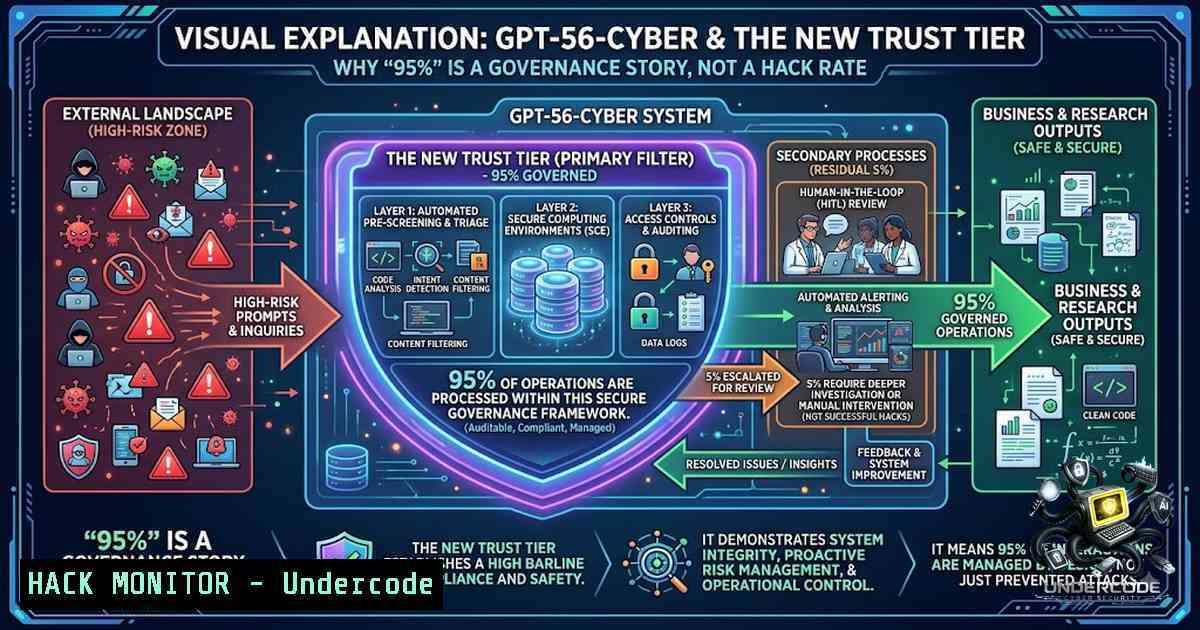
OpenAI’s GPT‑5.6‑Cyber has achieved a 95.0% completion rate on the internal Advanced Cybersecurity Completion Rate evaluation—a figure that has triggered widespread misinterpretation across security and business circles. The number does not represent a success rate for compromising real-world targets; rather, it signals a fundamental architectural shift: enterprise AI safety is moving beyond blanket refusal toward trusted capability—where capability is granted based on verified identity, authorized scope, isolated environments, monitoring, and accountable escalation. For B2B leaders, the practical lesson is that consequential AI agents require executable authority controls, not policy slides.
Learning Objectives
- Understand the distinction between OpenAI’s 95.0% completion benchmark and actual compromise success rates
- Master the five‑control framework for enterprise agent governance: identity, scope, environment, escalation, and auditability
- Implement runtime authority controls using AWS IAM, CloudTrail, VPC endpoints, and data‑perimeter policies
- Apply the Daybreak Red governance pattern to marketing, finance, and customer‑facing AI agents
- Operationalize hardware‑based authentication and legal attestations for high‑risk AI workloads
You Should Know
- Deconstructing the 95.0% Completion Rate: What It Actually Measures
OpenAI’s Advanced Cybersecurity Completion Rate tracks how often a model responds to high‑risk cybersecurity prompts—not whether it successfully compromises systems. The evaluation covers categories such as exploit‑chain development, authentication bypass, and privilege escalation. GPT‑5.6‑Cyber completed 95.0% of these requests, compared to just 1.5% for the standard GPT‑5.6 Sol model and 57.3% for its predecessor GPT‑5.5‑Cyber.
What this means in practice: The model has been trained to refuse fewer advanced cyber requests when the request comes from a verified, authorized user operating within a governed environment. The capability is not unlocked for everyone—it is unlocked for trusted users.
Step‑by‑step guide to interpreting AI security benchmarks:
- Identify the evaluation metric. Ask: does this measure response behavior, successful exploitation, or something else?
- Check the access tier. Is the model available to the general public or restricted to approved organizations? GPT‑5.6‑Cyber is available only through Daybreak Red, which requires identity verification, legal attestations, and—starting 1 September 2026—hardware security keys for individual accounts.
- Compare against a baseline. The 1.5% completion rate for GPT‑5.6 Sol provides the proper context—the 95% figure is a relative improvement for authorized users, not an absolute measure of offensive capability.
- Ask about real‑world validation. OpenAI itself states that GPT‑5.6‑Cyber remains at its High cyber‑capability threshold, below its Critical threshold.
Linux command to check your browser’s V8 version (for CVE‑2026‑15903 mitigation):
> “`bash
> google-chrome –version
Expected output: Google Chrome 150.0.7871.128 or higher
> If below 150.0.7871.128, update immediately:
sudo apt update && sudo apt upgrade google-chrome-stable
> “`
> Windows command (PowerShell) to check Chrome version:
> “`bash
> (Get-Item “C:\Program Files\Google\Chrome\Application\chrome.exe”).VersionInfo.ProductVersion
> “`
- The Daybreak Red Governance Model: From Refusal to Trusted Capability
Daybreak Red pairs GPT‑5.6‑Cyber with a multi‑layer governance architecture that transforms how AI safety is operationalized. Instead of treating every risky request as a reason to refuse, Daybreak Red combines stronger capability with:
- Verified identity – individual accounts must use hardware security keys from 1 September 2026
- Approved use – legal attestations and scoped authority define what the model can do
- Monitoring – continuous oversight of all model interactions
- Accountability – every consequential action is logged and reconstructable
Step‑by‑step guide to implementing the Daybreak Red governance pattern in your own enterprise:
- Establish identity verification. Require hardware security keys (FIDO2/WebAuthn) for all users accessing high‑risk AI capabilities. Enforce this with conditional access policies in your identity provider (Azure AD, Okta, or AWS IAM Identity Center).
-
Define approved use cases in machine‑readable policy. Create a policy document that specifies:
– Which systems the agent can access
– Which actions are permitted (e.g., read only, write with approval, execute)
– Numerical limits (budget caps, API rate limits, data volume limits)
- Implement continuous monitoring. Log all agent requests and responses. Use a SIEM or cloud‑native logging service (AWS CloudTrail, Azure Monitor, Google Cloud Logging) to capture:
– User identity and session
– Prompt and response content (sanitized for PII)
– Timestamp and environment context
– Any approvals or escalations triggered
- Enforce legal attestations. Before granting Daybreak Red access, require signed agreements that define acceptable use, data handling, and liability. Store these attestations in a secure, auditable repository.
-
Set up escalation workflows. Define clear thresholds for human review:
– Budget moves above $X
– Changes to production systems
– Actions involving sensitive data categories
– Anomalous behavior detected by runtime monitoring
AWS IAM policy snippet for scoped agent permissions:
> “`bash
> {
> “Version”: “2012-10-17”,
> “Statement”: [
> {
> “Effect”: “Allow”,
> “Action”: [
> “bedrock:InvokeModel”,
> “bedrock:InvokeModelWithResponseStream”
> ],
> “Resource”: “arn:aws:bedrock:us-east-1::foundation-model/openai.daybreak-red”,
> “Condition”: {
> “StringEquals”: {
> “aws:PrincipalTag/Department”: “Security”,
> “aws:PrincipalTag/Clearance”: “Approved”
> },
> “IpAddress”: {
> “aws:SourceIp”: “192.168.0.0/16”
> }
> }
> }
> ]
> }
> “`
- CVE‑2026‑15903: How GPT‑5.6‑Cyber Discovered a Critical V8 Vulnerability
OpenAI used GPT‑5.6‑Cyber to investigate V8, Chrome’s JavaScript engine, and discovered two previously unknown vulnerabilities that could be chained to corrupt memory and escape the V8 heap sandbox. Google fixed one as CVE‑2026‑15903—an out‑of‑bounds read and write vulnerability in V8 that allowed a remote attacker to execute arbitrary code inside a sandbox via a crafted HTML page.
Step‑by‑step guide to vulnerability discovery and validation with AI‑assisted tools:
- Set up an isolated testing environment. Use a sandboxed VM or container with network isolation. Never run exploit validation on production systems.
-
Define the research scope. Specify which components (e.g., V8, kernel, database) and which vulnerability classes (e.g., memory corruption, privilege escalation) are in scope.
-
Craft the prompt. For a model like GPT‑5.6‑Cyber, structure your request with:
– Target component and version
– Known attack surface (e.g., “V8’s JIT compiler”)
– Desired output (e.g., “provide a proof‑of‑concept that triggers memory corruption”)
- Validate the model’s output. The model may generate code or steps. Do not execute blindly—review each step manually or in a controlled sandbox.
-
Coordinate disclosure. If you find a vulnerability, follow responsible disclosure: report to the vendor, wait for a patch, and then publish coordinated details.
Docker command to spin up an isolated Chrome testing environment:
> “`bash
> docker run –rm -it –cap-drop=ALL –security-opt=no-1ew-privileges \
> selenium/standalone-chrome:150.0.7871.128
> “`
Python snippet to check for out‑of‑bounds patterns in JavaScript (static analysis aid):
> “`bash
> import re
> def detect_oob_patterns(js_code):
> patterns = [
> r’buffer\[[^\]]\]’, array access
> r’\.subarray\([^)]\)’, subarray with potential OOB
> r’\.slice\([^)]\)’ slice with potential OOB
> ]
> findings = []
> for pattern in patterns:
> matches = re.finditer(pattern, js_code)
> for match in matches:
> findings.append({
> ‘pattern’: pattern,
> ‘match’: match.group(),
> ‘position’: match.start()
> })
> return findings
> “`
4. The Five‑Control Framework for Enterprise AI Agents
Before granting any AI agent permission to make consequential changes, your system must answer five questions at runtime—not just in policy documents:
| Control Question | Practical Implementation |
|||
| Who is acting? | Verified user or service identity, strong account controls (hardware keys), and role assignment |
| What can it do? | Scoped tools, approved accounts, API permissions, and numerical limits |
| Where can it act? | Sandboxed or isolated environments, data boundaries, and network restrictions |
| When should it stop? | Review gates, exception rules, anomaly detection, and human escalation |
| Can the work be reconstructed? | Action logs, input/output records, approvals, and audit trails |
Step‑by‑step guide to implementing the five‑control framework:
- Identity (Who): Integrate with your existing IAM system. Assign each agent a service account with a unique identifier. Enforce multi‑factor authentication (MFA) and hardware security keys for all high‑privilege identities.
-
Scope (What): Define granular permissions using attribute‑based access control (ABAC). For example:
– `agent:department = “Marketing”`
– `agent:budget_limit = 50000`
– `agent:allowed_actions = [“read_campaign”, “update_budget”]` -
Environment (Where): Deploy agents in isolated VPCs or subnets with network policies that restrict outbound traffic to approved endpoints. Use VPC endpoints for AWS services to avoid public internet exposure.
-
Escalation (When): Implement a circuit‑breaker pattern. If an agent attempts an action outside its defined scope, halt execution and trigger a human review. Use anomaly detection to flag unusual patterns (e.g., sudden budget spikes, unusual API call frequencies).
-
Auditability (Reconstruct): Enable comprehensive logging. For AWS, use CloudTrail for API calls, CloudWatch for metrics, and S3 for long‑term log storage. Ensure logs are immutable and tamper‑evident.
AWS CloudTrail event example for monitoring agent actions:
> “`bash
> {
> “eventVersion”: “1.08”,
> “userIdentity”: {
> “type”: “AssumedRole”,
> “principalId”: “AROAEXAMPLE:agent-session”,
> “arn”: “arn:aws:sts::123456789012:assumed-role/AgentRole/agent-session”
> },
> “eventTime”: “2026-08-13T10:00:00Z”,
> “eventName”: “InvokeModel”,
> “requestParameters”: {
> “modelId”: “openai.daybreak-red”,
> “inputText”: “…” // truncated for PII
> },
> “responseElements”: null,
> “sourceIPAddress”: “192.168.1.100”,
> “userAgent”: “agent-client/1.0”
> }
> “`
- Operationalizing “Human in the Loop” – Why It’s No Longer Enough
“Human in the loop” is useful shorthand, but it is incomplete. Someone watching a dashboard cannot compensate for poorly scoped permissions, unlogged tool calls, or unclear authority. The critical question is whether the architecture can enforce boundaries before an action, review elevated actions while they are pending, and explain what happened after the fact.
Step‑by‑step guide to moving from policy to executable controls:
- Embed controls in the workflow, not just in documents. Use policy‑as‑code tools (e.g., Open Policy Agent, AWS Organizations SCPs) to enforce permissions at runtime.
-
Implement pre‑action checks. Before an agent executes a high‑risk action, validate:
– Is the action within the agent’s defined scope?
– Are all preconditions met (e.g., performance thresholds, time windows)?
– Is the action approved by the required number of human reviewers?
- Use runtime anomaly detection. Deploy machine learning models that monitor agent behavior and flag deviations from historical patterns. For example, if a marketing agent suddenly attempts to move 10× its usual budget, trigger an alert.
-
Maintain immutable audit trails. Use blockchain or cryptographic hashing to ensure logs cannot be altered after the fact. This provides defensible evidence for compliance and incident investigations.
-
Conduct regular red‑team exercises. Simulate scenarios where an agent is compromised or misconfigured. Test whether your controls detect and contain the breach.
Open Policy Agent (OPA) rule for budget approval:
> “`bash
> package agent.policy
> default allow = false
> allow {
> input.action == “update_budget”
> input.budget_delta <= 10000
> input.account in data.approved_accounts
> input.time within data.allowed_hours
> }
> allow {
> input.action == “update_budget”
> input.budget_delta > 10000
> input.has_human_approval == true
> input.approver.role == “Manager”
> }
> “`
- Applying the Governance Pattern to Marketing and GTM Agents
The Daybreak governance model is not limited to cybersecurity—it applies equally to marketing, finance, and customer‑facing agents. Consider an AI media agent connected to Google Ads, Meta Ads, CRM data, analytics, a CMS, and a pricing system. A blanket ban on changing budgets is safe but prevents valuable work; an unrestricted agent is fast but creates unacceptable commercial and compliance risk.
Step‑by‑step guide to governing a marketing AI agent:
- Define approved accounts. Specify which ad accounts, campaigns, and property IDs the agent can modify.
-
Set budget boundaries. Limit the agent to adjusting budgets within a defined range (e.g., ±10% of current spend) and only within a specified time window (e.g., 9 AM–5 PM).
-
Enforce performance thresholds. Require that the agent only makes changes when key performance indicators (KPIs) meet or exceed targets (e.g., ROAS > 3.0, CPA < $50).
-
Log every action. Record each budget change, ad copy update, and targeting adjustment. Store the rationale provided by the agent.
-
Require human approval for high‑impact actions. Any action that would commit more than a predefined amount (e.g., $50,000) must go through a human manager for final sign‑off.
Google Ads API script to simulate budget adjustment with governance checks:
> “`bash
> from google.ads.googleads.client import GoogleAdsClient
> def adjust_budget(customer_id, campaign_id, new_budget, approved_by):
> Governance checks
> if new_budget > 50000:
> raise PermissionError(“Budget exceeds limit without escalation”)
> if approved_by not in [“Manager”, “Director”]:
> raise PermissionError(“Insufficient approval role”)
> client = GoogleAdsClient.load_from_storage()
> campaign_service = client.get_service(“CampaignService”)
> campaign = campaign_service.get_campaign(customer_id, campaign_id)
> campaign.budget.micro_amount = new_budget 1_000_000
> campaign_service.mutate_campaigns(customer_id, [bash])
> Log action
> log_action(customer_id, campaign_id, new_budget, approved_by)
> “`
- AWS Bedrock Integration: Deploying Daybreak Red in Your Cloud Environment
AWS and OpenAI have made Daybreak Red and Daybreak Blue available to eligible Amazon Bedrock customers. Daybreak Red provides GPT‑5.6‑Cyber for advanced vulnerability research and exploit validation, while Daybreak Blue provides GPT‑5.6 Sol for defensive security work such as incident response and detection engineering.
Step‑by‑step guide to deploying Daybreak models on AWS Bedrock:
- Complete Daybreak enrollment. Apply for OpenAI Trusted Access for Cyber through the AWS Management Console or AWS CLI.
-
Configure IAM permissions. Create an IAM role that allows `bedrock:InvokeModel` on the Daybreak model ARNs. Restrict access to specific users, roles, or VPC endpoints.
-
Set up VPC endpoints. Use AWS PrivateLink to access Bedrock from within your VPC without traversing the public internet.
-
Enable CloudTrail logging. Ensure CloudTrail is enabled for all Bedrock API calls. Store logs in an S3 bucket with encryption and immutability policies.
-
Implement data perimeter policies. Use AWS Organizations SCPs and VPC endpoint policies to restrict data exfiltration and enforce data residency requirements.
AWS CLI command to invoke Daybreak Red model:
> “`bash
> aws bedrock-runtime invoke-model \
> –model-id openai.daybreak-red \
–body ‘{“prompt”: “Analyze this vulnerability report…”, “max_tokens”: 2000}’ \
> –cli-binary-format raw-in-base64-out \
> invoke-model-output.txt
> “`
> Terraform snippet to provision Daybreak Red access:
> “`bash
> resource “aws_iam_role” “daybreak_role” {
> name = “daybreak-research-role”
> assume_role_policy = jsonencode({
> Version = “2012-10-17”
> Statement = [{
> Action = “sts:AssumeRole”
> Effect = “Allow”
> Principal = {
> Service = “bedrock.amazonaws.com”
> }
> }]
> })
> }
> resource “aws_iam_policy” “daybreak_policy” {
> name = “daybreak-invoke-policy”
> policy = jsonencode({
> Version = “2012-10-17”
> Statement = [{
> Effect = “Allow”
> Action = “bedrock:InvokeModel”
> Resource = “arn:aws:bedrock:us-east-1::foundation-model/openai.daybreak-red”
> }]
> })
> }
> “`
What Undercode Say
- The 95% figure is a governance signal, not a hack rate. The real story is not that GPT‑5.6‑Cyber can do more—it’s that OpenAI has built a trust architecture that allows it to do more for verified, authorized users. This distinction is critical for every enterprise deploying AI agents.
-
Executable authority beats policy documents. The five‑control framework—identity, scope, environment, escalation, auditability—must be embedded in the runtime architecture, not just written in a compliance binder. Policy‑as‑code, IAM, and immutable logging are the new must‑haves for AI governance.
-
Hardware security keys are becoming mandatory for high‑risk AI. The 1 September 2026 deadline for Daybreak accounts signals a broader trend: physical authentication is no longer optional for sensitive AI workloads. Enterprises should accelerate their FIDO2/WebAuthn deployments.
-
AI‑assisted vulnerability discovery is real but requires human validation. GPT‑5.6‑Cyber found CVE‑2026‑15903 and hundreds of kernel vulnerabilities, but OpenAI itself notes that the model remains below its Critical threshold. AI augments, not replaces, human security researchers.
-
The next model tier is a trust tier. As Modi Elnadi articulated, the practical question for leaders is no longer “Is this agent capable?” but “Who is it allowed to act for, under what limits, and can we reconstruct every consequential action afterwards?”. This trust‑based differentiation will become the primary differentiator in enterprise AI products.
Prediction
-
+1 Enterprise AI procurement will shift from capability benchmarks to governance certifications. By 2027, “trust tier” will be a standard procurement criterion alongside model accuracy and latency.
-
+1 Hardware‑based authentication (FIDO2/WebAuthn) will become mandatory for all high‑risk AI agents across regulated industries, mirroring the Daybreak Red requirement.
-
-1 Organizations that treat AI governance as a policy exercise rather than an architectural imperative will experience at least one major incident (financial loss, data breach, or regulatory fine) involving an over‑permissioned agent within the next 18 months.
-
+1 The five‑control framework (identity, scope, environment, escalation, auditability) will be codified into industry standards and regulatory guidance, similar to how NIST CSF evolved for cybersecurity.
-
-1 The gap between AI capability and governance controls will widen for most enterprises, creating a “trust deficit” that slows adoption of autonomous agents in critical business functions—exactly the opposite of what AI vendors intend.
-
+1 AWS Bedrock’s integration of Daybreak Red and Blue will accelerate enterprise adoption by providing native governance controls (IAM, CloudTrail, VPC endpoints) that reduce the operational burden of implementing trust architectures from scratch.
▶️ Related Video (76% Match):
https://www.youtube.com/watch?v=3iIPVaQ6aB4
🎯Let’s Practice For Free:
🎓 Live Courses & Certifications:
Join Undercode Academy for Verified Certifications
🚀 Request a Custom Project:
Secure, high-velocity infrastructure and disruptive technological engineering. Contact our engineering team for high-tier development and proprietary systems:
[email protected]
💎 Smart Architecture | 🛡️ Secure by Design | ⭐ Trusted by Thousands
IT/Security Reporter URL:
Reported By: https://lnkd.in/p/erTFaNKc – Hackers Feeds
Extra Hub: Undercode MoN
Basic Verification: Pass ✅


