Listen to this Post
Introduction:
The $116 million Coldcard wallet breach in July 2026 sent shockwaves through the crypto community—not because hardware wallets failed, but because it exposed a far more insidious threat: AI-powered attacks that can brute-force weak entropy at scale. Ledger’s Chief Human Agency Officer, Ian Rogers, made the case on Bloomberg Crypto that the real story isn’t about hardware vulnerabilities, but about the growing capability of AI to discover and exploit every systemic weakness. As AI agents become autonomous financial actors, the question is no longer whether they can do the work—it’s whether they should ever hold the keys.
Learning Objectives:
- Understand why AI agents with direct private key access create an unmanageable attack surface, including prompt injection, key exposure, and irreversible transaction risks.
- Learn how hardware-enforced approval models—exemplified by Ledger Agent Stack—can secure agentic workflows without sacrificing automation.
- Master practical implementation techniques for isolating cryptographic secrets from AI runtimes using OpenPGP, hardware security modules, and physical signers.
You Should Know:
- The Entropy Problem: Why AI Makes Brute-Force Attacks Viable
The Coldcard breach wasn’t a hardware failure—it was an entropy failure. Rogers explained that Ledger generates entropy entirely in hardware using a certified secure chip with no software fallback, making brute-force attacks computationally infeasible. The attackers succeeded because they exploited weak randomness in the wallet’s key generation, and AI supercharged their ability to find and exploit that weakness at scale.
The lesson is clear: any system that relies on software-generated entropy is now vulnerable to AI-assisted brute-force attacks. This isn’t theoretical—researchers have already demonstrated that AI agents can extract BIP-39 seeds embedded in LLM tool-call JSON payloads, exposing private keys to any transport or log that captures the interaction.
Step-by-Step: Verifying and Strengthening Entropy Sources
Linux – Check system entropy availability:
cat /proc/sys/kernel/random/entropy_avail
 If below 2000, install and configure haveged:
sudo apt-get install haveged
sudo systemctl enable haveged
sudo systemctl start haveged
Linux – Generate a strong seed using hardware RNG (if available):
 Using /dev/urandom with additional entropy from hardware
dd if=/dev/urandom bs=32 count=1 2>/dev/null | sha256sum
 Or use rng-tools to check hardware RNG:
sudo rngtest -c 1000 < /dev/random
Windows – Check and configure entropy sources:
 Check current entropy (approximate)
[System.Security.Cryptography.RandomNumberGenerator]::GetBytes(32) | Format-Hex
 Enable additional entropy sources via Group Policy:
 Computer Configuration > Administrative Templates > System > Cryptography
 Enable "Turn on .NET Framework cryptographic randomness"
Hardware Wallet – Verify key generation source (Ledger example):
 Use Ledger Live or the Ledger CLI to verify that keys are generated on-device
 The private key never leaves the secure element
 Always initialize your hardware wallet directly, never through software
- The Three Fatal Risks of AI Agents Holding Private Keys
When an AI agent holds a private key directly, three catastrophic risks emerge:
Risk 1: Hot Keys in Agent Runtimes – Many implementations store the signing credential as `AGENT_PRIVATE_KEY` in environment variables or configuration files, making it accessible to any process or vulnerability that compromises the runtime.
Risk 2: Prompt Injection (OWASP LLM01) – An attacker can craft a prompt that instructs the agent to sign a malicious transaction. The agent has no judgment, no hesitation, and no confirmation screen.
Risk 3: Irreversible Transactions – On-chain transactions have no refunds, no chargebacks, and no “undo” button. A single malicious signature can drain an entire wallet in one block.
Step-by-Step: Hardening AI Agent Credentials
Never store private keys in environment variables. Instead, use hardware-backed signing:
 Install Ledger CLI tools
pip install ledger-agent-sdk

Initialize an agent with hardware-backed signing (conceptual)
from ledger_agent import LedgerSigner, AgentConfig

The agent NEVER sees the private key
signer = LedgerSigner(device_type="NanoX", derivation_path="m/44'/60'/0'/0/0")
config = AgentConfig(signer=signer, require_hardware_approval=True)

Every transaction intent requires physical approval
tx_intent = agent.prepare_transaction(to="0x...", amount=0.1)
 This raises a prompt on the Ledger device; user must physically approve
signed_tx = signer.sign_transaction(tx_intent)
OpenPGP encryption for agent secrets (using Ledger’s OpenPGP app):
 Install GnuPG and configure Ledger OpenPGP app
gpg --card-status
 Set up encryption for agent configuration files
gpg --encrypt --recipient "[email protected]" agent_config.json
 Agent can only decrypt when Ledger is plugged in and user approves
gpg --decrypt agent_config.json.gpg > agent_config.json
Windows – Use TPM for key isolation:
 Create a key in the TPM (Trusted Platform Module)
$tpm = New-Object Microsoft.Tpm.Commands.TpmPresent
 Use the TPM to protect agent credentials via Windows Hello or BitLocker
 Agent secrets should be stored in the Windows Credential Manager
cmdkey /add:AgentVault /user:agent /pass:(Get-Content .\secret.txt)
 Retrieve securely in code
$cred = Get-Credential -Credential AgentVault
3. The Ledger Agent Stack: Propose, Approve, Execute
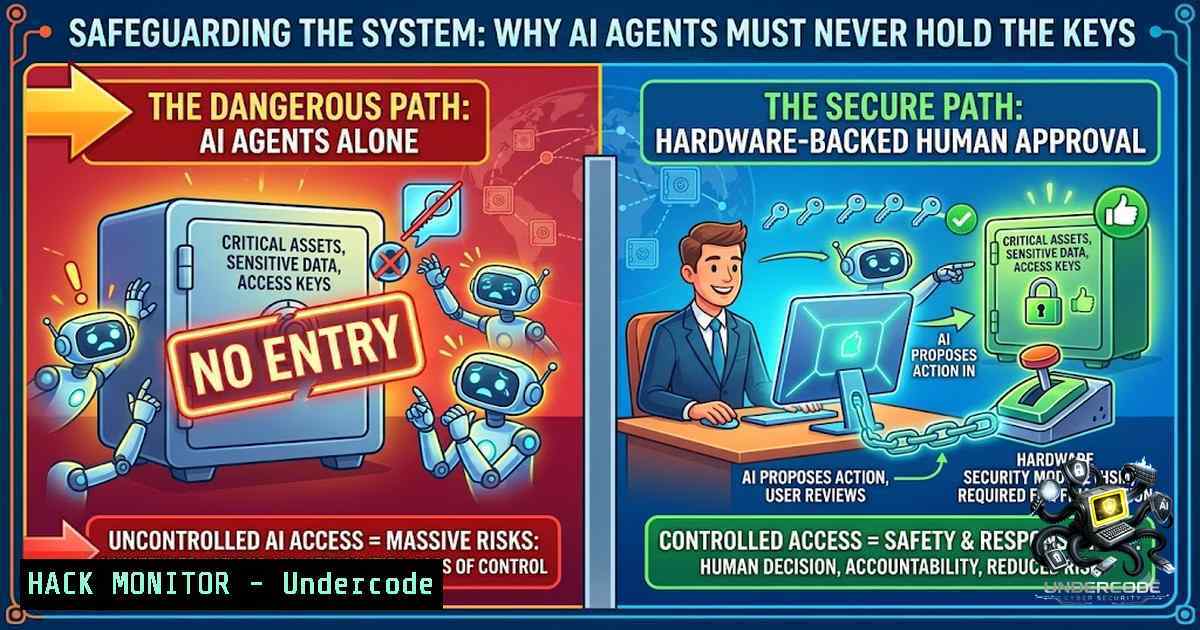
Ledger’s answer to the AI key problem is elegant: agents propose, humans approve, and hardware enforces. The Agent Stack is an open-source toolkit that lets AI agents read balances, analyze portfolios, prepare transactions, and suggest swaps—but requires explicit physical confirmation on a Ledger signer before any funds move.
The architecture follows a simple but powerful principle: private keys never leave the hardware. Even if an agent’s software environment is fully compromised, funds cannot move and secrets cannot be accessed without physical confirmation.
Step-by-Step: Deploying an AI Agent with Ledger Agent Stack
Install the Agent Stack toolkit:
 Clone the open-source repository
git clone https://github.com/LedgerHQ/agent-stack.git
cd agent-stack

Install dependencies
npm install
 or
pip install -r requirements.txt
Configure the agent to use hardware signing:
// JavaScript/TypeScript example
import { LedgerSigner, AgentWorkflow } from '@ledger/agent-stack';

const signer = new LedgerSigner({
deviceType: 'nanoX',
// The agent can only prepare intents; signing requires hardware
autoApprove: false
});

const agent = new AgentWorkflow({
signer: signer,
// Read-only operations are allowed
allowReadOnly: true,
// Every transaction requires physical approval
requirePhysicalApproval: true
});

// Agent prepares a transaction intent
const intent = await agent.prepareSwap({
fromToken: 'ETH',
toToken: 'USDC',
amount: '0.5'
});

// This blocks until the user physically approves on the Ledger
const result = await agent.executeIntent(intent);
Using Device Management Kit Skills to teach AI runtimes:
 Skill: Ledger Hardware Signing
 Description: This skill teaches the AI how to request hardware signing
 Instructions:
1. The agent constructs a transaction intent (JSON)
2. The intent is sent to the Ledger signer via USB/Bluetooth
3. The Ledger device displays the transaction details
4. User physically confirms or rejects
5. The signed transaction is returned to the agent for broadcast
 Security: The agent NEVER sees the private key
- Beyond Crypto: Securing All AI Credentials with Hardware
Ledger’s OpenPGP support extends hardware security beyond crypto wallets. Developers can now use their Ledger devices to encrypt API keys, AI agent credentials, and even gate login access to GitHub, npm, 1Password, and Discord. This transforms the hardware wallet into a universal security key for the agentic economy.
Step-by-Step: Using Ledger as a Universal Security Key
Configure Ledger as a YubiKey-style security key:
 Install the Security Key app on your Ledger
 Then configure FIDO2/U2F for your services

GitHub example - add security key
 Settings > Security > Security keys > Register new device
 Follow prompts and tap your Ledger when requested

SSH with hardware-backed key (using OpenPGP)
gpg --card-edit
 Generate an SSH key on the Ledger
 Add to ~/.ssh/authorized_keys
ssh -I /usr/lib/opensc-pkcs11.so user@server
Windows – Use Ledger with Azure AD or Windows Hello:
 Configure Ledger as a smart card for Windows authentication
 Install the Ledger OpenPGP app and the OpenSC driver
 Enroll the certificate for Windows logon
certreq -1ew -q -config "SmartCard" myrequest.inf myrequest.req
 The private key remains on the Ledger device
- Human Error vs. AI Risk: The Hybrid Defense
Ledger cites research showing that human error accounts for roughly 60% of all security breaches, while 26.1% of all agent skills contain at least one security vulnerability. The answer isn’t to eliminate either humans or AI—it’s to create a hybrid model where each compensates for the other’s weaknesses. AI handles the volume and complexity; humans provide judgment and final authorization; hardware provides cryptographic enforcement.
Step-by-Step: Implementing a Human-in-the-Loop Approval Workflow
Configure approval policies:
 policy.yaml
approval_policies:
- name: "Large Transaction Approval"
condition: "amount > 1000 USDC"
required_approvals: 2  Two human approvers required

<ul>
<li>name: "Whitelist Only"
condition: "recipient not in whitelist"
action: "block"  Requires manual override</p></li>
<li><p>name: "Rate Limit"
condition: "daily_volume > 50000 USDC"
action: "require_hardware_approval"
Monitor and audit agent actions:
 Log all agent intents for audit
journalctl -u agent-service -f | grep "INTENT"
 Set up alerts for anomalous patterns
 Example: if agent proposes more than 10 transactions per minute
What Undercode Say:
- Private keys are non-1egotiable – No AI agent, regardless of sophistication, should ever have direct access to a private key. The attack surface is simply too large, and the consequences of compromise are irreversible.
-
Hardware is the only trustworthy root of trust – Software-based security can be reasoned around, patched, or exploited. Hardware-enforced approval creates a physical boundary that even the most capable AI cannot cross.
Analysis: The $116M Coldcard breach is a watershed moment for the crypto industry. It’s not a condemnation of hardware wallets—it’s a warning that AI has fundamentally changed the threat landscape. Weak entropy that might have been safe a year ago is now vulnerable to AI-assisted brute-force attacks. The industry’s response cannot be to abandon self-custody; it must be to raise the bar on security. Ledger’s Agent Stack provides a blueprint: agents can do the work, but they cannot hold the keys. The human must remain in the loop, and the hardware must enforce that loop. This isn’t about slowing down innovation—it’s about ensuring that the agentic economy doesn’t collapse under the weight of its own security failures.
Prediction:
- +1 Hardware-backed agent frameworks will become the industry standard within 18 months, with major platforms like MetaMask, OKX, and Coinbase adopting similar “propose-approve-execute” models.
-
-1 The number of AI-assisted crypto hacks will triple in the next 12 months as attackers increasingly weaponize LLMs to find and exploit weak entropy, misconfigured agents, and exposed credentials.
-
+1 Regulatory frameworks will begin requiring hardware-based approval for AI agents handling customer funds, accelerating adoption of solutions like Ledger Agent Stack.
-
-1 Projects that continue to give AI agents direct private key access will suffer catastrophic losses, potentially triggering a wave of insolvencies in the DeFi and agentic finance sectors.
-
+1 The convergence of hardware security and AI agent frameworks will create a new category of “security-as-a-service” for agentic workflows, with hardware signers becoming as common as two-factor authentication tokens are today.
▶️ Related Video (74% Match):
https://www.youtube.com/watch?v=3qxrCR6JVWI
🎯Let’s Practice For Free:
🎓 Live Courses & Certifications:
Join Undercode Academy for Verified Certifications
🚀 Request a Custom Project:
Secure, high-velocity infrastructure and disruptive technological engineering. Contact our engineering team for high-tier development and proprietary systems:
[email protected]
💎 Smart Architecture | 🛡️ Secure by Design | ⭐ Trusted by Thousands
IT/Security Reporter URL:
Reported By: https://lnkd.in/p/e_TEzBRE – Hackers Feeds
Extra Hub: Undercode MoN
Basic Verification: Pass ✅


