Listen to this Post
Introduction
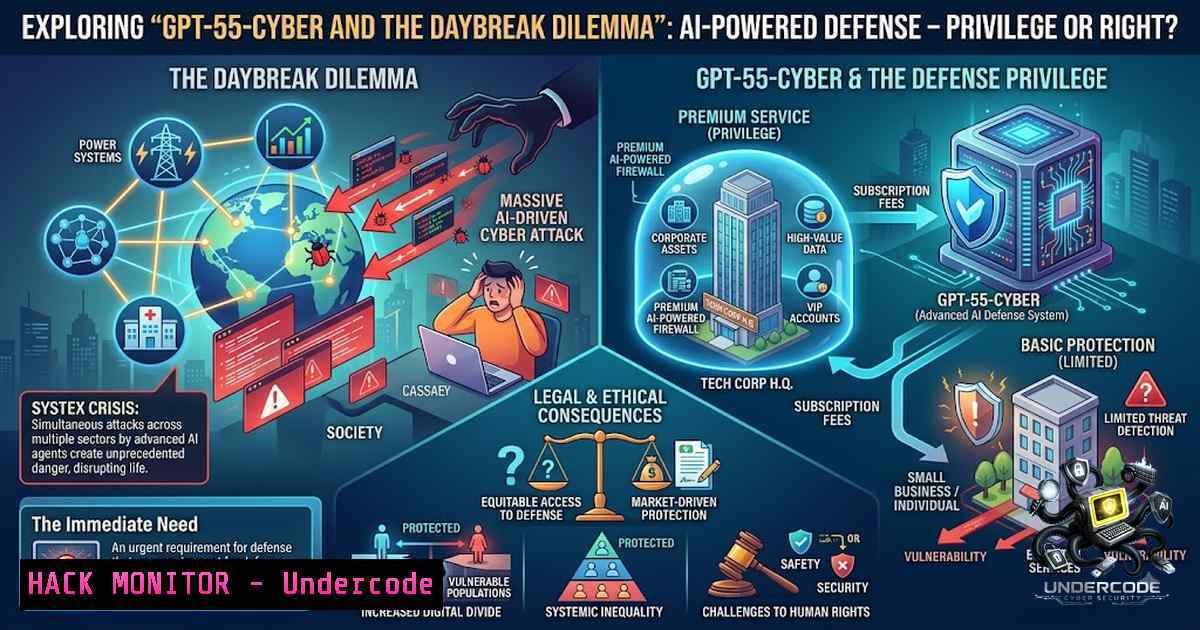
OpenAI has quietly deployed an AI model capable of identifying and confirming exploitable security vulnerabilities in production-grade software—including Chrome, Firefox, the Linux kernel, and FreeBSD—before malicious actors can weaponize them. The model, designated GPT-5.5-Cyber, achieves a record 85.6% on the CyberGym benchmark and 69.8% on SEC-bench Pro for long-horizon vulnerability discovery. But access to this capability is split across two tiers: Daybreak Blue, available to “approved defenders” for routine security work, and Daybreak Red, a vetted tier that actually finds and confirms real-world exploitation methods. For founders running lean startups, this creates an asymmetrical threat landscape where the defenders who need AI-powered protection most are precisely those locked out of the tools designed to provide it.
Learning Objectives
- Understand the architectural differences between Daybreak Blue and Daybreak Red access tiers and their implications for organizational security postures
- Master the practical application of Codex Security for automated vulnerability discovery, patch generation, and CI/CD integration
- Implement OS-level hardening commands and vulnerability mitigation techniques across Linux and Windows environments
- Evaluate the real-world effectiveness of AI-driven security tools against traditional vulnerability management workflows
You Should Know
- Daybreak Red vs. Daybreak Blue: What the Access Tiers Actually Mean
OpenAI’s Daybreak framework partitions cybersecurity AI capabilities into two distinct access levels. Daybreak Blue provides GPT-5.5 with “Trusted Access for Cyber” and Codex Security integration—sufficient for most defensive security workflows. Daybreak Red, however, unlocks GPT-5.5-Cyber’s full capabilities, including relaxed behavioral policies that permit the model to validate exploits and generate proof-of-concept code.
The critical distinction lies in the CyberGym and ExploitGym benchmarks. GPT-5.5-Cyber achieves 85.6% on CyberGym (vs. 81.8% for GPT-5.5) and 39.5% on ExploitGym—a test that evaluates whether an agent can transform a known vulnerability into a working exploit for unauthorized code execution. This capability to confirm exploitability is what separates a vulnerability report from an actionable security fix.
What this means for your organization: If you lack a dedicated security team large enough to navigate OpenAI’s vetting process for Daybreak Red, you’re restricted to Daybreak Blue’s capabilities. Meanwhile, threat actors using jailbroken or freely available AI tools face no such restrictions.
Linux Command: Checking for Known Vulnerabilities in Your Kernel
 Check your current kernel version
uname -r

List known CVEs affecting your installed kernel packages (Debian/Ubuntu)
apt list --upgradable 2>/dev/null | grep -i linux-image

For RHEL/CentOS/Fedora
sudo dnf list updates --security | grep -i kernel

Check for exploitable kernel vulnerabilities using the kernel's own vulnerability reporting
cat /sys/devices/system/cpu/vulnerabilities/
Windows Command: Vulnerability Assessment Using Built-in Tools
 Check Windows update status for security patches
Get-WUHistory | Where-Object { $_.Result -eq "Succeeded" } | Select-Object -First 10

List installed KBs related to security
Get-HotFix | Where-Object { $_.Description -match "Security" }

Use the Windows Security Center API to check protection status
Get-MpComputerStatus | Select-Object AntivirusEnabled, RealTimeProtectionEnabled, IoavProtectionEnabled
Step-by-Step: Simulating a Daybreak-Style Vulnerability Scan
- Install CodeQL (GitHub’s semantic code analysis engine) as a local analog to Codex Security:
Download CodeQL CLI
wget https://github.com/github/codeql-cli-binaries/releases/latest/download/codeql-linux64.zip
unzip codeql-linux64.zip -d /opt/codeql
export PATH=$PATH:/opt/codeql
2. Create a CodeQL database for your codebase:
codeql database create ./my-db --language=python --source-root=/path/to/your/project
3. Run security queries against the database:
codeql database analyze ./my-db --format=sarif-latest --output=results.sarif
- Review the SARIF output for vulnerability findings, prioritizing those with “high” or “critical” severity ratings.
2. Codex Security: Automating the Vulnerability-to-Patch Pipeline
Codex Security represents OpenAI’s most tangible contribution to the defensive security ecosystem. Since its preview release, it has scanned over 30,000 code repositories, analyzed more than 30 million commits, and autonomously flagged over 500,000 findings as fixed. The tool doesn’t merely generate alerts—it understands a team’s codebase and threat model, identifies potential vulnerabilities, determines whether affected code is reachable, collects verification evidence, develops targeted patches, and validates the results.
Practical Integration: Codex Security Plugin Workflow
The updated Codex Security plugin enables:
- Deep scans or review of recent changes with severity-graded reports
- Attack path tracing and threat model construction
- Patch generation for human review
- Integration with existing vulnerability management systems via SARIF or CodeQL queries
Linux Hardening Commands (Manual Mitigation for Common Vulnerabilities)
 Disable unnecessary services to reduce attack surface
sudo systemctl list-unit-files --type=service --state=enabled
sudo systemctl disable [unneeded-service]

Harden SSH configuration
sudo sed -i 's/PermitRootLogin prohibit-password/PermitRootLogin no/' /etc/ssh/sshd_config
sudo sed -i 's/PasswordAuthentication yes/PasswordAuthentication no/' /etc/ssh/sshd_config
sudo systemctl restart sshd

Set restrictive umask for system-wide security
echo "umask 027" | sudo tee -a /etc/profile

Configure iptables to drop all incoming connections except established
sudo iptables -P INPUT DROP
sudo iptables -A INPUT -m state --state ESTABLISHED,RELATED -j ACCEPT
sudo iptables -A INPUT -p tcp --dport 22 -j ACCEPT  Allow SSH only
sudo iptables-save | sudo tee /etc/iptables/rules.v4
Windows Hardening Commands (PowerShell)
 Disable SMBv1 (known attack vector for ransomware)
Disable-WindowsOptionalFeature -Online -FeatureName SMB1Protocol

Enable Windows Defender real-time protection if disabled
Set-MpPreference -DisableRealtimeMonitoring $false

Configure Windows Firewall to block all inbound by default
Set-1etFirewallProfile -Profile Domain,Public,Private -DefaultInboundAction Block

Enable audit logging for security events
auditpol /set /category:"Logon/Logoff" /subcategory:"Logon" /success:enable /failure:enable
Step-by-Step: Automating Patch Validation with CodeQL
- After CodeQL identifies a vulnerability, generate a suggested fix using semantic analysis:
codeql query run /path/to/security-queries/CWE-89.ql --database=./my-db
-
Create a patch file manually based on the query output:
git diff > suggested-patch.patch
3. Validate the patch doesn’t introduce regressions:
git apply --check suggested-patch.patch
- Apply and test in a staging environment before production deployment.
-
The Patch the Planet Initiative: Open Source’s New Defense Layer
OpenAI’s Patch the Planet initiative, launched with Trail of Bits and supported by HackerOne, addresses the critical gap between vulnerability discovery and remediation. Over 30 open-source projects have committed to participation, including cURL, Go, Python, Sigstore, and pyca/cryptography. The initiative recognizes that 94% of high-traffic open-source projects have fewer than 10 developers contributing over 90% of new code annually—a staffing reality that makes manual vulnerability triage impossible at scale.
What This Means for Your Stack: If your startup relies on open-source dependencies (and virtually every startup does), the security of those dependencies now depends on whether the maintainers have access to AI-powered patch generation. The bottleneck has shifted from finding vulnerabilities to fixing them.
Linux Command: Auditing Open-Source Dependencies for Known Vulnerabilities
 Using OWASP Dependency-Check
wget https://github.com/jeremylong/DependencyCheck/releases/latest/download/dependency-check-9.0.0-release.zip
unzip dependency-check-9.0.0-release.zip
./dependency-check/bin/dependency-check.sh --scan /path/to/your/project --format HTML

Using Trivy for container image scanning
trivy image your-container-image:latest --severity HIGH,CRITICAL

Check installed packages against CVE databases (Debian/Ubuntu)
sudo apt-get install debsecan
debsecan --suite=$(lsb_release -cs) --format=html > vulnerabilities.html
Windows Command: Auditing .NET and NuGet Dependencies
 Install OWASP Dependency-Check for .NET
dotnet tool install --global dotnet-dependency-check

Run against your solution
dotnet dependency-check .\YourSolution.sln --format HTML

Check NuGet packages for known vulnerabilities
dotnet list package --vulnerable --include-transitive
Step-by-Step: Implementing an Open-Source Security Policy
- Generate a Software Bill of Materials (SBOM) for your project:
Using Syft
syft dir:/path/to/your/project -o spdx-json > sbom.spdx.json
-
Compare your SBOM against the National Vulnerability Database:
grype sbom:sbom.spdx.json --fail-on high
-
For critical findings, use `git bisect` to identify when the vulnerability was introduced:
git bisect start
git bisect bad [current-commit]
git bisect good [known-safe-commit]
Test each commit and mark with git bisect good/bad
-
Apply patches manually or using automated tooling, then verify with regression tests.
-
API Security and Cloud Hardening in the AI Era
The AI-driven threat landscape extends beyond code repositories to API endpoints and cloud infrastructure. Attackers using AI tools can now automate API reconnaissance, parameter fuzzing, and authentication bypass attempts at machine speed. Traditional rate limiting and WAF rules are insufficient against AI-generated attack patterns that adapt in real-time.
Linux Command: Securing API Endpoints with NGINX
 Rate limiting to mitigate API abuse
sudo nano /etc/nginx/nginx.conf
 Add:
 limit_req_zone $binary_remote_addr zone=api_limit:10m rate=10r/s;
 limit_req zone=api_limit burst=20 nodelay;

Restrict HTTP methods
sudo nano /etc/nginx/sites-available/default
 Add in location block:
 if ($request_method !~ ^(GET|POST|PUT|DELETE)$) {
 return 405;
 }

Implement basic SSL/TLS hardening
sudo sed -i 's/ssl_protocols TLSv1 TLSv1.1 TLSv1.2/ssl_protocols TLSv1.2 TLSv1.3/' /etc/nginx/nginx.conf
sudo systemctl restart nginx
Windows Command: Securing IIS with PowerShell
 Enable request filtering to block malicious patterns
Add-WebConfigurationProperty -Filter "system.webServer/security/requestFiltering/denyQueryStringSequences" -1ame "." -Value @{sequence="script"}

Disable insecure TLS versions
New-Item -Path "HKLM:\SYSTEM\CurrentControlSet\Control\SecurityProviders\SCHANNEL\Protocols\TLS 1.0\Server" -Force
Set-ItemProperty -Path "HKLM:\SYSTEM\CurrentControlSet\Control\SecurityProviders\SCHANNEL\Protocols\TLS 1.0\Server" -1ame "Enabled" -Value 0

Enable HTTP response headers for security
Add-WebConfigurationProperty -Filter "system.webServer/httpProtocol/customHeaders" -1ame "." -Value @{name="X-Content-Type-Options"; value="nosniff"}
Step-by-Step: Implementing Zero-Trust API Security
1. Implement mutual TLS (mTLS) for service-to-service communication:
 Generate client certificates
openssl req -1ew -1ewkey rsa:4096 -days 365 -1odes -x509 -keyout client.key -out client.crt
- Configure your API gateway to require client certificate validation.
3. Implement short-lived JWT tokens with refresh rotation:
import jwt
import time
 Set expiration to 15 minutes
token = jwt.encode({'exp': time.time() + 900, 'sub': 'user_id'}, 'secret', algorithm='HS256')
- Log all API access attempts and set up alerting for anomalous patterns.
-
Vulnerability Exploitation and Mitigation: What GPT-5.5-Cyber Actually Does
The ExploitGym benchmark, where GPT-5.5-Cyber scores 39.5% compared to GPT-5.5’s 25.95%, measures an agent’s ability to convert a known vulnerability into a working exploit. This is the capability that makes Daybreak Red genuinely dangerous in the wrong hands—and genuinely valuable in the right ones.
Common Vulnerability Classes GPT-5.5-Cyber Can Identify:
- Memory corruption (buffer overflows, use-after-free) in C/C++ codebases
- Injection flaws (SQL, NoSQL, OS command) across web applications
- Authentication and session management bypasses
- Cryptographic failures including weak key generation and improper padding
Linux Command: Manual Memory Corruption Testing
 Using Valgrind to detect memory issues
valgrind --leak-check=full --show-leak-kinds=all ./your-application

Using AddressSanitizer during compilation
gcc -fsanitize=address -g -o your-app your-app.c
./your-app

Check for stack protection in binaries
checksec --file=/usr/bin/your-binary
Windows Command: Memory and Exploit Mitigation
 Check if ASLR is enabled for a specific process
Get-Process -1ame "your-process" | Select-Object -ExpandProperty Modules | ForEach-Object { $_.BaseAddress }

Enable Data Execution Prevention (DEP) for all processes
Set-ProcessMitigation -PolicyFilePath .\dep-policy.xml

Enable Control Flow Guard (CFG) for your application
Edit-ProcessMitigation -1ame "your-app.exe" -Enable CFG
Step-by-Step: Simulating Exploit Validation (Ethical, Controlled Environment)
- Set up a isolated test environment (VM or container) for safe testing.
-
Use Metasploit to validate a known CVE in a test application:
msfconsole
use exploit/windows/smb/ms17_010_eternalblue
set RHOSTS 192.168.1.100
check
3. Document the exploit chain and attack surface.
-
Apply the vendor patch and re-test to confirm mitigation.
-
Update your security monitoring rules to detect similar exploit attempts.
What Undercode Say
-
The AI defense gap is real and widening. Organizations without dedicated security teams are being systematically excluded from the most advanced defensive AI capabilities, while attackers face no such restrictions. The vetting process for Daybreak Red creates a moat that benefits only enterprises large enough to navigate it.
-
Vulnerability discovery is no longer the bottleneck. OpenAI’s own analysis confirms that the security industry has shifted from a discovery problem to a remediation problem. Tools like Codex Security and Patch the Planet address this by automating patch generation—but only for those with access. Startups running on limited runway face the same AI-powered threat landscape as billion-dollar enterprises, but with drastically inferior tools.
-
The open-source ecosystem is the canary in the coal mine. With 94% of high-traffic OSS projects maintained by teams of 10 or fewer developers, the success of Patch the Planet will determine whether the software supply chain remains secure. If AI-assisted patching remains gated, the entire open-source ecosystem becomes vulnerable.
-
Manual hardening is still essential. No AI model can replace fundamental security hygiene. The Linux and Windows commands outlined above represent baseline protections that every organization—regardless of Daybreak access—should implement immediately.
-
The future of cybersecurity is asymmetric. The gap between AI-powered defenders and AI-powered attackers will only widen. Organizations that cannot access Daybreak Red must compensate with rigorous manual processes, third-party tooling, and aggressive patch management cycles.
Prediction
-
+1 The Patch the Planet initiative will accelerate open-source security by 3-5x over the next 18 months, reducing the average time from CVE disclosure to patch availability from weeks to days for participating projects.
-
-1 The Daybreak Red vetting process will create a two-tiered security landscape where Fortune 500 companies enjoy AI-driven exploit validation while SMBs and startups remain reliant on legacy vulnerability scanners that cannot confirm exploitability.
-
-1 Threat actors will increasingly target the 94% of OSS projects maintained by small teams, knowing these projects lack the resources to implement AI-assisted patching and are therefore more likely to have unpatched, exploitable vulnerabilities.
-
+1 Open-source maintainers who gain access to GPT-5.5-Cyber through partnerships will develop new security automation workflows that eventually become democratized through community tooling, slowly closing the gap.
-
-1 The average cost of a data breach for SMBs will increase by 40% over the next two years as AI-powered attack automation outpaces the defensive capabilities available to resource-constrained organizations.
-
+1 Regulatory pressure will eventually force AI defense tool providers to offer baseline capabilities to all organizations, similar to how SSL/TLS certificates became universally available after initial enterprise exclusivity.
-
-1 The cybersecurity talent shortage will worsen as AI tools automate junior-level security roles, concentrating expertise in organizations that can afford both the tools and the senior staff to operate them.
-
+1 Community-driven security tooling (OSSF, SLSA, SBOM frameworks) will evolve to fill the gap, providing AI-assisted vulnerability detection that, while less powerful than GPT-5.5-Cyber, remains accessible to all.
-
-1 By 2028, organizations without Daybreak Red-equivalent capabilities will face an average of 2.5x more successful breaches than those with access, fundamentally altering the competitive landscape.
-
+1 The open-source community’s response to this asymmetry—through initiatives like Sigstore, PyCA, and the Python Software Foundation’s security investments—will demonstrate that collective defense can partially compensate for unequal AI access.
▶️ Related Video (78% Match):
https://www.youtube.com/watch?v=-l7ExMj7RrM
🎯Let’s Practice For Free:
🎓 Live Courses & Certifications:
Join Undercode Academy for Verified Certifications
🚀 Request a Custom Project:
Secure, high-velocity infrastructure and disruptive technological engineering. Contact our engineering team for high-tier development and proprietary systems:
[email protected]
💎 Smart Architecture | 🛡️ Secure by Design | ⭐ Trusted by Thousands
IT/Security Reporter URL:
Reported By: Victoria M – Hackers Feeds
Extra Hub: Undercode MoN
Basic Verification: Pass ✅


