
Listen to this Post
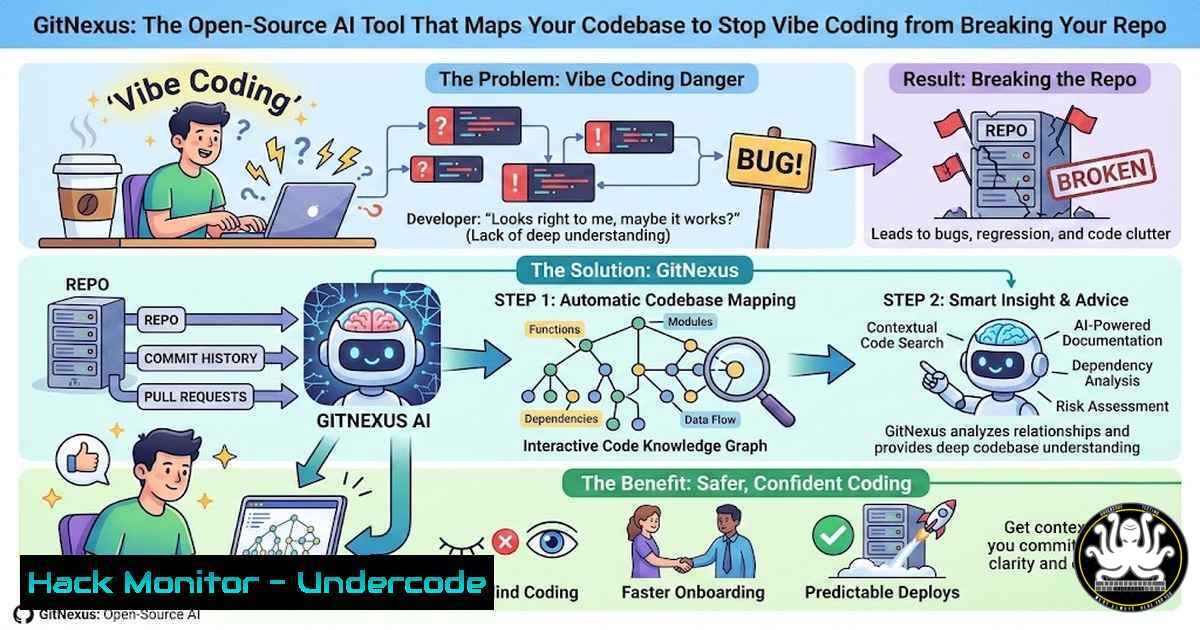
Introduction:
The rise of AI-assisted “vibe coding” has dramatically accelerated development velocity, but it has also introduced a critical vulnerability: codebase fragmentation. When AI agents edit files without a comprehensive understanding of inter-function dependencies, they can silently break 47 other functions relying on a changed return type. GitNexus addresses this by indexing an entire repository into a knowledge graph, providing AI agents with complete architectural context to prevent systemic errors and maintain code integrity.
Learning Objectives:
- Understand how GitNexus uses a four-pass indexing process to build a comprehensive codebase knowledge graph.
- Learn to install and run GitNexus locally using its CLI and Docker to visualize dependencies.
- Explore how to leverage the Model Context Protocol (MCP) server to integrate GitNexus with AI agents for context-aware code modifications.
You Should Know:
1. Understanding GitNexus: The Four-Pass Indexing Engine
GitNexus is an open-source tool designed to solve the problem of “context blindness” in AI programming. It transforms a static codebase into a dynamic, queryable knowledge graph. This is achieved through a systematic four-pass analysis:
– Pass 1: File System Scan: It recursively scans every file and folder in the repository, building a baseline inventory of the project structure.
– Pass 2: Syntax Parsing: Each file is parsed into an Abstract Syntax Tree (AST) to understand its logical blocks, functions, classes, and variables.
– Pass 3: Import Resolution: It resolves every import and `require` statement, linking files and modules to understand the project’s modular dependencies.
– Pass 4: Call Graph Mapping: This is the most critical step. It traces every function call across the entire repository, mapping out the complex web of dependencies (e.g., which functions call functionA(), and which functions `functionA()` calls).
2. Installing and Running GitNexus via CLI
To start using GitNexus, you need to clone the repository and run it locally. The tool provides a Command Line Interface (CLI) to index repos and launch a visual explorer.
Step-by-step guide:
 1. Clone the GitNexus repository
git clone https://github.com/abhigyanpatwari/GitNexus.git
cd GitNexus

<ol>
<li>Install dependencies (assuming Node.js environment)
npm install</p></li>
<li><p>Build the project
npm run build</p></li>
<li><p>Index a target repository (provide the path to the codebase you want to analyze)
This command will initiate the four-pass indexing process.
node dist/cli.js index /path/to/your/target/repo</p></li>
<li><p>Launch the visual graph explorer (this will start a local web server)
node dist/cli.js serve
Output: Visual graph explorer running at http://localhost:3000
Once the server is running, open `http://localhost:3000` in your browser. You will see an interactive graph where nodes represent files or functions, and edges represent imports or function calls. You can click on a function to see its immediate dependents and dependencies.
- Leveraging the MCP Server for AI Agent Integration
The most powerful feature of GitNexus is its Model Context Protocol (MCP) server. MCP is a standard that allows AI tools like Desktop, Cursor, or custom agents to connect directly to external data sources—in this case, the codebase knowledge graph.
Step-by-step configuration for Desktop:
- Locate the MCP Server Script: In the GitNexus directory, find the MCP server entry point (e.g.,
dist/mcp-server.js). - Configure Desktop: Open the Desktop configuration file (typically located at `~/Library/Application Support//_desktop_config.json` on macOS or `%APPDATA%\\_desktop_config.json` on Windows).
3. Add a GitNexus MCP Server Entry:
{
"mcpServers": {
"gitnexus": {
"command": "node",
"args": [
"/absolute/path/to/GitNexus/dist/mcp-server.js",
"--repo",
"/absolute/path/to/your/target/repo"
]
}
}
}
4. Restart Desktop. You can now prompt with questions like, “Before changing the return type of `calculateTotal()` in billing.js, use the GitNexus MCP tool to list all functions that depend on it.” The AI agent will query the graph and receive structured data about the dependency chain before generating a code change.
4. Incremental Updates for Real-Time Agent Edits
A critical question raised in the comments is whether the graph rebuilds from scratch after every change. While the current implementation may require a full re-index for major updates, the architectural goal for real-time agentic workflows is incremental updates. This can be achieved by combining GitNexus with filesystem watchers.
Conceptual workflow for incremental awareness:
- Setup: Run a file watcher like `nodemon` or use Node.js’s `fs.watch` on the target repo.
- Trigger: When a file is saved (
billing.js), the watcher triggers a targeted re-indexing script. - Command: Instead of a full repo scan, you can theoretically run a delta update:
Hypothetical command for incremental update
node dist/cli.js update /path/to/your/target/repo/billing.js
- Result: The knowledge graph updates only the nodes and edges affected by the changes in
billing.js, minimizing latency for the AI agent’s next query. This ensures that the AI is always working with the most current architectural snapshot without performance degradation.
- Using GitNexus for Security Audits and Vulnerability Analysis
Beyond aiding AI development, the knowledge graph is a powerful tool for security professionals. Mapping function calls and data flow can reveal hidden attack surfaces and insecure data propagation.
Example: Tracing Unsanitized User Input
Assume you want to trace how user input from an API endpoint flows to a sensitive SQL query.
1. Index the Repository: Run the indexing as shown in Section 2.
2. Query the Graph (via MCP or Explorer): Locate the function that handles the initial API request (e.g., `handleRequest(req)` in api.js).
3. Analyze the Path: The graph will show all functions called by handleRequest. You can trace the path:
`handleRequest(req)` → `validateParams(params)` → `buildQuery(params)` → `executeQuery(query)`
- Identify Gaps: If the graph shows a direct edge from `handleRequest` to `buildQuery` without passing through
validateParams, you have identified a potential SQL injection vulnerability. The visualization makes it immediately clear where input sanitization is missing.
What Undecode Say:
- Context is the New Token Limit: The future of AI-assisted development isn’t just about larger context windows; it’s about structured, relational understanding of code. GitNexus proves that pre-computing a knowledge graph provides far richer context than simply dumping raw files into a prompt.
- Open Source as the Enabler for Secure AI: By open-sourcing the MCP server and indexer, GitNexus allows teams to run this critical infrastructure locally, ensuring that proprietary codebases are not exposed to external APIs during the analysis phase, which is a massive win for enterprise security and data privacy.
- From “Vibe Coding” to “Architectural Coding”: The primary takeaway is a shift in methodology. Developers and AI agents must move from editing files in isolation to editing within a known architectural framework. Tools like GitNexus are the harness that will allow AI’s raw speed to coexist with the long-term integrity and security of complex software systems. The challenge of debugging is evolving from fixing syntax errors to understanding broken relationships in a dependency graph.
Prediction:
Within the next 18 months, integrated development environments (IDEs) and AI coding assistants will universally adopt background indexing services that build real-time knowledge graphs of the current project. This will become a standard feature, much like syntax highlighting or autocomplete. The immediate impact will be a significant reduction in AI-induced technical debt and a new class of security analysis tools that can visualize zero-day vulnerability paths by simply mapping unsanitized data flows across an application’s entire call graph.
▶️ Related Video (74% Match):
🎯Let’s Practice For Free:
IT/Security Reporter URL:
Reported By: Eric Vyacheslav – Hackers Feeds
Extra Hub: Undercode MoN
Basic Verification: Pass ✅


