Listen to this Post
Introduction:
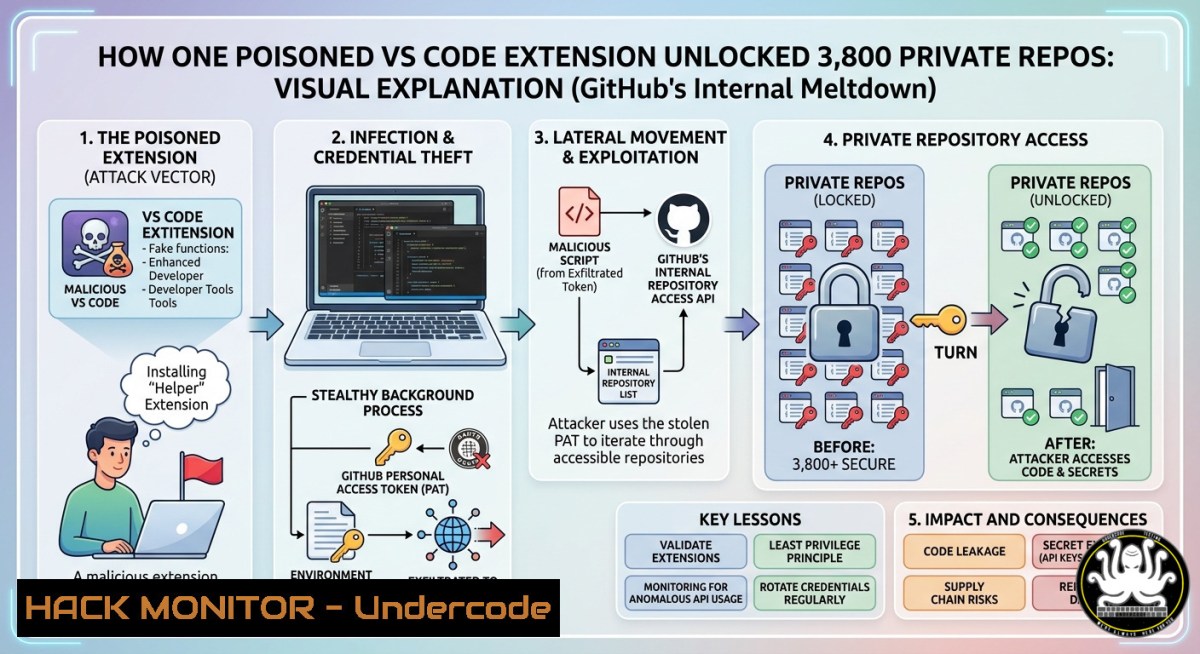
The software development ecosystem suffered a seismic shock in May 2026 when the notorious TeamPCP threat actor group successfully infiltrated GitHub’s internal infrastructure, exfiltrating source code from approximately 3,800 private repositories. This breach was not the result of a sophisticated zero-day exploit, but rather a devastatingly simple supply chain attack that exploited the trust placed in developer tooling. By poisoning a single Visual Studio (VS) Code extension, the attackers gained unfettered access to an employee’s workstation, subsequently pivoting to GitHub’s core intellectual property and putting the secrets of one of the world’s largest code hosts up for sale for $50,000.
Learning Objectives:
- Analyze the attack vector of the TeamPCP GitHub breach and understand how poisoned VS Code extensions can bypass traditional perimeter defenses.
- Master forensic techniques to detect malicious browser and IDE extensions on Windows and Linux endpoints.
- Implement hardened CI/CD pipeline controls, GitHub Actions security, and credential hygiene to mitigate software supply chain risks.
You Should Know:
1. Dissecting the Poisoned VS Code Extension Attack
The GitHub breach underscores a critical truth: the developer workstation is the new perimeter. Threat actors like TeamPCP have shifted focus from breaking into servers to compromising the tools developers use daily. In this incident, the attackers published a trojanized extension to the official VS Code Marketplace. Once an employee installed it, the extension leveraged VS Code’s full system access to steal session tokens, SSH keys, and cloud credentials. With these stolen secrets, the attackers pivoted from the single endpoint to exfiltrate nearly 4,000 internal repositories.
This step-by-step guide demonstrates how to simulate the credential theft mechanism used in such attacks and how to audit your own machine for suspicious extensions.
Step 1: Simulate Malicious Extension Behavior (Educational Use Only)
A malicious extension often executes hidden scripts upon installation. The following Python script mimics how an attacker might harvest saved Git credentials from a compromised Windows machine:
import os
import subprocess

Simulated function to harvest Git credentials (Educational Use)
def harvest_git_creds():
try:
 Command to list Git credentials stored in Windows Credential Manager
result = subprocess.run(['cmd', '/c', 'cmdkey', '/list'], capture_output=True, text=True)
print("[!] Harvested credentials:\n", result.stdout)
except Exception as e:
print(f"Error: {e}")

Simulated exfiltration over HTTPS
def exfiltrate_data(data):
 In a real attack, this would send data to a C2 server
print("[] Exfiltrating data to remote server...")

if <strong>name</strong> == "<strong>main</strong>":
harvested = harvest_git_creds()
exfiltrate_data(harvested)
Step 2: Audit VS Code Extensions for Malicious Indicators
To protect your environment, manually audit installed extensions using the CLI. On a Linux/macOS endpoint, list all extensions and check for recent anomalous installations:
 List all installed VS Code extensions with versions
code --list-extensions --show-versions

Check the installation directory for recently added or modified files
ls -la ~/.vscode/extensions/ | grep -E "2026-05"
On Windows (PowerShell), review the extension folder for unexpected executables or scripts:
 Navigate to VS Code extensions directory
cd $env:USERPROFILE.vscode\extensions

Check for files that were modified on the day of the breach or outbreak
Get-ChildItem -Recurse | Where-Object {$_.LastWriteTime -ge "2026-05-01"}
2. Hardening CI/CD Pipelines Against Token Theft
TeamPCP’s success relied heavily on leveraging stolen tokens to access GitHub’s internal infrastructure. Once the attackers had initial access, they used compromised personal access tokens (PATs) and OAuth tokens to clone private repositories. To prevent a similar fate, organizations must implement aggressive credential hygiene and pipeline hardening.
Step 1: Rotate and Revoke Compromised Secrets Immediately
Following GitHub’s incident response, they rotated “critical secrets” within hours. Your incident response plan must include automated secret rotation. Use the GitHub CLI to revoke all tokens for a specific user:
 List all tokens for a user (requires admin access)
gh api /users/{username}/authorizations

Revoke a specific token by ID
gh api -X DELETE /authorizations/{id}
Step 2: Enforce Fine-Grained Personal Access Tokens
Fine-grained tokens, which are restricted to specific repositories and permissions, drastically reduce blast radius. Use this API call to create a token with minimal privileges:
curl -L -X POST -H "Accept: application/vnd.github+json" -H "Authorization: Bearer <ADMIN_TOKEN>" https://api.github.com/orgs/{org}/personal-access-tokens -d '{"access_token":"<TOKEN_VALUE>","permissions":{"contents":"read"}}'
Step 3: Audit GitHub Actions Logs for Anomalies
Attackers often abuse GitHub Actions runners to exfiltrate data. Use the following command to search recent workflow logs for signs of unusual data transfer commands or `curl` requests to external IPs:
 Fetch recent workflow runs and scan for suspicious commands
gh run list --limit 50 | awk '{print $1}' | xargs -I {} gh run view {} --log | grep -E "curl|wget|nc|base64"
3. Defending the Endpoint: Detecting IDE Malware
The compromised workstation was the patient zero of this breach. Charlie Eriksen from Aikido Security noted that VS Code extensions have full access to a developer’s machine. Defenders need telemetry into the IDE layer to detect malicious behavior.
Step 1: Monitor File System Changes in Real-Time
Use auditing tools to monitor the VS Code extensions directory for unexpected modifications. On Linux, `auditd` can be configured to track this:
 Add audit rule to watch the extensions directory for writes
auditctl -w /home/$USER/.vscode/extensions/ -p wa -k vscode_extensions

Search the audit log for recent changes
ausearch -k vscode_extensions --format text
On Windows, use PowerShell to create a file system watcher:
$watcher = New-Object System.IO.FileSystemWatcher
$watcher.Path = "$env:USERPROFILE.vscode\extensions"
$watcher.IncludeSubdirectories = $true
$watcher.EnableRaisingEvents = $true
Register-ObjectEvent $watcher "Changed" -Action {Write-Host "File changed: $($Event.SourceEventArgs.FullPath)"}
Step 2: Analyze Extension Source Code for Obfuscation
If an extension is suspected, download it and scan for obfuscated JavaScript or calls to external domains. Run this simple grep command to find potential command-and-control (C2) infrastructure within the extension’s codebase:
 Recursively grep for URLs or IP addresses
grep -E "http://|https://|[0-9]+\.[0-9]+\.[0-9]+\.[0-9]+" ~/.vscode/extensions/suspicious_extension/ -R
- Software Bill of Materials (SBOM) and Dependency Scanning
TeamPCP’s campaign, codenamed “Mini Shai-Hulud,” involved compromising open-source security utilities like Trivy to spread malware downstream. This demonstrates the need for a Software Bill of Materials (SBOM) to map your software supply chain. The `syft` tool can generate an SBOM of your development environment to identify compromised components.
Step 1: Generate an SBOM of Your Development Container
Scan your local development environment for all packages, including VS Code extensions and system libraries, to detect known malicious components.
 Install Syft on Linux/macOS
curl -sSfL https://raw.githubusercontent.com/anchore/syft/main/install.sh | sh -s -- -b /usr/local/bin

Generate an SBOM in CycloneDX format and output to JSON
syft dir:/home/user/development --output cyclonedx-json > sbom_report.json
Step 2: Compare SBOM Against Vulnerability Databases
Once the SBOM is generated, upload it to a tool like Dependency-Track or use a local policy engine to scan for packages known to be compromised by TeamPCP (e.g., specific versions of Trivy or LiteLLM). This proactive measure is crucial for identifying whether your pipeline inadvertently pulled a malicious dependency.
5. Hardening GitHub Enterprise and Cloud Secrets Management
The breach revealed that exposed Docker APIs and Kubernetes configs were also targeted by TeamPCP to harvest credentials. To secure your cloud-native environment, enforce the principle of least privilege and eliminate standing credentials.
Step 1: Use OpenID Connect (OIDC) Instead of Static Secrets
Static cloud credentials stored in GitHub Actions are a goldmine for attackers. Configure OIDC to mint short-lived tokens directly from your cloud provider (AWS, Azure, GCP). Below is an example of a GitHub Actions workflow using OIDC for AWS, which eliminates the need for long-lived AWS keys:
name: 'OIDC Hardened Workflow'
on:
push:
branches: [ main ]
permissions:
id-token: write  Required for OIDC
contents: read
jobs:
build:
runs-on: ubuntu-latest
steps:
- name: Configure AWS credentials via OIDC
uses: aws-actions/configure-aws-credentials@v3
with:
role-to-assume: arn:aws:iam::123456789:role/GitHubOIDCRole
aws-region: us-east-1
Step 2: Enforce Push Protection for Secrets
GitHub’s push protection, which blocks commits containing secrets, is a critical control. Enable it at the repository or organization level to prevent developers from accidentally (or maliciously) exposing tokens. As of March 2026, GitHub has expanded this feature to cover API keys from providers like Snowflake and Vercel. Use the REST API to enable push protection organization-wide:
curl -L -X POST -H "Accept: application/vnd.github+json" -H "Authorization: Bearer <TOKEN>" https://api.github.com/orgs/{org}/code-security/configurations -d '{"name":"Default_Hardening","secret_scanning_push_protection":"enabled"}'
What Undercode Say:
- Key Takeaway 1: The GitHub breach is a watershed moment for IDE security. VS Code extensions represent a massive, often overlooked attack surface that grants runtime access to a developer’s entire digital life, bypassing endpoint detection and response (EDR) tools that don’t inspect plugin activity.
- Key Takeaway 2: Software supply chain attacks are evolving from public package registries to direct developer tooling. TeamPCP’s ability to pivot from compromising Trivy to GitHub and then to Cisco shows a pattern of credential re-use and lateral movement that organizations are ill-equipped to track. The “blast radius” of a single developer’s token now encompasses thousands of repositories.
- Analysis: The industry’s reliance on implicit trust in marketplace extensions is a structural vulnerability. GitHub’s response was swift in containment, but the economic model of the attacker—demanding $50,000 for source code—suggests a move away from ransomware towards pure intellectual property theft for competitive advantage. This shifts the risk from data loss to the long-term erosion of a company’s trade secrets and competitive moat. The emergence of the “PCPJack” worm, which actively evicts TeamPCP to steal credentials for themselves, further illustrates that the cloud credential black market has become self-policing and increasingly chaotic.
Prediction:
This breach will force a fundamental reassessment of the “Inner Source” or open-core development model for major tech platforms. Over the next 12 months, we will see a wave of regulations demanding SBOMs for developer tools themselves, not just production applications. Furthermore, IDE vendors like Microsoft will be forced to implement sandboxing and granular permission models for extensions, similar to mobile operating systems. In the near term, anticipate a sharp rise in spear-phishing campaigns impersonating legitimate VS Code extension updates, as threat actors rush to replicate TeamPCP’s success before the marketplace security matures. The line between “developer” and “insider threat” has never been thinner, and the trust placed in tooling is now the primary vector for the next generation of mega-breaches.
▶️ Related Video (82% Match):
🎯Let’s Practice For Free:
IT/Security Reporter URL:
Reported By: Divya Kumari – Hackers Feeds
Extra Hub: Undercode MoN
Basic Verification: Pass ✅


