Listen to this Post
Introduction
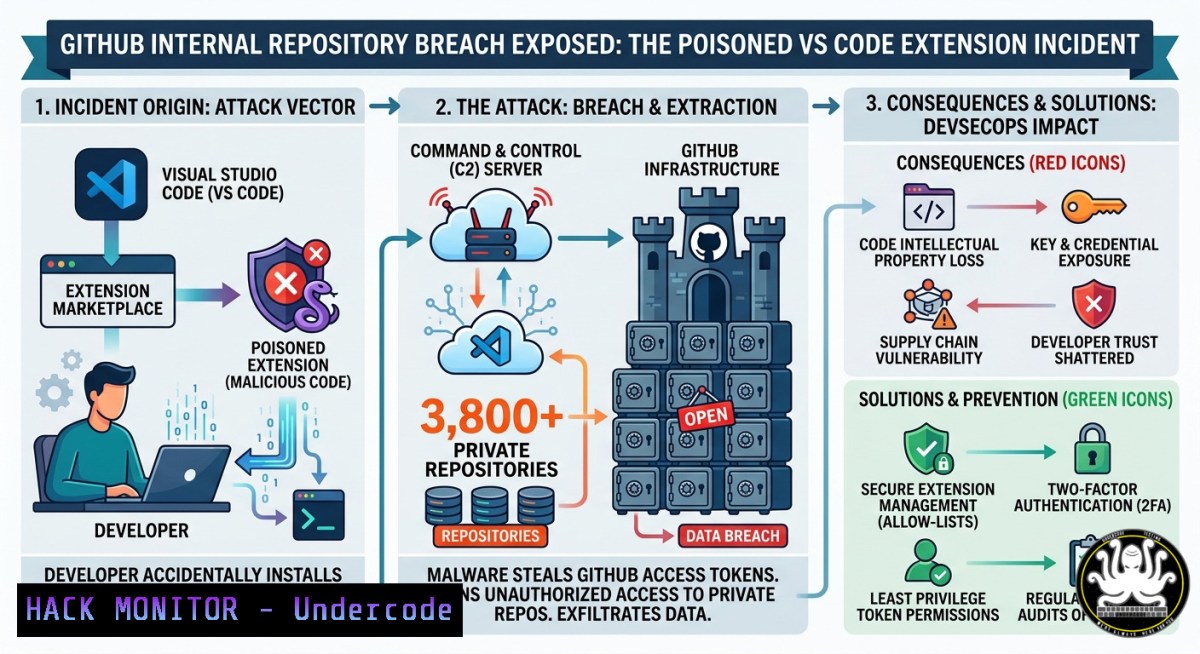
On May 19, 2026, GitHub became the victim of its own worst nightmare: a supply chain breach where a single poisoned Visual Studio Code extension installed by one employee allowed the infamous TeamPCP hacking group to exfiltrate approximately 3,800 internal repositories. The stolen data includes source code from GitHub Copilot, CodeQL, billing systems, and internal security tooling—assets that, if fully compromised, could expose proprietary architecture patterns, authentication logic, credential handling mechanisms, and even zero-day vulnerabilities within GitHub’s own infrastructure.
Learning Objectives
- Understand the Attack Vector: Learn how a malicious VS Code extension bypassed traditional perimeter defenses and compromised a developer workstation to gain access to nearly 4,000 internal repositories.
- Analyze the Technical Fallout: Explore what was taken (Copilot, CodeQL, billing systems, security tooling) and why the “no customer data impacted” statement may be insufficient reassurance.
- Implement Mitigation Strategies: Master practical command-line techniques for detecting malicious extensions, auditing CI/CD pipelines, rotating secrets, and hardening developer environments against supply chain attacks.
You Should Know
- How a Poisoned VS Code Extension Became an Insider Threat
The breach originated when a GitHub employee installed a malicious Visual Studio Code extension that had been trojanized by TeamPCP. VS Code extensions, by design, run with full access to the developer’s machine, including credentials, SSH keys, cloud keys, and all other secrets. Once installed, the extension likely executed a multi-stage credential stealer that harvested GitHub Personal Access Tokens (PATs), OAuth tokens, and CI/CD secrets from the employee’s environment, granting the attackers unfettered access to GitHub’s internal organization.
Step‑by‑step Attack Simulation
What This Does: Simulates how a malicious extension could harvest credentials and pivot to internal repositories.
Linux/macOS (Detecting Suspicious VS Code Extension Activity):
 List all installed VS Code extensions with versions and publishers
code --list-extensions --show-versions

Check extension installation timestamps (Linux/macOS)
ls -la ~/.vscode/extensions/

Examine extension package.json for suspicious scripts
grep -r "postinstall" ~/.vscode/extensions//package.json

Monitor VS Code extension network connections (requires root)
sudo lsof -i -P | grep -i "code|electron"
Windows (PowerShell):
 List all VS Code extensions with metadata
Get-ChildItem "$env:USERPROFILE.vscode\extensions" | Select-Object Name, CreationTime

Check for recently added extensions
Get-ChildItem "$env:USERPROFILE.vscode\extensions" | Where-Object {$_.CreationTime -gt (Get-Date).AddDays(-7)}

Examine PowerShell execution logs for suspicious activity
Get-WinEvent -FilterHashtable @{LogName='Microsoft-Windows-PowerShell/Operational'; ID=4104} | Select-Object -First 50
How to Use It: These commands help security teams identify unexpected or recently installed extensions, especially those with post-install hooks that could execute malicious code. TeamPCP’s extension was removed from the marketplace post-breach, but organizations should audit all installed extensions immediately.
Detection Rule Example (Sigma/YARA):
title: Suspicious VS Code Extension Installation
status: experimental
logsource:
product: windows
service: sysmon
detection:
selection:
EventID: 11  FileCreate
TargetFilename: '.vsix'
User: 'developer'
condition: selection
2. The CI/CD Credential Harvesting Playbook
TeamPCP’s attack didn’t stop at one employee’s machine. The group is known for abusing GitHub Actions workflows, particularly the `pull_request_target` trigger, which executes workflows with repository write permissions even when the pull request originates from a fork. Once inside GitHub’s internal CI/CD pipelines, the attackers systematically harvested package registry tokens, cloud credentials, SSH keys, Git credentials, and personal access tokens from any secret available in the environment.
Step‑by‑step CI/CD Hardening Commands
GitHub Actions Security Audit (GitHub CLI):
 List all secrets configured in a repository
gh secret list --repo owner/repo

Audit which workflows have access to secrets
gh api repos/owner/repo/actions/workflows --jq '.workflows[].path'

Check for pull_request_target usage in workflows
grep -r "pull_request_target" .github/workflows/
Rotating Compromised Secrets (Linux):
 Generate new SSH key pair for GitHub access
ssh-keygen -t ed25519 -C "post-breach-rotation" -f ~/.ssh/github_new

Add to GitHub via API
gh api user/keys -f title="Emergency-Rotation-$(date +%s)" -f key="$(cat ~/.ssh/github_new.pub)"

Rotate GitHub Personal Access Token (classic)
gh auth refresh -s repo,workflow,admin:org
Windows (PowerShell) — Enumerate CI/CD Secrets in Environment Variables:
 Display all environment variables containing common secret patterns
Get-ChildItem Env: | Where-Object {$_.Name -match "TOKEN|SECRET|KEY|PASSWORD"} | Format-Table

Check GitHub Actions runner context for injected secrets (if running inside runner)
if (Test-Path env:GITHUB_TOKEN) { Write-Host "GITHUB_TOKEN present" }
How to Use It: These commands enable blue teams to inventory exposed secrets and rotate them quickly. Following the breach, GitHub rotated “critical secrets” overnight, prioritizing highest-impact credentials first. Your organization should have a similar runbook for immediate credential rotation upon suspected compromise.
3. Detecting Mini Shai‑Hulud — TeamPCP’s Self‑Replicating Worm
TeamPCP has operationalized the Mini Shai‑Hulud worm, a self-replicating malware campaign that automatically steals CI/CD credentials and uses them to publish infected versions of legitimate packages. This worm has previously compromised Trivy, Checkmarx KICS, LiteLLM, TanStack, and Microsoft’s durabletask PyPI package.
Step‑by‑step Malware Detection & Eradication
Check for Dropper Activity (Linux):
 Look for the known second-stage payload domain
grep -r "check.git-service.com" /var/log/ 2>/dev/null

Find rope.pyz payload (used by Mini Shai-Hulud)
find / -name "rope.pyz" -type f 2>/dev/null

Check for unauthorized outbound connections to attacker domains
sudo tcpdump -i any -n 'dst host 45.155.205.233 or dst domain check.git-service.com'
Analyze Python Package for Backdoor (PyPI Safety Check):
 Install safety CLI
pip install safety

Check installed packages against known vulnerabilities
safety check --json

Inspect package metadata for suspicious publish timestamps
pip show <package-name> | grep -E "Location|Version|Requires"
Windows — Detect Mini Shai‑Hulud Artifacts:
 Search for rope.pyz across all drives
Get-ChildItem -Path C:\ -Filter "rope.pyz" -Recurse -ErrorAction SilentlyContinue

Check for suspicious scheduled tasks (worm persistence)
Get-ScheduledTask | Where-Object {$_.TaskName -match "update|telemetry|sync"}

Audit Windows Defender logs for detection events
Get-MpThreatDetection | Where-Object {$_.ThreatName -match "teampcp|shai"} | Format-Table
How to Use It: The worm configures the stealer to execute only on Linux systems, making Linux-based build agents and CI/CD runners the primary targets. Security teams should prioritize Linux endpoint detection and enforce runtime monitoring for processes spawning unexpected outbound connections to IPs associated with TeamPCP’s command-and-control infrastructure.
4. Post‑Breach Mitigation: Secrets Rotation & Access Revocation
GitHub’s immediate response included isolating the compromised endpoint, removing the malicious extension version, and rotating critical secrets. However, the group may have already exfiltrated token patterns and architecture logic that aren’t easily revoked.
Step‑by‑step Emergency Response Playbook
Revoke All Tokens (GitHub CLI):
 List all personal access tokens for an organization
gh api orgs/ORGNAME/tokens

Revoke a specific token (run as admin)
gh api -X DELETE /orgs/ORGNAME/tokens/TOKEN_ID

Generate audit log of token usage
gh api orgs/ORGNAME/audit-log --jq '.[] | select(.action=="access_token")'
Rotate AWS Credentials (if compromised via GitHub Action secrets):
 Deactivate compromised IAM access keys
aws iam update-access-key --access-key-id AKIA... --status Inactive

Create new access keys
aws iam create-access-key --user-name github-runner

Update GitHub Actions secrets with new keys
gh secret set AWS_ACCESS_KEY_ID -b "new_key"
gh secret set AWS_SECRET_ACCESS_KEY -b "new_secret"
Windows — Revoke Azure DevOps Tokens:
 List all Azure DevOps PATs (requires Azure CLI)
az devops user list --organization https://dev.azure.com/org --show-pats

Revoke PAT via API
Invoke-RestMethod -Method Delete -Uri "https://vssps.dev.azure.com/org/_apis/tokens/tokenId?api-version=7.1" -Headers @{Authorization="Bearer $TOKEN"}
How to Use It: Secrets rotation alone is insufficient if the attackers have exfiltrated source code containing hardcoded credential patterns or cryptographic keys embedded in binaries. Teams must also scan their repositories for secrets that may have been unintentionally committed.
5. Fortifying Developer Workstations Against Extension‑Based Attacks
The GitHub breach demonstrates that a single developer workstation can become a critical attack vector. VS Code extensions have been abused before: multiple malicious extensions with millions of installs have been pulled for stealing credentials. Charlie Eriksen of Aikido Security warns: “Most security teams still have zero visibility into what extensions or packages are on their developers’ machines, or how recently they were published. That’s the blind spot these attacks keep walking through”.
Step‑by‑step Hardening Configuration
Enforce Extension Allowlisting (Linux/macOS):
 Create allowed extensions list
cat > /etc/vscode-allowed-extensions.txt << EOF
ms-python.python
ms-vscode.cpptools
eamodio.gitlens
EOF

Script to audit and block non-allowlisted extensions
for ext in $(code --list-extensions); do
if ! grep -qx "$ext" /etc/vscode-extensions-allowlist.txt; then
echo "Unauthorized extension: $ext" | logger -t vscode-audit
fi
done
Windows (PowerShell) — Disable Auto‑Update for VS Code Extensions:
 Modify VS Code settings.json to disable automatic extension updates
$settingsPath = "$env:APPDATA\Code\User\settings.json"
$settings = Get-Content $settingsPath | ConvertFrom-Json
$settings.'extensions.autoUpdate' = $false
$settings.'extensions.autoCheckUpdates' = $false
$settings | ConvertTo-Json | Set-Content $settingsPath

Enforce via Group Policy (add registry keys)
New-ItemProperty -Path "HKLM:\SOFTWARE\Policies\Microsoft\VS Code" -Name "DisableExtensionAutoUpdate" -Value 1 -PropertyType DWord -Force
VS Code Marketplace Integrity Check (Node.js script):
// Check extension publisher verification status
const fetch = require('node-fetch');
const installedExts = ['ms-python.python', 'github.copilot'];
installedExts.forEach(async (ext) => {
const res = await fetch(<code>https://marketplace.visualstudio.com/_apis/public/gallery/extensionquery`, {
method: 'POST',
body: JSON.stringify({ filters: [{criteria: [{filterType: 7, value: ext}]}] })
});
const data = await res.json();
console.log(</code>${ext}: Publisher Verified = ${data.results[bash].extensions[bash].publisher?.domain?.verified}`);
});
How to Use It: These configurations prevent automatic updates from pulling malicious versions (as happened with the Nx Console extension, which was backdoored and caught only after 11 minutes of exposure, during which many auto-updated instances were infected). Organizations should also consider using VS Code Enterprise with policy-based extension management.
6. Protecting Against Credential Harvesting from CI/CD
TeamPCP’s attack methodology has been consistent: compromise a trusted developer tool, collect the credentials it touches, and hand them to ransomware affiliates like VECT for deployment. The group has publicly stated it’s “not interested in extorting GitHub” but will sell the data to a single buyer for a minimum of $50,000, or leak it for free if no buyer emerges. This creates a ticking clock for defenders: if the data isn’t purchased, it becomes a public disclosure.
Step‑by‑step CI/CD Secret Management Hardening
Use OIDC Instead of Long‑Lived Tokens (GitHub Actions):
 Instead of storing AWS keys in secrets, configure OIDC
jobs:
deploy:
permissions:
id-token: write
contents: read
steps:
- name: Configure AWS credentials via OIDC
uses: aws-actions/configure-aws-credentials@v4
with:
role-to-assume: arn:aws:iam::123456789012:role/github-actions-role
aws-region: us-east-1
Audit GitHub Actions Workflow Permissions:
 Script to flag workflows with excessive permissions
for workflow in $(find .github/workflows -name ".yml"); do
echo "=== $workflow ==="
grep -A5 "permissions:" "$workflow" || echo "No explicit permissions (defaults to write!)"
echo
done
Enforce Branch Protection Rules (GitHub CLI):
 Require status checks before merging
gh api repos/owner/repo/branches/main/protection \
-X PUT \
-f required_status_checks='{"strict":true,"contexts":["continuous-integration"]}' \
-f enforce_admins=true \
-f required_pull_request_reviews='{"required_approving_review_count":2}'
Monitor for Suspicious GitHub Actions Usage (ELK Query):
{
"query": {
"bool": {
"must": [
{ "term": { "event.type": "workflow_run" } },
{ "range": { "@timestamp": { "gte": "now-1h" } } }
],
"filter": [
{ "terms": { "workflow.name": ["pull_request_target", "push"] } }
]
}
}
}
What Undercode Say:
- Key Takeaway 1: The “no customer data impacted” statement is technically accurate but dangerously narrow. Source code from GitHub Copilot, CodeQL, and internal security tooling reveals proprietary logic, architectural patterns, and potential zero-day vulnerabilities that could be weaponized in future attacks against GitHub’s customers.
- Key Takeaway 2: The attack vector—a single poisoned VS Code extension—exposes a massive blind spot in enterprise security. Most organizations have zero visibility into developer extensions, yet these tools run with high privilege levels on workstations connected to production environments.
Analysis: The GitHub breach is a watershed moment for DevSecOps. TeamPCP, which has already compromised Trivy, Checkmarx, Bitwarden CLI, and TanStack in 2026 alone, has demonstrated a repeatable playbook: compromise developer tooling, harvest credentials, and pivot to internal infrastructure. The group’s use of the Mini Shai‑Hulud worm automates this process across entire ecosystems, making manual incident response nearly impossible at scale.
What makes this breach particularly concerning is GitHub’s position as the central nervous system of modern software development. If attackers can exfiltrate GitHub’s own source code, they gain insight into how the platform authenticates users, manages permissions, and handles secrets—all of which could be used to craft supply chain attacks against the millions of organizations that rely on GitHub daily. The group’s retirement announcement may be tactical misdirection; history suggests cybercriminals rarely retire permanently.
Prediction
The GitHub breach will accelerate a fundamental shift in how organizations approach developer tooling security. Expect to see mandatory extension allowlisting become a compliance requirement for SOC2 and ISO 27001 within 12 months. Additionally, GitHub will likely be forced to redesign its VS Code marketplace to include mandatory publisher verification, runtime sandboxing for extensions, and cryptographic signing of all updates. In the near term, TeamPCP’s stolen repository archive will either be sold to state-sponsored actors (who can weaponize GitHub’s architectural knowledge for espionage) or leaked publicly, potentially exposing zero-day vulnerabilities in Copilot’s code-generation models and CodeQL’s analysis engine. Organizations should treat this as a supply chain readiness wake‑up call and implement secrets rotation, extension governance, and CI/CD pipeline hardening immediately—not after the next breach.
▶️ Related Video (76% Match):
🎯Let’s Practice For Free:
IT/Security Reporter URL:
Reported By: Cameronww7 Unconfirmed – Hackers Feeds
Extra Hub: Undercode MoN
Basic Verification: Pass ✅


