Listen to this Post
Introduction:
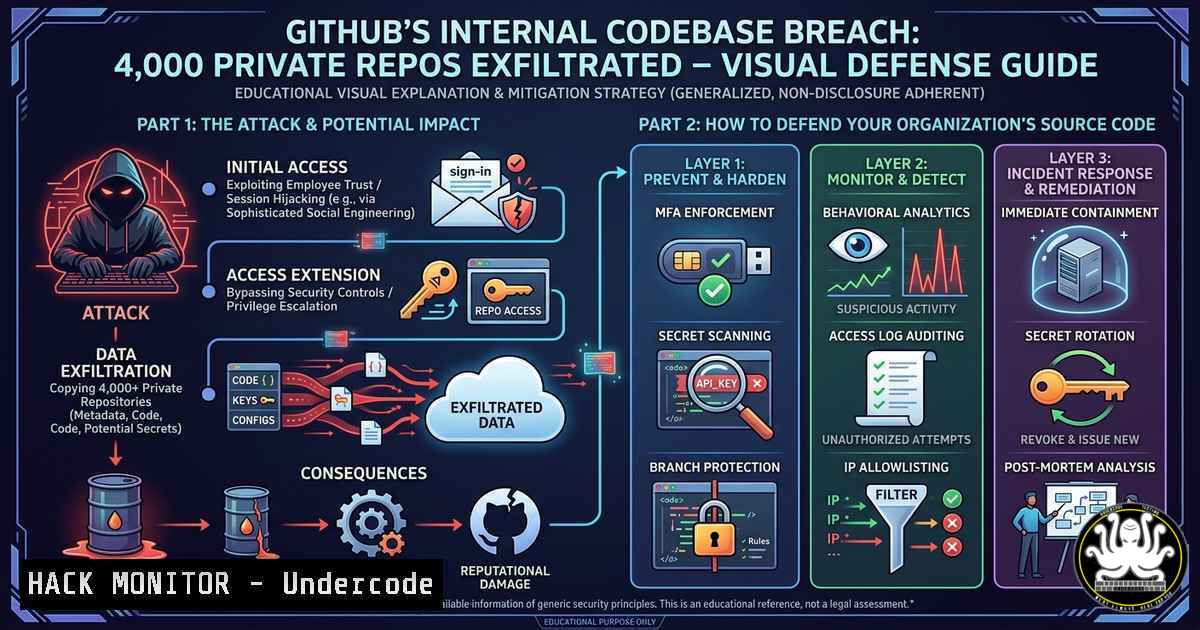
Source code is the crown jewel of any software-driven organization. When a threat actor like TeamPCP claims to have breached GitHub’s internal systems and exfiltrated 4,000 private repositories, it highlights a terrifying reality: even the most trusted platforms are vulnerable. This incident underscores the urgent need for robust source‑code security, continuous monitoring, and proactive defense strategies to prevent unauthorized access to proprietary intellectual property.
Learning Objectives:
- Understand the attack vectors commonly used to compromise code hosting platforms and internal CI/CD systems.
- Learn to detect unauthorized access to private repositories using native GitHub audit logs and third‑party scanning tools.
- Implement practical hardening measures for GitHub organizations, including branch protection, secret scanning, and access token policies.
You Should Know:
- Detecting Leaked Secrets and Compromised Tokens in Your Repositories
If an attacker gains access to internal source code, hardcoded secrets (API keys, passwords, tokens) become immediate liabilities. Use automated scanners to retrospectively audit your own repositories and those of dependencies.
Step‑by‑step guide (Linux):
 Install truffleHog – scans Git history for secrets
python3 -m pip install truffleHog
 Scan a local clone of a repository
git clone https://github.com/yourorg/your-repo.git
cd your-repo
trufflehog filesystem . --json | jq '.'
Step‑by‑step guide (Windows – PowerShell):
 Install gitleaks (pre-built binary)
Invoke-WebRequest -Uri "https://github.com/gitleaks/gitleaks/releases/download/v8.18.0/gitleaks_8.18.0_windows_x64.zip" -OutFile "gitleaks.zip"
Expand-Archive gitleaks.zip -DestinationPath C:\tools\gitleaks
 Scan a repository
C:\tools\gitleaks\gitleaks detect --source C:\path\to\repo --verbose
For ongoing protection, enable GitHub’s secret scanning (Settings → Code security and analysis) and enforce push protection to block commits containing known secrets.
2. Hardening GitHub Organization Settings Against Unauthorized Access
Following a breach, attackers often leverage overly permissive org‑level settings. Restrict access using the principle of least privilege.
Step‑by‑step hardening:
- Require two‑factor authentication (2FA) for all members: Organization → Settings → Authentication security → Require two-factor authentication.
- Limit organization roles: Owners should be ≤3 people; use the “Member” role with fine‑grained permissions.
- IP allow listing: Under Organization → Settings → Security → IP allow list, add your corporate CIDR ranges (e.g.,
203.0.113.0/24). This blocks access from untrusted networks. - Audit third‑party OAuth apps: Go to Organization → Settings → Third-party access → Review and remove unused apps.
Command‑line check (using GitHub CLI):
gh auth login --with-token <your_pat>
gh api orgs/your-org/installations --jq '.[].account.login'
3. Incident Response for a Source Code Exfiltration
If you suspect a breach similar to GitHub’s, immediate containment is critical. Focus on revoking active sessions and tokens, then analyze audit logs.
Step‑by‑step response:
- Revoke all Personal Access Tokens (classic and fine‑grained):
– Organization → Settings → Personal access tokens → Review and revoke suspicious tokens.
2. Force logout all users: Use the GitHub API to expire sessions:
curl -L -X DELETE -H "Authorization: Bearer $GH_TOKEN" \
https://api.github.com/orgs/your-org/credential-authorizations
3. Analyze audit log for unusual activity: Export logs via UI (Organization → Settings → Audit log) or API:
gh api -X GET "orgs/your-org/audit-log" --paginate | jq '.[] | select(.action=="git.clone")'
4. Rotate all secrets stored in GitHub Actions secrets, environment variables, and Codespaces.
4. Protecting CI/CD Pipelines from Supply‑Chain Attacks
Exfiltrated source code often leads to tampered build pipelines. Secure GitHub Actions by adopting OpenID Connect (OIDC) and signed commits.
Step‑by‑step OIDC configuration:
- Replace long‑lived secrets with OIDC to authenticate to cloud providers (AWS, Azure, GCP).
Example workflow snippet for AWS:
permissions:
id-token: write
contents: read
steps:
- name: Configure AWS credentials
uses: aws-actions/configure-aws-credentials@v3
with:
role-to-assume: arn:aws:iam::123456789012:role/GitHubActionRole
aws-region: us-east-1
– Enforce signed commits for `main` branch:
Branch protection rule → Require signed commits → Enable.
- Scan your workflow files for insecure patterns using actionlint:
docker run --rm -v $(pwd):/repo rhysd/actionlint -color
- Monitoring for Anomalous Git Activity with SIEM Integration
Proactively detect data exfiltration by streaming GitHub audit logs to a SIEM (Splunk, Sentinel, ELK).
Step‑by‑step (using GitHub’s audit log API and Elasticsearch):
1. Create a service account with `read:audit_log` scope.
- Use a scheduled script to fetch events every 5 minutes:
!/bin/bash
AFTER=$(date -u -d '5 minutes ago' +"%Y-%m-%dT%H:%M:%SZ")
gh api -X GET "/orgs/your-org/audit-log" -f after="$AFTER" -f per_page=100 \
--jq '.[] | {actor: .actor, action: .action, repo: .repo, created_at: .created_at}' \
>> /var/log/github_audit.json
3. Forward JSON logs to Elasticsearch using Filebeat.
4. Create detection rules for:
– `git.clone` of >10 private repos per hour from a single IP
– `git.force_push` to protected branches
– `oauth_access_token.created` followed by `git.clone`
6. Zero‑Trust for Code Repositories: Short‑Lived Tokens and IP Restriction
Assume that any long‑lived credential can be exfiltrated. Implement ephemeral tokens and network controls.
Step‑by‑step with GitHub’s REST API:
- Generate a fine‑grained personal access token with expiration (e.g., 1 hour) and restrict it to specific repositories.
- Automate token rotation using a script (Linux):
!/bin/bash TOKEN=$(curl -L -X POST -H "Authorization: Bearer $ADMIN_TOKEN" \ -H "Accept: application/vnd.github+json" \ https://api.github.com/user/personal-access-tokens \ -d '{"name":"CI-token","expires_at":"'$(date -u -d '+1 hour' +'%Y-%m-%dT%H:%M:%SZ')'"}') - Enforce branch protection rules that require status checks and dismiss stale reviews.
For cloud environments, configure VPC endpoints for GitHub if using GitHub Enterprise Server, and use webhooks with HMAC signatures to verify payload authenticity.
- Leveraging AI for Anomaly Detection in Git Logs
AI models can identify subtle exfiltration patterns that static rules miss. Train a model on historical `git log` metadata.
Proof‑of‑concept using Python and `scikit-learn`:
import pandas as pd
from sklearn.ensemble import IsolationForest
 Collect git log features: commit frequency, file changes, hour of day
df = pd.read_csv("git_log_features.csv")
model = IsolationForest(contamination=0.05)
df['anomaly'] = model.fit_predict(df[['hour', 'commit_size', 'file_count']])
anomalies = df[df['anomaly'] == -1]
print("Suspicious commits:", anomalies)
Integrate this into a daily cron job that scans new commits and alerts Slack/Teams when an anomaly is detected.
What Undercode Say:
- Key Takeaway 1: Exfiltration of private source code is often silent – traditional security tools miss Git‑specific events. Organizations must shift from reactive scanning to proactive audit‑log monitoring and short‑lived credential policies.
- Key Takeaway 2: The GitHub breach narrative reinforces that trust in a platform does not eliminate insider or external threats. Every team should assume compromise and implement zero‑trust principles at the repository level, including mandatory 2FA, IP allowlisting, and signed commits.
Analysis (10 lines): This incident, whether fully verified or not, serves as a critical stress test for DevOps security. Threat actors increasingly target source code as a shortcut to discovering API secrets, infrastructure as code, and internal business logic. The claim of 4,000 private repositories is particularly alarming because GitHub itself hosts the world’s largest collection of open‑source and proprietary code – a breach would have cascading supply‑chain effects. Immediate lessons include the inadequacy of default GitHub security settings (most organizations do not enforce IP allowlisting or audit token usage). Moreover, the lack of mandatory signed commits in many repos allows attackers to inject backdoors without leaving obvious traces. From a defensive standpoint, automating audit log analysis with SIEM or AI anomaly detection is no longer optional. Finally, this event should prompt every engineering leader to run a “red team” exercise focusing on source code exfiltration – including simulating a compromised maintainer token. The real vulnerability isn’t just GitHub’s infrastructure; it’s the aggregate of every weak PAT and overprivileged OAuth app across thousands of organizations.
Prediction:
In the next 12‑18 months, we will see a surge in mandates for ephemeral tokens and biometric‑enforced repository access across major code hosting platforms. GitHub, GitLab, and Bitbucket will likely introduce native “zero‑trust mode” as a paid security feature. Additionally, regulatory bodies (e.g., SEC, EU Cyber Resilience Act) will begin requiring quarterly source‑code exfiltration drills and third‑party audits of CI/CD pipelines. AI‑powered behavioral monitoring for Git will become a standard component of DevSecOps toolchains, and attackers will respond by developing stealthier “low‑and‑slow” exfiltration techniques that mimic legitimate developer patterns. Organizations that fail to move beyond static branch protection rules will face increased breach liability and insurance premium hikes.
▶️ Related Video (76% Match):
🎯Let’s Practice For Free:
IT/Security Reporter URL:
Reported By: Cybersecuritynews Share – Hackers Feeds
Extra Hub: Undercode MoN
Basic Verification: Pass ✅


