Listen to this Post
Introduction:
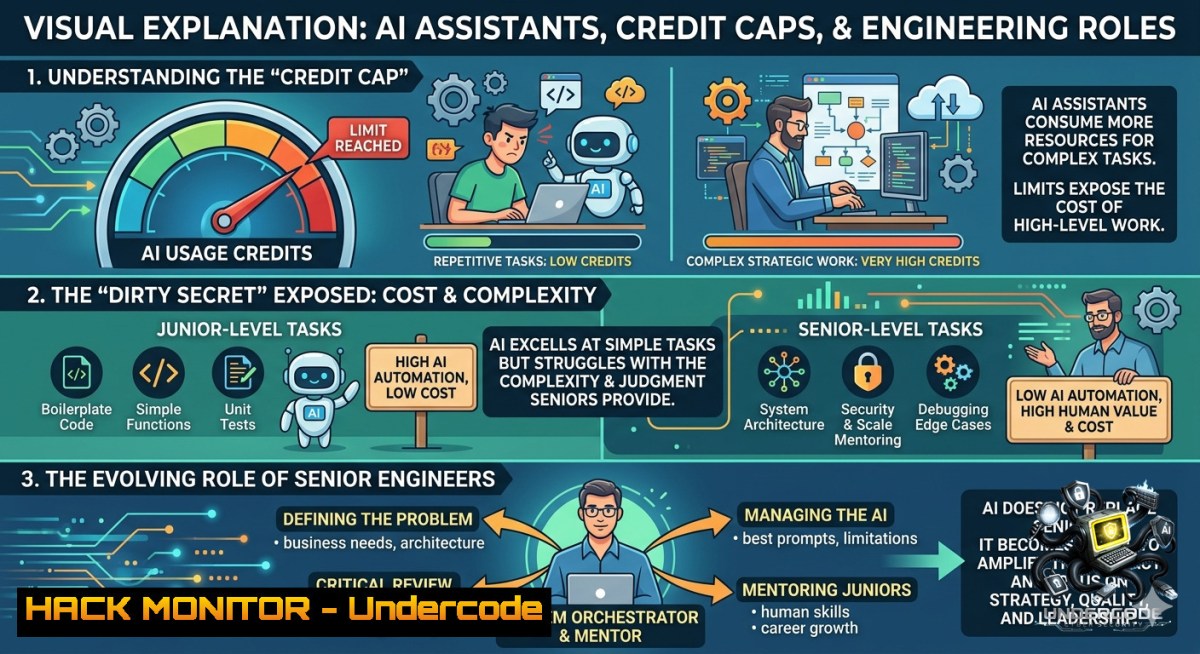
The promise of AI-driven development has long hovered over engineering teams—suggesting that junior workloads might vanish and even senior roles could become obsolete. Yet GitHub’s new usage-based credit system for Copilot Pro+ reveals a hidden friction point: economic sustainability. When routine test generation burns through 30% of a monthly allocation after only five tasks, the conversation shifts from raw capability to cost-per-task and workflow integration, reminding us that productivity gains without affordable scale are merely theoretical.
Learning Objectives:
– Analyze how AI credit limits impact real‑world developer workflows and tool adoption
– Implement cost‑aware AI‑assisted test generation and code review strategies
– Apply Linux/Windows commands to monitor, log, and optimize AI tool usage across CI/CD pipelines
You Should Know:
1. Understanding AI Credit Systems & Cost Optimization
The post highlights that Youssef Salameh consumed over 30% of his Copilot Pro+ monthly allocation by generating tests for existing code—not building full applications. This section explains how to audit your own AI usage and apply rate‑limiting strategies.
Step‑by‑step guide:
– Check current AI credit consumption (GitHub Copilot CLI extension):
`gh copilot credits` (Linux/macOS) – no native Windows equivalent, but use `gh copilot credits` inside WSL or Git Bash.
– Log daily usage for trend analysis:
`gh api -X GET /user/copilot/usage –paginate > copilot_usage_$(date +%Y%m%d).json` (requires `jq` for parsing)
– Set spending limits via organization settings in GitHub → Settings → Billing → Copilot → Usage limits.
– Optimize prompts to reduce token/credit waste: instead of “write all unit tests for this module,” use “write positive/negative test cases for function X only.”
– Implement local caching of common AI responses using `redis-cli` or a simple bash script to avoid repeated identical queries.
2. AI‑Assisted Test Generation with a Security Focus
Generating tests via AI can inadvertently create insecure mocks, miss edge‑case vulnerabilities, or produce tests that pass but ignore security invariants. This section adds a security layer to AI‑driven test generation.
Step‑by‑step guide:
– Generate a baseline test suite using Copilot:
`// Generate Pytest unit tests for this login function, including SQL injection and overflow checks`
– Run static analysis on generated tests (Linux):
`bandit -r tests/ -f json -o bandit_report.json` (Python security linter)
– Windows (PowerShell) equivalent:
`pip install bandit; bandit -r .\tests\ -f json -o bandit_report.json`
– Inject fault‑tolerant assertions manually:
Add `assert response.elapsed.total_seconds() < 0.5` to detect performance regressions caused by AI hallucinated loops.
- Validate test coverage with `pytest --cov=. --cov-report=html` and ensure AI didn’t skip boundary conditions.
3. Linux/Windows Commands for Monitoring AI Tool Usage
To prevent surprise overages, developers need real‑time visibility into Copilot and other AI assistant traffic. These commands work across OSes.
Step‑by‑step guide:
– Monitor outbound API requests to Copilot (Linux – using `tcpdump`):
`sudo tcpdump -i eth0 -1 -s 0 -w copilot_traffic.pcap host api.github.com and port 443`
(Replace `eth0` with your interface.)
– Windows (PowerShell as Admin):
`netsh trace start capture=yes provider=Microsoft-Windows-TCPIP tracefile=copilot.etl`
Stop with `netsh trace stop` and analyze via `netsh trace convert copilot.etl`.
– Log process‑level usage (Linux – `lsof`):
`lsof -i @api.github.com:443 | grep copilot`
– Set up a cron job to capture daily totals:
`0 0 gh api /user/copilot/usage | jq ‘.total_credits_used’ >> /var/log/copilot_daily.log`
4. API Security Hardening When Using AI‑Generated Code
AI assistants often produce insecure API endpoints (e.g., missing rate limiting, improper input validation). This section hardens Node.js/Python APIs against common AI‑induced flaws.
Step‑by‑step guide:
– After Copilot generates an Express endpoint, manually add rate limiting:
const rateLimit = require('express-rate-limit');
const limiter = rateLimit({ windowMs: 15601000, max: 100 });
app.use('/api/', limiter);
– Validate all inputs using a schema library (Linux/Windows universal):
`npm install joi` then `const schema = Joi.object({ userId: Joi.number().integer().min(1) });`
– Scan generated code for API secrets with `gitleaks` (Linux):
`gitleaks detect –source . –report-format json –report-path leaks.json`
– Windows: download `gitleaks.exe` and run `.\gitleaks.exe detect –source . –verbose`
– Enforce TLS 1.3 on cloud load balancers (AWS CLI example):
`aws elbv2 modify-listener –listener-arn arn:aws:… –ssl-policy ELBSecurityPolicy-TLS13-1-2-2021-06`
5. Cloud Hardening for AI‑Driven CI/CD Pipelines
If your CI/CD pipeline uses Copilot to generate test code or deployment scripts, attackers could exfiltrate credits or inject malicious prompts. This section hardens GitHub Actions and cloud runners.
Step‑by‑step guide:
– Restrict Copilot to specific repositories via GitHub organization policy:
`gh api -X PATCH /orgs/{org}/copilot/settings –field “enabled_repositories=selected” –field “selected_repository_ids=[123,456]”`
– Use OIDC instead of long‑lived secrets in Actions (AWS example):
Add to workflow: `permissions: id-token: write, contents: read` then `aws configure set region us-east-1`
– Audit Copilot API calls from CI (Linux `jq`):
`gh api /orgs/{org}/copilot/usage –paginated | jq ‘.[] | select(.source==”actions”)’`
– Block unauthenticated egress from runners:
In Azure DevOps, set “Allow public network access = Disabled” + service tags.
– Windows server hardening: Disable PowerShell script block logging bypass for Copilot‑generated scripts:
`Set-ItemProperty -Path “HKLM:\SOFTWARE\Policies\Microsoft\Windows\PowerShell\ScriptBlockLogging” -1ame “EnableScriptBlockLogging” -Value 1`
6. Vulnerability Mitigation Through AI Code Review
AI can also help find flaws, but the post reminds us that credits constrain how deeply you can scan. This section shows how to prioritize vulnerabilities using free/low‑cost tools combined with AI.
Step‑by‑step guide:
– Run Semgrep OSS (free) before using Copilot to review:
`semgrep –config auto –output semgrep_results.sarif` (Linux/WSL)
– Feed critical findings into Copilot with a targeted prompt:
`“Fix the SQL injection in line 34. Use parameterized queries. Return only the corrected function.”`
– Verify the fix with `sqlmap` (Linux):
`sqlmap -u “http://target.com/page?id=1” –risk=3 –level=5 –batch –smart`
– Windows: use `docker run –rm -it sqlmap/sqlmap` inside Docker Desktop.
– Automate regression testing with GitHub Actions that only trigger expensive AI review on changed files:
on: pull_request
jobs:
ai-review:
if: github.event.pull_request.additions < 200
runs-on: ubuntu-latest
steps:
- run: gh copilot review --pr ${{ github.event.pull_request.number }}
What Undercode Say:
– Key Takeaway 1: AI credit limits are not just a billing nuisance—they are a forcing function for engineering discipline. Teams will need to instrument AI usage like they monitor CPU or memory, or risk productivity inversion where developers game the system rather than build value.
– Key Takeaway 2: The most senior engineers will remain irreplaceable because they know what to ask and when to stop asking. Junior engineers burning credits on trivial tests without understanding code coverage or security boundaries will hit the limits first, widening the experience gap rather than closing it.
Analysis (10 lines):
The LinkedIn exchange between Youssef Salameh and Elahi Bakhesh exposes a subtle but critical shift: AI tooling is moving from “unlimited playground” to “metered utility.” This mirrors early cloud computing—once billing started, optimization followed. For cybersecurity practitioners, metered AI introduces new attack surfaces: credit exhaustion as a denial‑of‑service vector, prompt injection to inflate token usage, and economic sabotage of CI/CD pipelines. On the defensive side, usage logs provide forensic evidence of malicious AI queries. The financial caps also democratize tooling—startups can compete because giants cannot simply out‑spend on brute‑force AI. However, the risk of “credit hoarding” (developers avoiding AI for non‑critical tasks) could lead to undetected vulnerabilities in code that never gets AI‑reviewed. Ultimately, organizations must build cost‑aware AI governance into their DevSecOps frameworks, treating credits as a finite resource to be allocated, audited, and protected like any other critical asset.
Expected Output:
Prediction:
– -1 AI credit scarcity will drive a new class of “token‑efficient” programming languages and frameworks that generate less verbose code, reducing AI processing costs at the expense of readability and security hardening defaults.
– +1 Usage‑based AI credits will accelerate the adoption of on‑premise, private LLMs (e.g., Llama 3, Mistral) inside air‑gapped environments, reducing exfiltration risks and giving full control over cost per inference.
– -1 Engineering teams may start under‑testing complex edge cases because generating exhaustive test suites becomes too expensive, leading to a rise in subtle runtime vulnerabilities that evade both AI and manual reviews.
– +1 Open‑source tooling for AI credit monitoring and optimization will emerge as a new category in the DevSecOps ecosystem, similar to what Kubernetes cost management tools did for cloud spend.
▶️ Related Video (80% Match):
🎯Let’s Practice For Free:
🎓 Live Courses & Certifications:
[Join Undercode Academy for Verified Certifications](https://undercode.co.uk/certifications/)
🚀 Request a Custom Project:
Secure, high-velocity infrastructure and disruptive technological engineering. Contact our engineering team for high-tier development and proprietary systems:
[[email protected]](mailto:[email protected])
💎 Smart Architecture | 🛡️ Secure by Design | ⭐ Trusted by Thousands
IT/Security Reporter URL:
Reported By: [Youssef Salameh](https://www.linkedin.com/posts/youssef-salameh_github-githubcopilot-ai-share-7467505429674348544-3cva/) – Hackers Feeds
Extra Hub: Undercode MoN
Basic Verification: Pass ✅
🔐JOIN OUR CYBER WORLD [ CVE News • HackMonitor • UndercodeNews ]
[💬 Whatsapp](https://undercode.help/whatsapp) | [💬 Telegram](https://t.me/UndercodeCommunity)
📢 Follow UndercodeTesting & Stay Tuned:
[𝕏 formerly Twitter 🐦](https://x.com/undercodeupdate) | [@ Threads](https://www.threads.net/@undercodetesting) | [🔗 Linkedin](https://www.linkedin.com/company/undercodetesting/) | [🦋BlueSky](https://bsky.app/profile/undercode.bsky.social)


