Listen to this Post
Introduction:
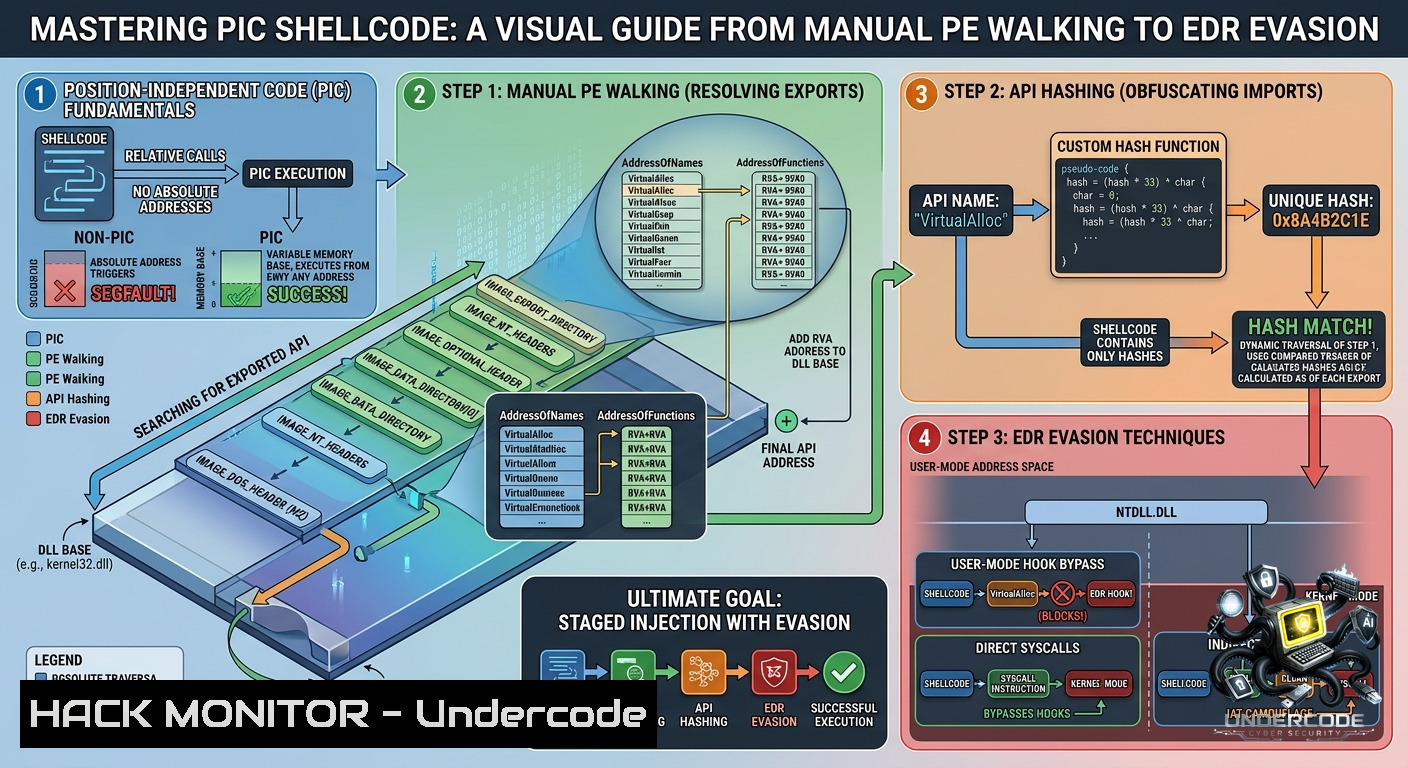
Position-independent code (PIC) forms the backbone of modern exploit development, allowing malicious payloads to execute from any memory location without relying on hardcoded addresses. Building upon a foundational framework, this advanced guide explores the process of manual API resolution, specifically targeting the NTDLL library, while implementing API hashing to minimize static detection footprints.
Learning Objectives:
– Understand the process of manually locating DLL base addresses by walking the Process Environment Block (PEB) and Thread Environment Block (TEB) structures
– Implement API hashing techniques to resolve functions dynamically while evading static analysis
– Develop and test a complete position-independent shellcode using NASM and MinGW-w64 toolchains
You Should Know:
1. Manual DLL Base Address Resolution via TEB/PEB Walking
The original proof-of-concept for PIC shellcode involved walking the Process Environment Block (PEB) structure to locate the base address of `NTDLL.DLL`. `RtlAllocateHeap` is a forwarder function from `Kernel32.dll`, meaning `HeapAlloc` is actually a stub that redirects to `RtlAllocateHeap` inside the `NTDLL` library. To resolve this, the code modifies the target from the standard `Kernel32` base address to the `NTDLL` base address, streamlining the allocation of heap memory for shellcode payloads. This process begins by locating the TEB, which contains a pointer to the PEB, which then provides the loader data structure with the loaded module list. The shellcode then iterates through the `InMemoryOrderModuleList` to find `NTDLL` by comparing DLL names and extracting its image base.
Step-by-Step Guide
The following sequence of steps is essential for manual resolution:
1. Locate the Thread Environment Block (TEB): On x64 Windows, the TEB is stored in the `GS` segment register at offset `0x30`. Access it using: `mov rax, gs:
`.
2. Locate the Process Environment Block (PEB): The PEB is located at offset `0x60` within the TEB: `mov rax, [rax+0x60]`.
3. Retrieve the Loader Data: The `LDR` structure is at offset `0x18` of the PEB: `mov rax, [rax+0x18]`.
4. Access the Module List: Obtain the first entry of the `InMemoryOrderModuleList` at offset `0x20`. The corresponding command is: `mov rax, [rax+0x20]`.
5. Iterate Through DLLs: Use a loop structure to traverse the doubly linked list and compare each module's name for the pattern `NTDLL.DLL`. The initial unoptimized code resembles the following:

[bash]
; Microsoft x64 Calling Convention:
; mov rbx, qword [rsi+0x60] ; rbx = PEB
; mov rbx, qword [rbx+0x18] ; rbx = LDR
; mov rbx, qword [rbx+0x20] ; rbx = first module
next_mod:
mov rsi, qword [rbx+0x20] ; rsi = module base name (unicode)
xor rcx, rcx ; zero RCX for string comparison
2. Implementing API Hashing to Lower Static Footprints
To avoid storing plaintext API names in the shellcode, a hashing algorithm is applied to the function names. This reduces the static analysis footprint and makes the payload more resistant to detection.
Step-by-Step Guide
The API hashing process is performed as follows:
1. Retrieve the Export Table from the DLL Base Address: Once the base address of `NTDLL` is resolved, locate the `IMAGE_DOS_HEADER` at that address. The necessary command is: `mov edx, [rax+0x3C]` to find the PE header offset.
2. Traverse the Export Directory: Add the base address to the `e_lfanew` value to find the `IMAGE_NT_HEADERS`, then locate the `IMAGE_EXPORT_DIRECTORY` from the data directory. Key commands include: `mov rbx, qword [rcx+0x88]` to access the data directory.
3. Calculate Hashes Dynamically: For each function name in the `AddressOfNames` array, compute the hash using a rolling algorithm. The typical code used is:
DWORD hashApi(char cFunctionName) {
DWORD dwHash = 0;
while (cFunctionName) {
dwHash = ((dwHash >> 0x1D) | (dwHash << 0x03)) + (cFunctionName ^ 0xAF);
cFunctionName++;
}
return dwHash;
}
4. Compare the Hash to a Precomputed Target: The target hash for functions like `RtlAllocateHeap` is compared against the computed hash values. When a match is found, the function pointer is retrieved from the `AddressOfFunctions` array. The typical assembly approach involves:
get_apis:
pop rcx ; RCX = Address of DLL base
xor edx, edx ; EDX = 0 for export table search
call walk_pe_exports ; Walk export directory and calculate hashes

hash_loop:
lodsb ; Load next function name byte
test al, al ; Check for null terminator
jz store_hash ; Jump if null terminator reached
; Rolling hash calculation
jmp hash_loop
3. Shellcode Encoding, Decoding, and In-Memory Execution
To avoid memory scans and static detection, the shellcode is often stored in an encoded format that is decoded only at runtime. This process typically involves an XOR or shift-based decoder stub that is prepended to the encoded payload. The execution flow starts with the decoder, which iterates over the encoded bytes, applies the reversal logic, and then jumps to the decoded shellcode.
Step-by-Step Guide
The following steps are implemented in the assembly template:
1. Setup the Decoder: The initial assembly code, as seen in the reference NASM file, uses a jmp-call-pop method to locate the encoded shellcode in memory. Basic commands are: `jmp short call_shellcode ; pop rsi ; get address of EncodedShellcode`.
2. Decode the Payload: The decoder uses a loop to decode the shellcode. For XOR-based encoding, the typical command is:
decode_loop:
xor byte [bash], 0xAA ; XOR decode each byte
inc rsi ; Move to next byte
loop decode_loop ; Loop until RCX=0
3. Execute the Decoded Shellcode: After decoding, the decoder must redirect execution to the start of the decoded payload. This is achieved with: `jmp rsi` or `call rsi`.
4. Convert to PIC Shellcode: Use NASM to compile the assembly file: `nasm -fwin64 custom_shellcode.asm -o custom_shellcode.obj`. Link the object to extract the .text section using the MinGW linker: `ld -m i386pep -1 -o custom_shellcode.exe custom_shellcode.obj`. The resulting binary is then analyzed with `objdump -d custom_shellcode.exe` to extract the final shellcode bytes.
4. Evasion Tactics: Hooking, Syscalls, and Memory Protection
Advanced shellcode loaders implement evasion techniques to bypass Endpoint Detection and Response (EDR) solutions. These methods include using direct system calls to avoid user-land API hooks and altering memory protection flags to evade kernel-triggered memory scans.
Step-by-Step Guide
The following tactics are commonly used:
1. Direct System Calls: Instead of calling `VirtualAlloc` from `kernel32.dll`, the shellcode invokes syscalls directly. For Windows, the syscall number for `NtAllocateVirtualMemory` is moved into the `EAX` register before executing the `syscall` instruction. For example: `mov eax, 0x18 ; syscall`.
2. Dynamic Memory Protection: After decoding the shellcode in a `RW` (Read-Write) memory region, change the protection to `RX` (Read-Execute) using `NtProtectVirtualMemory`. This technique avoids memory scans that target newly allocated `RX` sections.
3. API Hashing with Anti-Debugging: The API hashing technique previously described also serves as an evasion mechanism. By avoiding the `IAT` (Import Address Table), the shellcode bypasses static API import detection. Some loaders incorporate timing checks, such as `rdtsc` (Read Time-Stamp Counter) comparisons, to detect debugger slowing.
5. Cross-Platform Compilation and Testing
The development of PIC shellcode often requires a cross-platform toolchain, allowing a Linux environment to produce Windows-compatible shellcode using `mingw-w64`. This approach is common among security researchers and red team operators.
Step-by-Step Guide
To compile Windows PIC shellcode on Linux:
1. Install the MinGW-w64 Toolchain: On Debian-based systems, use: `sudo apt-get install gcc-mingw-w64-x86-64`.
2. Compile the C/C++ Code: For a C++ based PIC template, compile with the flags: `x86_64-w64-mingw32-g++ -c template.cpp -o template.o -O2 -Wall -fno-exceptions -fno-rtti`.
3. Extract the .text Section: Use `objcopy` to extract the `.text` section: `x86_64-w64-mingw32-objcopy -j .text -O binary template.o shellcode.bin`.
4. Test the Shellcode: Develop a simple loader in C or Python to execute the raw shellcode from the `shellcode.bin` file. The Python loader resembles:
import ctypes
shellcode = bytearray(open('shellcode.bin', 'rb').read())
ctypes.windll.kernel32.VirtualAlloc.restype = ctypes.c_void_p
ptr = ctypes.windll.kernel32.VirtualAlloc(0, len(shellcode), 0x3000, 0x40)
ctypes.windll.kernel32.RtlMoveMemory(ctypes.c_void_p(ptr), shellcode, len(shellcode))
ctypes.windll.kernel32.CreateThread(0, 0, ctypes.c_void_p(ptr), 0, 0, 0)
6. Defense and Mitigation Against PIC Shellcode
For blue teams, understanding these techniques is critical to developing effective detection rules and system hardening strategies. Shellcode execution can be mitigated through several controls, such as enforcing `Attack Surface Reduction (ASR)` rules, implementing `Control Flow Guard (CFG)` and `Arbitrary Code Guard (ACG)`, and deploying `Endpoint Detection and Response (EDR)` sensors with user-land API hooking.
Step-by-Step Guide
To protect against PIC shellcode:
1. Enable Windows Defender Exploit Guard (WDEG): Activate `Controlled Folder Access` and `Network Protection` to prevent unauthorized memory allocations.
2. Implement ETW (Event Tracing for Windows) Monitoring: Configure ETW providers such as `Microsoft-Windows-Threat-Intelligence` to log syscall events. Use `logman` to start a trace session: `logman create trace -1 “SyscallMonitor” -p “{Microsoft-Windows-Threat-Intelligence}” 0xffffffffffffffff 0xff -o c:\logs\syscall.etl -ets`.
3. Deploy and Monitor API Call Stacks: Utilize EDR solutions with user-land hooking to inspect all calls to `VirtualAlloc` and `CreateThread`. Integrate YARA rules to scan for known PIC patterns and shellcode signatures within process memory.
4. Audit PowerShell and Scripting Activity: Block PowerShell loaders that retrieve and execute shellcode from remote URLs.
What Undercode Say:
– Key Takeaway 1: The manual process of walking the PEB and TEB structures remains a fundamental technique for API resolution, but the shift toward using NTDLL for heap allocation provides a more direct and less monitored path for memory management in Windows environments.
– Key Takeaway 2: The implementation of API hashing significantly raises the bar for static analysis, but it does not protect against dynamic analysis where memory access patterns can still reveal the intention of the code. Combining hashing with direct syscalls offers a robust evasion strategy. The future will see increased use of indirect syscalls and dynamic syscall number retrieval to further obscure system-level operations from EDR solutions.
Prediction:
– +1 EDR solutions will shift toward kernel-level monitoring of syscall sequences, rather than relying on user-land API hooks that can be bypassed by direct system calls.
– -1 As offensive techniques evolve, the cybersecurity industry will see a rise in AI-driven shellcode generation that can automatically bypass signature-based and heuristic detection engines.
– +1 The adoption of memory-safe languages for writing PIC shellcode, such as Rust, will increase, offering better reliability and cross-platform compatibility without sacrificing performance.
– -1 The growing complexity of PIC shellcode will likely lead to more sophisticated ransomware strains that can execute directly from memory without touching the disk, making forensic analysis significantly more challenging.
▶️ Related Video (82% Match):
🎯Let’s Practice For Free:
🎓 Live Courses & Certifications:
[Join Undercode Academy for Verified Certifications](https://undercode.co.uk/certifications/)
🚀 Request a Custom Project:
Secure, high-velocity infrastructure and disruptive technological engineering. Contact our engineering team for high-tier development and proprietary systems:
[[email protected]](mailto:[email protected])
💎 Smart Architecture | 🛡️ Secure by Design | ⭐ Trusted by Thousands
IT/Security Reporter URL:
Reported By: [Florian Hansemann](https://www.linkedin.com/posts/florian-hansemann_pic-shellcode-from-the-ground-up-part-2-share-7468231417433391104-xvsQ/) – Hackers Feeds
Extra Hub: Undercode MoN
Basic Verification: Pass ✅
🔐JOIN OUR CYBER WORLD [ CVE News • HackMonitor • UndercodeNews ]
[💬 Whatsapp](https://undercode.help/whatsapp) | [💬 Telegram](https://t.me/UndercodeCommunity)
📢 Follow UndercodeTesting & Stay Tuned:
[𝕏 formerly Twitter 🐦](https://x.com/undercodeupdate) | [@ Threads](https://www.threads.net/@undercodetesting) | [🔗 Linkedin](https://www.linkedin.com/company/undercodetesting/) | [🦋BlueSky](https://bsky.app/profile/undercode.bsky.social)


