Listen to this Post
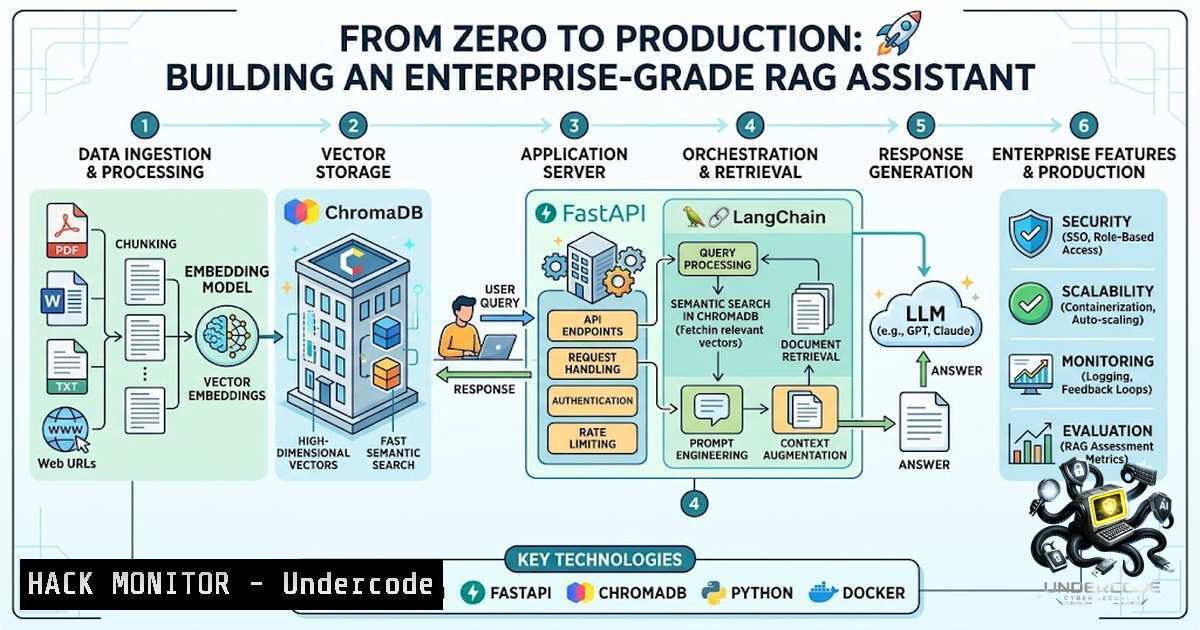
Introduction:
Retrieval-Augmented Generation (RAG) has emerged as one of the most transformative techniques in artificial intelligence, combining the precision of real-world information retrieval with the reasoning capabilities of large language models. Unlike traditional LLM applications that rely solely on pre-trained knowledge, RAG systems dynamically retrieve relevant information from external document sources before generating responses, ensuring answers are not only intelligent but also grounded in factual, up-to-date information. This architectural pattern powers everything from enterprise chatbots and search engines to personalized content generation systems, making it an essential capability for any AI engineer’s toolkit.
Learning Objectives:
- Understand the end-to-end architecture of a RAG system, from document ingestion to response generation
- Build a production-ready RAG API using FastAPI, LangChain, and ChromaDB with practical code examples
- Implement best practices for text chunking, embedding generation, vector storage, and semantic retrieval
- Deploy and secure a RAG service with authentication, monitoring, and scalable infrastructure
You Should Know:
1. Setting Up Your RAG Development Environment
Before diving into the RAG pipeline, you need to establish a solid development foundation. The core tech stack includes Python 3.8+, LangChain for orchestration, FastAPI for the REST API layer, ChromaDB as the vector database, and Ollama for running open-source LLMs locally.
Start by installing the essential dependencies:
 Create and activate a virtual environment
python -m venv venv
source venv/bin/activate  On Windows: venv\Scripts\activate

Install core packages
pip install fastapi uvicorn langchain langchain-community chromadb
pip install langchain-huggingface pypdf2 python-multipart
pip install ollama python-dotenv

Pull a local LLM with Ollama
ollama pull llama3.1  or gemma2:2b for lighter models
ollama serve  Starts API at http://localhost:11434
For production deployments, consider using Docker Compose to containerize the entire stack:
 docker-compose.yml
version: '3.8'
services:
backend:
build: ./backend
ports:
- "8000:8000"
environment:
- CHROMA_PERSIST_DIR=./chroma_db
volumes:
- ./chroma_db:/app/chroma_db
2. Document Processing and Intelligent Text Chunking
The quality of your RAG system depends heavily on how you prepare your documents. Document loaders import data from various sources—PDFs, text files, databases—and convert them into a usable format. The critical step here is text chunking: splitting long documents into smaller pieces that fit within embedding model context windows while preserving semantic meaning.
Here’s a production-grade document ingestion pipeline:
from langchain_community.document_loaders import PyPDFLoader
from langchain.text_splitter import RecursiveCharacterTextSplitter

def process_document(file_path: str):
 Load the document
loader = PyPDFLoader(file_path)
documents = loader.load()

Smart chunking with overlap
text_splitter = RecursiveCharacterTextSplitter(
chunk_size=1000,  Optimal for most embedding models
chunk_overlap=200,  10-20% overlap preserves context
length_function=len,
separators=["\n\n", "\n", " ", ""]
)
chunks = text_splitter.split_documents(documents)
return chunks
Best Practice: Start with a chunk size of 512 tokens with 10-15% overlap, then tune based on your specific data and use case. For legal or technical documents, consider sentence or window-based schemes.
3. Building the Vector Database with ChromaDB
ChromaDB provides a lightweight, persistent vector database that stores document embeddings and enables fast semantic similarity search. Using a persistent client ensures your data is stored on disk permanently and not lost when the program ends.
import chromadb
from langchain_huggingface import HuggingFaceEmbeddings
from langchain_community.vectorstores import Chroma

Initialize persistent Chroma client
persist_directory = "./chroma_db"
client = chromadb.PersistentClient(path=persist_directory)

Load embedding model
embeddings = HuggingFaceEmbeddings(
model_name="sentence-transformers/all-MiniLM-L6-v2"
)

Create or load vector store
vectorstore = Chroma(
client=client,
collection_name="documents",
embedding_function=embeddings,
persist_directory=persist_directory
)

Add document chunks to the vector store
vectorstore.add_documents(chunks)
vectorstore.persist()
Production Consideration: For larger deployments, consider using PostgreSQL with pgvector extension instead of ChromaDB for better scalability and ACID compliance.
4. Implementing the RAG Retrieval Chain
The retrieval chain is the heart of your RAG system. It takes a user query, converts it to an embedding, searches for the most relevant document chunks using cosine similarity, and assembles them into a prompt for the LLM.
from langchain.prompts import PromptTemplate
from langchain_community.llms import Ollama
from langchain.chains import RetrievalQA

Configure the LLM
llm = Ollama(model="llama3.1", temperature=0.3)

Create the prompt template
prompt_template = """Answer the question based ONLY on the following context.
If the context doesn't contain enough information, say "I don't have enough information."

Context: {context}

Question: {question}

Answer:"""
PROMPT = PromptTemplate(template=prompt_template, input_variables=["context", "question"])

Build the retrieval QA chain
qa_chain = RetrievalQA.from_chain_type(
llm=llm,
chain_type="stuff",
retriever=vectorstore.as_retriever(search_kwargs={"k": 4}),
return_source_documents=True,
chain_type_kwargs={"prompt": PROMPT}
)

Query the system
result = qa_chain({"query": "What is the refund policy?"})
print(result["result"])
print("Sources:", [doc.metadata for doc in result["source_documents"]])
Key Insight: Setting temperature to 0 (or very low) is a common practice for production RAG systems where deterministic, factual responses are preferred over creative variation.
5. Building the FastAPI REST API with Streaming
FastAPI provides asynchronous request handling, automatic OpenAPI documentation, and seamless integration with RAG pipelines. For a better user experience, implement Server-Sent Events (SSE) for real-time response streaming.
from fastapi import FastAPI, UploadFile, File, HTTPException
from fastapi.responses import StreamingResponse
from pydantic import BaseModel
import asyncio

app = FastAPI(title="RAG Assistant API")

class ChatRequest(BaseModel):
question: str
document_ids: list[bash] = []

@app.post("/api/v1/chat")
async def chat(request: ChatRequest):
"""Non-streaming chat endpoint"""
result = qa_chain({"query": request.question})
return {
"answer": result["result"],
"sources": [
{
"content": doc.page_content[:200],
"metadata": doc.metadata
}
for doc in result["source_documents"]
]
}

@app.post("/api/v1/chat/stream")
async def chat_stream(request: ChatRequest):
"""Streaming chat endpoint with SSE"""
async def event_generator():
 Send retrieval status
yield f"data: {json.dumps({'event': 'retrieving', 'message': 'Searching documents...'})}\n\n"

Stream the response token by token
for chunk in llm.stream(qa_chain.prompt.format(
context=retrieved_context,
question=request.question
)):
yield f"data: {json.dumps({'event': 'token', 'content': chunk})}\n\n"
await asyncio.sleep(0.01)

Send source documents after completion
yield f"data: {json.dumps({'event': 'sources', 'sources': sources})}\n\n"
yield "data: [bash]\n\n"

return StreamingResponse(event_generator(), media_type="text/event-stream")
API Example (curl):
curl -X POST http://localhost:8000/api/v1/chat \
-H "Content-Type: application/json" \
-d '{"question": "What is the refund policy?"}'
6. Securing Your RAG API
Production RAG systems must implement robust security measures to protect sensitive data. API key authentication is the minimum baseline, but enterprise deployments should consider fine-grained authorization.
from fastapi import Depends, HTTPException, Security
from fastapi.security import APIKeyHeader

API_KEYS = {"your-secret-key-here"}  Store in environment variables
api_key_header = APIKeyHeader(name="X-API-Key")

def verify_api_key(api_key: str = Security(api_key_header)):
if api_key not in API_KEYS:
raise HTTPException(status_code=403, detail="Invalid API Key")
return api_key

@app.post("/api/v1/chat", dependencies=[Depends(verify_api_key)])
async def chat(request: ChatRequest):
 ... existing logic
Additional Security Considerations:
- Implement rate limiting to prevent abuse
- Use HTTPS in production
- Sanitize user inputs to prevent prompt injection
- Implement audit logging for all API calls
- Consider using an API gateway to hide credentials and mediate retrieval
7. Production Deployment and Monitoring
Moving from prototype to production requires careful attention to scalability, observability, and continuous improvement.
Deployment Checklist:
- Use environment variables for all configuration
- Implement health check endpoints
- Set up logging and monitoring (consider LangSmith or similar)
- Configure proper CORS settings for web clients
- Use a process manager (gunicorn with uvicorn workers) for production
Monitoring Key Metrics:
- Retrieval latency and accuracy
- End-to-end response time
- Token usage and cost
- User satisfaction and feedback
- Embedding quality and drift
Chunking Strategy | Chunk Size | Overlap | Best For
|||
Fixed-size | 512 tokens | 10-15% | General purpose
Recursive Character | 1000 chars | 200 chars | Mixed content
Semantic | Variable | N/A | Complex documents
What Undercode Say:
- High-quality data is the foundation — No amount of prompt engineering or model tuning can compensate for poor data preparation. Invest time in cleaning, chunking, and indexing your documents properly.
-
Effective retrieval is more important than model choice — The difference between a good and great RAG system often comes down to retrieval quality, not the LLM itself. Focus on optimizing your embedding strategy, chunking approach, and retrieval parameters.
-
Production RAG is about the whole pipeline — Building a working prototype is only half the battle. True value comes from scalable architecture, robust monitoring, and continuous evaluation.
-
Start simple, then iterate — Begin with a basic RAG implementation using default settings, then systematically improve each component based on real-world performance data.
Prediction:
+1 The RAG market will continue to expand rapidly, with Gartner predicting that by 2028, over 50% of enterprise LLM deployments will use RAG architectures. This growth will drive demand for engineers skilled in building production-grade retrieval systems.
+1 Open-source tooling like LangChain, ChromaDB, and Ollama will mature significantly, making RAG development accessible to a broader audience while reducing cloud dependency costs.
-1 The complexity of production RAG systems will increase, requiring specialized skills in vector database optimization, evaluation frameworks, and security implementation. Teams without these capabilities may struggle to move beyond prototypes.
+N Agentic RAG patterns—where the system can iteratively refine queries, evaluate retrieval quality, and select appropriate tools—will become the next frontier, with LangGraph emerging as a key framework for building these intelligent systems.
-1 Security and data privacy concerns will intensify as RAG systems are deployed in sensitive enterprise environments. Organizations will need to invest in fine-grained authorization and data governance frameworks.
▶️ Related Video (80% Match):
🎯Let’s Practice For Free:
🎓 Live Courses & Certifications:
Join Undercode Academy for Verified Certifications
🚀 Request a Custom Project:
Secure, high-velocity infrastructure and disruptive technological engineering. Contact our engineering team for high-tier development and proprietary systems:
[email protected]
💎 Smart Architecture | 🛡️ Secure by Design | ⭐ Trusted by Thousands
IT/Security Reporter URL:
Reported By: Radhika Pande – Hackers Feeds
Extra Hub: Undercode MoN
Basic Verification: Pass ✅


