Listen to this Post
Introduction:
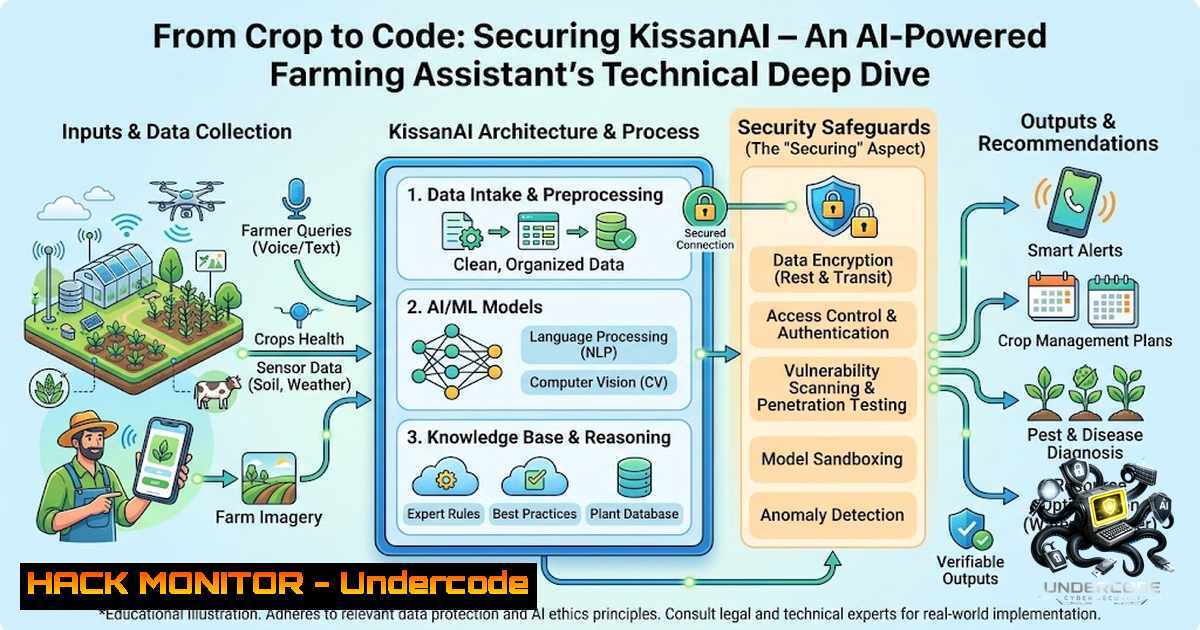
The integration of Artificial Intelligence (AI) into agriculture, often termed “AgriTech,” is revolutionizing traditional farming practices by providing data-driven insights. Projects like KissanAI, which leverage computer vision and large language models (LLMs) to detect crop diseases and nutrient deficiencies, represent a significant leap forward in precision agriculture. However, the deployment of such AI systems introduces a complex attack surface, requiring robust cybersecurity measures and IT infrastructure to ensure data integrity, model security, and user privacy.
Learning Objectives:
- Understand the core technical architecture of a modern AI-powered web application, including frontend frameworks, backend APIs, and ML model integration.
- Identify critical cybersecurity vulnerabilities specific to AI/ML systems, including adversarial attacks, prompt injection, and data poisoning.
- Learn to implement practical security hardening measures for cloud-based AI deployments, spanning network configuration, API security, and data protection.
You Should Know:
1. Architecture Deep Dive: The Full-Stack AI Pipeline
The KissanAI project exemplifies a modern full-stack AI application, likely built on the MERN stack (MongoDB, Express.js, React, Node.js) for the web interface, integrated with a Python-based machine learning backend (PyTorch). The architecture typically involves a frontend React application that captures user images via a webcam or file upload. This image is sent to a Node.js/Express backend, which acts as an orchestrator. The backend receives the image, preprocesses it, and forwards it to a PyTorch-based inference server (often deployed as a separate microservice) for disease or nutrient detection. The results, along with context from a vector database (like Pinecone or Weaviate), are then processed by an LLM to generate conversational responses for the AI Farming Assistant.
Step‑by‑step guide to setting up the backend environment:
To replicate the core AI inference logic, you would need to set up a Python environment with the necessary dependencies.
Step 1: Environment Setup (Linux/macOS)
 Create a virtual environment
python3 -m venv kissanai-env
source kissanai-env/bin/activate
Step 2: Install Core Dependencies
pip install torch torchvision transformers flask flask-cors pillow numpy opencv-python
Step 3: Model Loading Script (Python)
import torch
from torchvision import models, transforms
from PIL import Image

Load a pre-trained ResNet model for classification
model = models.resnet50(pretrained=True)
model.eval()

Define image preprocessing
preprocess = transforms.Compose([
transforms.Resize(256),
transforms.CenterCrop(224),
transforms.ToTensor(),
transforms.Normalize(mean=[0.485, 0.456, 0.406], std=[0.229, 0.224, 0.225]),
])

def predict_disease(image_path):
image = Image.open(image_path)
input_tensor = preprocess(image).unsqueeze(0)
with torch.no_grad():
output = model(input_tensor)
 Further logic to map output to disease classes
return output
- Securing the API Gateway and Web Application Firewall (WAF)
Given that the application is exposed to the public internet, securing the API endpoints is paramount. Without proper security, attackers could exploit the system to perform denial-of-service (DoS) attacks, scrape data, or inject malicious payloads. Implementing a Web Application Firewall (WAF) and rate limiting are critical first steps. On cloud platforms like AWS, you can use AWS WAF with AWS Shield, while on Azure, you would use Azure WAF. For self-managed servers, tools like ModSecurity for Apache/Nginx can be used. The Node.js backend should also implement express-rate-limit to throttle requests, specifically for image upload endpoints which are resource-intensive.
Step‑by‑step guide for setting up rate limiting in Express.js:
Step 1: Install the rate-limiting package.
npm install express-rate-limit
Step 2: Implement rate limiter in your main `app.js` or server.js.
const rateLimit = require('express-rate-limit');

// Create a limiter for the image upload route
const imageUploadLimiter = rateLimit({
windowMs: 15  60  1000, // 15 minutes
max: 50, // Limit each IP to 50 requests per windowMs
message: 'Too many image upload requests from this IP, please try again later.',
standardHeaders: true, // Return rate limit info in the `RateLimit-` headers
legacyHeaders: false, // Disable the `X-RateLimit-` headers
});

// Apply to POST request for image upload
app.post('/api/diagnose', imageUploadLimiter, (req, res) => {
// Your diagnosis logic here
res.send('Diagnosis processed');
});
3. Model Security: Defending Against Adversarial Attacks
AI models are susceptible to adversarial attacks, where subtle, imperceptible perturbations to input images can cause the model to misclassify them. For an agricultural app, an attacker could manipulate an image of a healthy crop to be classified as diseased, causing unnecessary panic and economic impact. To mitigate this, developers can implement defensive distillation or use adversarial training, where the model is trained on both clean and adversarial examples. Additionally, input validation and preprocessing such as image denoising (e.g., applying a median filter) can help remove potential adversarial noise before the image reaches the model.
Step‑by‑step guide to applying a simple image denoising filter before inference (Python):
Step 1: Use OpenCV to preprocess the image.
import cv2
import numpy as np

def denoise_image(image_path):
 Read the image
img = cv2.imread(image_path)
 Apply a median blur to reduce noise
denoised_img = cv2.medianBlur(img, 5)
 Save or return the denoised image
return denoised_img
Step 2: Integrate this into the inference pipeline.
def run_inference(image_path):
 Preprocess: Denoise
clean_image = denoise_image(image_path)
 Convert back to PIL or pass to model
 ... (rest of the inference logic)
4. RAG and LLM Security: Preventing Prompt Injection
The “AI Farming Assistant” feature likely uses a Retrieval-Augmented Generation (RAG) approach, where a user’s query (e.g., “my wheat is turning yellow”) is used to retrieve relevant context from a vector database of agricultural knowledge, which is then fed to an LLM to generate a response. This system is vulnerable to prompt injection attacks, where a user crafts a query to override the system prompts or extract sensitive information. To secure this, strict input sanitization and output filtering are required. Never directly concatenate user input into the system prompt. Instead, use structured input templates. Additionally, implement an LLM guardrail or content filter (like using the OpenAI Moderation API) to check for malicious or harmful prompts.
Step‑by‑step guide to building a secure prompt template (Node.js/Python):
Step 1: Define a secure system prompt in your backend.
SYSTEM_PROMPT = """
You are an AI assistant for Pakistani farmers. Your purpose is to provide helpful, practical, and accurate advice based on the provided context. Always ground your answers in the provided context.
"""
Step 2: Structure the user query safely.
def construct_prompt(user_query, retrieved_context):
 Do not directly use user_query in the system prompt.
 Create a safe, structured user input block.
safe_prompt = f"Context from knowledge base: {retrieved_context}\n\nUser's Question: {user_query}\n\nAssistant's Response:"
return safe_prompt
- Data Security and Privacy: Hardening the Cloud Infrastructure
The KissanAI app processes potentially sensitive data, including farm locations and crop conditions. It is crucial to secure data in transit and at rest. Ensure all communication between the React frontend and the Node.js backend, and between the backend and ML microservice, uses TLS 1.3 encryption. Data stored in MongoDB should be encrypted using Transparent Data Encryption (TDE) or field-level encryption. Additionally, access to the database should be strictly controlled using network security groups (NSGs) or security groups, ensuring that only the application server can connect to the database endpoint. Implement a secrets management solution like HashiCorp Vault or AWS Secrets Manager to securely store database credentials and API keys, rather than hardcoding them in the source code.
Command-line (Linux) to verify TLS configuration for your domain:
 Use openssl to check the TLS version and cipher suite of your endpoint
openssl s_client -connect your-kissanai-domain.com:443 -tls1_3
Windows PowerShell command to check open ports and security groups:
 Check active network connections to ensure no unauthorized ports are open
netstat -abn | findstr "443"
Step‑by‑step guide to securing environment variables in Node.js:
Step 1: Install the `dotenv` package.
npm install dotenv
Step 2: Create a `.env` file in the root of your project.
 .env
DATABASE_URI=mongodb+srv://<username>:<password>@cluster.mongodb.net/kissanai
MODEL_API_KEY=your_secure_api_key
Step 3: Load and use environment variables in your app.
require('dotenv').config();

const express = require('express');
const app = express();

const dbUri = process.env.DATABASE_URI;
const modelKey = process.env.MODEL_API_KEY;

// Connect to database using dbUri
// ...
6. CI/CD Pipeline Security and Containerization
For continuous integration and deployment, the application should be containerized using Docker to ensure consistency across development, testing, and production environments. The Docker image should be built from a secure base image and scanned for vulnerabilities using tools like Trivy or Grype. The CI/CD pipeline (using GitHub Actions or GitLab CI) should include these security scanning steps and should never store secrets in the codebase. Instead, use the CI/CD platform’s secrets management.
Sample `Dockerfile` for the Node.js backend:
FROM node:18-alpine AS builder
WORKDIR /app
COPY package.json ./
RUN npm ci --only=production
COPY . .
EXPOSE 3000
CMD ["node", "server.js"]
Docker build and run commands:
 Build the Docker image
docker build -t kissanai-backend .
 Run the container
docker run -p 3000:3000 -e DATABASE_URI="your_secure_uri" --1ame kissanai-app kissanai-backend
7. Monitoring and Incident Response
Proactive monitoring is essential for maintaining the security and availability of the application. Implement logging for all API requests and ML inference events, capturing metadata like user IP (anonymized if needed), timestamp, and response status. Forward these logs to a centralized logging system (e.g., ELK stack or AWS CloudWatch). Set up alerts for anomalies, such as sudden spikes in traffic to the `/api/diagnose` endpoint, which could indicate a DoS attack or a system breach. A well-defined incident response plan should be in place, outlining the steps to take in case of a security incident, including communication protocols and rollback procedures.
What Undercode Say:
- Key Takeaway 1: The fusion of AI and agriculture with projects like KissanAI is a promising trend, but it places a heavy burden on developers to secure the entire pipeline—from data collection to model deployment.
- Key Takeaway 2: Real-world AI applications are only as good as their security posture. A compromised model can lead to misdiagnosis, eroding farmer trust and potentially causing economic harm.
- Analysis: While the core functionality of KissanAI focuses on computer vision for diseases and deficiencies, the technical challenge extends to building a resilient, scalable, and secure platform. The use of a bilingual interface (English/Urdu) is a commendable step towards digital inclusion, but it also introduces complexities in NLP processing, which must be handled with care to avoid misinterpretation. The project serves as a microcosm of the broader AI industry, highlighting that performance and accuracy cannot overshadow the need for robust security, privacy, and ethical considerations.
Prediction:
- +1 Empowerment of Small-Scale Farmers: Platforms like KissanAI will likely evolve into comprehensive digital ecosystems, offering not just disease detection but also market price forecasts, weather alerts, and supply chain logistics, effectively acting as a digital co-op for farmers.
- +1 Democratization of AI Development: The success of such AI-assisted development projects will encourage more domain experts in non-tech fields to build custom AI solutions, accelerating digital transformation across various sectors.
- -1 Increased Risk of Model Poisoning: As these AI systems become more prevalent, they will become lucrative targets for adversaries. State-sponsored or industrial espionage actors might attempt to poison training datasets to cause widespread agricultural damage, a form of “economic cyberwarfare.”
- -1 Data Privacy Concerns: The collection of geolocated agricultural data could lead to privacy violations or be exploited by corporations for market manipulation, necessitating stronger data governance and regulatory oversight.
▶️ Related Video (80% Match):
🎯Let’s Practice For Free:
🎓 Live Courses & Certifications:
Join Undercode Academy for Verified Certifications
🚀 Request a Custom Project:
Secure, high-velocity infrastructure and disruptive technological engineering. Contact our engineering team for high-tier development and proprietary systems:
[email protected]
💎 Smart Architecture | 🛡️ Secure by Design | ⭐ Trusted by Thousands
IT/Security Reporter URL:
Reported By: Nouman Jalil – Hackers Feeds
Extra Hub: Undercode MoN
Basic Verification: Pass ✅


