
Listen to this Post
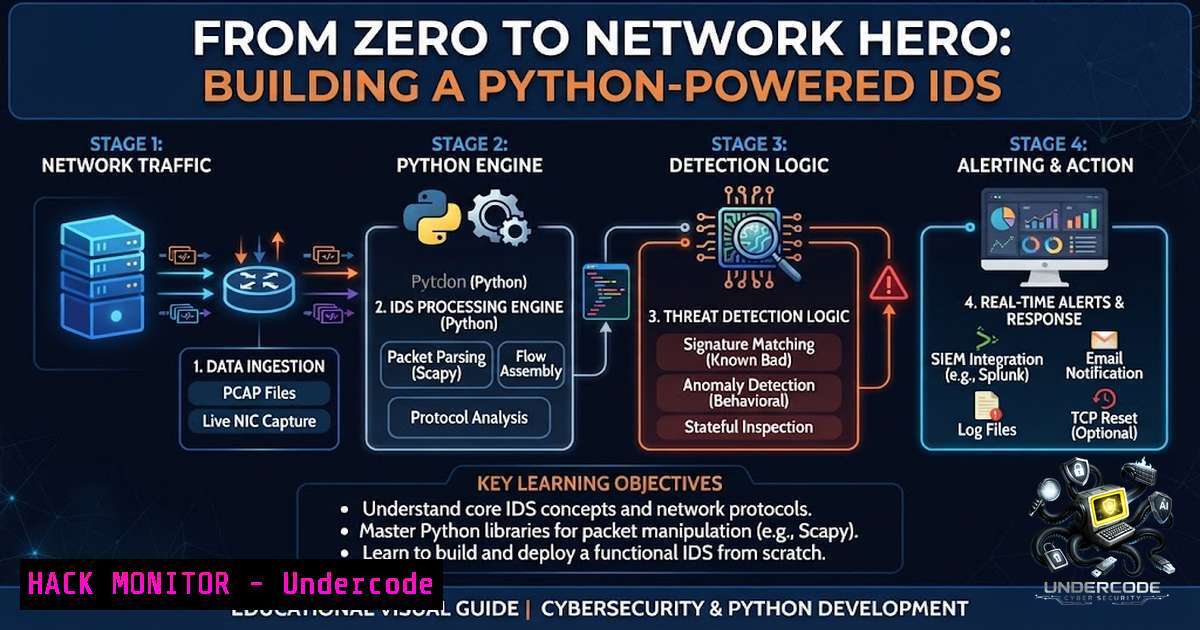
Introduction:
Network security isn’t just about configuring firewalls; it’s about understanding the invisible conversations happening on your wire. A custom Python-based Intrusion Detection System (IDS) provides the ultimate hands-on education, allowing you to peek inside packets, spot dangerous legacy protocols, and truly grasp the vulnerabilities lurking in your infrastructure. By building your own network traffic analyzer, you transition from a passive user to an active defender, learning the anatomy of an attack before it strikes.
Learning Objectives:
- Understand the architecture of a real-time network traffic analyzer and its role in a security operations center (SOC).
- Master packet sniffing and deep packet inspection using Python’s Scapy library.
- Develop detection rules to identify and alert on insecure protocols like FTP and Telnet.
- Implement alerting mechanisms for immediate threat awareness.
- Harden network infrastructure by identifying and mitigating legacy protocol usage.
You Should Know:
- Understanding the Core: Network Packet Analysis with Scapy
At the heart of any network analyzer is the ability to capture and dissect raw data traveling across the network. Python, combined with the Scapy library, is a powerhouse for this task. Scapy allows you to sniff packets, manipulate them, and inspect every layer of the OSI model.
Step-by-step guide explaining what this does and how to use it:
This script initializes a packet sniffer that listens on a specified network interface, extracts key information from each packet, and checks for specific, insecure protocols.
Linux/macOS Setup:
 Install Python3 and pip if not already installed
sudo apt update && sudo apt install python3 python3-pip -y  Debian/Ubuntu

Install the Scapy library
pip3 install scapy
Windows Setup:
1. Install Python from python.org.
2. Open Command Prompt as Administrator.
3. Install Scapy: `pip install scapy`
- Critical for Windows: Install Npcap (not WinPcap) from npcap.com, ensuring you select “Install in WinPcap API-compatible Mode”.
Example Python Sniffer (sniffer.py):
from scapy.all import sniff, IP, TCP, UDP

def packet_callback(packet):
if IP in packet:
ip_src = packet[bash].src
ip_dst = packet[bash].dst
proto = packet[bash].proto

Check for TCP or UDP
if TCP in packet:
sport = packet[bash].sport
dport = packet[bash].dport
 Detecting FTP (port 21) or Telnet (port 23)
if dport == 21 or dport == 23:
print(f"[!] ALERT: Insecure Protocol Detected! {ip_src}:{sport} -> {ip_dst}:{dport}")
elif UDP in packet:
 UDP analysis can be added here
pass

Sniff packets on the network interface (e.g., 'eth0' for Linux, 'Wi-Fi' for Windows)
print("[] Starting packet sniffer... Press Ctrl+C to stop.")
sniff(prn=packet_callback, store=0, iface="eth0")  Change 'iface' to your network interface
How to use:
- Replace `”eth0″` with your active network interface (find it using `ipconfig` on Windows or
ifconfig/ip aon Linux).
2. Run the script: `python3 sniffer.py`
- Generate some traffic (e.g., attempt an FTP connection) to see alerts.
This simple script is your foundation. It captures traffic and alerts you in real-time. The detection logic focuses on destination ports, but more advanced systems inspect payloads for plaintext credentials.
2. Leveling Up: Building a Rule-Based Detection Engine
A basic sniffer is informative, but a true IDS needs a rule engine. This allows you to define specific signatures for malicious or dangerous behavior, similar to how a SOC analyst uses SIEM tools.
Step-by-step guide explaining what this does and how to use it:
We’ll expand our script to include a simple rule set. This introduces the concept of signature-based detection, where we look for specific patterns.
Example Expanded IDS (ids_engine.py):
from scapy.all import sniff, IP, TCP, UDP, Raw
import datetime

Define a simple rule set
RULES = {
"FTP": {"port": 21, "proto": "TCP", "severity": "High", "msg": "Cleartext FTP traffic detected."},
"TELNET": {"port": 23, "proto": "TCP", "severity": "High", "msg": "Cleartext Telnet traffic detected."},
"HTTP": {"port": 80, "proto": "TCP", "severity": "Medium", "msg": "Unencrypted HTTP traffic."},
}

def check_rules(packet):
if IP not in packet:
return

ip_src = packet[bash].src
ip_dst = packet[bash].dst

Check TCP ports against rules
if TCP in packet:
dport = packet[bash].dport
for rule_name, rule in RULES.items():
if rule["proto"] == "TCP" and dport == rule["port"]:
timestamp = datetime.datetime.now().strftime("%Y-%m-%d %H:%M:%S")
alert = f"[{timestamp}] [{rule['severity']}] {rule['msg']} {ip_src} -> {ip_dst}:{dport}"
print(alert)
 In a production system, you would log this to a file or database
with open("ids_alerts.log", "a") as log_file:
log_file.write(alert + "\n")

You can add similar logic for UDP rules

print("[] IDS Engine started. Monitoring for insecure protocols...")
sniff(prn=check_rules, store=0, iface="eth0")
This script introduces a structured rule format. It checks every TCP packet against a dictionary of known insecure ports and logs alerts with timestamps and severity levels. This is the beginning of a professional-grade tool. The alerting mechanism can be extended to send emails, push notifications to Slack/Discord, or even trigger automated firewall rules.
- The Threat Landscape: Why FTP and Telnet are Red Alerts
Seeing your custom IDS flag FTP and Telnet traffic is satisfying, but it’s also a critical security finding. These protocols transmit data, including usernames and passwords, in plaintext. An attacker with a packet sniffer on the same network segment can easily capture these credentials and compromise your systems.
Mitigation Strategy:
- Immediate Action: Identify all systems using FTP and Telnet and migrate them to secure alternatives like SFTP (SSH File Transfer Protocol) and SSH (Secure Shell).
- Network Segmentation: If legacy systems must remain, isolate them in a secure network segment with strict firewall rules to limit exposure.
- Continuous Monitoring: Your Python IDS is now a key tool for enforcing this policy. By constantly monitoring for these ports, you can detect policy violations and respond instantly.
- Hardening Your Defenses: Commands to Secure Your Network
While your Python IDS is excellent for detection, you also need to know how to block and remediate. Here are essential commands for securing your environment.
Linux (iptables/nftables): Block insecure ports at the firewall level.
 Block all incoming FTP (port 21) and Telnet (port 23) traffic
sudo iptables -A INPUT -p tcp --dport 21 -j DROP
sudo iptables -A INPUT -p tcp --dport 23 -j DROP

Block outgoing traffic as well to prevent internal systems from using them
sudo iptables -A OUTPUT -p tcp --dport 21 -j DROP
sudo iptables -A OUTPUT -p tcp --dport 23 -j DROP

Save the rules (command varies by distribution)
 For Debian/Ubuntu: sudo netfilter-persistent save
Windows (Firewall via PowerShell): Block ports using the Windows Defender Firewall.
 Block inbound FTP
New-1etFirewallRule -DisplayName "Block Inbound FTP" -Direction Inbound -Protocol TCP -LocalPort 21 -Action Block
 Block inbound Telnet
New-1etFirewallRule -DisplayName "Block Inbound Telnet" -Direction Inbound -Protocol TCP -LocalPort 23 -Action Block
Disable Services: On Linux, you can stop and disable the services entirely.
 Stop and disable Telnet (if using inetd)
sudo systemctl stop telnet.socket
sudo systemctl disable telnet.socket
 Stop and disable FTP (vsftpd example)
sudo systemctl stop vsftpd
sudo systemctl disable vsftpd
5. Advanced Analysis: Packet Inspection and Payload Analysis
Detecting protocols by port is a good start, but attackers can run services on non-standard ports. To be truly effective, your IDS needs to perform Deep Packet Inspection (DPI) by analyzing the payload content.
Step-by-step guide explaining what this does and how to use it:
This advanced feature looks inside the packet’s raw data to confirm the protocol based on its signature, not just its port.
Example Payload Inspection Snippet:
from scapy.all import Raw

def deep_inspection(packet):
if TCP in packet and Raw in packet:
payload = packet[bash].load.decode('utf-8', errors='ignore')
 Look for FTP commands like USER, PASS
if "USER" in payload or "PASS" in payload:
print(f"[!!!] CRITICAL: Possible FTP credentials in cleartext! {packet[bash].src}")
 Look for Telnet negotiation strings
elif "\xff\xfd" in payload or "\xff\xfb" in payload:
print(f"[!!!] CRITICAL: Telnet traffic detected on non-standard port! {packet[bash].src}")
This type of analysis is crucial for identifying insecure protocols that have been moved to different ports to evade detection. It’s a core technique used in Next-Generation Firewalls (NGFW) and advanced intrusion prevention systems.
6. Building a GUI and Reporting Dashboard
While terminal output is effective for a developer, a professional SOC analyst often relies on a dashboard for visualization. Many open-source projects use Python with Tkinter to build a GUI for their network analyzers. A GUI can display real-time traffic statistics, a list of alerts, and visual indicators of threat levels.
Conceptual Dashboard Features:
- Live Traffic Chart: A graph showing packets per second.
- Alert Feed: A scrolling list of the latest security events with color-coded severity.
- Top Talkers: A list of the most active IP addresses on the network.
- Protocol Breakdown: A pie chart showing the distribution of TCP, UDP, ICMP, and other protocols.
Building such a dashboard is a fantastic project to deepen your understanding of both Python GUI development and network security monitoring. It transforms your Python script into a powerful, enterprise-ready security tool.
What Undercode Say:
- Key Takeaway 1: Building a custom IDS with Python and Scapy is not just a coding exercise; it is one of the most effective ways to internalize network protocols and attack vectors. The act of writing detection logic for FTP and Telnet forces you to understand exactly why they are dangerous.
- Key Takeaway 2: Detection is only half the battle. A robust security posture requires immediate action—blocking ports, disabling services, and migrating to secure alternatives. Your IDS should be the trigger that sets these remediation workflows in motion, turning passive monitoring into active defense.
Analysis:
The project exemplifies the “security mindset” where you must think like an attacker to defend effectively. By seeing raw packet data and writing rules to catch malicious or insecure traffic, you gain an intuition that no textbook can provide. Furthermore, the modular nature of the Python script allows for endless expansion—integrating machine learning for anomaly detection or linking with threat intelligence feeds for real-time IoC (Indicators of Compromise) matching. This project is a microcosm of the entire cybersecurity field, from network engineering to threat hunting, all within a single, manageable codebase.
Prediction:
- +1 The proliferation of low-cost, high-performance computing will make custom Python-based IDS solutions increasingly viable for small to medium-sized businesses, democratizing network security and reducing reliance on expensive proprietary appliances.
- -1 As AI-generated attacks become more sophisticated, simple signature-based IDS will struggle to keep up. The future will demand IDS that can perform real-time behavioral analysis and anomaly detection, pushing developers to integrate machine learning models into their Python frameworks to stay relevant.
- +1 The rise of 5G and IoT will lead to a massive increase in network traffic and attack surfaces. Python’s flexibility and the powerful Scapy library will become essential tools for security engineers tasked with monitoring and securing these complex, high-speed networks.
▶️ Related Video (78% Match):
🎯Let’s Practice For Free:
🎓 Live Courses & Certifications:
Join Undercode Academy for Verified Certifications
🚀 Request a Custom Project:
Secure, high-velocity infrastructure and disruptive technological engineering. Contact our engineering team for high-tier development and proprietary systems:
[email protected]
💎 Smart Architecture | 🛡️ Secure by Design | ⭐ Trusted by Thousands
IT/Security Reporter URL:
Reported By: Ibrahim Cyber – Hackers Feeds
Extra Hub: Undercode MoN
Basic Verification: Pass ✅


