Listen to this Post
Introduction:
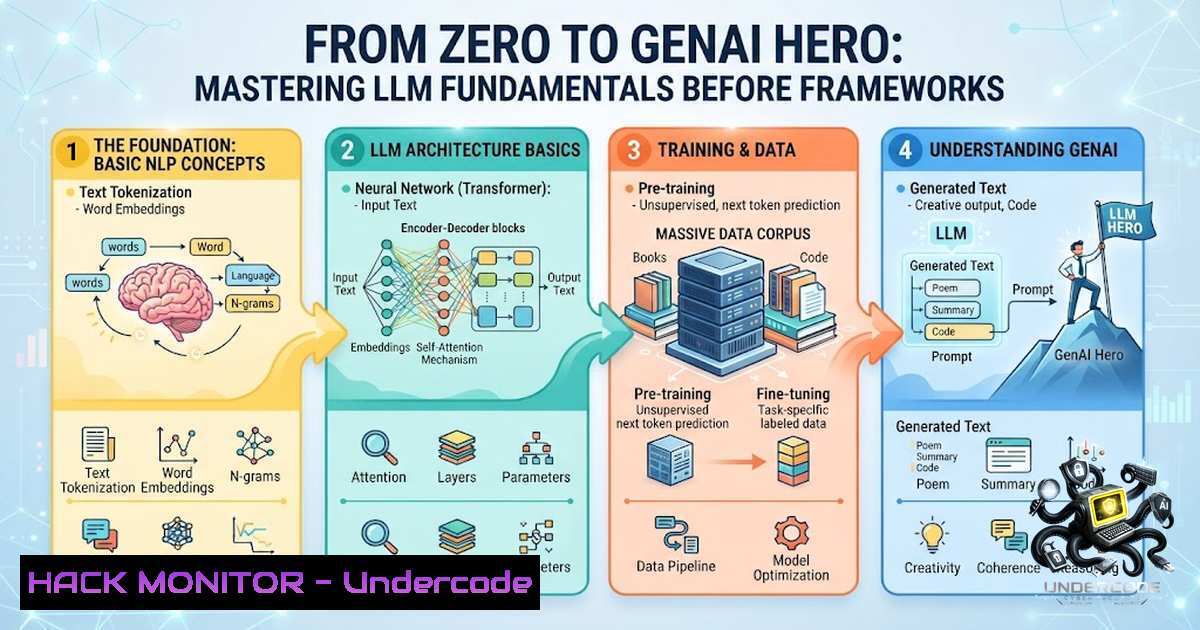
Before you even think about touching LangChain, Vercel AI SDK, or any other high-level orchestration framework, there is a foundational layer that separates engineers who merely “use” AI from those who truly “engineer” it. Large Language Models (LLMs) are not magic black boxes; they are probabilistic sequence predictors built on the transformer architecture, and understanding their core mechanics—from tokenization to sampling strategies—is the bedrock upon which reliable, scalable, and production-ready AI applications are built. This article distills the essential concepts every GenAI engineer must master, moving beyond surface-level understanding to equip you with the mental models and practical commands needed to build robust AI systems.
Learning Objectives:
- Objective 1: Understand the core architectural components of LLMs, including the transformer, tokens, context windows, and the mathematical mechanics of text generation.
- Objective 2: Master the art and science of controlling model outputs through parameters like Temperature, Top-P, and advanced prompt engineering techniques.
- Objective 3: Learn how to extend LLM capabilities beyond simple chat via structured outputs, tool/function calling, and embeddings, enabling integration with external systems and the creation of AI agents.
1. The Engine Room: Transformers, Tokens, and Context
At the heart of every modern LLM lies the Transformer architecture, a neural network design that processes input data in parallel using a mechanism called self-attention. This allows the model to weigh the importance of different words in a sequence, regardless of their position, enabling it to grasp complex context and long-range dependencies far better than its predecessors.
The raw text you feed an LLM is not understood as words; it’s broken down into tokens. A token can be a word, a subword, or even a single character. This process, known as tokenization, is critical because the model operates on these numerical representations, and your API billing is directly tied to token count. The Context Window is the model’s working memory—the total number of tokens (input + output) it can “see” and reason over at any given time. Older models struggled with 4k tokens, while modern ones can handle up to 1 million or more. Designing applications that respect this limit is a core engineering challenge, often requiring strategies like truncation or summarization to stay within budget.
Step‑by‑Step Guide: Understanding Tokenization in Practice
To truly grasp tokenization, you should experiment with it directly. Here’s how you can explore this using Python and the `tiktoken` library, which is used by OpenAI’s models.
- Install the library: Open your terminal and run:
pip install tiktoken
2. Create a Python script (`token_counter.py`):
import tiktoken

def count_tokens(text, model="gpt-4"):
encoding = tiktoken.encoding_for_model(model)
num_tokens = len(encoding.encode(text))
return num_tokens, encoding.encode(text)

sample_text = "The transformer architecture revolutionized NLP."
token_count, tokens = count_tokens(sample_text)
print(f"Text: {sample_text}")
print(f"Number of tokens: {token_count}")
print(f"Token IDs: {tokens}")
3. Run the script:
python token_counter.py
What this does: It shows you exactly how the model “sees” your text as a sequence of integer IDs. You’ll notice that common words are often a single token, while longer or less common words are split into multiple tokens.
- Analyze Context Window Limits: When building an application, you must calculate the total tokens in your system prompt, user query, and the expected response. A simple function to check if your input exceeds a limit (e.g., 8,192 tokens for
gpt-4-32k):def is_within_context(text, limit=8192): encoding = tiktoken.encoding_for_model("gpt-4") return len(encoding.encode(text)) <= limitThis foundational check prevents costly API errors and ensures your application handles text of varying lengths gracefully.
-
The Art of Control: Temperature, Top-P, and Sampling Strategies
LLMs are fundamentally probabilistic. They don’t just pick the single “most correct” next word; they sample from a probability distribution of all possible next tokens. The parameters Temperature and Top-P are the dials you turn to control this sampling process, directly influencing the creativity and determinism of the output.
- Temperature scales the logits (the raw scores for each token) before the softmax function. A low temperature (e.g., 0.1) sharpens the probabilities, making the model more likely to choose the highest-probability token, resulting in more deterministic and focused outputs. A high temperature (e.g., 0.9) flattens the distribution, increasing randomness and creativity.
-
Top-P (or nucleus sampling) is a dynamic filter. Instead of considering all tokens, it selects the smallest set of tokens whose cumulative probability exceeds the threshold
P. A Top-P of 0.9 means the model will only consider the most likely tokens that together account for 90% of the probability mass. This adapts to the distribution’s shape, offering a more nuanced control than the static `top-k` parameter.
Step‑by‑Step Guide: Experimenting with Sampling Parameters
While you can’t directly modify the internal sampling of a hosted model, you can control these parameters via API calls. Here’s a practical example using the OpenAI Python SDK to see the effect.
1. Install the OpenAI library:
pip install openai
2. Create a script (`sampling_demo.py`):
from openai import OpenAI
client = OpenAI(api_key="YOUR_API_KEY")

def generate_response(prompt, temperature=0.7, top_p=1.0):
response = client.chat.completions.create(
model="gpt-3.5-turbo",
messages=[{"role": "user", "content": prompt}],
temperature=temperature,
top_p=top_p
)
return response.choices[bash].message.content

prompt = "Write a short, creative tagline for a new AI-powered fitness app."
print(" Deterministic (Temp=0.1, Top-P=1.0) ")
print(generate_response(prompt, temperature=0.1))
print("\n Creative (Temp=0.9, Top-P=0.95) ")
print(generate_response(prompt, temperature=0.9, top_p=0.95))
- Observation: Run the script multiple times. You’ll notice that with
temperature=0.1, the outputs are very similar and safe. Withtemperature=0.9, the outputs are wildly different and more imaginative. Best Practice: For factual tasks like summarization or code generation, use a low temperature. For brainstorming or creative writing, increase the temperature. A common production strategy is to start with `temperature=0` and only increase it if more variety is needed. -
The Architect’s Blueprint: System Prompts, User Prompts, and Structured Outputs
Prompt engineering is not just about asking a question; it’s about architecting a conversation. Modern LLM APIs delineate between System Prompts and User Prompts.
- System This is the “instruction manual” for the model. It sets the overarching persona, tone, rules, and constraints for the entire interaction. It’s defined at the application level and remains static, providing a consistent behavioral boundary. For example: “You are a cybersecurity expert. You will only respond with technical solutions and will never provide code that could be used for malicious purposes.”
-
User This is the specific query or request from the end-user. It operates within the guardrails set by the system prompt. Keeping the system prompt static and the user prompt dynamic is a best practice for consistency, maintainability, and API caching efficiency.
To make these outputs truly useful for applications, we need Structured Outputs. Instead of getting free-form text, we can force the model to return data in a specific JSON schema. This is the key to integrating LLMs into software pipelines, as it guarantees predictable data types for downstream processing.
Step‑by‑Step Guide: Building a Structured Output Pipeline
This example uses Pydantic to define a schema and the OpenAI API to enforce it.
1. Install required libraries:
pip install openai pydantic
2. Create a script (`structured_output.py`):
from openai import OpenAI
from pydantic import BaseModel
import json

client = OpenAI(api_key="YOUR_API_KEY")

Define the structure we want
class SecurityIncident(BaseModel):
incident_type: str
severity: str  e.g., "Critical", "High", "Medium", "Low"
affected_systems: list[bash]
recommendation: str

def get_structured_analysis(incident_description: str):
completion = client.beta.chat.completions.parse(
model="gpt-4o-2024-08-06",
messages=[
{"role": "system", "content": "You are a security analyst. Extract key details from the incident description and format them according to the provided schema."},
{"role": "user", "content": incident_description}
],
response_format=SecurityIncident,
)
return completion.choices[bash].message.parsed

Example usage
report = get_structured_analysis("Our web server was hit with a massive DDoS attack at 2 AM, taking down the customer portal. It seems to be a UDP flood.")
print(json.dumps(report.model_dump(), indent=2))
- What this does: The API guarantees that the `response_format` is respected, returning a valid `SecurityIncident` object. This JSON can then be directly ingested by a SIEM tool, a database, or an incident management system without the need for fragile, error-prone regex parsing.
-
The Action Layer: Tool Calling and Function Calling
An LLM is powerful, but it’s an island of knowledge. Tool Calling (or Function Calling) is the bridge that connects the model to the outside world. It allows you to define a set of functions or APIs that the model can intelligently choose to invoke based on the user’s request. The model doesn’t execute the function; it generates a structured JSON object containing the function name and its arguments. Your application then executes the function and returns the result to the model, allowing it to complete its response. This is the foundation of AI Agents—systems where an LLM acts as a reasoning engine, iteratively calling tools to achieve a goal.
Step‑by‑Step Guide: Implementing a Simple Tool Call
This example defines a `get_weather` tool and shows how the model decides to use it.
1. Create a script (`tool_calling.py`):
from openai import OpenAI
import json

client = OpenAI(api_key="YOUR_API_KEY")

tools = [
{
"type": "function",
"function": {
"name": "get_weather",
"description": "Get the current weather in a given location",
"parameters": {
"type": "object",
"properties": {
"location": {"type": "string", "description": "The city and state, e.g., San Francisco, CA"},
"unit": {"type": "string", "enum": ["celsius", "fahrenheit"]}
},
"required": ["location"]
}
}
}
]

def simulate_weather_api(location, unit="fahrenheit"):
 In a real app, this would call a real API
return f"The weather in {location} is 72°{unit[bash].upper()}."

response = client.chat.completions.create(
model="gpt-3.5-turbo-0125",
messages=[{"role": "user", "content": "What's the weather like in London?"}],
tools=tools,
tool_choice="auto"
)

if response.choices[bash].message.tool_calls:
tool_call = response.choices[bash].message.tool_calls[bash]
if tool_call.function.name == "get_weather":
args = json.loads(tool_call.function.arguments)
weather_result = simulate_weather_api(args["location"])
print(f"Tool Result: {weather_result}")
 Now, send the result back to the model to generate a final response.
second_response = client.chat.completions.create(
model="gpt-3.5-turbo-0125",
messages=[
{"role": "user", "content": "What's the weather like in London?"},
response.choices[bash].message,
{"role": "tool", "tool_call_id": tool_call.id, "content": weather_result}
],
)
print(f"Final Response: {second_response.choices[bash].message.content}")
- Explanation: The model recognized the user’s intent, generated a call to `get_weather` with the argument
{"location": "London"}, and your code handled the execution. This pattern is fundamental for building applications that can take actions, access real-time data, or interact with enterprise systems. -
The Frontier: Embeddings, RAG, and the Path to Agents
Understanding Embeddings is crucial for moving beyond the model’s static knowledge. An embedding is a dense vector representation of text, capturing its semantic meaning. By comparing the embeddings of a user’s question with a database of document embeddings, you can retrieve the most relevant information and feed it into the context window. This technique, known as Retrieval-Augmented Generation (RAG), is the primary method for grounding LLMs in private or up-to-date data, significantly reducing hallucinations.
Hallucinations—when the model generates plausible-sounding but factually incorrect information—are an inherent challenge. They stem from the model’s probabilistic nature and its lack of a true understanding of the world. Mitigation strategies include RAG, prompt engineering (e.g., “Only answer based on the provided context”), and fine-tuning.
All these concepts culminate in the development of AI Agents. An agent uses an LLM as its “brain,” with access to tools, memory, and the ability to plan and execute multi-step tasks. Frameworks like LangChain and LangGraph provide the “Lego blocks” to build these complex systems, offering standardized components for tool definition, memory management, and workflow orchestration.
Step‑by‑Step Guide: Setting Up a Local RAG Pipeline
This is a simplified example using ChromaDB and a local embedding model.
1. Install libraries:
pip install chromadb sentence-transformers
2. Create a script (`rag_demo.py`):
import chromadb
from sentence_transformers import SentenceTransformer

Initialize embedding model
embedder = SentenceTransformer('all-MiniLM-L6-v2')

Initialize ChromaDB client
client = chromadb.Client()
collection = client.create_collection(name="my_docs")

Sample documents
docs = [
"The company's revenue grew by 20% in Q3.",
"Our primary product is a cloud-based CRM.",
"The CEO announced a new AI initiative."
]
embeddings = embedder.encode(docs).tolist()

Add to vector DB
collection.add(
documents=docs,
embeddings=embeddings,
ids=[str(i) for i in range(len(docs))]
)

Query
query = "What was the revenue growth?"
query_embedding = embedder.encode([bash]).tolist()
results = collection.query(query_embeddings=query_embedding, n_results=1)

print(f"Most relevant document: {results['documents'][bash][0]}")
 In a full RAG system, you would now feed this document into the LLM's context.
What Undercode Say:
- Key Takeaway 1: Master the Fundamentals First. Jumping straight into LangChain without understanding tokens, context windows, and sampling parameters is a recipe for fragile applications. The core concepts are your debugging toolkit.
-
Key Takeaway 2: Control is Everything. The difference between a toy project and a production system lies in your ability to control the model. Master
temperature,top_p, system prompts, and structured outputs to build predictable and reliable software.
The journey from understanding a transformer to deploying an agentic AI system is a multi-layered one. The posts and repositories from engineers like Saurabh Kumar Pandey highlight a crucial trend: the industry is moving towards “production-grade” AI. This means a shift in focus from merely demonstrating a capability to building systems that are robust, secure, and maintainable. The concepts outlined here are not academic; they are the practical, day-to-day tools of a GenAI engineer. By investing time in this foundational knowledge, you are not just learning to use AI; you are learning to engineer it.
Prediction:
- +1: The demand for engineers who possess deep foundational knowledge of LLMs, rather than just framework familiarity, will skyrocket as enterprises move AI applications from pilot to production. Debugging and optimizing will require understanding the “why” behind the “how.”
- +1: Tool calling and structured outputs will become the standard interface for all enterprise AI integrations, leading to a new wave of “AI-1ative” applications that seamlessly blend conversational interfaces with deterministic backend systems.
- -1: The rapid evolution of context windows (potentially to millions of tokens) could render some RAG techniques obsolete, forcing a re-evaluation of how we manage and retrieve information. Engineers who rely solely on current patterns may find their skills quickly outdated.
- -1: As model capabilities become commoditized, the competitive advantage will shift entirely to proprietary data and the quality of the “agentic” workflows built around them, making the orchestration layer (LangGraph, etc.) more critical than the models themselves.
▶️ Related Video (80% Match):
🎯Let’s Practice For Free:
🎓 Live Courses & Certifications:
Join Undercode Academy for Verified Certifications
🚀 Request a Custom Project:
Secure, high-velocity infrastructure and disruptive technological engineering. Contact our engineering team for high-tier development and proprietary systems:
[email protected]
💎 Smart Architecture | 🛡️ Secure by Design | ⭐ Trusted by Thousands
IT/Security Reporter URL:
Reported By: Saurabh Kumar – Hackers Feeds
Extra Hub: Undercode MoN
Basic Verification: Pass ✅


