
Listen to this Post
Introduction:
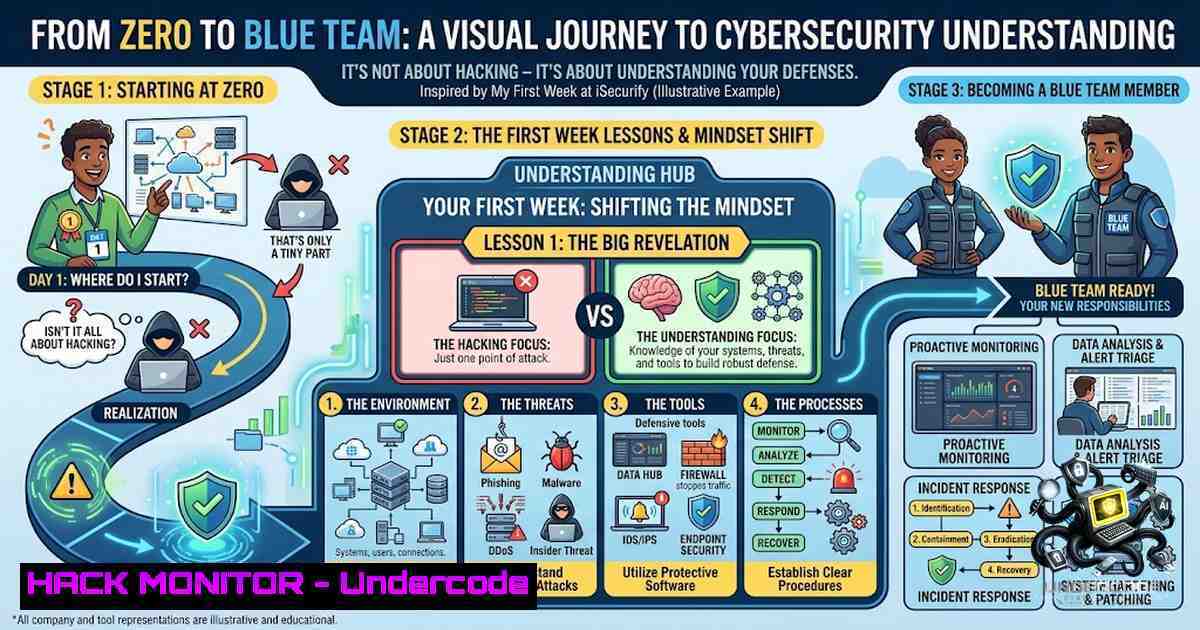
In an era where cyber threats evolve faster than defense mechanisms can adapt, the cybersecurity industry often glorifies the “hacker” mindset—penetration testing, zero-day exploits, and red team heroics. Yet, as any seasoned practitioner will attest, the true foundation of effective security lies not in the tools you wield, but in your comprehension of the systems you are paid to protect. My first week at iSecurify Technologies shattered the glamorized perception of cybersecurity, revealing that mastery over Linux internals, application footprints, and identity management is not merely preparatory work—it is the very essence of the discipline.
Learning Objectives:
- Understand the Linux filesystem hierarchy and its critical role in security investigations and incident response.
- Master identity and access management (IAM) principles, including user/group permissions and the implementation of least privilege.
- Develop a working knowledge of network fundamentals and authentication attack vectors to strengthen both offensive and defensive postures.
You Should Know:
- Decoding the Linux Filesystem: The Blueprint of System Defense
The Linux operating system is not a monolithic entity; it is a meticulously organized collection of directories, each serving a distinct purpose. For a cybersecurity professional, understanding this hierarchy is non-1egotiable. The `/etc` directory houses host-specific system-wide configuration files—the nerve center where applications like SSH, Apache, and system daemons store their settings. The `/var` directory contains variable data, including log files (/var/log), spools, and caches, making it the primary source of truth during forensic investigations. The `/proc` and `/sys` directories are virtual filesystems specific to the Linux kernel, providing real-time insights into running processes, hardware devices, and kernel parameters. Finally, `/home` stores user-specific personal data and configurations.
Step‑by‑Step Guide: Navigating and Investigating the Linux Filesystem
- Map the System: Use `lsblk` and `df -h` to understand the physical and logical storage layout.
- Explore Configuration: Navigate to `/etc` and examine critical files like
passwd,shadow, andsudoers. Use `cat /etc/os-release` to identify the distribution. - Analyze Logs: Change to
/var/log. Use `tail -f syslog` to monitor real-time system events. Investigate authentication logs withgrep "Failed password" /var/log/auth.log. - Inspect Processes: Explore
/proc. Use `cat /proc/cpuinfo` for hardware info, and `ls -l /proc/[bash]/fd` to see open file descriptors for a specific process. - Examine Kernel Parameters: Review kernel settings by navigating `/sys` or using `sysctl -a` to see runtime configuration.
2. Application Footprints: Following the Digital Breadcrumbs
Applications don’t operate in a vacuum; they leave a distinct “footprint” across the system. For security analysts and system administrators, knowing where an application stores its binaries, configurations, logs, and user data is crucial for troubleshooting and threat hunting. Typically, binaries reside in `/usr/bin` or /usr/local/bin, global configuration files are found in /etc, and application-specific logs are stored in /var/log.
Step‑by‑Step Guide: Profiling an Application’s Digital Footprint
- Locate Binaries: Use `which [bash]` or `whereis [bash]` to find the executable’s path.
- Find Configuration: Check `/etc/[bash]/` or use
find /etc -1ame "[bash]". For user-specific configs, look in `~/.config/` or~/.application_name. - Identify Log Files: Examine `/var/log/` for logs named after the application, e.g.,
/var/log/apache2/access.log. For systemd services, use `journalctl -u [bash].service` to view logs. - Trace Data Storage: Investigate `/var/lib/[bash]` for persistent data like databases or caches.
- Monitor in Real-Time: Use `strace -p [bash]` or `lsof -p [bash]` to see what files a running process is accessing.
-
Identity & Access Management: The Principle of Least Privilege in Practice
Access control is the cornerstone of system security. The Principle of Least Privilege dictates that a user or process should only have the minimum permissions necessary to perform its function. In Linux, this is implemented through users, groups, and file permissions (read, write, execute). Effective IAM involves not just setting permissions, but regularly auditing them to prevent privilege creep.
Step‑by‑Step Guide: Implementing Least Privilege Access Control
- Audit Current State: Use `id [bash]` to see a user’s UID, GID, and group memberships. Use `sudo -l -U [bash]` to list their sudo privileges.
- Create Dedicated Users: For services, create system users with `useradd -r -s /usr/sbin/nologin [bash]` to prevent interactive login.
- Manage Groups: Use `groupadd [bash]` and `usermod -aG [bash] [bash]` to assign users to groups.
- Set File Permissions: Use `chmod` to set permissions (e.g., `chmod 750 /sensitive_data` for owner rwx, group r-x, others none). Use `chown` and `chgrp` to set ownership.
- Configure Sudo: Edit `/etc/sudoers` using `visudo` to grant specific, granular commands to users or groups (e.g.,
%webadmins ALL=(ALL) /usr/bin/systemctl restart nginx).
4. Networking Fundamentals from a Security Lens
Network communication is the lifeblood of modern systems, and understanding its flow is essential for both offensive and defensive security. Tools like `ping` for connectivity, `nslookup` for DNS resolution, `netstat` for active connections, and `traceroute` for path mapping are fundamental for diagnosing issues and identifying malicious activity.
Step‑by‑Step Guide: Network Reconnaissance and Analysis
- Test Connectivity: Use `ping -c 4 8.8.8.8` to test basic network reachability and latency.
- Resolve DNS: Use `nslookup google.com` to query the DNS for an IP address. Use `dig google.com ANY` for more detailed records.
- Map the Route: Use `traceroute google.com` (Linux) or `tracert google.com` (Windows) to see the path packets take to reach a destination.
- Check Open Ports: Use `netstat -tulpn` (Linux) or `netstat -an` (Windows) to list all listening ports and active connections.
- Analyze Traffic: For deep inspection, use `tcpdump -i any -1` to capture and analyze network packets in real-time.
5. Authentication Security: Defending the Front Door
Authentication is the primary barrier against unauthorized access. Common attack techniques like brute force (trying many passwords for one account), password spraying (trying one common password against many accounts), and credential stuffing (using breached credentials) exploit weak authentication mechanisms. Mitigations include enforcing Multi-Factor Authentication (MFA), implementing strong password policies, and using account lockout mechanisms.
Step‑by‑Step Guide: Hardening Authentication Mechanisms
- Enforce MFA: Implement MFA for all remote access and critical administrative interfaces. This is the single most effective control.
- Implement Account Lockout: Configure systems to lock accounts after a defined number of failed login attempts (e.g., `pam_tally2` or
fail2ban). - Enforce Password Policies: Set minimum password length, complexity requirements, and password history to prevent reuse (e.g., using
pam_pwquality). - Disable Default Credentials: Ensure all default usernames and passwords for applications and devices are changed immediately upon deployment.
- Monitor Authentication Logs: Regularly review logs for anomalies, such as a high volume of failed logins from a single IP (brute force) or successful logins from unusual geographic locations.
6. Connecting the Dots: The Bigger Picture
The true value of these foundational skills emerges when they are interconnected. A security alert is not an isolated event; it is a symptom that manifests across multiple layers. A suspicious network connection (networking) may lead to an unrecognized process (Linux internals), which may have modified a configuration file (application footprint) using escalated privileges (IAM). Understanding these underlying systems allows an analyst to trace the attack chain, correlate events, and respond effectively rather than merely reacting to surface-level symptoms.
What Undercode Say:
- Key Takeaway 1: Cybersecurity is fundamentally about understanding the technology stack, not just using tools. Mastery of Linux, networking, and IAM provides the context needed to interpret security alerts and identify anomalies.
- Key Takeaway 2: The Principle of Least Privilege is not a theoretical concept but a practical, enforceable control. Implementing and auditing IAM policies is a continuous process that significantly reduces the attack surface.
Analysis:
The first week at iSecurify underscores a critical gap in modern cybersecurity education: the obsession with advanced topics like SIEM and penetration testing often overshadows the foundational knowledge required to excel in those areas. An analyst cannot effectively tune a SIEM without understanding what constitutes normal system behavior, nor can a penetration tester reliably exploit a system without knowing how it is built. The intern’s experience is a powerful reminder that “security” is not a layer you add on top—it is an intrinsic property of a well-understood system. The focus on Linux internals, application footprints, and networking fundamentals is not a detour; it is the main road. The ability to “read” a system through its files, logs, and network traffic is what separates a script kiddie from a true security professional. This approach builds a mental model of the system that is indispensable for both defense (hunting for anomalies) and offense (identifying misconfigurations). The insight that a failed login, a suspicious connection, or a compromised account leaves traces across all these layers is the essence of effective incident response.
Prediction:
- -1 (Negative): The cybersecurity industry’s continued emphasis on tool-centric training over foundational system knowledge will create a generation of analysts who are adept at using SIEM dashboards but incapable of investigating incidents that fall outside predefined rules, leading to prolonged breach dwell times and higher incident response costs.
- +1 (Positive): Organizations that adopt a “foundations-first” approach to training, similar to iSecurify’s methodology, will build more resilient security teams capable of adapting to novel threats, ultimately reducing their overall risk posture and fostering a culture of deep technical understanding.
- +1 (Positive): The growing recognition that cybersecurity begins with understanding systems will drive a shift in educational curricula, with more emphasis placed on operating system internals, networking, and IAM, creating a more robust and capable talent pipeline for the industry.
▶️ Related Video (68% Match):
🎯Let’s Practice For Free:
🎓 Live Courses & Certifications:
Join Undercode Academy for Verified Certifications
🚀 Request a Custom Project:
Secure, high-velocity infrastructure and disruptive technological engineering. Contact our engineering team for high-tier development and proprietary systems:
[email protected]
💎 Smart Architecture | 🛡️ Secure by Design | ⭐ Trusted by Thousands
IT/Security Reporter URL:
Reported By: Princeraj Zala – Hackers Feeds
Extra Hub: Undercode MoN
Basic Verification: Pass ✅


