Listen to this Post
Introduction:
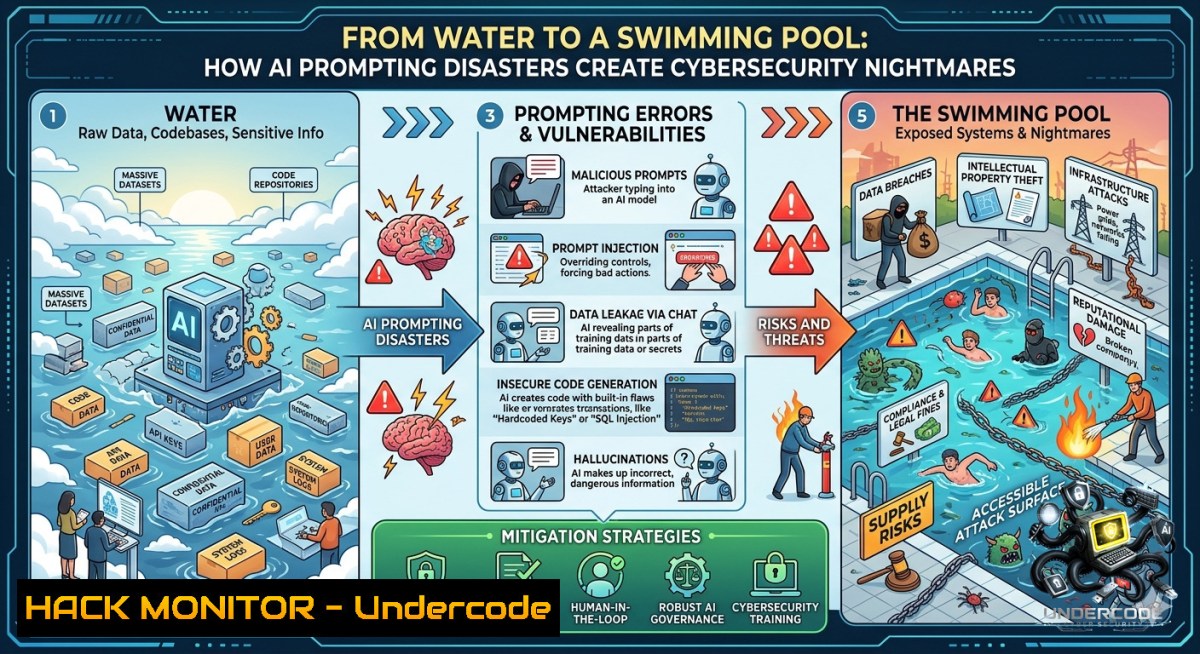
The viral quip “I asked for water, it built a swimming pool” perfectly captures the double-edged nature of AI‑driven development—vague prompts produce excessive, often insecure code. As organizations race to integrate LLMs into DevOps, poor prompt engineering isn’t just a productivity sink; it directly introduces vulnerabilities, from API over‑provisioning to hidden backdoors. Understanding how to scope, secure, and audit AI‑generated outputs is now a core cybersecurity discipline.
Learning Objectives:
– Master prompt scoping techniques that reduce AI‑induced attack surfaces.
– Identify and mitigate common security flaws in AI‑generated code (injection, excessive permissions, exposed secrets).
– Implement validation workflows using static analysis and runtime guards across Linux and Windows environments.
You Should Know:
1. Why Vague Prompts Build Swimming Pools – and How to Drain Them
When you ask an LLM for “a script to handle user input,” it might return a full‑blown web server with file write permissions and an admin endpoint. This over‑generosity stems from the model’s training on diverse, unfiltered examples. Attackers love this because every extra feature is a potential foothold.
Step‑by‑step guide to shrink the pool:
– Atomic requests: Break tasks into single‑purpose prompts (e.g., “validate email format” not “build a registration system”).
– Explicit deny patterns: State what the code must not do (e.g., “no file system access, no subprocess calls”).
– Use meta‑prompts: Prefix with “You are a security‑conscious developer. Output only the minimal code required.”
Linux command to inspect AI‑generated scripts for suspicious syscalls:
 Trace file operations and network connections during a test run
strace -e trace=open,openat,connect,execve -f python ai_generated_script.py 2>&1 | grep -E "open|connect|execve"
Windows (PowerShell) equivalent using Sysinternals:
 Monitor process creation and file writes
& "C:\Tools\Procmon.exe" /AcceptEula /Minimized /BackingFile ai_activity.pml
 Then filter for Process Name = python.exe and Operation contains "CreateFile" or "TCP Connect"
2. Prompt Injection: The Unseen API Security Hole
Poorly scoped prompts can lead to indirect injection attacks where user input manipulates the LLM into generating malicious code or leaking data. This is especially dangerous when AI agents have API keys or database access.
Step‑by‑step guide to test and harden against prompt injection:
1. Treat LLM input as untrusted – same as SQL or command injection.
2. Use delimiter‑based scoping: Wrap user data in unique tokens (e.g., `<<
3. Apply output encoding: Sanitize any code before execution.
API security header example (Python with Flask):
from flask import request, jsonify
from markupsafe import escape

@app.route('/ai-query', methods=['POST'])
def safe_ai_call():
user_text = escape(request.json['prompt'])  basic XSS protection
 Then use a system message that forbids code generation
response = call_llm(system="Return ONLY plain text answers. NO code blocks.",
user=user_text)
return jsonify({"response": response})
Cloud hardening tip for AWS Bedrock / OpenAI:
Restrict the model’s function‑calling permissions via IAM roles that allow only read‑only tools.
3. Auditing AI‑Generated Code with Static Analysis (Semgrep & CodeQL)
Most vulnerabilities in LLM outputs are classic injection, path traversal, or hardcoded secrets. Automate detection.
Step‑by‑step guide:
1. Install Semgrep (cross‑platform):
pip install semgrep
2. Run OWASP rules against AI output:
semgrep --config "p/owasp-top-ten" ./ai_generated_code/
3. For deeper flow analysis (Linux/macOS): Install CodeQL CLI and run:
codeql database create ./db --language=python --source-root=./ai_code
codeql database analyze ./db --format=sarif-latest --output=results.sarif codeql/python-queries
Windows (WSL or native): Semgrep works via PowerShell with `pip`. For CodeQL, use WSL2 for best performance.
4. Hardening Your AI‑Dev Pipeline Against Over‑Permissive Outputs
If an AI builds a swimming pool, restrict its water supply. Apply principle of least privilege to both the AI’s environment and its generated artifacts.
Step‑by‑step guide using Docker and Linux namespaces:
 Run AI-generated code in a read-only, non-root container
docker run --rm --read-only --tmpfs /tmp:rw,noexec,nosuid --cap-drop ALL --security-opt=no-1ew-privileges python:3.11-slim python /app/ai_script.py
Windows (Hyper‑V isolation):
 Use Docker Desktop with Windows containers in isolated mode
docker run --isolation=hyperv --read-only --rm python:3.11-windowsservercore python ai_script.py
Also set resource limits to prevent cryptomining or DoS:
docker update --cpus="0.5" --memory="256m" <container_id>
5. Training Your Team: From Water to Precision Engineering
The swimming‑pool problem is a training gap. Build internal courses on “Secure Prompt Engineering” and “AI Output Validation”.
Step‑by‑step guide for a hands‑on lab:
– Lab 1 (Vulnerable prompt): Ask an LLM to “write a function to download a user‑supplied URL.” Let students observe it generates `urllib.request.urlopen` with no validation → then exploit via SSRF.
– Lab 2 (Hardened prompt): Same request but with restrictions: “only allow https, domain must be in whitelist, use timeout 5s, no follow redirects.” Compare outputs.
– Tool to automate validation: Create a Python wrapper that rejects any code containing banned patterns (e.g., `eval`, `exec`, `subprocess`, `open(`).
Linux command to scan for dangerous keywords across all files:
grep -rnw './ai_output/' -e 'eval' -e 'exec(' -e '__import__' -e 'subprocess' -e 'socket' --color=always
Windows PowerShell:
Get-ChildItem -Path .\ai_output -Recurse | Select-String -Pattern "eval|exec\(|__import__|subprocess|socket" -CaseSensitive
6. Exploitation Walkthrough: How an Over‑Generated Pool Becomes a Breach
Demonstrate the risk. Suppose AI produces a “simple data plotter” but also includes a hidden Flask debug endpoint.
Step‑by‑step attack simulation:
1. Generate the vulnerable code using a vague prompt: “Create a Python script to plot CSV data from user uploads.”
2. The AI might add `app.run(debug=True, host=’0.0.0.0′)` plus a `/shell` endpoint.
3. As an attacker, scan for open ports:
nmap -p 5000 target.com
4. Access the debug console – Flask debugger allows arbitrary Python execution, leading to RCE.
5. Mitigation step: Apply a post‑generation filter to strip any occurrence of `debug=True` or `host=’0.0.0.0’` using `sed`:
sed -i 's/debug=True/debug=False/g' ai_generated_app.py
sed -i "s/host='0.0.0.0'/host='127.0.0.1'/g" ai_generated_app.py
7. The Ultimate Training Course: “Secure AI Code Generation”
Based on the Cyber Security Times post and expert comments (Łukasz Glegoła: “bad prompting and context generate poor results”; Ethan Graham: “general prompts explore options before scoping”), build a formal training module.
Course outline:
– Module 1: Prompt decomposition – turn “build a pool” into “fill a glass” using constrained language.
– Module 2: Automated validation pipelines (GitHub Actions + Semgrep + OWASP ZAP).
– Module 3: Red‑teaming your own AI assistant with tools like Garak (LLM vulnerability scanner).
– Lab: Given a “secure data viewer” request, compare outputs from GPT‑4, Claude, and Llama – measure over‑permission metrics (file ops, network calls, eval usage).
Linux command to run Garak (LLM scanner):
git clone https://github.com/leondz/garak
cd garak
pip install -e .
garak --model_type openai --model_name gpt-3.5-turbo --probes encoding,dan,slowroll
What Undercode Say:
– Key Takeaway 1: Vague AI prompts are not just inefficient – they’re a direct supply‑chain risk. Every extra line of code, every unrequested debug endpoint, every hidden permission expands the attack surface exponentially.
– Key Takeaway 2: “Explore first, scope later” (Ethan Graham) is valid for brainstorming but lethal for production. You must have a hard boundary between discovery sandboxes and secured pipelines.
Analysis (approx. 10 lines):
The swimming‑pool metaphor perfectly illustrates the gap between human intent and model generalization. In cybersecurity, that gap is where breaches are born – an AI that builds a full web server when asked for a simple validator is functionally equivalent to an insider threat that over‑provisions IAM roles. The comment by Łukasz Glegoła highlights the root cause: context and prompting granularity. Organizations that treat prompt engineering as an afterthought will see AI‑generated code become their 1 vulnerability source. Conversely, teams that implement the step‑by‑step guards above (static analysis, container isolation, keyword filters, explicit deny prompts) can safely harness LLMs as junior assistants rather than reckless architects. The training gap is real – most developers don’t know how to ask for “one glass of water” in a way the model understands. Investing in secure prompt engineering courses is no longer optional; it’s the firewall between a helpful tool and a self‑constructed breach.
Prediction:
– +1 Increased adoption of AI‑specific SCA (Software Composition Analysis) tools that scan not just libraries but the semantic structure of generated code for over‑permission patterns.
– +1 Emergence of “prompt firewalls” – proxy layers that intercept LLM requests, automatically append security constraints, and filter outputs before they reach CI/CD pipelines.
– -1 Rise of “prompt injection as a service” on darknet markets, where attackers sell curated prompt chains that trick enterprise LLMs into leaking credentials or generating backdoors.
– -1 Regulatory backlash – within 18 months, the EU’s AI Act will be amended to require explicit “minimal output” certifications for any model used in critical software development.
– +1 Open‑source hardening standards (e.g., OWASP LLM Top 10 v2) will include “Excessive Functionality” as a top‑three risk, driving widespread adoption of post‑generation trimming tools.
▶️ Related Video (80% Match):
🎯Let’s Practice For Free:
🎓 Live Courses & Certifications:
[Join Undercode Academy for Verified Certifications](https://undercode.co.uk/certifications/)
🚀 Request a Custom Project:
Secure, high-velocity infrastructure and disruptive technological engineering. Contact our engineering team for high-tier development and proprietary systems:
[[email protected]](mailto:[email protected])
💎 Smart Architecture | 🛡️ Secure by Design | ⭐ Trusted by Thousands
IT/Security Reporter URL:
Reported By: [%F0%9D%97%A3%F0%9D%97%BF%F0%9D%97%BC%F0%9D%97%B4%F0%9D%97%BF%F0%9D%97%AE%F0%9D%97%BA%F0%9D%97%BA%F0%9D%97%B6%F0%9D%97%BB%F0%9D%97%B4 %F0%9D%98%84%F0%9D%97%B6%F0%9D%98%81%F0%9D%97%B5](https://www.linkedin.com/posts/%F0%9D%97%A3%F0%9D%97%BF%F0%9D%97%BC%F0%9D%97%B4%F0%9D%97%BF%F0%9D%97%AE%F0%9D%97%BA%F0%9D%97%BA%F0%9D%97%B6%F0%9D%97%BB%F0%9D%97%B4-%F0%9D%98%84%F0%9D%97%B6%F0%9D%98%81%F0%9D%97%B5-%F0%9D%97%94%F0%9D%97%9C-%F0%9D%97%9C-share-7466114563445260288-QGY4/) – Hackers Feeds
Extra Hub: Undercode MoN
Basic Verification: Pass ✅
🔐JOIN OUR CYBER WORLD [ CVE News • HackMonitor • UndercodeNews ]
[💬 Whatsapp](https://undercode.help/whatsapp) | [💬 Telegram](https://t.me/UndercodeCommunity)
📢 Follow UndercodeTesting & Stay Tuned:
[𝕏 formerly Twitter 🐦](https://x.com/undercodeupdate) | [@ Threads](https://www.threads.net/@undercodetesting) | [🔗 Linkedin](https://www.linkedin.com/company/undercodetesting/) | [🦋BlueSky](https://bsky.app/profile/undercode.bsky.social)


