Listen to this Post
Introduction:
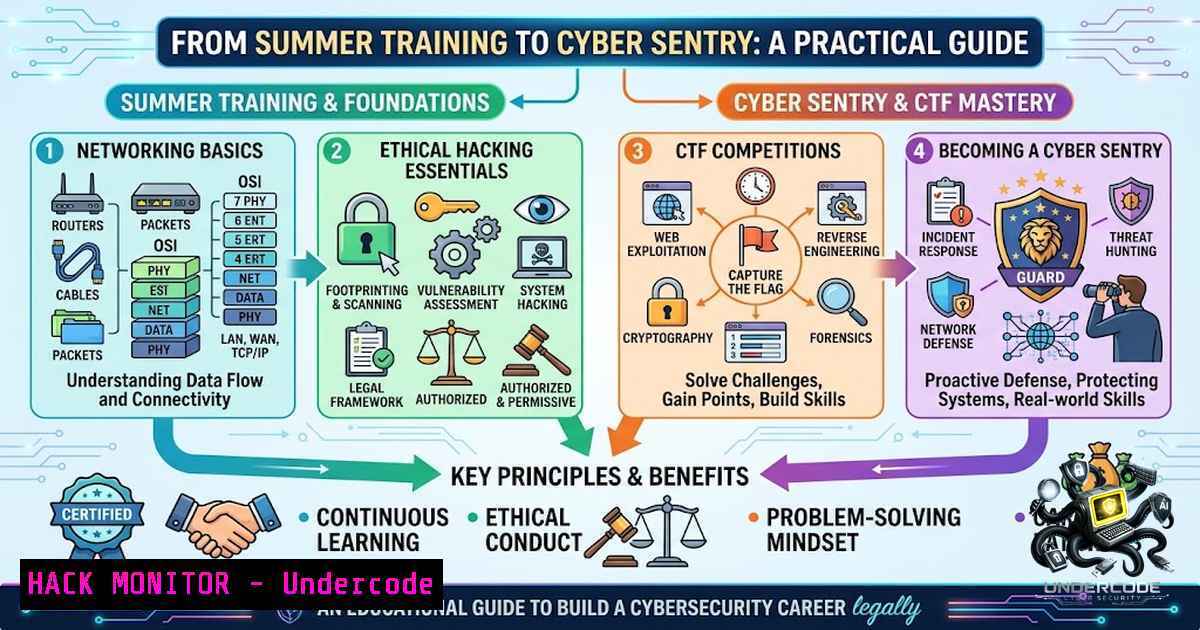
In an era where cyber threats evolve at machine speed, the demand for versatile security professionals has never been more critical. Ahmed Tarek Elmandouh, an Artificial Intelligence major at AAST, recently completed a 72-hour intensive Cyber Security Summer Training with XPAND CS / MCS, highlighting the growing recognition that AI and cybersecurity are converging fields. This training covered everything from network security fundamentals to hands-on Capture The Flag (CTF) challenges, embodying the hybrid skill set modern defenders need. As organizations scramble to protect digital assets, the ability to navigate both Linux and Windows environments, conduct ethical hacking, and respond to incidents is becoming a baseline requirement for any serious security practitioner.
Learning Objectives & Secrets:
- Objective 1: Master Core Network Security Concepts and Commands. Gain proficiency in diagnosing and securing network configurations using essential command-line tools across Linux and Windows. Secret Tip: Always start with `netstat -ano` on Windows or `ss -tupn` on Linux to map active connections and listening ports—this reveals hidden backdoors and unauthorized services immediately.
-
Objective 2: Execute Ethical Hacking and Penetration Testing Like a Pro. Move beyond theory by applying reconnaissance, privilege escalation, and post-exploitation techniques. Secret Tip: Use `nmap -A -T4 -p-
` for an aggressive yet thorough initial scan, then automate enumeration with tools like LinPEAS (Linux) or winPEAS (Windows) to uncover misconfigurations that are often overlooked. -
Objective 3: Dominate CTF Challenges with a Strategic Mindset. CTFs are not just games—they are simulations of real attack paths. Secret Tip: Always inspect web source code and HTTP headers first; many flags are hidden in plain sight. For binary exploitation, combine `checksec` with `gdb` to understand protections before crafting payloads.
You Should Know:
1. Network Security Hardening: Command-Line Firewall Mastery
Securing network perimeters starts with proper firewall configuration. On Linux, `iptables` remains the gold standard for packet filtering, while Windows administrators rely on netsh advfirewall. Below are verified commands to establish a baseline secure configuration:
- Linux (iptables): Block all incoming traffic except established connections and SSH.
sudo iptables -P INPUT DROP
sudo iptables -P FORWARD DROP
sudo iptables -P OUTPUT ACCEPT
sudo iptables -A INPUT -m state --state ESTABLISHED,RELATED -j ACCEPT
sudo iptables -A INPUT -p tcp --dport 22 -j ACCEPT
sudo iptables -A INPUT -p icmp --icmp-type echo-request -j ACCEPT  Allow ping selectively
sudo iptables-save > /etc/iptables/rules.v4
Step-by-step: These rules set default policies to drop incoming packets, permit outbound traffic, allow established connections, and only expose SSH (port 22) and ICMP echo requests. Always test with `sudo iptables -L -v` to verify.
-
Windows (netsh advfirewall): Enable firewall and configure logging for incident response.
netsh advfirewall set allprofiles state on
netsh advfirewall set allprofiles logging filename %systemroot%\system32\LogFiles\Firewall\pfirewall.log
netsh advfirewall set allprofiles logging maxfilesize 4096
netsh advfirewall set allprofiles logging droppedconnections enable
netsh advfirewall set allprofiles logging allowedconnections enable
Step-by-step: This turns on the Windows Firewall for all profiles (Domain, Private, Public), enables detailed logging of both dropped and allowed connections, and sets a 4MB log file size to prevent disk exhaustion. Review logs with
notepad C:\Windows\System32\LogFiles\Firewall\pfirewall.log.
2. Ethical Hacking Reconnaissance and Privilege Escalation
Reconnaissance is the cornerstone of ethical hacking. Start with network scanning to identify live hosts and open ports:
- Nmap Scanning:
nmap -sV -sC -O -p- <target-ip> Version, default scripts, OS detection, all ports
Once a foothold is established, privilege escalation is critical. Use these checklists:
- Linux Privilege Escalation:
find / -perm -4000 2>/dev/null  Find SUID binaries
sudo -l  List sudo permissions for current user
cat /etc/passwd | grep /bin/bash  Identify user accounts with shell access
Step-by-step: SUID binaries run with the owner’s privileges—misconfigured ones (e.g.,
pkexec,vim) can grant root access. The `sudo -l` command reveals what commands you can run as root without a password, a common vector for lateral movement. -
Windows Privilege Escalation:
whoami /priv  List current user privileges
whoami /groups  Check group memberships
powershell -ExecutionPolicy Bypass -File .\PowerUp.ps1  Run PowerUp for misconfigurations
Step-by-step: `whoami /priv` shows enabled and disabled privileges (e.g.,
SeImpersonatePrivilege). If high-integrity privileges are present, tools like `JuicyPotato` or `PrintSpoofer` can escalate to SYSTEM. PowerUp automates the discovery of vulnerable services and scheduled tasks.
3. CTF Problem-Solving Techniques: From Web to Binary
CTF challenges test practical security skills across multiple domains. Here are proven strategies:
- Web Exploitation: Always examine source code (
Ctrl+U), cookies, and HTTP headers. Use `curl -v` to inspect server responses. For SQL injection, start with `’ OR ‘1’=’1` and use `sqlmap -u –dbs` for automated exploitation. -
Forensics: Analyze file metadata with `exiftool
` and search for embedded strings using strings <file> | grep -i flag. For network packet captures, use `tshark -r capture.pcap -Y “http”` to filter HTTP traffic. -
Binary Exploitation: Use `checksec
` to view security mitigations (NX, PIE, Canary). For buffer overflows, generate patterns with `pattern_create.rb -l 100` (from Metasploit) and find the offset with pattern_offset.rb -q <value>.
4. Operating System Security Fundamentals
Securing operating systems involves managing accounts, permissions, and processes:
- Linux Account Security:
sudo useradd -m -s /bin/bash newuser
sudo passwd newuser
sudo chage -M 90 newuser  Set password max age to 90 days
Step-by-step: Create a new user with a home directory and Bash shell, set a strong password, and enforce password rotation every 90 days. Review `/etc/shadow` for password hashes and ensure no empty passwords exist.
-
Windows Account Security (PowerShell):
New-LocalUser -1ame "newuser" -Password (ConvertTo-SecureString "P@ssw0rd" -AsPlainText -Force)
Add-LocalGroupMember -Group "Administrators" -Member "newuser"
Set-LocalUser -1ame "newuser" -PasswordNeverExpires $false
Step-by-step: Create a local user with a secure password, optionally add to the Administrators group, and enforce password expiration. Use `Get-LocalUser` to list all accounts and identify inactive or default accounts for removal.
5. Incident Response and Log Analysis
When a breach occurs, rapid detection and response are paramount. Use these commands to gather forensic evidence:
- Linux Log Analysis:
journalctl -xe -p err -S "2026-08-19"  Show errors from a specific date
grep "Failed password" /var/log/auth.log | tail -20  Identify brute-force attempts
lsof -i -P -1 | grep LISTEN  List all listening ports and associated processes
-
Windows Event Log Analysis:
Get-WinEvent -LogName Security -MaxEvents 50 | Where-Object { $_.Id -eq 4625 }  Failed logons
wevtutil qe Security /c:50 /f:text /q:"[System[(EventID=4624)]]"  Successful logons
Step-by-step: On Linux, `journalctl` provides a unified view of system logs; filtering by priority (
-p err) surfaces critical issues. On Windows, Event ID 4624 indicates successful logon, while 4625 indicates failure—monitoring these can reveal account compromise or brute-force attacks.
6. AI and Cybersecurity: The Convergence
Artificial Intelligence is reshaping cybersecurity, moving from reactive to predictive defense. Machine learning models can analyze vast telemetry data to detect anomalies and indicators of compromise faster than traditional methods. For example, AI-driven SIEM (Security Information and Event Management) systems can correlate events across thousands of endpoints, identifying patterns that human analysts might miss. As Ahmed Tarek’s training illustrates, combining AI expertise with cybersecurity fundamentals creates a powerful hybrid profile—one capable of building intelligent defenses and automating threat response. However, adversaries are also leveraging AI to craft sophisticated phishing campaigns and evade detection, making continuous learning and adaptation essential.
What Undercode Say:
- Key Takeaway 1: Hands-on experience bridges the gap between theory and practice. The 72-hour training at XPAND CS / MCS emphasized CTF challenges and practical labs, proving that active participation in simulated attacks is the most effective way to internalize security concepts.
-
Key Takeaway 2: Cross-disciplinary knowledge is a force multiplier. As an AI major, Ahmed expanded his expertise into cybersecurity, recognizing that modern security challenges demand diverse skills—from network hardening to machine learning-driven threat detection.
The convergence of AI and cybersecurity is not just a trend; it is a necessity. Organizations are increasingly seeking professionals who can write secure code, configure firewalls, respond to incidents, and deploy AI-based defenses. The training provided by XPAND CS and MCS, in partnership with industry leaders like Exabeam, reflects this shift by offering comprehensive curricula that cover SOC operations, ethical hacking, and emerging technologies. For students and early-career professionals, investing in such cross-functional training is a strategic move that opens doors to roles in security engineering, threat intelligence, and AI security research. The path forward is clear: master the fundamentals, embrace continuous learning, and never stop exploring.
Prediction:
- +1 The integration of AI into cybersecurity training programs will accelerate, with more universities and academies offering combined curricula that produce graduates capable of building intelligent, self-healing security systems.
-
+1 Demand for professionals with both AI and cybersecurity expertise will outpace supply, leading to higher salaries and more specialized roles such as AI Security Engineer and ML Threat Analyst.
-
-1 The democratization of AI-powered hacking tools will lower the barrier to entry for cybercriminals, increasing the volume and sophistication of automated attacks.
-
-1 Organizations that fail to adopt AI-driven defenses will struggle to keep pace with threat actors, resulting in more frequent and costly data breaches.
-
+1 CTF platforms and gamified training will become standard components of corporate security awareness programs, improving overall organizational resilience.
▶️ Related Video (76% Match):
https://www.youtube.com/watch?v=0eLmvsgQo8g
🎯Let’s Practice For Free:
🎓 Live Courses & Certifications:
Join Undercode Academy for Verified Certifications
🚀 Request a Custom Project:
Secure, high-velocity infrastructure and disruptive technological engineering. Contact our engineering team for high-tier development and proprietary systems:
[email protected]
💎 Smart Architecture | 🛡️ Secure by Design | ⭐ Trusted by Thousands
IT/Security Reporter URL:
Reported By: https://lnkd.in/p/e2DziqcY – Hackers Feeds
Extra Hub: Undercode MoN
Basic Verification: Pass ✅


