Listen to this Post
Introduction
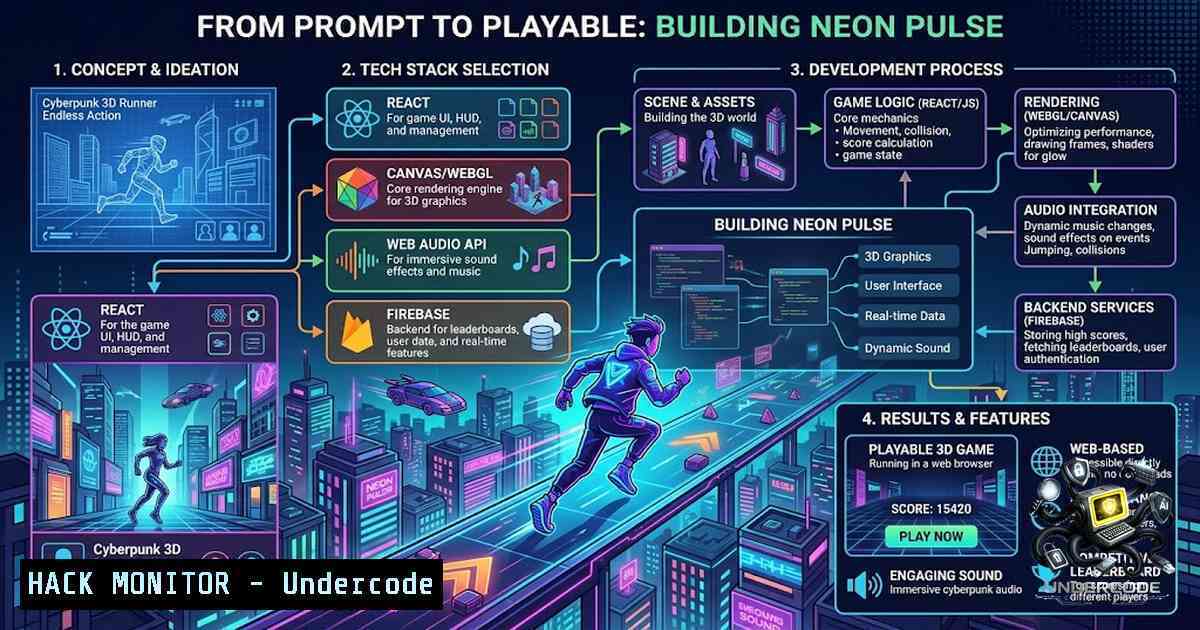
The gap between a conceptual idea and a functional web application has narrowed dramatically with the advent of generative AI. NEON PULSE, a futuristic 3D cyberpunk subway runner with audio-visual feedback, exemplifies this shift—built with React, HTML5 Canvas, Web Audio API, and Firebase, it was spawned from a single prompt in Google AI Studio. This article deconstructs the technical architecture, security considerations, and performance optimizations behind such AI-accelerated development, offering a blueprint for developers looking to harness similar tools while maintaining robust security postures.
Learning Objectives
- Understand the end-to-end architecture of a modern browser-based 3D game using React, Canvas, Web Audio API, and Firebase.
- Implement secure Firebase Security Rules to protect cloud leaderboard data from unauthorized access.
- Apply performance optimization techniques for HTML5 Canvas rendering and Web Audio processing.
- Leverage Google AI Studio for rapid prototyping and prompt-to-code workflows.
- Identify and mitigate common web vulnerabilities including XSS, WebAudio exploits, and insecure cloud configurations.
You Should Know
1. AI-Accelerated Prototyping with Google AI Studio
The genesis of NEON PULSE began not with a code editor, but with a text prompt in Google AI Studio. This approach—often called “vibe coding”—allows developers to describe an application in natural language and receive a fully functional web app in minutes.
Step‑by‑step guide to prompt-to-game workflow:
- Open Google AI Studio and navigate to the “Build” mode.
- Craft a detailed prompt describing your game mechanics, visual style, and tech stack. For example:
Build a React web app that is a 3D cyberpunk subway runner game with:</li>
</ol>

- A three-lane runner with jump and slide mechanics
- Cyber hazards and an EMP shockwave power-up
- Beat-reactive audio using Web Audio API
- A cloud leaderboard using Firebase Firestore
- Mobile touch controls support
3. Generate and iterate—AI Studio produces a working codebase. Refine by adding system instructions or editing the prompt for new features.
4. Export to GitHub for version control and further manual customization.Linux/macOS setup commands:
 Clone the generated repository
git clone https://github.com/yourusername/neon-pulse.git
cd neon-pulse

Install dependencies
npm install

Start development server
npm start
Windows (PowerShell) equivalents:
git clone https://github.com/yourusername/neon-pulse.git
cd neon-pulse
npm install
npm start
Security consideration: AI-generated code may contain vulnerabilities. Always audit dependencies and sanitize user inputs before deployment. Use `npm audit` to check for known issues:
npm audit fix
2. Securing Firebase Cloud Leaderboards
NEON PULSE utilizes Firebase for cloud leaderboard functionality. Misconfigured Firebase Security Rules are a leading cause of data exposure.
Step‑by‑step guide to hardening Firebase Security Rules:
- Start with a default-deny policy—explicitly allow only what is necessary:
rules_version = '2';
service cloud.firestore {
match /databases/{database}/documents {
// Default deny all access
match /{document=} {
allow read, write: if false;
}
}
}
2. Implement user-based authentication for leaderboard submissions:
match /leaderboard/{userId} {
allow read: if true; // Anyone can view scores
allow create: if request.auth != null && request.auth.uid == userId;
allow update, delete: if request.auth != null && request.auth.uid == userId;
}
3. Validate data types and constraints on writes:
allow create: if request.auth != null
&& request.auth.uid == userId
&& request.resource.data.score is int
&& request.resource.data.score >= 0
&& request.resource.data.score <= 999999;
- Deploy rules via Firebase CLI instead of the console for version control:
firebase deploy --only firestore:rules
-
Audit existing rules regularly and remove any `allow read, write: if true` entries.
3. Web Audio API: Performance and Security
The beat-reactive audio in NEON PULSE relies on the Web Audio API. However, this API has been the subject of multiple critical CVEs, including use-after-free vulnerabilities (CVE-2026-9952) and heap buffer overflows (CVE-2026-5864) that allow arbitrary code execution via crafted HTML pages.
Performance optimization techniques:
- Use `AudioContext` efficiently—create a single context and reuse it:
const audioCtx = new (window.AudioContext || window.webkitAudioContext)();
-
Analyze audio data with `AnalyserNode` for beat detection:
const analyser = audioCtx.createAnalyser();
analyser.fftSize = 256;
const dataArray = new Uint8Array(analyser.frequencyBinCount);</p></li>
</ol>

<p>function getFrequencyData() {
analyser.getByteFrequencyData(dataArray);
return dataArray;
}
3. Clean up resources to prevent memory leaks:
// Close context when no longer needed
audioCtx.close();
Security best practices:
- Keep browsers updated—vulnerabilities are patched in newer versions (Chrome 148.0.7778.216+ fixes multiple WebAudio CVEs).
- Validate all audio sources before processing—never trust user-supplied audio files without sanitization.
- Implement Content Security Policy (CSP) to restrict script sources and mitigate exploit delivery:
<meta http-equiv="Content-Security-Policy"
content="script-src 'self';
style-src 'self' 'unsafe-inline';
media-src 'self' blob:;">
4. HTML5 Canvas: 3D Rendering and Performance
NEON PULSE achieves its cinematic 3D rendering experience through HTML5 Canvas. Performance is critical for maintaining 60fps gameplay.
Step‑by‑step optimization guide:
- Disable transparency when not needed—this enables browser internal optimizations:
const ctx = canvas.getContext('2d', { alpha: false }); -
Use `requestAnimationFrame` instead of `setInterval` for smooth rendering loops:
function gameLoop(timestamp) { update(timestamp); render(); requestAnimationFrame(gameLoop); } requestAnimationFrame(gameLoop); -
Pre-render on offscreen canvases to avoid redrawing static elements every frame:
const offscreen = document.createElement('canvas');
const offCtx = offscreen.getContext('2d');
// Draw static elements once on offscreen canvas
// Then in main loop: ctx.drawImage(offscreen, 0, 0);
4. Avoid floating-point coordinates—use integers for pixel-perfect rendering:
// Instead of: ctx.drawImage(img, x, y) with floating x/y
// Use: ctx.drawImage(img, Math.floor(x), Math.floor(y))
- Minimize state changes—batch draw calls and avoid `shadowBlur` where possible.
5. React Security: XSS Prevention and Dependency Management
React auto-escapes JSX content by default, but
dangerouslySetInnerHTML, `href` injection, and dependency chains can introduce vulnerabilities.Critical security practices:
- Never use `dangerouslySetInnerHTML` with unsanitized user input. If absolutely necessary, sanitize with a library like DOMPurify:
import DOMPurify from 'dompurify'; const sanitized = DOMPurify.sanitize(userInput);</li> </ol> <div dangerouslySetInnerHTML={{ __html: sanitized }} />- Pin dependencies with a committed lockfile and verify package provenance:
npm ci  Uses lockfile for deterministic installs
npm audit  Scan for vulnerabilities
-
Implement runtime validation for all user inputs, treating TypeScript types as a correctness tool but not a security boundary.
4. Set security headers including CSP and X-Frame-Options:
<meta http-equiv="X-Frame-Options" content="DENY">
6. Mobile Optimization and Touch Controls
NEON PULSE supports mobile touch controls. Ensuring a seamless experience across devices requires specific considerations.
Implementation checklist:
1. Responsive canvas sizing—dynamically scale based on viewport:
function resizeCanvas() { const ratio = canvas.width / canvas.height; canvas.style.width = window.innerWidth + 'px'; canvas.style.height = (window.innerWidth / ratio) + 'px'; } window.addEventListener('resize', resizeCanvas);- Touch event handling—prevent default behaviors and support multi-touch:
canvas.addEventListener('touchstart', (e) => { e.preventDefault(); const touch = e.touches[bash]; handleInput(touch.clientX, touch.clientY); }); -
Frame-rate independent speed—use delta time to ensure consistent game speed across devices:
let lastTime = 0;
function gameLoop(timestamp) {
const delta = (timestamp - lastTime) / 1000;
lastTime = timestamp;
update(delta);
render();
requestAnimationFrame(gameLoop);
}
What Undercode Say
-
AI is an accelerator, not a replacement—Google AI Studio can turn prompts into functional prototypes, but security, performance, and production readiness still require human expertise. The “vibe coding” approach is ideal for rapid validation but demands rigorous post-generation auditing.
-
The browser is a powerful game platform—NEON PULSE demonstrates that modern web technologies (React, Canvas, Web Audio, Firebase) can deliver immersive 3D experiences without plugins or app stores. This reduces friction for users and expands reach across devices.
The intersection of AI-assisted development and browser-based gaming represents a paradigm shift. Developers can now iterate faster than ever, but this speed introduces new risks: AI-generated code may contain subtle vulnerabilities, and the reliance on third-party APIs (Web Audio, Firebase) exposes applications to upstream security flaws. The key takeaway is that security cannot be an afterthought—it must be integrated into the development lifecycle from the prompt stage through deployment. Regular audits, dependency scanning, and adherence to security best practices are non-1egotiable. NEON PULSE is not just a game; it’s a case study in modern full-stack development where creativity, AI, and security must coexist.
Prediction
- +1 AI-assisted development will become the standard for prototyping web applications, reducing time-to-market by 60–80% for MVPs while shifting developer focus toward security, performance, and user experience optimization.
-
+1 Browser-based gaming will continue to grow as WebAssembly, WebGPU, and advanced Canvas APIs mature, challenging native platforms and enabling instant-play experiences across all devices.
-
-1 The proliferation of AI-generated code will lead to a surge in vulnerabilities as less experienced developers deploy unvetted applications, making automated security scanning and AI-powered code review tools essential parts of the CI/CD pipeline.
▶️ Related Video (70% Match):
https://www.youtube.com/watch?v=aEdRB2yVK-I
🎯Let’s Practice For Free:
🎓 Live Courses & Certifications:
Join Undercode Academy for Verified Certifications
🚀 Request a Custom Project:
Secure, high-velocity infrastructure and disruptive technological engineering. Contact our engineering team for high-tier development and proprietary systems:
[email protected]
💎 Smart Architecture | 🛡️ Secure by Design | ⭐ Trusted by ThousandsIT/Security Reporter URL:
Reported By: Keerthipriya Peddada – Hackers Feeds
Extra Hub: Undercode MoN
Basic Verification: Pass ✅🔐JOIN OUR CYBER WORLD [ CVE News • HackMonitor • UndercodeNews ]
📢 Follow UndercodeTesting & Stay Tuned:
- Pin dependencies with a committed lockfile and verify package provenance:
- Start with a default-deny policy—explicitly allow only what is necessary:


