Listen to this Post
Introduction:
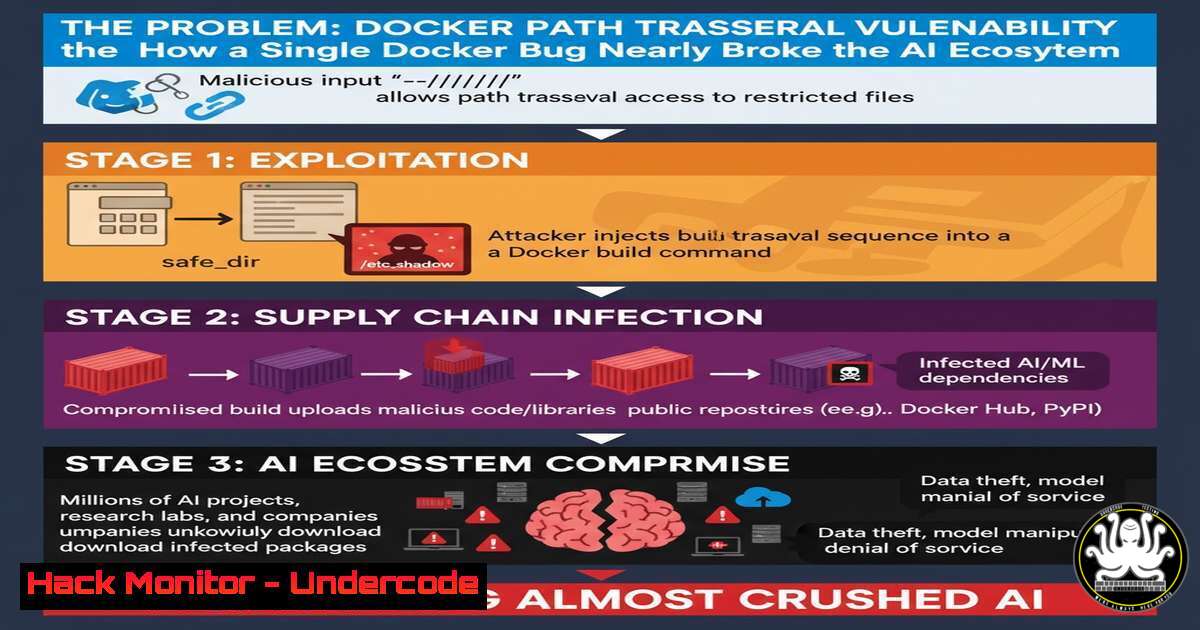
A recently disclosed path traversal vulnerability in Smithery.ai’s build process exposed over 3,000 Model Context Protocol (MCP) servers to potential takeover, nearly triggering a massive AI supply chain attack. This incident, stemming from an insecure Docker build argument, highlights the critical intersection of traditional application security flaws and modern AI infrastructure, where a single misconfiguration can compromise an entire ecosystem of servers and their associated API keys.
Learning Objectives:
- Understand the mechanism of the path traversal vulnerability within the Docker build context and its impact on the software supply chain.
- Learn critical command-line techniques for auditing Docker configurations, file systems, and network security to identify and mitigate such flaws.
- Develop a proactive defense strategy for securing build environments and hardening MCP servers against similar exploitation.
You Should Know:
1. Auditing Dockerfiles for Insecure Build Arguments
The vulnerability was rooted in the misuse of Docker build arguments (--build-arg) that could be manipulated to perform path traversal. Auditing your Dockerfiles is the first line of defense.
Verified Commands & Tutorials:
 1. Search Dockerfiles for the use of build arguments
find . -name "Dockerfile" -exec grep -l "ARG" {} \;

<ol>
<li>Inspect a built image's history to see the build commands used
docker history --no-trunc <image_name></p></li>
<li><p>Scan a Dockerfile for common security best practices using hadolint
docker run --rm -i hadolint/hadolint < Dockerfile</p></li>
<li><p>Check for secrets accidentally stored in an image's layers
docker run --rm -it aquasec/trivy image --security-checks secret <image_name></p></li>
<li><p>Dry-run build to see the final build context sent to the Docker daemon
docker build --no-cache --progress=plain .
Step-by-step guide: Start by using `find` and `grep` to locate all Dockerfiles in your project that use `ARG` instructions. For any identified images, use `docker history` to see the exact commands that were executed during the build, which can reveal if build args were used insecurely. Integrate `hadolint` into your CI/CD pipeline to automatically flag bad practices, and run `trivy` to ensure no sensitive data has been baked into the image layers. The `–progress=plain` build flag provides a verbose output, allowing you to audit the entire build process.
- Exploiting and Mitigating Path Traversal in Build Contexts
The Smithery.ai flaw allowed an attacker to use path traversal (../) in a build argument to overwrite critical files outside the intended build context, such as the package.json that defines MCP server dependencies.
Verified Commands & Tutorials:
 1. Simulate a malicious build argument attempting path traversal
docker build --build-arg PACKAGE_PATH="../../../malicious-package.json" .

<ol>
<li>Validate file paths within a Docker build using a multi-stage build
In your Dockerfile:
FROM alpine as validator
COPY . /tmp/build-context/
RUN find /tmp/build-context/ -name ".json" | grep -q "package.json" || exit 1</p></li>
<li><p>Use `COPY --chown` with explicit paths to prevent directory escape
COPY --chown=node:node ./app/package.json /app/package.json</p></li>
<li><p>Linux command to check for symlinks that could lead to path traversal
find . -type l -ls</p></li>
<li><p>Restrict the build context to a specific, safe directory
docker build /path/to/safe/build/context
Step-by-step guide: To test your image’s resilience, attempt a build with a malicious build argument containing path traversal sequences. If the build succeeds and places a file in an unexpected location, you are vulnerable. Mitigate this by strictly validating all user-supplied build arguments. Use multi-stage builds with a validation stage that checks for the existence and location of critical files before the final image is built. Always use explicit, relative paths with `COPY` and avoid using `ARG` values directly in file paths. Furthermore, ensure your build context is limited to the necessary files.
3. Securing MCP Server Deployments and API Keys
The compromise of an MCP server could lead to the theft of API keys for services like OpenAI, Anthropic, and Google AI. Securing these keys is paramount.
Verified Commands & Tutorials:
 1. Scan a system for exposed API keys using truffleHog
docker run --rm -v "$PWD:/pwd" trufflesecurity/trufflehog:latest filesystem /pwd --only-verified

<ol>
<li>Use GitHub's secret scanning pattern library to check for leaks
git log -p | grep -E "([a-zA-Z0-9]{32,})"</p></li>
<li><p>Revoke and rotate a potentially exposed OpenAI API key via API
curl -X DELETE "https://api.openai.com/v1/api_keys/{key_id}" \
-H "Authorization: Bearer $OPENAI_API_KEY"</p></li>
<li><p>Linux: Check which processes are making outbound network connections (potential data exfiltration)
lsof -i -P -n | grep ESTABLISHED</p></li>
<li><p>Use environment variables or a secrets manager, never hardcode keys
In your MCP server code:
import os
api_key = os.environ.get('ANTHROPIC_API_KEY')
Step-by-step guide: Immediately after a suspected breach, run a tool like `truffleHog` against your codebase to find verified, live secrets. Check your git history for any past commits that may have contained keys. For any key found, use the provider’s API or console to revoke it immediately and issue a replacement. On the server hosting the MCP service, use `lsof` to monitor for suspicious outbound connections that may indicate active exfiltration. Finally, refactor your application to pull secrets from environment variables or a dedicated secrets manager like HashiCorp Vault, ensuring they are never written to disk in plaintext.
4. Hardening the Container Runtime Environment
Preventing a compromised container from affecting the host or other containers is crucial for limiting the blast radius of an attack.
Verified Commands & Tutorials:
 1. Run a container as a non-root user
docker run --user 1000:1000 -d my-mcp-server

<ol>
<li>Start a container with read-only filesystem to prevent persistence
docker run --read-only -v /tmp:/tmp -d my-mcp-server</p></li>
<li><p>Drop all capabilities and add only the required ones
docker run --cap-drop=ALL --cap-add=NET_BIND_SERVICE -d my-mcp-server</p></li>
<li><p>Apply a seccomp security profile for syscall filtering
docker run --security-opt seccomp=/path/to/profile.json -d my-mcp-server</p></li>
<li><p>Use a user namespace to remap container root to a non-root host user
docker run --userns-remap=default -d my-mcp-server
Step-by-step guide: Hardening your runtime starts with the principle of least privilege. Never run containers as root; instead, use the `–user` flag with a specific UID/GID. Make the container’s filesystem read-only using --read-only, and define explicit volume mounts for any directories that need write access. Drop all Linux capabilities (--cap-drop=ALL) and add back only the specific ones your application requires. For advanced security, apply a custom seccomp profile to restrict the system calls the container can make. Finally, consider using user namespace remapping to isolate the container’s root user from the host’s root user.
5. Network Segmentation and MCP Server Isolation
An MCP server should only have network access to the resources it strictly requires, minimizing the potential for lateral movement.
Verified Commands & Tutorials:
 1. Create a custom Docker network for isolation
docker network create --internal mcp-isolated-network

<ol>
<li>Run a container on a custom, internal-only network
docker run --network mcp-isolated-network -d my-mcp-server</p></li>
<li><p>Linux iptables rule to block a container from initiating outbound connections to the internet
iptables -I DOCKER-USER -p tcp --dport 443 -j DROP</p></li>
<li><p>Use a reverse proxy (like nginx) to enforce API rate limiting and access control
nginx.conf snippet:
location /api/ {
limit_req zone=one burst=10 nodelay;
proxy_pass http://mcp-server:8080;
}</p></li>
<li><p>Docker command to check a container's network mappings
docker port <container_name>
Step-by-step guide: Isolate your MCP servers by running them on a custom Docker network created with the `–internal` flag, which prevents any external internet access. If outbound traffic is necessary, use the host’s firewall (iptables) to block traffic to unexpected ports or IP ranges. Place a reverse proxy in front of your MCP servers to act as a gatekeeper, enforcing TLS, authentication, and rate limiting. Regularly use `docker port` to audit which container ports are exposed to the host, ensuring no unnecessary services are accessible.
6. Proactive Cloud and API Logging and Monitoring
Without comprehensive logging, a supply chain attack may go unnoticed. Monitoring for anomalous activity is non-negotiable.
Verified Commands & Tutorials:
 1. Tail Docker container logs in real-time for debugging
docker logs -f --tail 50 <container_name>

<ol>
<li>Send Docker logs to a centralized logging service (e.g., syslog)
docker run --log-driver=syslog --log-opt syslog-address=udp://logserver:514 -d my-mcp-server</p></li>
<li><p>AWS CLI command to check CloudTrail logs for unusual API activity
aws cloudtrail lookup-events --start-time "2024-01-01T00:00:00Z" --end-time "2024-01-02T00:00:00Z" --lookup-attributes AttributeKey=EventName,AttributeValue=CreateUser</p></li>
<li><p>Query for failed login attempts on a Linux host
grep "Failed password" /var/log/auth.log</p></li>
<li><p>Check for unexpected new processes using auditd
/etc/audit/audit.rules: -a always,exit -F arch=b64 -S execve
ausearch -sc -k process_monitor
Step-by-step guide: Configure your Docker daemon to use a log driver that forwards all container stdout and stderr to a centralized, secure log aggregation service—this prevents attackers from deleting local logs to cover their tracks. In your cloud environment, ensure AWS CloudTrail, Google Cloud Audit Logs, or Azure Activity Logs are enabled and being monitored. Set up alerts for critical security events, such as the creation of new IAM users or roles. On the host OS, use tools like `auditd` to log process execution and regularly review authentication logs for brute-force attacks or unauthorized access.
What Undercode Say:
- The Build Chain is the New Attack Surface: This incident proves that the integrity of the entire AI supply chain hinges on the security of its build and deployment pipelines. A flaw in a single, seemingly minor build script can have cascading consequences, compromising thousands of dependent services.
- AI Infrastructure Inherits All Old Problems: The MCP protocol represents the bleeding edge of AI tooling, yet it was brought to its knees by a classic path traversal vulnerability. This underscores that adopting new, complex technologies does not absolve developers from applying fundamental security hygiene.
The Smithery.ai case is not an anomaly but a harbinger. As organizations rush to integrate AI capabilities, they are gluing together complex, interconnected services (MCP servers, model APIs, orchestration layers) using automation scripts and container builds that are often developed without rigorous security review. The focus has been on functionality and speed-to-market, leaving the underlying infrastructure susceptible to well-known attack classes. The real lesson is that the “supply chain” is not just the open-source libraries you import; it’s the entire process that assembles, configures, and deploys your application. Until security is baked into every stage of this CI/CD and deployment lifecycle, from the Dockerfile to the runtime configuration, the ecosystem will remain critically vulnerable to attacks that can poison the well for countless users and applications.
Prediction:
This near-miss event will serve as a catalytic moment for the AI and DevSecOps industries, forcing a paradigm shift towards “Build Chain Security.” We predict a surge in the development and adoption of specialized Software Composition Analysis (SCA) tools that extend beyond analyzing code dependencies to actively scanning Dockerfile instructions, build arguments, and CI/CD configurations for missteps that could lead to supply chain compromise. Regulatory bodies may begin to draft standards for securing AI software supply chains, similar to existing frameworks for financial or healthcare data. Furthermore, MCP server repositories will likely implement mandatory security audits and provenance signing for submissions, making verified integrity a non-negotiable feature for adoption within major AI platforms. The race to build AI is over; the race to secure its foundation has just begun.
🎯Let’s Practice For Free:
IT/Security Reporter URL:
Reported By: Mthomasson Gitguardian – Hackers Feeds
Extra Hub: Undercode MoN
Basic Verification: Pass ✅


