Listen to this Post
Introduction:
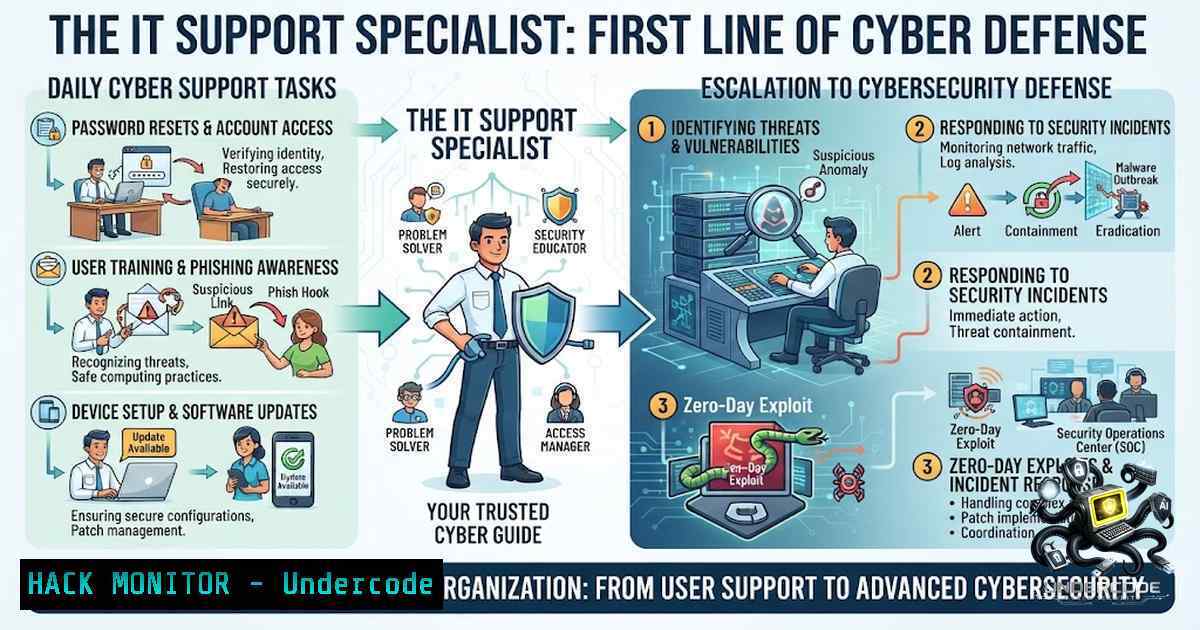
In the chaotic world of IT support, the daily grind of password resets and printer jams often masks a deeper, more critical reality: the help desk is the primary battleground for organizational cybersecurity. Every support ticket is not just a technical hurdle but a potential entry point for threat actors or a crucial opportunity to reinforce security protocols. Modern IT support professionals are evolving beyond simple troubleshooting into frontline defenders, where the technical knowledge of Active Directory, networking, and system internals is now essential for detecting and mitigating sophisticated threats that bypass traditional perimeter defenses.
Learning Objectives:
- Understand the critical intersection of IT support tasks and cybersecurity vulnerabilities, learning to treat every ticket as a potential security investigation.
- Master structured troubleshooting methodologies that incorporate security checks, including user verification, permission audits, and anomaly detection.
- Acquire practical command-line and scripting skills to automate incident responses and validate system integrity across Windows and Linux environments.
- Develop communication strategies to translate complex technical issues into actionable security guidance for non-technical users.
- Beyond the Ticket: The Cybersecurity Implications of Routine Support
Every password reset request is a potential identity theft scenario, and every application crash could be a symptom of a zero-day exploit or memory corruption vulnerability. IT support specialists must look beyond immediate user complaints to assess the broader security context. When a user reports a slow workstation, for instance, it could be a performance issue, but it could also indicate cryptocurrency mining malware consuming resources. The shift from reactive ticket-fixer to proactive security sentinel requires a fundamental change in how support technicians view their daily tasks. This involves validating user identity through multifactor authentication resets, checking for unauthorized software installations, and analyzing error logs for signs of compromise. By integrating security checkpoints into standard troubleshooting workflows, support teams can significantly reduce the attack surface while resolving user issues.
2. Structured Troubleshooting with a Security Lens
A disorganized approach to troubleshooting invites disaster, particularly when stress levels are high during a network outage. Combining the OSI model with security-specific frameworks like MITRE ATT&CK can transform a support desk into an incident response hub. The methodology begins at Layer 1 (Physical) but must quickly ascend to Layer 7 (Application) to check for suspicious API calls or unauthorized access attempts. In Windows, the `Event Viewer` is indispensable; specifically, tracking security logs for Event IDs like 4624 (successful logon), 4625 (failed logon), and 4672 (special privileges assigned) can reveal brute-force attacks or privilege escalation attempts. For Linux administrators, the `/var/log/auth.log` file, monitored with `grep` or journalctl -xe, offers similar insights. Integrating these checks into standard resolution guides ensures that security is not an afterthought but a component of every solved ticket.
- Mastering Active Directory and Azure AD for Password Management
Password resets are the most common support request, yet they represent a prime vector for credential theft if not managed correctly. A robust protocol involves verifying identity through pre-set security questions, manager approval, or a brief video call, depending on organizational policy. After resetting a password in Active Directory Users and Computers (dsa.msc), the specialist should use command-line tools to ensure the user is not locked out elsewhere and to check for suspicious group memberships. Utilizing the `Net User` command in Windows allows for quick verification of password policies and group associations:net user username /domain. In modern hybrid environments, synchronization with Azure AD requires using PowerShell to manage cloud identities. The command `Connect-MgGraph` followed by `Get-MgUser -UserId [email protected]` provides insight into conditional access policies and sign-in logs. This dual-layer verification prevents lateral movement, ensuring a compromised account doesn’t become a springboard for a broader attack. -
Network Fault Isolation: The DNA of Security Analysis
Network issues rarely exist in a vacuum; they are often the first indicators of a deeper security incident. When troubleshooting a network connectivity issue, one must utilize a suite of diagnostic tools to simultaneously validate network health and security. The `ping` and `tracert` commands are standard, but they must be followed by `nslookup` to verify DNS resolution is not pointing to a malicious domain. More critically, running `netstat -an` on a user’s machine can reveal active connections to unexpected IP addresses, a classic sign of malware callback. For internal routing, `route print` in Windows and `ip route` in Linux help visualize the network path. In managed environments, checking switch and firewall logs via SSH, using commands like `show interface` orshow log, allows support to verify that network segmentation is intact. This ensures that a simple “no internet” ticket isn’t masking a larger compromise.
5. BSoD Analysis and System Integrity Verification
Blue Screen of Death (BSoD) errors are among the most intimidating tickets for support staff, but they offer valuable forensic data. The stop code and associated memory dump can provide critical insights into kernel-level processes and driver vulnerabilities. Analyzing a memory dump with the Windows Debugger (WinDbg) can reveal if the crash was caused by a legitimate driver conflict or a malicious rootkit attempting to inject code into the kernel. This forensic approach extends beyond the BSoD; using System File Checker (sfc /scannow) and DISM (DISM /Online /Cleanup-Image /RestoreHealth) ensures that critical system binaries remain untampered. For proactive defense, implementing the Windows Defender Offline Scan acts as a low-level check on system files. Documentation of the specific error codes and mitigation strategies becomes crucial, creating a knowledge base that aids in identifying recurring vulnerabilities or attack patterns.
- The Windows Registry: A Fortress of System Stability
The Windows Registry is the central configuration database for the operating system. A corrupt registry or unexpected registry entry can lead to application crashes or system instability. More ominously, it is a primary persistence mechanism for malware. IT support specialists must be proficient with the Registry Editor (regedit.exe) to resolve issues, but this proficiency must be paired with security awareness. Accessing and modifying registry keys like `HKLM\Software\Microsoft\Windows\CurrentVersion\Run` or `HKCU\Software\Microsoft\Windows\CurrentVersion\Run` is common for managing startup processes. However, specialists must be vigilant in identifying and removing suspicious entries. Using tools like `Process Explorer` to verify digital signatures of running processes can confirm if a registry entry points to a legitimate file or a malicious payload. Backing up the registry before any changes is paramount, as is the use of Group Policy Objects to enforce security configurations and prevent users from making insecure modifications. -
Virtualization and Cloud Hardening: The New Frontier of IT Support
With the migration of infrastructure to the cloud, IT support specialists are increasingly managing virtual machines and containers. Troubleshooting an issue on a cloud platform like Azure or AWS requires a different skillset but the same structured approach. In Linux VMs, system logs found in `/var/log/` are crucial, particularly `dmesg` for kernel messages and `syslog` for system-wide events. For security, command-line tools are vital. Ensuring Secure Shell (SSH) configurations are hardened by editing `/etc/ssh/sshd_config` to disable root login and enforce key-based authentication is a standard task. Additionally, utilizing `fail2ban` to mitigate brute-force attempts is considered best practice. As Kubernetes adoption grows, support specialists must use `kubectl` to inspect pod logs and ensure robust network policies are in place to restrict unnecessary intra-cluster communication.
What Undercode Say:
- “True IT mastery is not just in knowing the commands, but in understanding the data they produce and the security context they define.”
- “The best support specialists don’t just solve the problem; they build the necessary barriers so the issue never recurs.”
The modern IT support function has transitioned from a cost center to a critical component of the security posture. The analysis of support tickets provides an early warning system for cyberattacks. As threats grow more sophisticated, the technical repertoire of the support specialist must expand to include forensic data collection, log analysis, and incident response coordination. The tools are already in the technicians’ hands—the command line, event viewers, and network tools—but the mindset must shift from “fixing” to “understanding and defending.” This involves continuous learning, not just to stay relevant, but to be prepared for the unknown.
Prediction:
+1: The integration of AI-driven analytics into ticketing systems will allow support specialists to predict hardware failures and detect subtle security anomalies, elevating the role to a predictive, proactive defense layer.
+1: There will be a surge in demand for support specialists with cybersecurity certifications as companies realize the help desk is a critical chokepoint for stopping ransomware.
-1: The increasing complexity of hybrid IT environments (on-prem, multiple clouds, and edge) will stretch support capabilities thin, potentially creating security gaps if processes aren’t unified.
-1: The shortage of skilled professionals will exacerbate burnout, leading to rushed troubleshooting and missed security steps, making automation not just an efficiency tool but a security necessity.
▶️ Related Video (74% Match):
🎯Let’s Practice For Free:
🎓 Live Courses & Certifications:
Join Undercode Academy for Verified Certifications
🚀 Request a Custom Project:
Secure, high-velocity infrastructure and disruptive technological engineering. Contact our engineering team for high-tier development and proprietary systems:
[email protected]
💎 Smart Architecture | 🛡️ Secure by Design | ⭐ Trusted by Thousands
IT/Security Reporter URL:
Reported By: Vivekshukladelhi Itsupport – Hackers Feeds
Extra Hub: Undercode MoN
Basic Verification: Pass ✅


