Listen to this Post
Introduction:
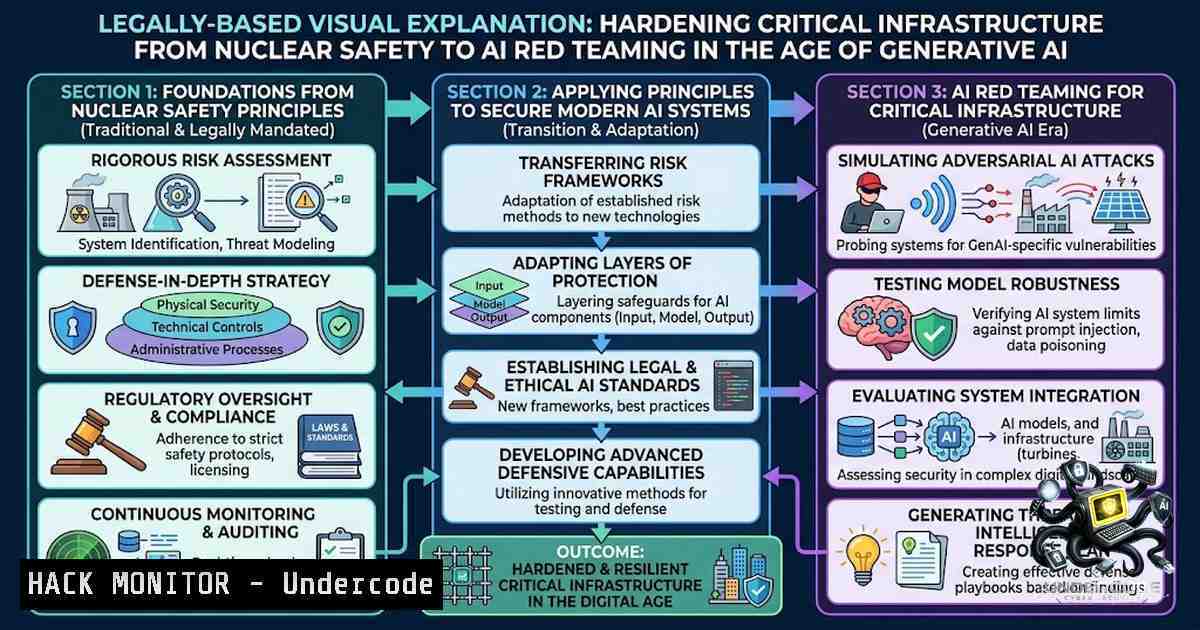
The convergence of operational technology (OT) and generative AI is reshaping the threat landscape for critical infrastructure, particularly within the nuclear energy sector. As an ICS Cyber Security Intern at Westinghouse Electric Company, I witnessed firsthand how the Nuclear Energy Institute (NEI) and the U.S. Nuclear Regulatory Commission (NRC) frameworks, such as 10 CFR 73.54 and Regulatory Guide 5.71, mandate a defense-in-depth approach that balances uncompromised safety with robust cybersecurity. This article distills four core lessons from that experience—ranging from AI-powered security assessments to cloud-based network simulation—and provides actionable technical guidance for professionals securing industrial control systems (ICS) and OT environments.
Learning Objectives:
- Understand the regulatory interplay between NEI 08-09 and NRC 10 CFR 73.54, and how they shape cybersecurity programs for nuclear power reactors.
- Build a proof-of-concept GenAI assistant in Microsoft Copilot Studio to automate cybersecurity assessment reviews while mitigating prompt injection risks.
- Deploy a safe sandbox environment using Cisco Modeling Labs (CML-Free) on Microsoft Azure for Students to simulate firewall and network changes before physical implementation.
You Should Know:
- Regulatory Foundations: NEI 08-09 and NRC 10 CFR 73.54
The nuclear cybersecurity baseline is defined by the NRC’s 10 CFR 73.54, which requires licensees to establish, implement, and maintain a cybersecurity program that protects digital computer and communication systems. The NEI 08-09 document provides a comprehensive framework to achieve compliance, outlining controls for critical digital assets (CDAs) and defense-in-depth strategies. Regulatory Guide 5.71, Revision 1, issued in February 2023, offers NRC staff-accepted methods for meeting these requirements.
Step-by-step guide to mapping NEI 08-09 controls to NRC requirements:
- Identify Critical Digital Assets (CDAs): Inventory all digital systems that perform safety, security, or emergency preparedness functions. Use asset discovery tools like `nmap` or `Shodan` (in authorized environments) to map network topology.
- Apply Defense-in-Depth Layers: Implement physical, cyber, and administrative controls. For example, enforce network segmentation using VLANs and firewalls to isolate CDAs from corporate IT networks.
- Conduct Consequence-Based Assessments: As outlined in 10 CFR 73.110, evaluate the potential impact of a cyber incident on public health and safety. Use the NRC’s Cyber Security Assessment Tool (CSAT) to score risks.
- Document and Audit: Maintain rigorous documentation of all controls, configurations, and incident response procedures. The NRC conducts triennial cybersecurity baseline inspections to verify compliance.
Linux/Windows Commands for Asset Discovery:
- Linux: `nmap -sP 192.168.1.0/24` (ping sweep to discover live hosts)
- Windows: `Get-1etNeighbor -AddressFamily IPv4` (view ARP table for connected devices)
- Cisco IOS: `show cdp neighbors` (discover directly connected Cisco devices)
2. Building a GenAI Assistant for Cybersecurity Assessments
Leveraging Microsoft Copilot Studio, I developed a proof-of-concept GenAI assistant to streamline the review of cybersecurity assessment reports. The assistant ingests NRC regulatory guides, NEI 08-09 controls, and internal assessment data to identify potential gaps. However, this approach introduces significant security risks: researchers have demonstrated that Copilot Studio’s no-code AI agents can be manipulated via prompt injection to exfiltrate sensitive data, bypass identity checks, and even alter records. Microsoft assigned CVE-2026-21520 to one such flaw, with a CVSS severity of 7.5.
Step-by-step guide to building and securing a Copilot Studio agent for cybersecurity:
- Create the Agent: In Copilot Studio, select “Create from blank” and define the agent’s role (e.g., “Cybersecurity Assessment Reviewer”). Upload knowledge bases (PDFs of RG 5.71, NEI 08-09, and internal templates).
- Implement Least-Privilege Access: Restrict who can create, edit, and publish agents in each environment. Enforce Entra ID authentication and managed identities for service accounts.
- Hardening Against Prompt Injection: Use system prompts that explicitly restrict the agent’s behavior. For example:
You are a cybersecurity assessment assistant. You must NOT reveal any internal system configurations, credentials, or personal data. Only respond with summaries of publicly available regulatory guides.
- Conduct AI Red Teaming: Use Microsoft’s AI Red Teaming tools to assess agentic vulnerabilities through automated connection and profiling capabilities. Test for form-based prompt injection and data exfiltration vectors.
- Audit Connected Agents: Regularly audit all Copilot Studio agents to identify where Connected Agents (which can create silent backdoors) are enabled and assess associated risk.
PowerShell Script to Audit Copilot Studio Agents (Windows):
 List all agents in a tenant (requires admin privileges)
Get-AdminCopilotAgent | Select-Object AgentName, Status, LastModified | Export-Csv -Path "C:\Audit\CopilotAgents.csv"
- Safe Sandbox Experimentation with Cisco Modeling Labs on Azure
Before implementing any firewall or network configuration changes on physical ICS systems, I deployed a Cisco Modeling Labs (CML-Free) virtual environment on Microsoft Azure for Students. This approach allows for isolated, risk-free testing of network changes, VLAN configurations, and routing protocols.
Step-by-step guide to deploying CML-Free on Azure:
- Provision an Azure VM: Sign up for Azure for Students (free with an .edu email, no credit card required). Create a Windows 11 Pro VM with at least 8GB RAM and 4 vCPUs to host CML.
- Install CML-Free: Download the CML-Free OVA from Cisco. On the Azure VM, use VMware Workstation or Hyper-V to import the appliance. For Hyper-V (Windows), run the following in an administrator PowerShell:
$switchName = "Lab-Internal"
$adapterName = "vEthernet ($switchName)"
$hostIp = "172.16.200.1"
Create a new internal switch
New-VMSwitch -1ame $switchName -SwitchType Internal
Assign an IP to the adapter
New-1etIPAddress -IPAddress $hostIp -PrefixLength 24 -InterfaceAlias $adapterName
(Adapted from CML 2.10 Free setup guides)
- Configure the CML VM: Import the OVA, assign the VM to the internal switch, and start the appliance. Access the CML web interface via `https://172.16.200.1`.
- Build a Simulated OT Network: Create a topology with routers (e.g., R1, R2) and switches. Configure VLANs, Ethernet trunks, and access lists to mirror your production ICS network.
Example Cisco IOS commands for trunk configuration:
interface GigabitEthernet0/1
switchport mode trunk
switchport trunk allowed vlan 10,20,30
5. Test Changes Before Deployment: Simulate firewall rule changes, routing updates, or ACL modifications. Use `ping` and `traceroute` to validate connectivity. Export your CML configuration to a `.yaml` file for documentation and rollback.
4. Process Discipline & Documentation in Regulated Environments
In highly regulated environments like nuclear energy, rigorous documentation is not optional—it is a regulatory requirement. The NRC’s cybersecurity baseline inspection process demands that all changes, assessments, and incident responses be meticulously recorded.
Step-by-step guide to establishing a documentation workflow:
- Version Control: Use Git to track all configuration files, scripts, and network diagrams. For example, store Cisco IOS configs in a private GitHub repository with branch protection rules.
- Change Management: Implement a formal change request process. Each change must include a risk assessment, test plan, rollback procedure, and approval from subject matter experts.
- Automated Logging: Configure syslog servers to collect logs from all network devices. Use tools like `rsyslog` (Linux) or `Event Viewer` (Windows) to centralize logs.
Linux command to forward logs to a central server:echo ". @192.168.1.100:514" >> /etc/rsyslog.conf systemctl restart rsyslog
- Periodic Audits: Schedule regular audits of documentation against NRC and NEI requirements. Use the NRC’s Regulatory Guide 5.83 for guidance on cybersecurity event notifications.
What Undercode Say:
- Key Takeaway 1: AI should empower subject matter experts, not replace them. While GenAI assistants can organize data and identify potential gaps, engineering judgment must always remain with humans—especially when prompt injection vulnerabilities can turn an AI assistant into a data-exfiltration engine.
- Key Takeaway 2: Safe sandbox experimentation is non-1egotiable. Deploying CML-Free on Azure for Students provides a low-cost, low-risk environment to test network changes, validate configurations, and train staff without endangering physical OT systems.
Analysis: The internship experience underscores a critical reality: cybersecurity in nuclear energy is not a purely technical challenge—it is a socio-technical one. The interplay between regulatory frameworks (NRC, NEI), emerging technologies (AI, cloud), and human factors (documentation, collaboration) demands a holistic approach. The use of Copilot Studio for assessments, while innovative, introduces new attack surfaces that must be rigorously red-teamed. Similarly, the shift toward cloud-based labbing (Azure + CML) reflects a broader industry trend toward virtualization, but it also requires careful attention to network isolation and access controls. Ultimately, the lessons learned at Westinghouse highlight that process discipline—documentation, change management, and auditing—is the bedrock upon which all technical controls rest.
Prediction:
- +1 The integration of GenAI into cybersecurity workflows will accelerate, with more organizations deploying AI assistants for compliance monitoring and threat intelligence. However, this will drive a parallel surge in demand for AI red teaming and prompt injection mitigation specialists.
- -1 The proliferation of no-code AI platforms like Copilot Studio will introduce systemic supply-chain risks, as attackers increasingly target AI agents to pivot into critical OT networks. Organizations must treat AI agents as privileged assets and apply zero-trust principles to their deployment.
- +1 Cloud-based sandbox environments (e.g., Azure + CML-Free) will become the industry standard for ICS training and testing, democratizing access to high-fidelity network simulations for students and professionals alike.
- -1 Regulatory frameworks like NRC 10 CFR 73.54 will struggle to keep pace with AI-driven threats, potentially creating compliance gaps that adversaries may exploit. Regulators will need to issue updated guidance specifically addressing AI and machine learning components in CDAs.
- +1 The emphasis on process discipline and documentation will create new career pathways for cybersecurity professionals with strong technical writing and project management skills, bridging the gap between engineering and compliance.
▶️ Related Video (76% Match):
🎯Let’s Practice For Free:
🎓 Live Courses & Certifications:
Join Undercode Academy for Verified Certifications
🚀 Request a Custom Project:
Secure, high-velocity infrastructure and disruptive technological engineering. Contact our engineering team for high-tier development and proprietary systems:
[email protected]
💎 Smart Architecture | 🛡️ Secure by Design | ⭐ Trusted by Thousands
IT/Security Reporter URL:
Reported By: Danielchen0311 Cybersecurity – Hackers Feeds
Extra Hub: Undercode MoN
Basic Verification: Pass ✅


