
Listen to this Post
Introduction
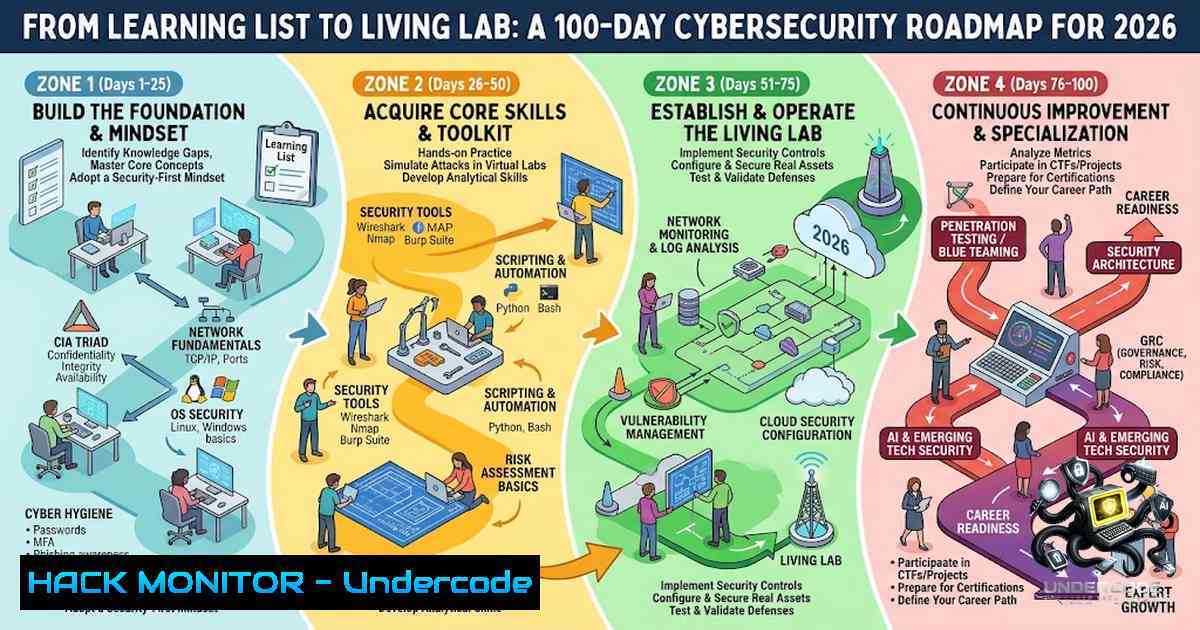
In an era where cyber threats evolve faster than traditional education can adapt, the gap between academic theory and industry practice has never been wider. A student’s journey—documented after attending TECHCIPHER ’26 with Mr. Dinesh Paranthagan, Founder & CEO of Hackup Technology Pvt. Ltd.—captures a fundamental truth: collecting tool names and resources is not the same as building capability. The 100-day cybersecurity learning roadmap outlined in that session represents a shift from passive consumption to active, structured practice—a methodology that transforms curiosity into competence through deliberate, daily engagement.
Learning Objectives & Secrets
- Objective 1: Master the Cybersecurity Ecosystem — Gain hands-on proficiency with industry-standard platforms including Kali Linux, Hack The Box, TryHackMe, and PortSwigger Web Security Academy. Understand not just how to use these tools, but when and why each is appropriate for specific security scenarios.
-
Objective 2 Secret Tip: Analyze Real Job Descriptions Before You Start Learning — Rather than guessing what skills matter, systematically study 100 cybersecurity job postings. Extract required tools, certifications, and soft skills. Use this data to build a targeted, employer-aligned learning path rather than a generic one.
-
Objective 3 Secret Tip: Leverage AI for Personalized Roadmapping — Use AI-assisted tools (such as shell-gpt in Kali Linux 2026.2 or HTB Coach) to analyse collected job data and generate a customised 100-day curriculum. AI can help identify skill gaps, suggest relevant labs, and adapt your learning pace based on progress.
You Should Know
1. Setting Up Your Cybersecurity Lab Environment
A proper lab environment is the foundation of any serious cybersecurity practice. Here’s how to establish yours:
Step 1: Install Kali Linux 2026.2
Kali Linux 2026.2, released in June 2026, is the latest penetration testing distribution featuring the Linux 6.19 kernel and nine new security tools. Download the ISO from the official Kali website and install as a virtual machine using VMware or VirtualBox, or run it as a live USB environment.
Step 2: Explore the New Toolset
The 2026.2 release adds critical utilities:
 Install all new tools
sudo apt update && sudo apt install arsenal-1g legba oletools penelope shell-gpt tailscale tookie-osint uro

arsenal-1g - 200+ cybersecurity cheat-sheets in one CLI tool
arsenal-1g --list

shell-gpt - AI-powered command-line assistant
shell-gpt "How do I perform a basic Nmap scan for open ports?"

uro - URL declutterer for web crawling
uro --input urls.txt --output clean_urls.txt

legba - Multi-protocol credential bruteforcer
legba http-post --target example.com/login --username admin --password-list passwords.txt

tookie-osint - Social media account finder
tookie-osint --target "john.doe" --platforms all
Step 3: Optimise VM Performance
Kali 2026.2 VM images now exclude graphics firmware by default, reducing initrd to 60MB and cutting boot time by approximately 3x. For bare-metal installations, the full 200MB initrd remains with all firmware pre-installed.
Step 4: Connect to Hack The Box via OpenVPN
 Download your .ovpn file from HTB and connect
sudo openvpn ~/Downloads/htb-Starting_Point.ovpn

Wait for "Initialization Sequence Completed"
 Keep terminal open—closing it disconnects the VPN
HTB’s Starting Point feature provides a linear series of machines across three Tiers (Tier 0–2), each with comprehensive writeups explaining concepts at every step.
- Choosing the Right Learning Platform: TryHackMe vs. Hack The Box
For beginners in 2026, the choice between TryHackMe and Hack The Box is critical.
Step 1: Start with TryHackMe for Structured Learning
TryHackMe offers guided learning paths including:
- Cyber Security 101 (New 2026)
- Jr Penetration Tester
- AI Security (New 2026)
- SOC Level 1
- Pre Security
Step 2: Progress to Hack The Box for Real-World Challenges
Once comfortable with fundamentals, transition to Hack The Box’s unguided, competitive environment. HTB machines more closely simulate real-world network scenarios and require independent problem-solving.
Step 3: Use Both Platforms Strategically
 Example workflow: Enumeration with Nmap (practiced on both platforms)
nmap -sV -sC -A -T4 target_ip

Web application testing with Burp Suite (PortSwigger labs)
 Set Burp as proxy in browser and intercept requests
 PortSwigger Academy labs cover SQLi, XSS, CSRF, SSRF, and 30+ categories
TryHackMe provides structured theory-plus-lab format ideal for absolute beginners, while Hack The Box suits intermediate learners ready for CTF-style challenges.
3. Web Application Security with PortSwigger Academy
PortSwigger Web Security Academy remains the gold standard for web application security training in 2026.
Step 1: Access the Labs
Navigate to `https://portswigger.net/web-security/all-labs` and begin with Apprentice-level labs.
Step 2: SQL Injection Lab Workflow
-- Example: SQL injection UNION attack to retrieve data
' UNION SELECT username, password FROM users--

-- For MySQL/Microsoft databases
' UNION SELECT @@version, NULL--

-- For Oracle
' UNION SELECT banner, NULL FROM v$version--
Step 3: Use Burp Suite for Validation
Configure Burp Suite as an intercepting proxy. Send requests to Repeater, modify parameters with payloads, and analyse responses. Start with minimal payloads before escalating attacks.
Step 4: Document Your Progress
Maintain a lab notebook tracking each vulnerability type, exploitation technique, and mitigation strategy. GitHub repositories with completed lab notes provide valuable reference material.
4. Understanding India’s Digital Safety Ecosystem
For cybersecurity students in India, familiarity with government digital safety services is essential for both personal security and professional awareness.
Sanchar Saathi Portal — A flagship initiative of the Department of Telecommunications:
CEIR (Central Equipment Identity Register) : Enables blocking and tracing of lost or stolen mobile phones to prevent misuse.
TAFCOP (Telecom Analytics for Fraud Management and Consumer Protection) : Allows citizens to check mobile connections issued in their name and report unauthorised connections.
Chakshu Facility: Platform to report suspected fraud communications including phishing calls, fake SMS, and fraudulent WhatsApp messages.
Step-by-Step Usage:
1. Visit the Sanchar Saathi Portal or download the mobile app (available on Android and iOS)
2. Use TAFCOP to verify all mobile connections under your name
3. Report unknown numbers immediately for disconnection
4. Use CEIR to block lost or stolen devices
5. Report suspicious communications via Chakshu
Impact Statistics (Punjab LSA) : 116,560 lost/stolen devices blocked, 82,087 devices traced, 14,010 recovered, and 451,067 mobile numbers disconnected under “Not My Number”.
5. Online Safety and Impersonation Awareness
Digital impersonation has become the dominant fraud type in 2026, with over 85% of fraud attempts involving impersonation.
Step 1: Recognise Impersonation Vectors
– AI-powered voice cloning and deepfake video calls
– Fake websites and lookalike domains
– Cloned social media profiles
– AI-generated images and videos of public figures
Step 2: Implement Protective Measures
 Verify identity through separate channels (e.g., call back on known number)
 Enable multi-factor authentication everywhere possible
 Limit personal and professional information shared publicly
 Be cautious of content designed to provoke strong emotional reactions
Step 3: Use StopNCII for Image Safety
StopNCII (Stop Non-Consensual Intimate Image Abuse) is a free, survivor-centred online tool that helps prevent the sharing of intimate images without consent. The tool uses on-device hashing technology that never collects or stores actual images.
Access at `https://stopncii.org/` and follow the prompts to create a case. The technology creates privacy-preserving digital fingerprints (hashes) that help platforms identify and remove known abusive content.
Step 4: Social Media Reporting Mechanisms
Platform reporting processes can be complex—currently requiring navigation through multiple screens. Familiarise yourself with:
– In-app reporting workflows for each platform
– Blocking and reporting contacts, businesses, unknown users, or groups
– Grievance redressal mechanisms available through platform support channels
6. Firewall and Endpoint Security Fundamentals
Understanding defensive security is as important as offensive skills.
Step 1: Configure Host-Based Firewalls
 Linux (UFW - Uncomplicated Firewall)
sudo ufw enable
sudo ufw default deny incoming
sudo ufw default allow outgoing
sudo ufw allow ssh
sudo ufw status verbose

Windows (Netsh)
netsh advfirewall set allprofiles state on
netsh advfirewall firewall add rule name="Allow SSH" dir=in action=allow protocol=TCP localport=22
Step 2: Implement Endpoint Protection
Endpoint security encompasses:
- Host-based intrusion detection systems (HIDS)
- Host-based intrusion prevention systems (HIPS)
- Application whitelisting
- Endpoint encryption
 Linux: Check for open ports and listening services
ss -tulpn
netstat -tulpn

Windows: Check firewall rules and active connections
netsh advfirewall show allprofiles
netstat -ano
Step 3: System Hardening
Apply endpoint hardening methods including:
- Disabling unnecessary services
- Regular patch management
- Principle of least privilege for user accounts
- Enabling audit logging
7. VirusTotal and Threat Intelligence
VirusTotal provides a powerful API for file and URL analysis.
Step 1: Obtain API Key
Register for a VirusTotal account and obtain your public API key from the API Key section.
Step 2: Basic API Usage (Python)
import requests

Replace with your API key
API_KEY = "your_api_key_here"

Scan a URL
url = "https://example.com"
response = requests.post(
"https://www.virustotal.com/api/v3/urls",
headers={"x-apikey": API_KEY},
data={"url": url}
)
scan_id = response.json()["data"]["id"]

Get report
report = requests.get(
f"https://www.virustotal.com/api/v3/analyses/{scan_id}",
headers={"x-apikey": API_KEY}
)
print(report.json())
Step 3: File Analysis
 Upload and scan a file
files = {"file": open("suspicious.exe", "rb")}
response = requests.post(
"https://www.virustotal.com/api/v3/files",
headers={"x-apikey": API_KEY},
files=files
)
VirusTotal API v3 supports files, URLs, domains, and IP intelligence. Free API keys provide rate-limited access suitable for individual learning and analysis.
What Undercode Say
- Key Takeaway 1: Information Without Practice Is Inert — The student’s core insight—that collecting resources is insufficient without consistent practice—echoes a fundamental principle of cybersecurity education. The 100-day challenge transforms passive knowledge into active capability through daily, deliberate engagement.
-
Key Takeaway 2: Build Knowledge, Not Just a Toolkit — Understanding when, why, and how security tools are used matters more than knowing their names. The roadmap prioritises conceptual understanding alongside practical application, ensuring learners develop judgment, not just muscle memory.
-
Key Takeaway 3: Data-Driven Learning Paths Outperform Generic Curricula — By analysing 100 job descriptions and using AI to process that data, learners can build customised roadmaps aligned with actual industry demands. This approach bridges the academic-practice gap that plagues traditional cybersecurity education.
-
Key Takeaway 4: Defensive and Offensive Skills Are Complementary — The roadmap includes both offensive platforms (HTB, TryHackMe, PortSwigger) and defensive awareness (firewalls, endpoint security, VirusTotal, Sanchar Saathi). This dual perspective creates well-rounded security professionals capable of understanding attacks and implementing effective defences.
-
Key Takeaway 5: Digital Citizenship Is Part of Cybersecurity — Awareness of impersonation, reporting mechanisms, StopNCII, and device tracking services extends cybersecurity beyond the technical realm into personal and social responsibility. These skills protect not just systems but people.
Prediction
-
+1 The 100-day structured learning model will gain widespread adoption in cybersecurity education, with universities incorporating similar challenge-based curricula alongside traditional coursework.
-
+1 AI-assisted personalised learning paths will become standard, with platforms like HTB Coach and shell-gpt reducing the barrier to entry for career-switchers and students from non-technical backgrounds.
-
-1 The sophistication of AI-powered impersonation and deepfake attacks will outpace public awareness, creating a growing need for digital literacy education that extends beyond technical professionals.
-
+1 Government digital safety initiatives like Sanchar Saathi will expand globally, setting precedents for telecom fraud prevention and consumer protection in the digital age.
-
-1 The gap between academic cybersecurity education and industry requirements will widen further, making self-directed, practice-based learning pathways increasingly essential for employability.
-
+1 Integrated platforms combining structured learning (TryHackMe) with unguided challenges (Hack The Box) will define the next generation of cybersecurity training, with seamless transitions between guided and independent practice.
“Don’t just collect tools. Build the knowledge to understand when, why and how security tools are used.”
“Learn with purpose. Practice with discipline. Document your progress. Build your future.”
Day 1/100 — The journey begins.
▶️ Related Video (84% Match):
🎯Let’s Practice For Free:
🎓 Live Courses & Certifications:
Join Undercode Academy for Verified Certifications
🚀 Request a Custom Project:
Secure, high-velocity infrastructure and disruptive technological engineering. Contact our engineering team for high-tier development and proprietary systems:
[email protected]
💎 Smart Architecture | 🛡️ Secure by Design | ⭐ Trusted by Thousands
IT/Security Reporter URL:
Reported By: https://lnkd.in/p/eTFzQ954 – Hackers Feeds
Extra Hub: Undercode MoN
Basic Verification: Pass ✅


