Listen to this Post
Introduction:
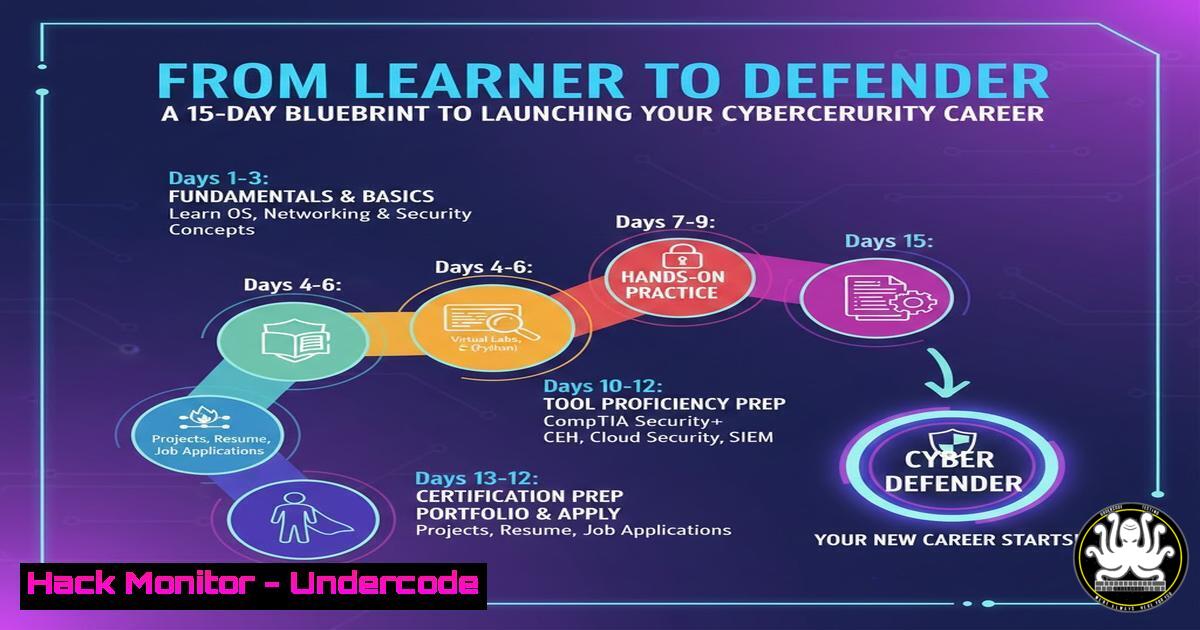
The journey into cybersecurity can be daunting, with its myriad of roles, tools, and certifications. A structured approach is critical for beginners to move from foundational concepts to practical, portfolio-ready skills. This article distills a proven 15-day learning framework, focusing on core operational roles, essential security hygiene, and a actionable roadmap for building demonstrable expertise in both defensive (Blue Team) and offensive (Red Team) disciplines.
Learning Objectives:
- Understand the fundamental dichotomy between Red Team (attack simulation) and Blue Team (defense) operations.
- Implement immediate, high-impact security hygiene practices like MFA, password management, and system patching.
- Develop a personalized, project-based learning roadmap using free labs and documentation to build a professional portfolio.
You Should Know:
- The Red vs. Blue Team Foundation: Choosing Your Path
The cybersecurity field is strategically divided into Red Teams (ethical hackers who simulate attacks to find weaknesses) and Blue Teams (defenders who monitor, detect, and respond to threats). Understanding this dichotomy is the first step in specializing your learning.
Step‑by‑step guide:
Day 1-2: Core Concept Assimilation. Research the daily responsibilities, key tools, and mindset of each team. For Red Team, think penetration testing and exploitation. For Blue Team, think Security Operations Center (SOC) analysis and incident response.
Day 3: Hands-On Tasting. Use free platforms to get a feel for each side. For a Red Team taste, use the `nmap` command to perform a basic network scan on a lab machine (e.g., a Metasploitable VM): nmap -sV -O <target_IP>. This scans for open ports and operating systems. For a Blue Team taste, analyze a sample log file. On Linux, use `grep` to hunt for failed SSH attempts: grep "Failed password" /var/log/auth.log. This introduces you to defensive log analysis.
Decision Point: Document which activity engaged you more—the methodology of breaking in or the vigilance of monitoring and protecting.
- Non-Negotiable Security Hygiene: Your First Line of Defense
Before learning to defend networks, you must secure your own digital footprint. Basic hygiene is the bedrock of all cybersecurity practice.
Step‑by‑step guide:
Password Management: Immediately adopt a password manager (e.g., Bitwarden, KeePass). Generate and store unique, complex passwords (16+ characters, mix of types) for every account.
Enable Multi-Factor Authentication (MFA): Activate MFA on all critical accounts (email, banking, social media). Use an authenticator app (Google Authenticator, Authy) over SMS where possible.
System Patching: Configure automatic updates. On Windows, run Settings > Windows Update > Advanced options > Turn on "Get the latest updates as soon as they're available". On Linux, schedule regular updates via cron: `sudo crontab -e` and add `0 2 0 sudo apt update && sudo apt upgrade -y` (for weekly updates at 2 AM Sunday on Debian-based systems).
3. Certification and Practical Skill Roadmapping
Certifications like CompTIA Security+ validate knowledge, but practical skills get you hired. A 30-day roadmap should blend both.
Step‑by‑step guide:
Week 1-2: Foundational Knowledge & Labs. Allocate 2 hours daily to Security+ domains using free resources like Professor Messer’s YouTube series. Concurrently, spend 1 hour daily on the TryHackMe “Pre Security” or “Complete Beginner” paths. These provide guided, browser-based labs.
Week 3-4: Portfolio Project Creation. Start a documented project. Example: “Building a Home SIEM.” Set up a virtual machine, install the ELK Stack (Elasticsearch, Logstash, Kibana) or a simpler alternative like Wazuh, and forward logs from your local machine. Document the process, challenges, and screenshots in a blog or GitHub README.
4. Building a Lab Environment for Safe Practice
A controlled lab is essential for practicing techniques without legal risk.
Step‑by‑step guide:
Set Up a Hypervisor: Install VirtualBox or VMware Workstation Player.
Create a Target Network: Download vulnerable VMs like Metasploitable2 or OWASP WebGoat. Configure your VM network to “Host-Only” or “NAT” to isolate the lab from your main network.
Set Up a Attack Machine: Download and install Kali Linux in a VM. This is your authorized “Red Team” toolbox. Practice basic commands like using `nikto` to scan the Metasploitable web server: nikto -h http://<metasploitable_IP>.
5. Developing a Defender’s Mindset with Log Analysis
Blue Team skills are in high demand. Start by learning to read and interpret system logs.
Step‑by‑step guide:
Windows Event Logs: Open Event Viewer (eventvwr.msc). Navigate to “Windows Logs > Security”. Filter for Event ID 4625 (failed logon) to see attack attempts. Learn to export these logs for analysis.
Linux Auth Logs: As shown earlier, the `/var/log/auth.log` file (or `/var/log/secure` on RHEL-based systems) is key. Write a simple Bash script to count failed login attempts per IP: grep "Failed password" /var/log/auth.log | awk '{print $11}' | sort | uniq -c | sort -nr.
Tool Introduction: Install and run `Wazuh Agent` on your lab machines to centralize and better visualize these logs, mimicking an enterprise Endpoint Detection and Response (EDR) setup.
6. Showcasing Skills: The Power of Public Documentation
Your learning portfolio is your professional currency. Documenting your journey demonstrates communication skills and technical depth.
Step‑by‑step guide:
Choose a Platform: Start a technical blog on Hashnode or Dev.to, or create a dedicated GitHub repository named “Cybersecurity-Journey” or “Home-Lab.”
Document One Project Thoroughly: For each project, structure your documentation with: Objective, Tools Used, Step-by-Step Walkthrough (with commands and screenshots), Challenges Faced & Solutions, and Key Learnings.
Example Project “Automated Vulnerability Assessment of a Local Lab Network Using OpenVAS.” Walk through the installation, target configuration, scan execution, and report interpretation.
7. Next-Level Pathways: Specialization
After the foundational 30 days, choose a path to dive deeper.
Step‑by‑step guide:
For Blue Team Aspirants: Pursue the TryHackMe SOC Level 1 path. Then, move to Blue Team Labs Online for realistic incident response exercises. Learn a query language like KQL (Kusto Query Language) for Microsoft Sentinel or Splunk SPL.
For Red Team Aspirants: Complete the TryHackMe Offensive Pentesting path. Then, tackle Hack The Box starting with “Starting Point.” Deepen web app skills with the PortSwigger Web Security Academy, which offers free, detailed tutorials on vulnerabilities like SQLi and XSS.
What Undercode Say:
- Structure Beats Talent. A deliberate, project-based plan is more valuable than aimless tutorial consumption. The outlined 15-day/30-day framework provides the scaffolding needed to transition from theory to demonstrable skill.
- Portfolio Over Certificate. While Security+ is a valuable credential, a GitHub with three well-documented lab projects (e.g., a hardened network setup, a penetration test report, a SIEM alert analysis) will often resonate more powerfully with hiring managers looking for practical aptitude.
Prediction:
The barrier to entry in cybersecurity will continue to shift from traditional degree-centric hiring to skill-based validation. Platforms offering gamified labs and hands-on certifications will become the primary talent pipelines. In the next 3-5 years, we will see a surge in “apprenticeship-by-portfolio,” where candidates use public, verifiable lab work and contributions to open-source security tools to bypass conventional requirements. Professionals who master both a specialty (Red/Blue) and the complementary discipline will become the most valued, leading to the rise of more integrated “Purple Team” roles focused on continuous security improvement through collaboration.
▶️ Related Video (84% Match):
🎯Let’s Practice For Free:
IT/Security Reporter URL:
Reported By: Sadikshakcneupane Aces – Hackers Feeds
Extra Hub: Undercode MoN
Basic Verification: Pass ✅


