
Listen to this Post
Introduction:
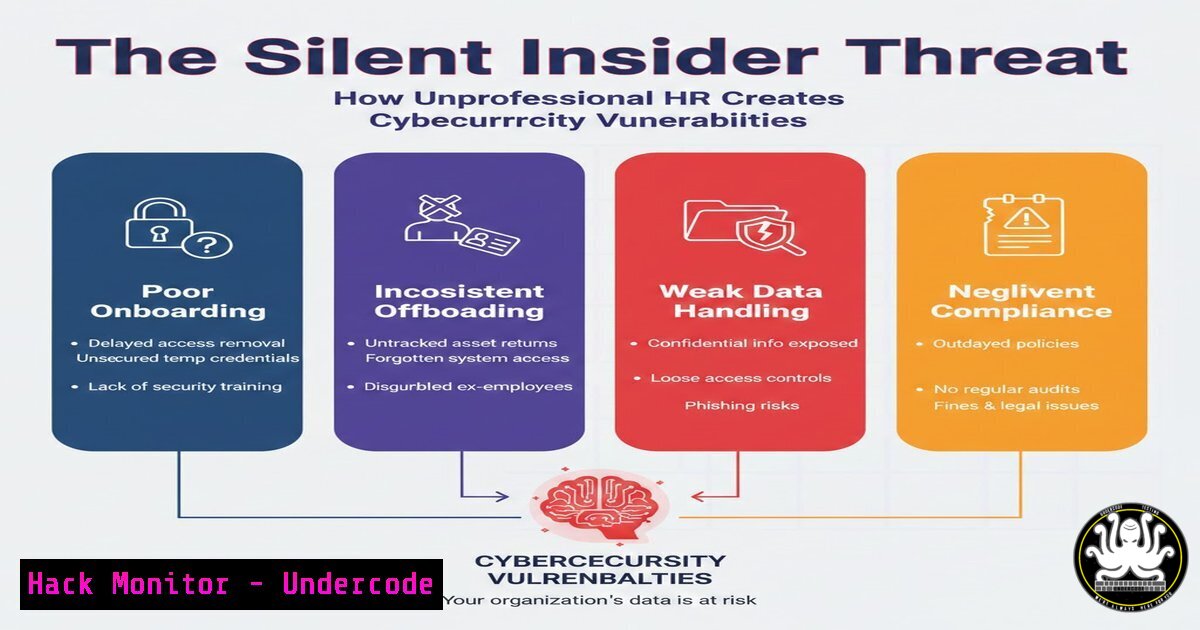
While cybersecurity teams focus outward—defending against malware, phishing, and APTs—the most insidious threats often originate inside the building. Unprofessional Human Resources practices are not merely a cultural problem; they are a direct vector for insider threats, data leaks, and compliance failures. When HR operates with bias, breaks confidentiality, or mishandles privileged employee data, they inadvertently lower the drawbridge for malicious actors and increase the risk surface across identity and access management (IAM) ecosystems.
Learning Objectives:
- Identify nine distinct HR dysfunctions that map directly to cybersecurity risks (insider threats, data leakage, privilege creep).
- Execute forensic analysis of HR systems using native Linux and Windows tools to audit confidential data access.
- Implement technical controls and API security measures to protect employee PII within HR platforms and cloud infrastructure.
- Apply vulnerability exploitation and mitigation techniques related to identity mismanagement and weak administrative practices.
- Design a resilient organizational security culture by integrating HR processes with zero‑trust and secure configuration frameworks.
- Auditing Confidentiality Breaches: Tracking Employee Record Access on Linux and Windows
Step‑by‑step guide explaining what this does and how to use it.
When HR staff share private conversations or leave sensitive spreadsheets on shared drives, they violate confidentiality. From a technical standpoint, this is an access control failure. Security analysts must be able to audit who accessed what, when, and from where.
Linux (auditd):
1. Enable auditing for HR file directories:
`sudo auditctl -w /home/hr_documents -p wa -k hr_access`
2. Search logs for access to termination records:
`sudo ausearch -k hr_access -ts today | grep “termination_review.xlsx”`
3. Identify failed access attempts (potential enumeration):
`sudo ausearch -k hr_access -sv no`
Windows (PowerShell & Event Logs):
- Enable Object Access auditing via Group Policy, then query Security Event ID 4663 (file access):
`Get-WinEvent -FilterHashtable @{LogName=’Security’; ID=4663; Data=’D:\HR_Confidential’}`
- Check for mass file copies (data exfiltration precursor):
`Get-WinEvent -LogName Security | Where-Object { $_.Message -like “ReadData” } | Group-Object UserId`These commands allow defenders to pinpoint exactly which HR professional accessed confidential performance reviews without a business need—transforming a soft “breach of trust” into a hard, auditable security incident.
-
Remediating Biased Access: Automating User Provisioning and Deprovisioning with PowerShell
Step‑by‑step guide explaining what this does and how to use it.
Favoritism in HR often manifests as “special” access granted to preferred employees, or failure to revoke access from ex‑employees who were friends with HR staff. This violates the Principle of Least Privilege (PoLP) and creates orphaned accounts.
Detect stale privileged users:
- Export all enabled AD users with termination dates older than 30 days:
`Search-ADAccount -AccountInactive -UsersOnly -TimeSpan 30.00:00:00 | Where-Object Enabled -eq $true`
2. Automatically disable accounts with specific flags:
`Get-ADUser -Filter { -eq “Terminated”} | Disable-ADAccount`
API‑driven HRIS integration (Okta/Azure AD):
Configure SCIM provisioning to automatically suspend accounts when HR marks status as “Inactive”.
– Test connector:
`Invoke-RestMethod -Uri https://yourtenant.okta.com/api/v1/users -Headers @{Authorization = “SSWS $token”}`
– Validate that leaver accounts receive status: DEPROVISIONED.
By automating these steps, we remove human bias from critical identity decisions and close the “friendly HR” backdoor.
- Hardening the HR Service Desk: API Security and Injection Prevention
Step‑by‑step guide explaining what this does and how to use it.
“Power-Misusing HR” often uses internal ticketing systems to intimidate employees. From a security view, these same systems are vulnerable to IDOR (Insecure Direct Object References) and injection attacks, allowing malicious insiders or external attackers to view all employee private notes.
Testing for IDOR in a typical HR case portal (Burp Suite):
1. Intercept a request for ticket `HR-1234`.
2. Change the parameter to `HR-1235` and forward.
- If the response contains another employee’s disciplinary records, the API lacks proper authorization.
Mitigation with API Gateways (Kong/NGINX):
Implement JWT validation requiring role claims:
location /api/hr/cases {
auth_jwt "HR API";
auth_jwt_claim_set $case_owner sub;
if ($case_owner != $jwt_claim_sub) {
return 403;
}
}
Hardening SQL queries in HR apps:
Replace dynamic SQL:
`EXEC sp_executesql N’SELECT FROM hr_notes WHERE case_id = @id’, N’@id INT’, @id = 123`
These controls ensure that even if HR staff misuse the system, lateral movement and privilege escalation remain technically blocked.
4. Detecting “Management-Blind” Cover‑ups via Cloud Trail Logging
Step‑by‑step guide explaining what this does and how to use it.
When HR protects management by deleting or altering unfavourable investigation records, they are tampering with evidence. In cloud environments (Microsoft 365, Google Workspace, AWS), this leaves forensic artifacts.
AWS CloudTrail – detect deletion of HR case documents:
1. Search for `DeleteObject` events on HR S3 buckets:
`aws cloudtrail lookup-events –lookup-attributes AttributeKey=EventName,AttributeValue=DeleteObject –query ‘Events[?contains(Resources[].ARN, `hr-investigations`)]’`
- Identify who deleted the object and source IP.
Microsoft 365 Unified Audit Log:
Search for `FileDeleted` in SharePoint HR libraries, and track `UserAgent` strings to identify if deletion was performed by HR director’s account:
`Search-UnifiedAuditLog -Operations FileDeleted -StartDate (Get-Date).AddDays(-90)`
This command chain turns “management protection” into a provable destruction of evidence, allowing legal and security teams to escalate appropriately.
- Mitigating Toxic Culture with Automated Sentiment Analysis (NLP)
Step‑by‑step guide explaining what this does and how to use it.
“Emotionally Unintelligent HR” leaves employees feeling undervalued. While not a traditional cyber tool, Natural Language Processing (NLP) on exit interviews and anonymous pulse surveys can quantify toxicity before it manifests as sabotage.
Python script using Hugging Face transformers:
from transformers import pipeline
sentiment = pipeline("sentiment-analysis", model="nlptown/bert-base-multilingual-uncased-sentiment")
reviews = ["HR ignored my harassment complaint for 6 months"]
print(sentiment(reviews))
 Output: [{'label': '1 star', 'score': 0.87}]
Aggregate scores across departments. A sustained average below 2 stars correlates with increased insider threat risk (unethical behavior, data theft). Integrate this with your SIEM as a “culture risk indicator.”
- Securing HR Communication Channels from Eavesdropping and Phishing
Step‑by‑step guide explaining what this does and how to use it.
“Poor Communication HR” creates confusion; attackers exploit confusion via whaling and business email compromise (BEC). HR must communicate policy changes securely.
Enforce S/MIME or TLS for all HR outbound email (Exchange Online):
`Set-IRMConfiguration -InternalLicensingEnabled $true`
`New-TransportRule -Name “Encrypt all HR emails” -FromScope InOrganization -ApplyRightsProtectionTemplate “Encrypt”`
Phishing simulation targeting HR:
Use GoPhish to send a fake “urgent payroll change” email from a spoofed CEO domain. Measure click rates. High click rates indicate HR staff require immediate security awareness training—otherwise they will likely fall for real BEC attacks that compromise entire employee databases.
7. Auditing “Politically Motivated” Slack/Teams Deletions
Step‑by‑step guide explaining what this does and how to use it.
When HR engages in office politics, they often delete messages to hide collusion. Slack and Teams retain deleted messages in compliance exports—if configured correctly.
Slack Enterprise Grid – legal hold and export:
1. Enable litigation hold for HR users:
`slack litigation-hold –users HR_User_ID –duration permanent`
2. Export all DMs and private channels:
`slack export –token xoxp-xxx –channels C123456`
Microsoft Teams – eDiscovery:
`New-ComplianceSearch -Name “HR_Comms_Audit” -ExchangeLocation [email protected] -ContentMatchQuery “kind:microsoft.teams”`
`Start-ComplianceSearch “HR_Comms_Audit”`
These steps ensure that political manipulation leaves a forensic footprint, and that HR cannot simply “disappear” uncomfortable conversations.
- Hardening HR Onboarding to Prevent “Incompetent” Configuration Errors
Step‑by‑step guide explaining what this does and how to use it.
Unskilled HR staff often misconfigure access during onboarding—granting new hires excessive privileges because they use outdated spreadsheets or ignore the principle of “Zero Trust.”
Automate baseline entitlements with Ansible:
- name: Onboard user with minimal access
hosts: domain_controllers
tasks:
- name: Add user to default HR group only
ansible.windows.win_domain_user:
name: "{{ newhire_username }}"
groups: "CN=HR_Default,CN=Users,DC=domain,DC=com"
state: present
- name: Explicitly deny admin access
ansible.windows.win_group_membership:
name: "Domain Admins"
members: "{{ newhire_username }}"
state: absent
Post-deployment validation:
Run a Nessus credentialed scan against the HR OU to detect users with administrative rights who do not require them. Remediate by removing `SeSecurityPrivilege` and SeTakeOwnershipPrivilege.
What Undercode Say:
- Technical controls enforce ethics: You cannot policy your way out of a malicious or negligent HR team. However, you can log, audit, and restrict their every move. Implementing strict IAM, immutable audit logs, and API authorization transforms “unprofessional behavior” from an HR problem into a detectable security incident.
- HR is now a Tier‑1 security stakeholder: Modern organizations must treat HR systems with the same rigor as financial databases. An unpatched HR portal with weak MFA is just as dangerous as an exposed RDP server. Security teams should conduct annual penetration tests specifically targeting HR platforms and workflows.
Key Takeaways:
- Confidentiality breaches in HR are equivalent to data leakage incidents—they must trigger the same IR playbooks.
- Favoritism and poor deprovisioning directly cause orphaned accounts, which are the leading cause of undetected lateral movement.
- Automated tooling (auditd, PowerShell, AWS CloudTrail) can detect all nine types of dysfunctional HR behavior listed in the original post.
- API security misconfigurations in HR ticketing systems are a top‑10 OWASP risk and require immediate remediation with JWTs and role‑based access.
Prediction:
As regulatory frameworks (GDPR, CCPA, DORA) increasingly impose personal liability on executives for data breaches, the “Management‑Blind HR” archetype will become a catastrophic legal liability. We predict a surge in D&O insurance claims specifically tied to HR’s failure to revoke access for senior managers who were under investigation. Within three years, “HR Security Architect” will be a standard role, and integrated HR‑SOAR platforms will automatically suspend employees the moment a termination letter is generated—eliminating the window for disgruntled insider data theft entirely.
▶️ Related Video (82% Match):
🎯Let’s Practice For Free:
IT/Security Reporter URL:
Reported By: Syed Imran – Hackers Feeds
Extra Hub: Undercode MoN
Basic Verification: Pass ✅


