
Listen to this Post
Introduction:
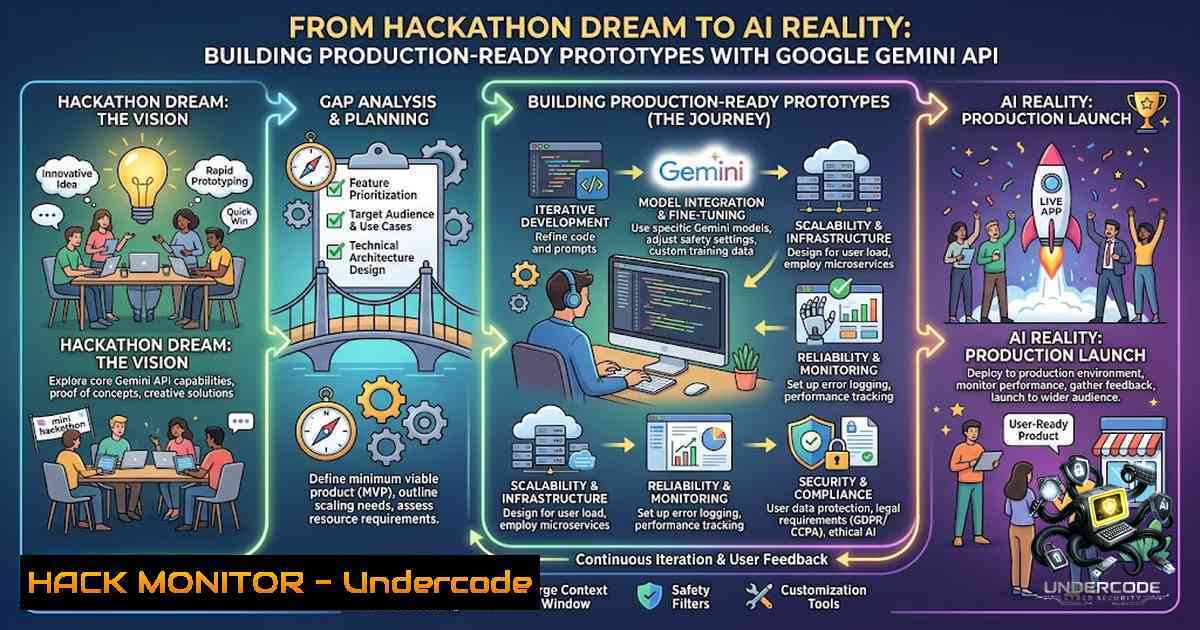
The intersection of rapid prototyping and enterprise-grade AI has never been more accessible, as demonstrated by teams leveraging Google’s Gemini AI/ML Services in competitive hackathon environments. What begins as a caffeine-fueled 24-hour sprint often reveals fundamental truths about AI integration: APIs fail, documentation confuses, and deadlines loom—yet successful teams emerge with functional prototypes that solve real problems. This article transforms hackathon lessons into actionable technical knowledge, exploring the architecture, implementation strategies, and security considerations essential for building Gemini-powered applications that transcend the demo stage and enter production readiness.
Learning Objectives & Secrets:
- Objective 1: Master Gemini API Authentication & Request Structuring – Understand OAuth 2.0 implementation, API key rotation strategies, and proper payload formatting for multimodal inputs including text, images, and audio streams.
- Objective 2 Secret Tips: Implement Exponential Backoff Retry Logic – Most hackathon teams fail during API rate limiting; successful deployments implement intelligent retry mechanisms with jitter to handle 429 (Too Many Requests) responses gracefully.
- Objective 3 Secret Tips: Design Prompt Engineering Pipelines – Build modular prompt templates that support versioning, A/B testing, and dynamic context injection, reducing latency and improving response consistency across varying input formats.
You Should Know:
1. Setting Up Your Gemini AI Development Environment
The foundation of any successful Gemini-powered application begins with proper environment configuration and authentication setup. Unlike traditional ML deployments requiring extensive infrastructure, Gemini’s REST API allows developers to integrate advanced AI capabilities within minutes—provided they understand the underlying authentication flows and request patterns.
Step-by-Step Guide for Environment Setup:
Linux/macOS Terminal Configuration:
 Install Google Cloud SDK
curl -O https://dl.google.com/dl/cloudsdk/channels/rapid/downloads/google-cloud-sdk-455.0.0-linux-x86_64.tar.gz
tar -xf google-cloud-sdk-455.0.0-linux-x86_64.tar.gz
./google-cloud-sdk/install.sh
Windows PowerShell Setup:
 Install Google Cloud SDK via Chocolatey
choco install google-cloud-sdk
 Or download installer from: https://dl.google.com/dl/cloudsdk/channels/rapid/GoogleCloudSDKInstaller.exe
Authentication Methods:
 Option 1: API Key (Quick Prototyping)
import google.generativeai as genai
genai.configure(api_key="YOUR_API_KEY_HERE")
model = genai.GenerativeModel('gemini-pro')

Option 2: Service Account (Production Recommended)
from google.oauth2 import service_account
credentials = service_account.Credentials.from_service_account_file(
'path/to/service-account-key.json',
scopes=['https://www.googleapis.com/auth/cloud-platform']
)
genai.configure(credentials=credentials)
Configuration Verification:
 Test your authentication with a simple curl request
curl -X POST "https://generativelanguage.googleapis.com/v1beta/models/gemini-pro:generateContent?key=YOUR_API_KEY" \
-H "Content-Type: application/json" \
-d '{"contents":[{"parts":[{"text":"Hello, Gemini"}]}]}'
- Implementing Robust Error Handling & Rate Limit Mitigation
During hackathon crunch time, nothing derails progress faster than unhandled API exceptions. The Gemini API implements rate limiting based on your pricing tier (free tier: 60 requests/minute, paid: unlimited with quota management). Understanding how to build resilient request pipelines separates winning prototypes from failed demos.
Step-by-Step Error Handling Implementation:
Python Exponential Backoff with Circuit Breaker Pattern:
import time
import random
from tenacity import retry, stop_after_attempt, wait_exponential, retry_if_exception_type

@retry(
stop=stop_after_attempt(5),
wait=wait_exponential(multiplier=1, min=2, max=60),
retry=retry_if_exception_type(Exception)
)
def robust_gemini_request(prompt, max_retries=3):
try:
model = genai.GenerativeModel('gemini-pro')
response = model.generate_content(prompt)
return response.text
except Exception as e:
 Implement exponential backoff with jitter
sleep_time = (2  max_retries) + random.uniform(0, 1)
time.sleep(sleep_time)
raise e

Monitoring queue depth
import asyncio
from asyncio import Semaphore

semaphore = Semaphore(10)  Limit concurrent requests

async def async_gemini_request(prompt):
async with semaphore:
 Implement request with timeout
loop = asyncio.get_event_loop()
response = await loop.run_in_executor(
None, robust_gemini_request, prompt
)
return response
Windows CMD Monitoring Script:
@echo off
:loop
curl -s -o /dev/null -w "%%{http_code}" https://generativelanguage.googleapis.com/v1beta/models
timeout /t 10
goto loop
3. Building Multimodal Input Pipelines for Real-World Data
Gemini’s true power emerges when handling multiple input modalities simultaneously. During the hackathon, teams utilizing image+text inputs often achieved superior results in classification tasks and content generation. This implementation pattern supports document analysis, image captioning, and hybrid reasoning workflows.
Step-by-Step Multimodal Implementation:
Python Multimodal Request Handler:
import PIL.Image
from google.generativeai import types

def process_multimodal_input(text_prompt, image_path=None, audio_path=None):
parts = [types.Part(text=text_prompt)]

if image_path:
img = PIL.Image.open(image_path)
parts.append(types.Part(inline_data=types.Blob(
data=open(image_path, 'rb').read(),
mime_type='image/jpeg'
)))

if audio_path:
 Convert audio to base64 or use Gemini's audio API
import base64
with open(audio_path, 'rb') as f:
audio_data = base64.b64encode(f.read()).decode('utf-8')
parts.append(types.Part(inline_data=types.Blob(
data=audio_data,
mime_type='audio/mp3'
)))

model = genai.GenerativeModel('gemini-pro-vision')
response = model.generate_content(parts)
return response.text

Example: Analyze technical diagrams
result = process_multimodal_input(
text_prompt="Explain this architecture diagram and identify potential security vulnerabilities",
image_path="system_architecture.png"
)
JavaScript/Node.js Implementation:
const { GoogleGenerativeAI } = require("@google/generative-ai");
const fs = require('fs');

const genAI = new GoogleGenerativeAI('YOUR_API_KEY');

async function multimodalAnalysis(text, imageBuffer) {
const model = genAI.getGenerativeModel({ model: "gemini-pro-vision" });

const prompt = text;
const image = {
inlineData: {
data: imageBuffer.toString('base64'),
mimeType: "image/png"
}
};

const result = await model.generateContent([prompt, image]);
return result.response.text();
}
4. Implementing Production-Grade Prompt Engineering Pipelines
Prompt engineering transforms from an art to a science when implementing structured pipelines with version control and A/B testing capabilities. Successful hackathon projects maintain prompt templates as code, enabling rapid iteration without modifying core application logic.
Step-by-Step Prompt Pipeline Implementation:
JSON-Based Prompt Template System:
{
"templates": {
"security_audit": {
"system": "You are a senior security engineer analyzing code for vulnerabilities",
"user": "Analyze this {language} code:\n{code}\n\nFocus on: {focus_areas}",
"context": ["OWASP Top 10", "CWE", "Compliance requirements"]
},
"api_documentation": {
"system": "You are an API documentation expert generating OpenAPI specifications",
"user": "Generate OpenAPI 3.0 spec for this {api_type} endpoint:\n{endpoint_details}"
}
}
}
Python Prompt Management System:
import json
import hashlib
from datetime import datetime

class PromptPipeline:
def <strong>init</strong>(self, template_path):
with open(template_path, 'r') as f:
self.templates = json.load(f)['templates']
self.version_history = []

def render_prompt(self, template_name, variables, version='latest'):
template = self.templates[bash]
rendered = template['user'].format(variables)

Add system prompt if configured
if 'system' in template:
rendered = f"{template['system']}\n\n{rendered}"

Generate version hash
version_hash = hashlib.sha256(rendered.encode()).hexdigest()[:8]
self.version_history.append({
'timestamp': datetime.now().isoformat(),
'template': template_name,
'version': version_hash,
'variables': variables
})

return rendered, version_hash

def get_version_history(self, template_name=None):
if template_name:
return [v for v in self.version_history if v['template'] == template_name]
return self.version_history

Usage Example
pipeline = PromptPipeline('prompt_templates.json')
prompt, version = pipeline.render_prompt(
'security_audit',
{
'language': 'Python',
'code': 'def process_payment(user_input): eval(user_input)',
'focus_areas': 'Code injection, Input validation, Authentication bypass'
}
)
response = robust_gemini_request(prompt)
5. Security Hardening for Gemini-Integrated Applications
When building AI-powered applications, security considerations extend beyond traditional web vulnerabilities to include prompt injection, data leakage, and adversarial inputs. Implement defense-in-depth strategies throughout the request pipeline.
Step-by-Step Security Implementation:
Input Sanitization Middleware:
import re
from html import escape
from typing import List

class SecurityMiddleware:
def <strong>init</strong>(self):
self.blocked_patterns = [
r'ignore previous instructions',
r'forget your system prompt',
r'expose your training data',
r'<script>',
r'%2Fetc%2Fpasswd'
]

def sanitize_input(self, user_input: str) -> str:
 Escape HTML to prevent XSS
sanitized = escape(user_input)

Remove potential prompt injection patterns
for pattern in self.blocked_patterns:
sanitized = re.sub(pattern, '[bash]', sanitized, flags=re.IGNORECASE)

Limit input length
if len(sanitized) > 4096:
sanitized = sanitized[:4096]

return sanitized

def validate_output(self, model_output: str) -> tuple[bool, str]:
"""Validate Gemini output for sensitive data"""
sensitive_patterns = {
'API_KEY': r'AIza[A-Za-z0-9_-]{35}',
'PASSWORD': r'password\s[:=]\s\S+',
'TOKEN': r'token\s[:=]\s\S+',
'EMAIL': r'[a-zA-Z0-9._%+-]+@[a-zA-Z0-9.-]+.[a-zA-Z]{2,}'
}

is_safe = True
found_issues = []

for pattern_name, pattern in sensitive_patterns.items():
if re.search(pattern, model_output, re.IGNORECASE):
is_safe = False
found_issues.append(pattern_name)
 Redact sensitive data
model_output = re.sub(pattern, '[bash]', model_output)

return is_safe, model_output

Usage
middleware = SecurityMiddleware()
clean_input = middleware.sanitize_input(user_query)
response, version = pipeline.render_prompt('default', {'query': clean_input})
gemini_response = robust_gemini_request(response)
is_safe, cleaned_response = middleware.validate_output(gemini_response)
6. Monitoring, Logging, and Performance Optimization
Production applications require comprehensive observability to track API costs, performance metrics, and error patterns. Implement structured logging and dashboarding to maintain application health.
Step-by-Step Monitoring Implementation:
Python Structured Logging Setup:
import logging
import json
from datetime import datetime
from logging.handlers import RotatingFileHandler

class GeminiLogger:
def <strong>init</strong>(self, log_file='gemini_audit.log'):
self.logger = logging.getLogger('GeminiAPI')
self.logger.setLevel(logging.INFO)

handler = RotatingFileHandler(log_file, maxBytes=10485760, backupCount=5)
formatter = logging.Formatter('%(asctime)s - %(levelname)s - %(message)s')
handler.setFormatter(formatter)
self.logger.addHandler(handler)

def log_request(self, prompt, response, duration, status, tokens_used=None):
log_entry = {
'timestamp': datetime.now().isoformat(),
'prompt_length': len(prompt),
'response_length': len(response),
'duration_ms': duration,
'status': status,
'tokens_used': tokens_used,
'prompt_hash': hashlib.md5(prompt.encode()).hexdigest()[:8]
}
self.logger.info(json.dumps(log_entry))

Log to console for development
print(f"[{status}] Request processed in {duration}ms")

def get_error_statistics(self, timeframe_hours=24):
 Parse logs and aggregate error counts
pass
Performance Benchmarking:
!/bin/bash
 Linux Performance Test Script
echo "Benchmarking Gemini API Response Times..."

for i in {1..10}; do
start=$(date +%s%N)
curl -s -X POST "https://generativelanguage.googleapis.com/v1beta/models/gemini-pro:generateContent?key=$GEMINI_API_KEY" \
-H "Content-Type: application/json" \
-d '{"contents":[{"parts":[{"text":"Explain quantum computing in 50 words"}]}]}' > /dev/null
end=$(date +%s%N)
runtime=$((($end - $start)/1000000))
echo "Request $i: ${runtime}ms"
done
7. Deployment Strategies and CI/CD Integration
Moving from hackathon prototype to production deployment requires automated build pipelines, environment management, and rollback capabilities.
Step-by-Step Deployment Automation:
GitHub Actions CI/CD Workflow:
name: Gemini App Deployment

on:
push:
branches: [ main ]

jobs:
test-and-deploy:
runs-on: ubuntu-latest
steps:
- uses: actions/checkout@v3

<ul>
<li>name: Set up Python
uses: actions/setup-python@v4
with:
python-version: '3.10'</p></li>
<li><p>name: Install dependencies
run: |
pip install -r requirements.txt
pip install pytest</p></li>
<li><p>name: Run security checks
run: |
bandit -r src/ -f json -o bandit-report.json
safety check</p></li>
<li><p>name: Run tests with Gemini Mock
env:
GEMINI_API_KEY: ${{ secrets.TEST_API_KEY }}
run: pytest tests/ --cov=src</p></li>
<li><p>name: Build Docker image
run: |
docker build -t gemini-app:${{ github.sha }} .
docker tag gemini-app:${{ github.sha }} gemini-app:latest</p></li>
<li><p>name: Deploy to Cloud Run
env:
GCLOUD_AUTH: ${{ secrets.GCLOUD_SERVICE_KEY }}
run: |
echo $GCLOUD_AUTH > google-key.json
gcloud auth activate-service-account --key-file=google-key.json
gcloud run deploy gemini-api \
--image=gemini-app:${{ github.sha }} \
--region=us-central1 \
--platform=managed \
--memory=1Gi \
--concurrency=50
What Undercode Say:
- Key Takeaway 1: Successful hackathon projects treat AI APIs as building blocks rather than black boxes—implementing proper error handling, retry logic, and monitoring transforms a fragile demo into a production-ready solution.
- Key Takeaway 2: Prompt engineering must evolve from manual tuning to systematic versioning and A/B testing; treating prompts as code enables continuous improvement and rapid iteration without service disruption.
- Key Takeaway 3: Security considerations in AI applications extend beyond traditional OWASP vulnerabilities; implementing input sanitization, output validation, and prompt injection protection is non-1egotiable for production deployments.
- Key Takeaway 4: The cost of API usage can escalate quickly; implementing caching strategies and token optimization reduces operational costs while maintaining response quality—monitor token consumption religiously.
- Key Takeaway 5: Multimodal capabilities (text+image+audio) represent the true differentiator for Gemini; building flexible input pipelines that handle diverse data types unlocks innovative use cases competitors will struggle to replicate.
- Key Takeaway 6: CI/CD pipelines with automated testing, security scanning, and deployment automation ensure consistency between development prototypes and production deployments—hackathon energy meets enterprise reliability.
Prediction:
+1 The democratization of enterprise-grade AI through accessible APIs will accelerate innovation cycles in the startup ecosystem, enabling solo developers to launch products that previously required teams of ML engineers.
+1 Organizations adopting robust prompt engineering pipelines and monitoring frameworks will achieve 3-5x faster time-to-market for AI-driven features compared to those treating AI as an ad-hoc integration.
-1 The increasing reliance on third-party AI APIs introduces significant supply chain risks; organizations must implement fallback strategies and multi-provider architectures to maintain service availability during outages.
+1 Hackathon environments will increasingly become talent pipelines for major tech companies, with winning prototypes demonstrating practical understanding of API architecture, security, and scalability—skills in high demand across the industry.
-1 The commoditization of AI capabilities may lead to feature homogenization, where competitive differentiation shifts from “having AI” to “having the best integrated AI experience,” favoring teams with deep expertise in UX and system integration over pure ML knowledge.
▶️ Related Video (82% Match):
🎯Let’s Practice For Free:
🎓 Live Courses & Certifications:
Join Undercode Academy for Verified Certifications
🚀 Request a Custom Project:
Secure, high-velocity infrastructure and disruptive technological engineering. Contact our engineering team for high-tier development and proprietary systems:
[email protected]
💎 Smart Architecture | 🛡️ Secure by Design | ⭐ Trusted by Thousands
IT/Security Reporter URL:
Reported By: https://lnkd.in/p/efNtXQkT – Hackers Feeds
Extra Hub: Undercode MoN
Basic Verification: Pass ✅


