
Listen to this Post
Introduction:
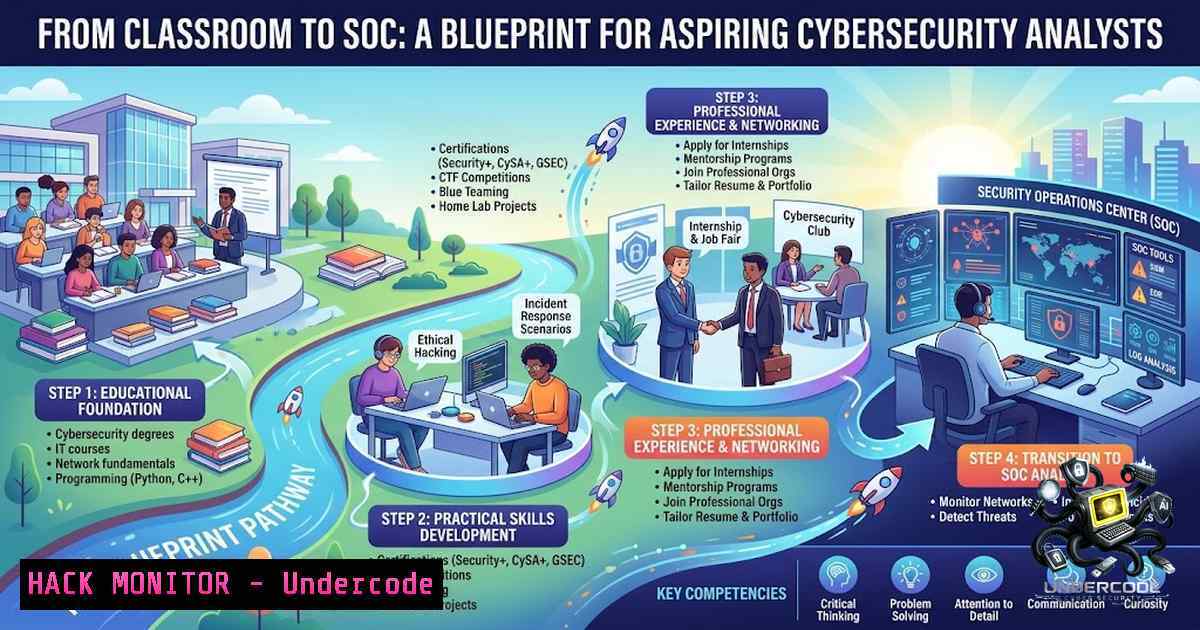
The transition from academic cybersecurity training to a frontline defensive role requires more than theoretical knowledge—it demands validated hands-on skills, tool proficiency, and the ability to operate under pressure. Ahmad Obeidat, a recent graduate from Amman Arab University, exemplifies this pathway by combining formal education with practical certifications, CTF victories, and over 100 lab challenges. His journey offers a replicable model for entry-level candidates seeking SOC Analyst or Penetration Testing positions in today’s competitive market.
Learning Objectives & Secrets:
- Objective 1 – Build a Home Lab Ecosystem: Deploy virtual machines running Kali Linux, Ubuntu, and Windows Server to simulate enterprise networks for safe attack and defense practice.
- Objective 2 – Master Core SOC Tools (Secret Tip): Go beyond basic Wireshark and Nmap usage—integrate Zeek (formerly Bro) for network metadata and use QRadar’s AQL (Ariel Query Language) for custom threat hunting queries.
- Objective 3 – CTF Strategy (Secret Tip): For TryHackMe and HTB, always start with enumeration using `rustscan` followed by `nmap -sC -sV -Pn` to uncover hidden services before diving into exploitation.
You Should Know:
1. Setting Up Your Virtual Lab Environment
A robust practice lab is the foundation of skill development. Use VMware or VirtualBox to create isolated networks. For Linux-based attacks, install Kali Linux and ensure you have the latest tools: sudo apt update && sudo apt full-upgrade -y. For Windows defensive analysis, deploy Windows Server 2019/2022 with Active Directory and enable Windows Event Forwarding to centralize logs.
Step‑by‑Step Guide:
- Download and install VirtualBox. Create a new virtual machine with 4GB RAM and 50GB storage for Kali Linux.
- Install Kali from the official ISO and run
sudo apt install wireshark nmap metasploit-framework burpsuite -y. - Set up a host‑only network adapter in VirtualBox to connect your Kali machine to a Windows Server VM for internal testing.
- Verify connectivity using `ping 192.168.56.101` (adjust IP as per your network configuration).
2. Packet Analysis and Triage with Wireshark
Effective log analysis and alert triage rely on capturing and interpreting live network traffic. Wireshark is indispensable for identifying malicious patterns, such as port sweeps or suspicious DNS queries.
Step‑by‑Step Guide:
- Launch Wireshark as root: `sudo wireshark` and select the active interface (e.g., eth0).
- Apply a display filter to isolate HTTP traffic: `http.request.method == “GET”` and examine User-Agent strings for anomalies.
- For threat hunting, use the filter `tcp.flags.syn == 1 && tcp.flags.ack == 0` to spot SYN scans from a single source IP.
- Export objects via File → Export Objects → HTTP to save and analyze suspicious files transferred over the network.
3. Network Scanning and Vulnerability Discovery with Nmap
Nmap is the swiss army knife for enumeration. Combining it with NSE scripts can reveal CVEs and misconfigurations.
Step‑by‑Step Guide:
- Perform a comprehensive scan: `nmap -sS -sV -p- -T4 -A 192.168.56.0/24` to identify open ports and service versions.
- Run vulnerability scripts: `nmap –script vuln 192.168.56.101` to check for known weaknesses like MS17-010 (EternalBlue).
- For stealthier reconnaissance, use `nmap -sS -sV -p 80,443 -f –data-length 200 192.168.56.101` to fragment packets and evade basic IDS signatures.
4. SIEM Configuration and Log Centralization (IBM QRadar)
QRadar aggregates logs from firewalls, servers, and endpoints to correlate events. New analysts must understand how to tune rules and create custom search queries.
Step‑by‑Step Guide:
- Access the QRadar Console and navigate to the Log Activity tab.
- Build an AQL query to find failed logins:
SELECT FROM events WHERE username = 'Administrator' AND eventname = 'Logon Failure' LAST 24 HOURS. - Create a custom rule to detect brute-force attempts by alerting when more than 10 failed logins occur from the same source IP within 5 minutes.
- Test the rule by simulating failed logins using
hydra -l administrator -P /usr/share/wordlists/rockyou.txt ssh://192.168.56.101.
5. Web Application Enumeration and Exploitation
Penetration testers frequently encounter web targets. Tools like Gobuster, Nikto, and Burp Suite are essential for directory brute‑forcing and parameter fuzzing.
Step‑by‑Step Guide:
- Use Gobuster to discover hidden directories:
gobuster dir -u http://192.168.56.101 -w /usr/share/wordlists/dirbuster/directory-list-2.3-medium.txt -x php,html,txt. - Run Nikto for server misconfigurations:
nikto -h http://192.168.56.101 -ssl -Cgidirs all. - Intercept a POST request in Burp Suite, send it to Intruder, and use a payload list (e.g.,
SecLists/Fuzzing/SQLi-Quick-Scan.txt) to test for SQL injection vulnerabilities.
6. Windows Server Hardening and Active Directory Security
Securing AD is critical. Attackers often target Kerberos and SMB. Defenders must implement best practices like disabling LM/NTLM and enabling logging.
Step‑by‑Step Guide:
- Open Group Policy Management Editor and navigate to Computer Configuration → Windows Settings → Security Settings → Local Policies → Security Options.
- Set “Network security: Restrict NTLM: Incoming NTLM traffic” to “Deny all accounts”.
- Enable advanced audit policies: Audit Account Logon Events → Success and Failure, and Audit Object Access → Success and Failure.
- Review event logs via PowerShell: `Get-WinEvent -LogName Security | Where-Object {$_.Id -eq 4625}` to identify failed login attempts.
7. Linux System Security and Privilege Escalation Mitigation
On Linux systems, misconfigured SUID binaries and writable cron jobs are common privilege escalation vectors. Analysts should know how to detect and remediate these.
Step‑by‑Step Guide:
- Find SUID binaries:
find / -perm -4000 -type f 2>/dev/null. - Check for world‑writable files in system directories:
find / -perm -2 -type f 2>/dev/null | grep -v /proc. - Review cron jobs: `cat /etc/crontab` and `crontab -l` for unprivileged users.
- Implement AppArmor or SELinux policies to restrict application capabilities, e.g.,
sudo aa-enforce /usr/sbin/nginx.
What Undercode Say:
- Key Takeaway 1: Real‑world cybersecurity roles reward practical lab hours over passive learning. Ahmad’s 100+ challenges on TryHackMe and HTB directly translate to interview readiness and operational confidence.
- Key Takeaway 2: The combination of SOC tool proficiency (QRadar, Wireshark) and offensive skills (Nmap, Kali, CTFs) creates a well‑rounded defender who can anticipate attacker movements, a trait highly valued in Tier‑1 SOC roles.
Analysis: Ahmad’s profile is a testament to the “purple team” mindset—where defensive analysts understand attack vectors to better detect and respond. His practical training with NCSCJO and Path2Cyber bridges the gap between university theory and enterprise requirements. The inclusion of specific tools and platforms like IBM QRadar and Kali Linux indicates a curriculum aligned with industry standards. His first‑place CTF win showcases not only technical prowess but also the ability to think critically under time constraints, a skill indispensable during active incidents. For hiring managers, this signals a candidate who can immediately contribute to alert triage and vulnerability assessment. Moreover, his networking through professional tags (e.g., @Wizard Cyber, @OFFTEC Jordan) demonstrates proactive community engagement, which is crucial for staying abreast of emerging threats and job opportunities.
Prediction:
- +1 The demand for entry‑level SOC analysts in the MENA region will surge by 25% over the next two years, creating numerous opportunities for candidates with practical certifications.
- +1 Cloud and AI‑driven security tools will become mandatory skills; candidates who supplement traditional tools with cloud SIEM (e.g., Microsoft Sentinel) will gain a competitive edge.
- -1 The rapid automation of Level‑1 alert triage may reduce the need for purely reactive analysts, pushing professionals to develop incident response and threat hunting expertise sooner.
- +1 CTF platforms and practical labs will increasingly be used as pre‑employment screening filters, making platforms like TryHackMe essential for job seekers.
▶️ Related Video (88% Match):
🎯Let’s Practice For Free:
🎓 Live Courses & Certifications:
Join Undercode Academy for Verified Certifications
🚀 Request a Custom Project:
Secure, high-velocity infrastructure and disruptive technological engineering. Contact our engineering team for high-tier development and proprietary systems:
[email protected]
💎 Smart Architecture | 🛡️ Secure by Design | ⭐ Trusted by Thousands
IT/Security Reporter URL:
Reported By: https://lnkd.in/p/ej2YpSmY – Hackers Feeds
Extra Hub: Undercode MoN
Basic Verification: Pass ✅


