Listen to this Post
Introduction:
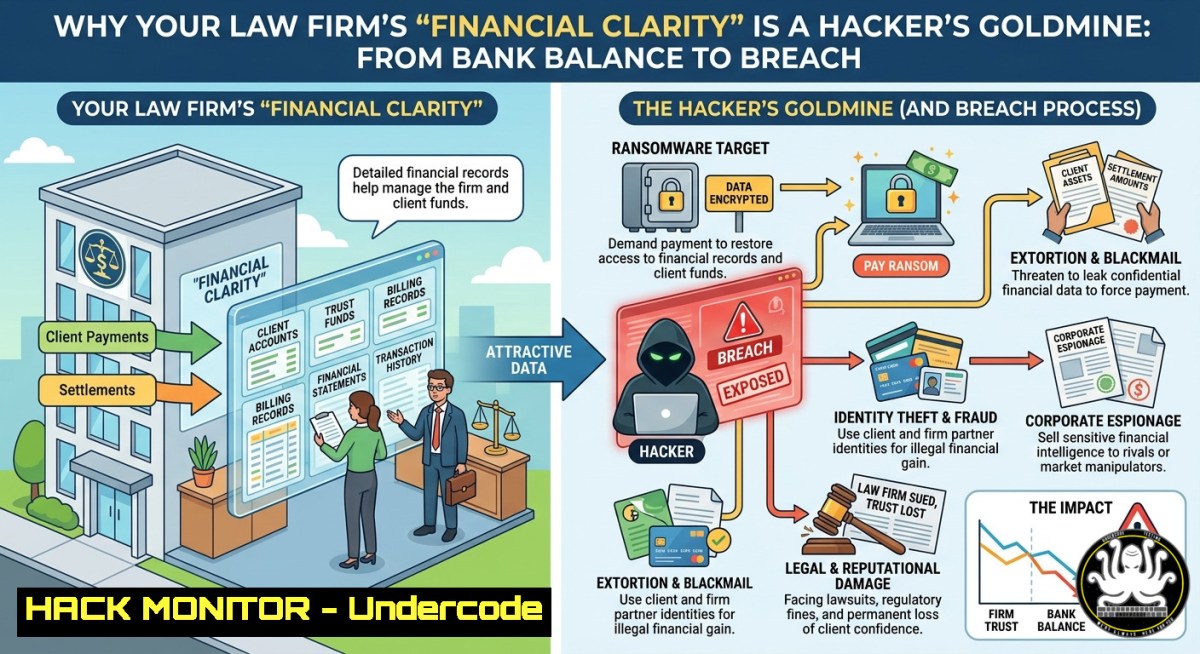
Relying on a bank balance to gauge a law firm’s financial health is not just poor strategy—it’s a dangerous gamble that exposes critical vulnerabilities. While modern financial management emphasizes real-time data for growth, this same digital clarity creates an irresistible attack surface for cybercriminals, as the sensitive data flowing through trust accounts (IOLTA) and firm finances has become a prime target for ransomware and data extortion.
Learning Objectives:
- Understand the specific cyber threats targeting law firm financial data and IOLTA trust accounts.
- Implement practical commands and configurations to harden Windows and Linux systems against common attack vectors.
- Apply a step-by-step incident response framework to detect, contain, and recover from a financial data breach.
You Should Know:
- The IOLTA Illusion: Why Your Trust Account Is a Ticking Time Bomb
The original post highlights the risk of managing a law firm by “checking your bank balance,” but this is far more than a financial strategy flaw. IOLTA accounts, which hold client funds, are an attractive target for cybercriminals. In the Haggett v. Kirzer case, hackers successfully looted an IOLTA account, sparking significant legal and ethical questions about security and professional conduct. The American Bar Association’s Model Rule 1.6 mandates that attorneys must make “reasonable efforts” to safeguard client data, making cybersecurity not just a technical issue but an ethical imperative. A breach can lead to disciplinary action, loss of license, and malpractice lawsuits, even if no data was actually stolen.
Step‑by‑step guide: Hardening Your Financial Data Environment
This practical guide focuses on securing the systems where financial data resides.
Step 1: Audit and Inventory Financial Data Access
First, you need to know where your sensitive data is. On a Windows Domain Controller or a Linux server, run the following to audit file permissions for your IOLTA and accounting folders.
Windows (PowerShell as Administrator):
 Export ACLs for a critical financial share to a CSV for review
Get-ChildItem -Path "D:\FirmFinancialData" -Recurse | Get-Acl | Export-Csv -Path "C:\Temp\Financial_ACL_Audit.csv"
Write-Host "ACL audit complete. Review the CSV for any unauthorized 'Everyone' or 'Domain Users' entries."
Linux (Bash as root):
 Find world-readable files in your financial data directory
find /var/financial_data -type f -perm -o=r -exec ls -la {} \; > /tmp/world_readable_audit.txt
echo "Audit complete. Check /tmp/world_readable_audit.txt for overly permissive files."

Use getfacl to dump all ACLs for a critical directory
getfacl -R /var/financial_data > /tmp/financial_acls_backup.txt
Step 2: Enforce the Principle of Least Privilege (PoLP)
Revoke all unnecessary access. Only specific finance personnel and managing partners should have access.
Windows (icacls command):
 Replace "FINANCE-USER" with the actual AD user/group. Remove inheritance and set explicit permissions.
icacls "D:\FirmFinancialData\IOLTA" /inheritance:r /grant "DOMAIN\Finance-Team:(OI)(CI)F" /grant "DOMAIN\ManagingPartner:(OI)(CI)R"
Linux (setfacl command):
 Give read-only access to a specific group and remove all others
setfacl -m g:finance_team:r-x /var/financial_data
setfacl -m u:partner:rwx /var/financial_data
setfacl -R -m g:finance_team:r-x /var/financial_data/
Step 3: Implement Robust Endpoint Hardening
Attackers often use credential harvesting. The FBI’s Private Industry Notification on the Silent Ransom Group (SRG) details how they use remote access tools like WinSCP to exfiltrate data. Block these tools or restrict their execution.
Windows (Software Restriction Policies via PowerShell):
 Block execution of WinSCP and other portable remote access tools
New-Item -Path "HKLM:\Software\Policies\Microsoft\Windows\Safer\CodeIdentifiers\0\Paths\WinSCP" -Force
Set-ItemProperty -Path "HKLM:\Software\Policies\Microsoft\Windows\Safer\CodeIdentifiers\0\Paths\WinSCP" -Name "SaferFlags" -Value 0 -Type DWord
Set-ItemProperty -Path "HKLM:\Software\Policies\Microsoft\Windows\Safer\CodeIdentifiers\0\Paths\WinSCP" -Name "ItemData" -Value "WinSCP.exe" -Type String
Write-Host "Application whitelisting policy updated. Logoff and login for changes to take effect."
Linux (AppArmor profile example):
Create a profile to restrict any binary executed from /tmp.
 Create a new AppArmor profile for temporary executables
sudo nano /etc/apparmor.d/tmp.binaries
 Add the following lines:
 profile tmp_binaries /tmp/.bin flags=(attach_disconnected) {
 /tmp/.bin r,
 /usr/bin/wget ix,
 deny /{usr/,}bin/{bash,sh,dash} x,
 deny network inet stream,
 }
sudo apparmor_parser -r /etc/apparmor.d/tmp.binaries
- The Silent Ransom Group (SRG) Playbook: From Phishing to Extortion
The “financial clarity” your firm seeks is the same data cybercriminals are after. According to a Baker & Hostetler report, cyberattacks targeting law firms increased in 2025, with incidents for a single threat actor nearly doubling from the previous year. The FBI has explicitly warned that the Silent Ransom Group (SRG) is targeting law firms using callback phishing emails and social engineering to gain remote access. Their new tactic involves posing as internal IT staff to trick employees into granting remote access, after which they exfiltrate data using tools like WinSCP or Rclone before issuing a ransom demand.
Step‑by‑step guide: Detecting and Responding to a Live Breach
Step 1: Immediate Containment (The “Kill Switch”)
If you suspect an active compromise, immediate action is crucial. The goal is to stop data exfiltration.
Windows (Force logoff all users):
 Query all active user sessions and forcefully log them off
query user
 For each session ID, run:
logoff <SESSION_ID> /server:localhost
Linux (Block outbound network traffic):
 Immediately block all outgoing traffic except to the management interface
iptables -P OUTPUT DROP
iptables -A OUTPUT -o lo -j ACCEPT
iptables -A OUTPUT -d <YOUR_MANAGEMENT_IP> -j ACCEPT
 Log the blocked traffic to capture the exfiltration destination
iptables -A OUTPUT -j LOG --log-prefix "BLOCKED_EXFIL: "
echo "Outbound traffic blocked. Check /var/log/syslog for blocked connection attempts."
Step 2: Forensic Collection and Artifact Hunting
SRG leaves few artifacts, but examining logs can reveal their presence.
Windows (Check for unauthorized remote access tools):
 Look for execution of WinSCP or Rclone in event logs
Get-WinEvent -FilterHashtable @{LogName='Security'; ID=4688} | Where-Object {$<em>.Message -match "WinSCP|rclone"} | Format-List
 Check PowerShell operational log for suspicious commands
Get-WinEvent -LogName "Windows PowerShell" | Where-Object {$</em>.Message -match "Exfil|Upload|Download"} | Export-Csv -Path "powershell_audit.csv"
Linux (Check for hidden processes and network connections):
 List all listening and established connections with process names
netstat -tulpn | grep ESTABLISHED
 Find hidden processes (those whose executable has been deleted)
ps -ef | grep " (deleted)"
 Examine bash history for suspicious wget, curl, or nc commands
cat ~/.bash_history | grep -E "wget|curl|nc|ncat|socat"
Step 3: Recovery and Hardening
After eradicating the threat, focus on recovery and preventing recurrence.
Restore from immutable backups: Ensure your backups are offline or immutable. A 2025 report found that half of law firms lack immutable backups, making them vulnerable to ransomware that encrypts backup repositories.
Enforce Multi-Factor Authentication (MFA) everywhere: The FBI alert stresses that phishing-resistant MFA is a key defense against credential theft. The American Bar Association also recommends MFA for all systems storing sensitive data.
Conduct regular employee training: All firm employees must be trained on identifying phishing and social engineering tactics.
What Undercode Say:
- Key Takeaway 1: Financial data clarity is a double-edged sword. The systems that provide real-time P&L and IOLTA management are the same systems that, if compromised, can lead to catastrophic financial loss, ethical violations, and loss of client trust.
- Key Takeaway 2: Reactive security is obsolete. Law firms must shift from a “bank balance management” mindset to a proactive, data-driven security posture. This means implementing robust logging, endpoint hardening, and a well-rehearsed incident response plan before an attack occurs.
Prediction:
-
- Increased Regulatory Scrutiny: The trend of states requiring law firms to implement specific cybersecurity measures as part of professional responsibility will accelerate, potentially leading to mandatory annual security audits and certifications.
-
- Rise of AI-Powered Legal Extortion: Cybercriminals will increasingly use large language models (LLMs) to craft hyper-personalized phishing emails and social engineering scripts, making detection far more difficult and leading to a new wave of AI-driven data breaches targeting legal professionals.
▶️ Related Video (78% Match):
🎯Let’s Practice For Free:
IT/Security Reporter URL:
Reported By: Managing A – Hackers Feeds
Extra Hub: Undercode MoN
Basic Verification: Pass ✅
🎓 Live Courses & Certifications:
Join Undercode Academy for Verified Certifications
🚀 Request a Custom Project:
Secure, high-velocity infrastructure and disruptive technological engineering. Contact our engineering team for high-tier development and proprietary systems:
[email protected]


