
Listen to this Post
Introduction:
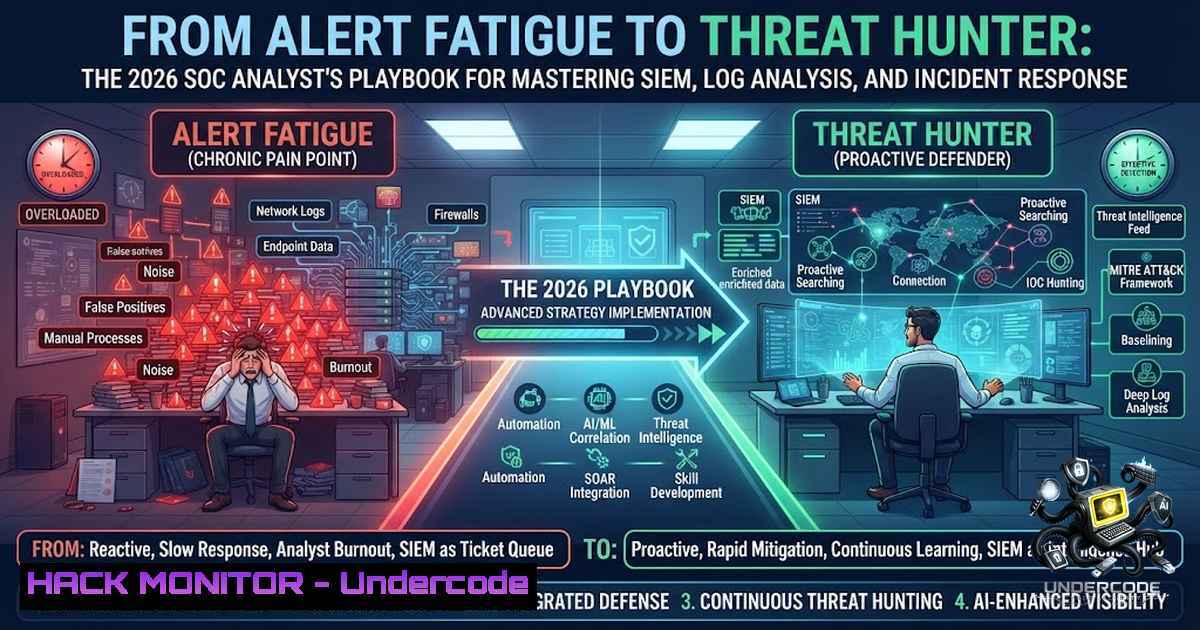
The modern Security Operations Center (SOC) is no longer a passive monitoring facility—it is an active, intelligence-driven war room where every log entry tells a story and every alert is a potential breadcrumb to an active breach. As Khwaja Zaher Sediqi, an Aspiring SOC Analyst and Threat Detection specialist, recently emphasized, the most impactful analysts are not those who claim to know everything, but those who commit to relentless learning, critical thinking, and purpose-driven investigation. In 2026, the cybersecurity landscape is evolving at an unprecedented pace, with attackers leveraging AI-driven tactics and cloud-1ative exploitation techniques, making the role of the SOC analyst more critical than ever. This article serves as a comprehensive technical blueprint for aspiring and junior SOC analysts, bridging the gap between motivational mindset and actionable, command-line proficiency across Linux, Windows, SIEM platforms, and cloud environments.
Learning Objectives:
- Master the core competencies of SOC operations, including networking fundamentals, operating system internals, and advanced log analysis techniques.
- Develop hands-on proficiency with industry-leading SIEM platforms (Splunk, Elasticsearch, Wazuh) and learn to craft detection queries that map to the MITRE ATT&CK framework.
- Acquire practical incident response skills, including host isolation, process termination, and forensic data collection across Linux and Windows systems.
- Build and deploy automated threat detection scripts using Python and Bash to streamline log parsing, indicator of compromise (IOC) extraction, and alert prioritization.
- Understand cloud security hardening and monitoring strategies for AWS, Azure, and GCP to defend modern, hybrid infrastructures.
1. Building Your SOC Lab: Simulating Enterprise Telemetry
Every great SOC analyst starts with a safe environment to fail, learn, and experiment. Before you touch a production SIEM, you need a home lab that mirrors enterprise telemetry sources. This lab should include at least one Windows endpoint (generating Security, System, and Application logs), one Linux server (producing syslog and auditd logs), and a network device forwarding NetFlow or firewall logs.
Step-by-Step Guide: Deploying a Mini-SOC with Elastic Stack (ELK) or Wazuh
- Provision the Environment: Use VirtualBox or VMware to spin up an Ubuntu 22.04 LTS VM with at least 4GB of RAM and 20GB of storage. This will host your SIEM.
- Install Elasticsearch: Download and install Elasticsearch. Configure `elasticsearch.yml` to set `network.host: 0.0.0.0` and `discovery.type: single-1ode` for lab purposes. Start the service with
sudo systemctl start elasticsearch. - Install Kibana: Install Kibana and connect it to your Elasticsearch instance by editing `kibana.yml` with
elasticsearch.hosts: ["http://localhost:9200"]. Access the web interface athttp://<your-vm-ip>:5601. - Deploy Wazuh Manager (Optional but Recommended): Wazuh provides out-of-the-box security detection rules mapped to MITRE ATT&CK. Install using the quickstart script:
curl -sO https://packages.wazuh.com/4.x/wazuh-install.sh && sudo bash wazuh-install.sh -a. - Install a Wazuh Agent on a Windows VM: Download the Wazuh agent MSI, install it, and point it to your manager’s IP. Verify connectivity by checking `C:\Program Files (x86)\ossec-agent\ossec.log` for “Connected to server”.
- Generate Test Alerts: Simulate a brute-force attack on your Linux VM using `hydra -l root -P /usr/share/wordlists/rockyou.txt ssh://
` and watch your SIEM dashboard populate with real-time alerts. -
Log Analysis Mastery: The Language of the SOC
Logs are the lifeblood of detection. A SOC analyst spends the majority of their time sifting through syslog, Windows Event Logs, firewall logs, and DNS queries. The ability to quickly parse and correlate these logs using command-line tools is non-1egotiable.
Linux Log Analysis Commands
journalctl: The modern syslog viewer. Use `journalctl -xe -p 3 -b` to view errors (priority 3) since boot.
– `grep` andawk: Extract failed SSH login attempts:sudo grep "Failed password" /var/log/auth.log | awk '{print $11}' | sort | uniq -c | sort -1r.auditd: For deep system call monitoring. Configure a rule to watch/etc/passwd:auditctl -w /etc/passwd -p wa -k identity_changes. View logs withausearch -k identity_changes.
Windows Log Analysis Commands (PowerShell)
Get-WinEvent: The PowerShell workhorse. Query the Security log for Event ID 4625 (failed logons) in the last 24 hours:Get-WinEvent -LogName Security -MaxEvents 100 | Where-Object { $_.Id -eq 4625 }wevtutil: Export logs for offline analysis:wevtutil epl Security C:\temp\security_backup.evtx.- Sysinternals Suite: Tools like `Autoruns` and `Process Explorer` are essential for live response. Run `autorunsc.exe -a -c` to export all auto-start entries to a CSV for analysis.
3. SIEM Query Writing: From Data to Detection
A SIEM is only as good as the queries you write. Whether you are using Splunk’s SPL, Elastic’s EQL, or KQL in Microsoft Sentinel, the goal is to reduce noise and surface malicious activity. In 2026, MITRE ATT&CK v18 introduced “Detection Strategies” and “Analytics” objects, requiring analysts to think in terms of specific adversary behaviors and log sources.
Step-by-Step: Creating a Detection Rule for Lateral Movement (Splunk Example)
- Identify the Tactic: Lateral Movement (TA0008) often involves using PsExec or WMI. The specific technique is T1021.002 (SMB/Windows Admin Shares).
- Data Source: Windows Security Event logs (specifically Event ID 5140 for network share access and 4688 for process creation).
3. Write the SPL Query:
index=windows_security EventCode=5140 ShareName="ADMIN$" OR ShareName="C$"
| stats count by src_ip, dest_ip, UserName
| where count > 5
4. Refine with Correlation: Combine with EventCode 4688 to check for `psexec.exe` or `wmic.exe` execution.
index=windows_security (EventCode=5140 ShareName="ADMIN$") OR (EventCode=4688 ProcessName="psexec")
| stats values(EventCode) as EventCodes by src_ip, dest_ip
| where mvcount(EventCodes) > 1
5. Map to MITRE ATT&CK: Tag the rule with `mitre_technique_id=T1021.002` and mitre_tactic=Lateral Movement.
6. Tune the Alert: Set a threshold to avoid alert fatigue. Schedule the search to run every 15 minutes and trigger a notable event if results > 0.
4. Incident Response Playbook: The 5-Step Triage
When an alert fires, the clock starts ticking. A structured incident response (IR) process ensures you contain the threat before it spreads. The following playbook integrates Linux and Windows commands for rapid containment.
Step 1: Identify and Isolate
- Network Isolation: Immediately block the compromised host at the firewall level. On Linux:
sudo iptables -A INPUT -s <malicious_ip> -j DROP. On Windows:New-1etFirewallRule -DisplayName "Block_IP" -Direction Inbound -RemoteAddress <malicious_ip> -Action Block. - Disable User Account: If the compromise is user-specific, disable the account immediately. On Windows Domain:
Disable-ADAccount -Identity <username>.
Step 2: Collect Volatile Data (Memory and Processes)
- Linux: Capture memory with
sudo dd if=/dev/mem of=/tmp/memory.dump bs=1M count=100. List processes with `ps auxf` and network connections withss -tulpn. - Windows: Use `WinPmem` to acquire memory:
winpmem_mini_x64.exe C:\temp\memory.raw. List running processes:Get-Process | Export-Csv C:\temp\processes.csv.
Step 3: Kill the Malicious Process
- Linux: `sudo kill -9
`
– Windows: `Stop-Process -ID-Force`
Step 4: Remove Persistence
- Linux: Check crontab for malicious entries: `crontab -l` and
sudo crontab -l. Check systemd services:systemctl list-units --type=service. - Windows: Use `Autoruns` to disable suspicious scheduled tasks or registry run keys.
Step 5: Eradication and Recovery
- Delete malicious files: `sudo rm -rf /tmp/malware.sh` or
del C:\temp\malware.exe. - Patch the vulnerability that allowed the initial access. If it was an unpatched server, apply the latest cumulative update immediately.
5. Proactive Threat Hunting with MITRE ATT&CK
Reactive monitoring is insufficient. Threat hunting is the proactive search for adversaries that have evaded existing security controls. As of 2026, threat hunting relies heavily on hypothesis-driven investigations, often starting with a specific MITRE ATT&CK technique.
Step-by-Step: Hunting for Persistence via Scheduled Tasks (T1053.005)
- Formulate the Hypothesis: “An attacker may have established persistence on our Windows endpoints by creating malicious scheduled tasks that run at system startup.”
- Data Source: Windows Security Event Log (Event ID 4698 – A scheduled task was created) and Sysmon (Event ID 1 – Process creation).
3. Query (Elastic EQL):
sequence by host.name
[any where event.code == "4698" and task.content contains "powershell"]
[any where event.code == "1" and process.name == "powershell.exe" and process.command_line contains "-1op"]
4. Investigate: Review the command line of the scheduled task. Look for encoded PowerShell commands (-enc) or connections to external IPs.
5. Use osquery: For a fleet-wide check, use osquery to query the scheduled tasks table:
SELECT FROM scheduled_tasks WHERE name LIKE '%updater%' OR enabled = 1;
6. Document Findings: If you find a legitimate task that appears suspicious, document it as a “False Positive” and tune your rule. If it’s malicious, escalate to incident response immediately.
6. Cloud Security Monitoring: Hardening AWS and Azure
With over 60% of enterprise workloads now in the cloud, SOC analysts must be proficient in cloud-1ative security tools. Misconfigured S3 buckets and overly permissive IAM roles remain the top attack vectors.
AWS Hardening Commands (AWS CLI)
- Enable CloudTrail:
aws cloudtrail create-trail --1ame "SecurityTrail" --s3-bucket-1ame "your-bucket" --is-multi-region-trail --enable-log-file-validation. - Enable GuardDuty:
aws guardduty create-detector --enable. - Check S3 Bucket Policies: `aws s3api get-bucket-policy –bucket your-bucket` to ensure it is not public.
- Audit IAM: `aws iam get-account-authorization-details` to list all users, roles, and policies.
Azure Hardening Commands (Azure CLI)
- Enable Defender for Cloud:
az security auto-provisioning-setting update --1ame "default" --auto-provision "On". - Configure Diagnostic Settings: Send all logs to a Log Analytics workspace:
az monitor diagnostic-settings create --1ame "SendToLAW" --resource <resource-id> --workspace <workspace-id>. - Review Conditional Access: Ensure MFA is enforced:
az ad conditional-access policy list --filter "displayName eq 'Require MFA'".
- Automating the Analyst: Python Scripts for Log Triage
Automation is the force multiplier for any SOC team. Python scripts can reduce the time spent on manual log review from hours to seconds. Use the following script to parse a Windows Security log and extract brute-force attack patterns.
Python Script: Failed Logon Analyzer
import re
from collections import Counter

def analyze_failed_logons(log_file_path):
failed_attempts = []
with open(log_file_path, 'r', encoding='latin-1') as file:
for line in file:
if '4625' in line:  Event ID for failed logon
 Extract IP using regex
ip_match = re.search(r'Source Network Address:\s+(\d+.\d+.\d+.\d+)', line)
if ip_match:
failed_attempts.append(ip_match.group(1))

Count attempts per IP
ip_counts = Counter(failed_attempts)
for ip, count in ip_counts.items():
if count > 10:  Threshold for brute-force
print(f"[bash] Possible brute-force from {ip} with {count} attempts.")

if <strong>name</strong> == "<strong>main</strong>":
analyze_failed_logons("C:/temp/Security.evtx.txt")
This script, when combined with a SIEM, can automatically generate alerts for IPs exceeding the login failure threshold. More advanced scripts can integrate VirusTotal API for IOC enrichment or Shodan for threat intelligence lookups.
What Undercode Say:
- The Mindset Trumps the Tool: The most advanced SIEM is useless without an analyst who understands why an alert fired. Continuous learning and intellectual curiosity are the true differentiators between a good analyst and a great one.
- Hands-On Practice is Non-1egotiable: Certifications provide the theory, but labs provide the muscle memory. Building a home lab, participating in CTFs, and using platforms like TryHackMe are essential for developing practical, real-world skills.
- Embrace the MITRE ATT&CK Framework: In 2026, ATT&CK is the universal language of threat detection. Understanding TTPs (Tactics, Techniques, and Procedures) allows analysts to proactively hunt for adversaries rather than just react to alerts.
- Cloud Security is a Core Competency: With the shift to hybrid and multi-cloud environments, SOC analysts must expand their skills beyond on-premises networking to include cloud-1ative monitoring, IAM, and infrastructure-as-code security.
- Automation is Your Ally: Repetitive tasks like log parsing and alert triage should be automated with Python or PowerShell. This frees up cognitive bandwidth for high-level threat hunting and complex incident investigation.
Prediction:
- +1 The demand for SOC analysts is projected to grow by over 31% year-over-year, making it one of the most in-demand cybersecurity roles in 2026 and beyond. This surge will drive increased investment in SOC automation and AI-assisted analysis tools.
- +1 The integration of AI and machine learning into SIEM platforms will augment, not replace, human analysts. The “future skill” will be AI prompt engineering for security—knowing how to query AI agents to surface hidden threats faster.
- -1 However, the attack surface will continue to expand with the proliferation of IoT devices and cloud-1ative microservices, increasing the volume of alerts and potentially overwhelming understaffed SOC teams.
- +1 The MITRE ATT&CK framework’s evolution to v18, with its focus on platform-specific analytics and detection strategies, will standardize detection engineering, making it easier for analysts to share and implement effective rules across different SIEM platforms.
- -1 The skills gap remains a critical challenge. Many organizations struggle to find analysts with practical, hands-on experience, emphasizing the urgent need for more accessible, lab-based training programs and apprenticeship models.
▶️ Related Video (70% Match):
🎯Let’s Practice For Free:
🎓 Live Courses & Certifications:
Join Undercode Academy for Verified Certifications
🚀 Request a Custom Project:
Secure, high-velocity infrastructure and disruptive technological engineering. Contact our engineering team for high-tier development and proprietary systems:
[email protected]
💎 Smart Architecture | 🛡️ Secure by Design | ⭐ Trusted by Thousands
IT/Security Reporter URL:
Reported By: Khwaja Zaher – Hackers Feeds
Extra Hub: Undercode MoN
Basic Verification: Pass ✅


